
Inference Usage Dashboard Now Available in Telnyx AI Suite
7, May 2026
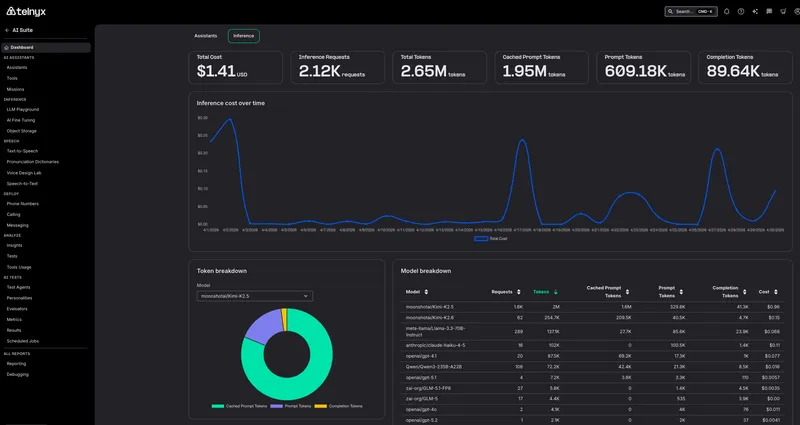
Telnyx now offers an Inference Usage Dashboard in the Mission Control Portal, giving you a per-model breakdown of inference consumption alongside your existing assistant usage metrics.
What's new
- Inference usage dashboard: A new dashboard view accessible from the AI Suite home page shows inference usage broken down by model, so you can see exactly which models are consuming resources and budget.
- Per-model cost breakdown: Usage is itemized by model ID, making it easy to identify your most expensive inference calls and optimize your configuration.
- Side-by-side with assistant usage: The inference dashboard appears as an option next to the existing assistant usage view on the AI Suite home page, keeping all usage reporting in one place.
Why it matters
Running voice AI agents across multiple models means costs can escalate in ways that are hard to trace. Without per-model visibility, you cannot tell which model is driving spend, or whether one assistant configuration is disproportionately more expensive than another.
The inference dashboard closes that visibility gap. You can now attribute every inference dollar to a specific model, compare cost across configurations, and make data-driven decisions about which models to use for which workloads.
This is especially important for teams scaling from prototype to production, where switching from a premium model to a cost-efficient one for non-critical paths can reduce inference spend significantly without sacrificing quality where it matters.
Example use cases
A voice AI team running GPT-4o for complex calls and a smaller model for simple routing can see the cost split between them and decide whether the premium model is justified for every call type.
A platform operator tracking monthly inference spend across multiple LLM providers can now see total inference cost per model in one view instead of cross-referencing billing data.
A product manager evaluating whether to switch models can compare actual usage and cost per model side by side before committing to the change.
Getting started
- Log in to the Mission Control Portal and navigate to AI Suite.
- On the AI Suite home page, select Inference Usage next to Assistant Usage.
- Use the dashboard filters to view usage by model, time range, or assistant.
Learn more in the Inference documentation or get started directly in the AI Reports Dashboard.


