
Voice
AI-to-human handoff for voice AI agents: a practical guide
How voice AI agents transfer calls to a human: cold transfer, warm transfer, and conferenced calls. With Telnyx, the AI stays on the line.

By Osman Husain
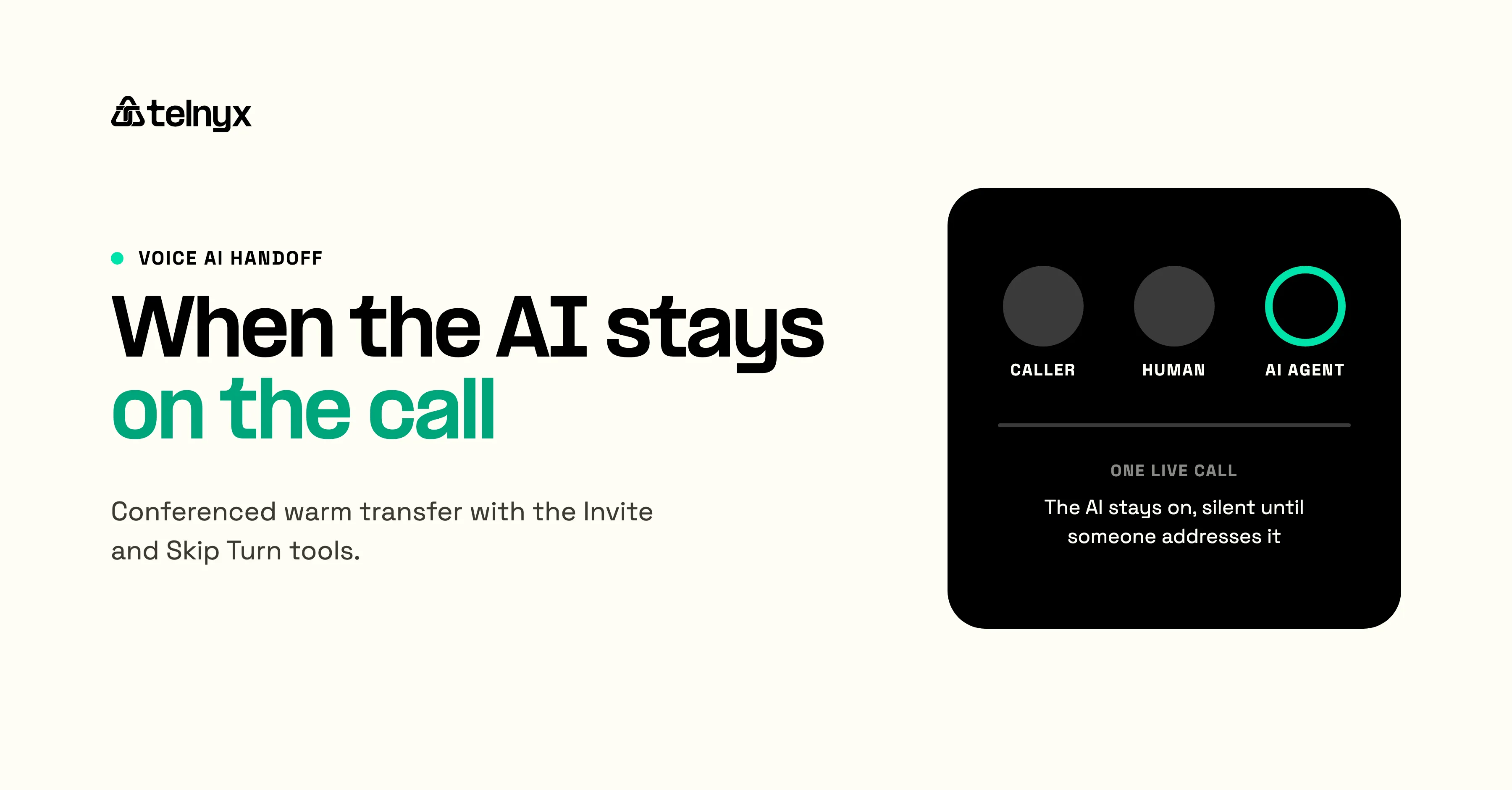
An AI voice agent handoff is when a human joins a live call previously steered by an AI agent. With Telnyx's Multi-Participant Voice AI Calls, an agent can invite a colleague or specialist, introduce them, and stay on the line. It listens quietly while the humans handle the conversation and steps in when one of them asks it to check a calendar, update a record, or schedule a meeting.
What is AI agent handoff to a human?
AI agent handoff is the moment a voice AI agent transfers a call to a human specialist. The AI may end its part of the call (cold transfer), brief the human privately and then merge the caller in (private warm transfer), or stay on the line as a third participant after the human joins (conferenced warm transfer).
Handoff matters because the AI agent already has the full conversation context: who the caller is, what they want, what's been tried, what comes next. A handoff that throws away that context forces the human to start over. A handoff that preserves it lets the conversation continue without the caller repeating themselves.
When does a voice AI agent transfer a call to a human?
A voice AI agent transfers a call to a human at the moment its job ends and a human's job begins. That moment varies by use case:
- A qualifying agent transfers when the lead crosses a threshold and a human closer takes over.
- A support agent transfers when the issue requires a tier above what the AI is configured to handle.
- A scheduling agent transfers when a participant needs to confirm a time with another human.
- A clinical triage agent transfers when symptoms require licensed clinical judgment.
- An L1 helpdesk agent transfers when an issue needs L2 access or expertise.
The shared pattern: the AI owns the front of the call, captures structured context, then transfers to a human at the right moment with that context preserved. Cold transfer breaks the pattern. Warm transfer keeps it intact.
The transfer trigger lives in the assistant's instructions, which decide when based on the conversation. The transfer mechanism handles what happens next.
Cold transfer, warm transfer, and conferenced calls: how voice AI agents handle each
Three patterns cover most voice AI handoff workflows.
Pattern A: cold transfer
The agent ends its part of the call and routes the caller to a new number or SIP URI. The human picks up cold and asks the caller what they need. This is the default behavior in most voice agent platforms because it maps to standard SIP REFER call control. Useful when context handoff isn't required, such as a generic IVR routing call to the right department.
Pattern B: private warm transfer
The agent dials the human first, briefs them privately, then bridges the caller in. The human starts the conversation already briefed. The agent has to call out, keep the original caller waiting, speak to the new participant, and then connect the two calls. Telnyx runs this pattern inside the assistant with the Transfer tool, where warm transfer instructions tell the assistant how to brief the human before the caller is bridged.
Pattern C: conferenced warm transfer
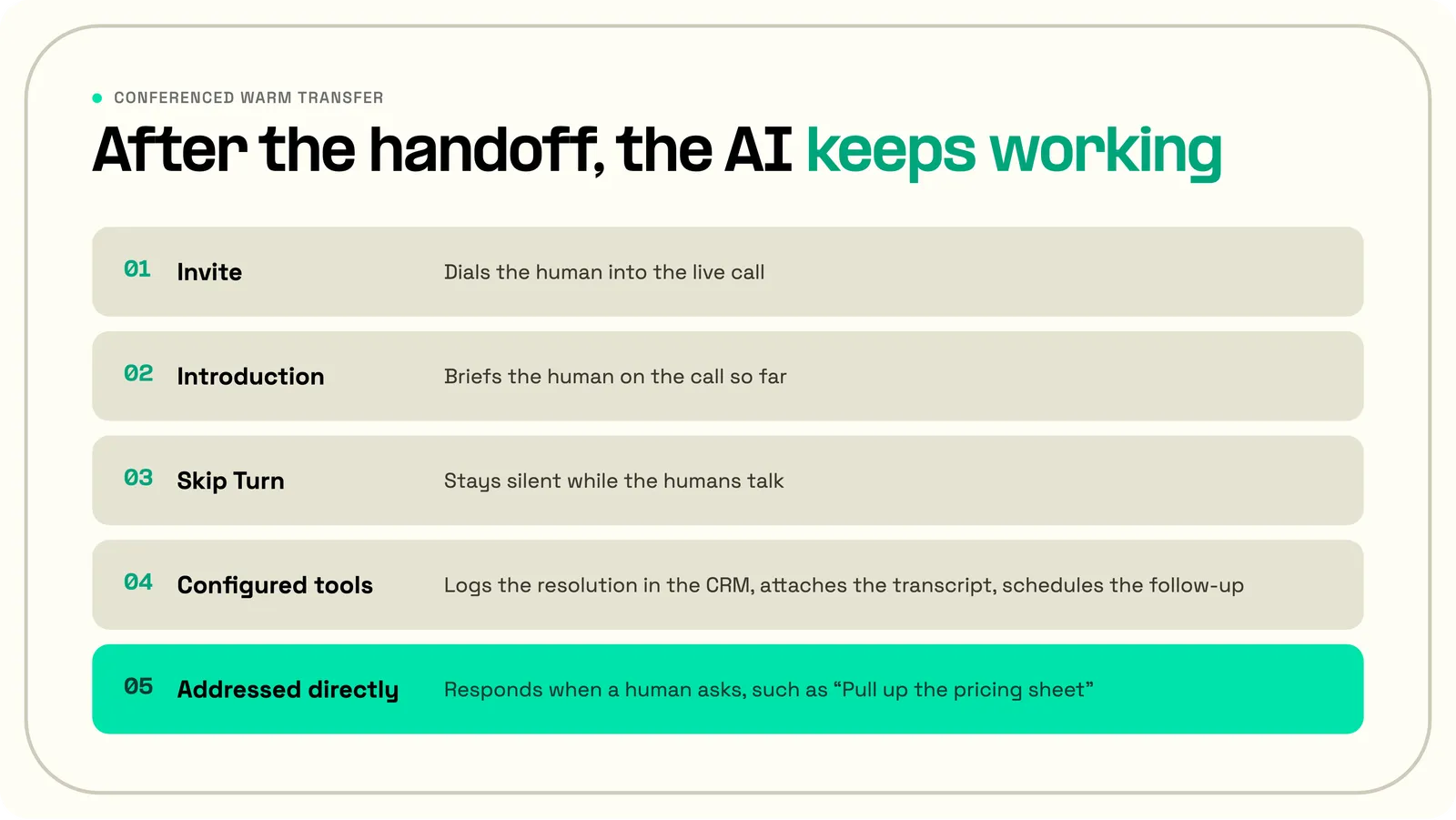
With multi-participant calls in Telnyx AI Assistants, the agent invites the human into the live call as a third participant. All three parties can speak. The agent stays present, defers during human-to-human conversation, and resumes when addressed. It keeps every tool it had configured before the human joined.
While the humans talk, the agent works in the background. A support specialist confirms a resolution with the customer, and the agent logs it in the CRM, attaches the call transcript, and schedules the follow-up. When either human addresses the agent directly ("Amber, look up that account again"), it responds. The Skip Turn tool keeps it quiet in between: it tells the agent not to speak for that turn, without ending the call or disabling its tools.
Common use cases for AI to human transfers
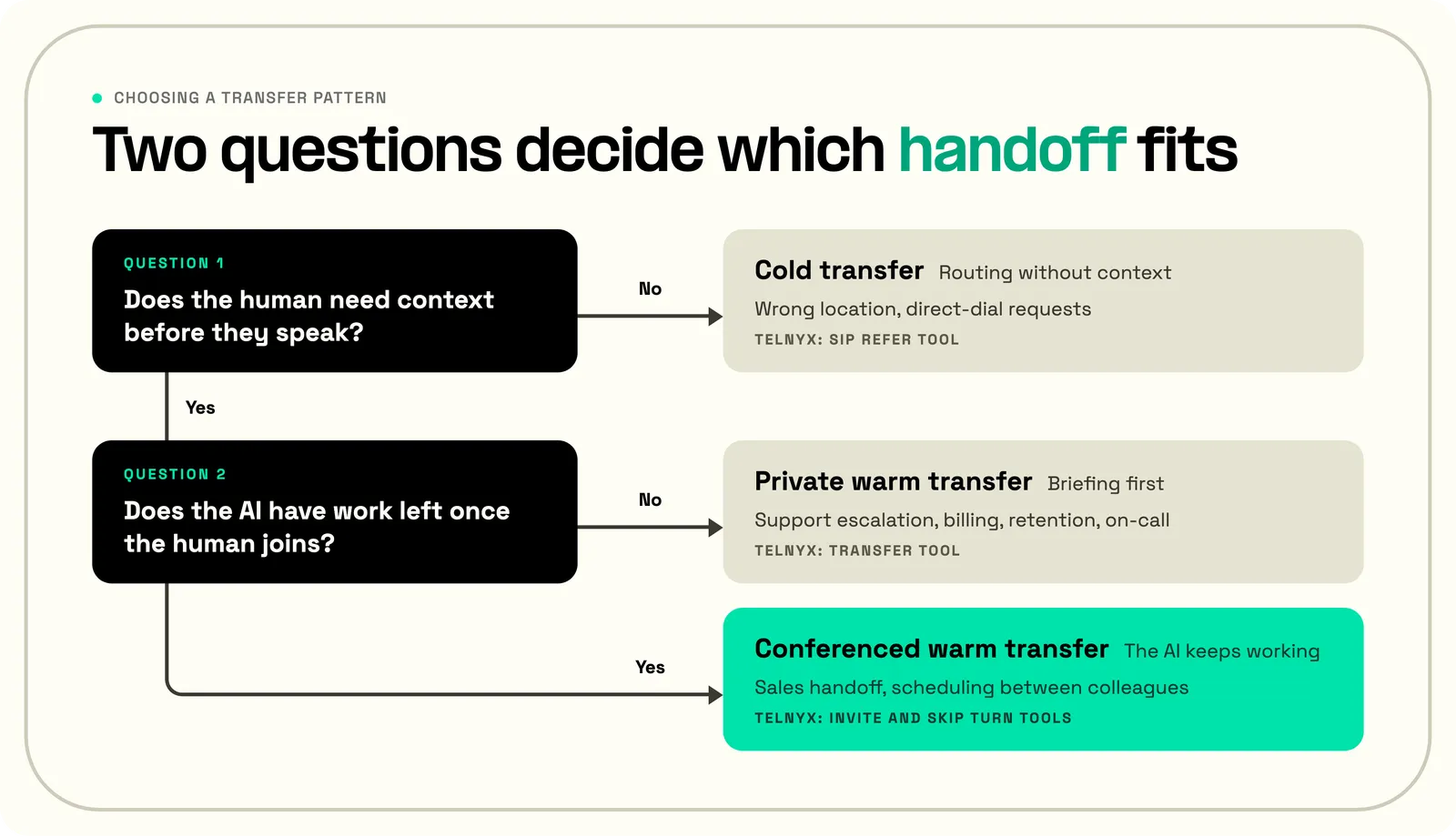
The right transfer pattern depends on whether the human needs context before they speak and whether the AI has work left once the human joins.
Cold transfer: routing without context
Cold transfer fits calls where the receiving human needs nothing from the AI agent:
- Wrong location. A patient calls the downtown clinic about an appointment at the north office. The AI transfers the call to the north office's front desk, which can pull up the appointment itself.
- Direct-dial requests. A caller asks for a named person or an extension. The AI connects them to someone who expects the call and needs no summary.
Private warm transfer: the human needs a briefing first
Private warm transfer fits escalations where the AI summarizes the customer's need for the human before handing off, and nothing remains for the AI afterward.
- Support escalation to engineering. A high-priority issue needs an engineer. The AI briefs the tier-2 engineer on the problem and what has already been tried, then connects the customer.
- Billing issues. A support call turns into a billing question. The AI transfers it to billing with the account context already shared, so the billing specialist starts from the account instead of a verification script.
- Retention and cancellation. A customer wants to cancel. The retention specialist gets the customer's history and reason for leaving in a summary before picking up, and can open with an answer instead of a question.
- On-call escalation. The AI calls the on-call engineer or nurse and asks whether they can take the call. With warm transfer acceptance turned on, a decline sends the assistant back to the caller with the reason, so the caller hears a next step instead of voicemail.
Conferenced warm transfer: the AI keeps working
Conferenced warm transfer fits calls where the human takes over the conversation, and the AI still has systems work to do, such as logging fields, booking the next step, taking notes, or updating a ticket.
- Sales handoff. The AI qualifies the lead, introduces the account executive live, then stays on to log the qualification fields and book the next meeting.
- Scheduling between colleagues. Two people compare calendars while the assistant waits, then it books the slot they agree on.
 | “The best AI-to-human handoffs happen before the customer feels stuck. The Voice Assistant should recognize uncertainty, emotion, or complexity early, summarize the context clearly, and transfer the caller to a human who can pick up without making them repeat themselves.” Anusha Thukral, Developer Advocate, Telnyx |
Which Telnyx tool handles each pattern
For Pattern A (cold transfer), the assistant's SIP Refer tool hands the call to a new number or SIP URI with a standard SIP REFER request. Teams that run their own call control can do the same through the Voice API Transfer command or SIP REFER command, and can build Pattern B from a Dial and the Bridge command. Pattern C is the only one of the three in which the assistant stays on the call after the human joins.
Telnyx tools for each handoff pattern, and what the AI does after the handoff.
| Pattern | Telnyx mechanism | The AI after the handoff |
|---|---|---|
| Cold transfer | SIP Refer tool, or Voice API Transfer and SIP REFER commands | Leaves the call |
| Private warm transfer | Transfer tool with warm transfer instructions | Briefs the human, then leaves once the caller is bridged |
| Conferenced warm transfer | Invite and Skip Turn tools | Stays on the call, silent until someone addresses it |
How the Telnyx Invite tool helps warm transfer
Telnyx's Multi-Participant Voice AI Calls feature ships conferenced warm transfer (Pattern C) as a built-in capability. Two tools handle it: Invite and Skip Turn.
The assistant calls the Invite tool during a live conversation, passing the participant's phone number or SIP URI. Telnyx dials the participant and brings them into the existing call as a new party. Once the participant joins, the assistant receives updated conversation context and continues the call with all parties.
Every tool the assistant had configured before the join continues to work. Calendar lookups, CRM updates, custom webhooks, transcription, all of it. There is no separate multi-participant configuration surface. Full setup is in the Multi-Participant Calls dev guide.
Add the Invite tool to your assistant
Best voice AI agents with seamless handoff
Telnyx, Vapi, Retell, Bland, and ElevenLabs all document cold transfer and a warm transfer that briefs the human before the caller joins. Of these five major voice AI platforms, Telnyx is the only one whose public documentation, as of October 2026, keeps the AI on the call after the human joins.
The best voice AI agents for handoff meet three criteria:
- Context survives the transfer. The human picks up briefed, through a spoken summary or a record the AI has already updated, so the caller does not repeat themselves.
- More than one transfer pattern. A platform that only does cold transfer leaves private and conferenced warm transfer on the table.
- The AI stays useful after the handoff. An AI that stays on keeps updating records and taking instructions while the humans talk.
Telnyx covers all three patterns inside the assistant: the SIP Refer tool for cold transfer, the Transfer tool for warm transfers that pass key context to the human, and the Invite and Skip Turn tools for conferenced calls. The other four end the AI's part once the human is connected. Retell states that its AI drops off once the transfer bridges; ElevenLabs removes the agent from the conference; Bland's agent introduces both parties and steps back; and Vapi's transfer assistant finishes by connecting the two parties.
The companion guide, Voice AI on multi-speaker calls, covers how the AI stays on the line through speaker awareness and the Skip Turn tool.
Best practices for AI agent handoff to live reps
Trigger handoff on named signals. Define the conditions in the assistant instructions: the customer asks for a manager, the request needs a policy exception, the caller crosses a qualification threshold, or frustration rises after repeated failed attempts. "Hand off when the AI gets confused" gives the model nothing it can check.
Pass structured context, not free-form notes. The human picks up a one-line briefing or a structured handoff card with the fields that matter: account ID, request type, what has been tried, and customer sentiment. A free-form summary makes the human dig for the one detail they need.
Plan for the human who does not answer. A transfer that rings out or reaches voicemail strands the caller. With warm transfer acceptance turned on, a decline returns the assistant to the caller with the reason, and voicemail detection on the transfer lets the assistant stop the transfer or leave a message and come back to the caller.
Use Skip Turn explicitly when the AI stays on the line. Without it, the assistant interrupts the human-to-human conversation. Add Skip Turn to the assistant's tool list and instruct it to defer when participants are addressing each other rather than the AI.
Review handoff calls in Conversation History. Multi-participant calls are harder to tune than one-to-one calls. The transcript, audio, and tool calls show where the assistant interrupted, where it stayed silent when it should have spoken, and where the briefing landed.
Examples of AI to human handoff by industry
Each example below is a conferenced warm transfer: the agent owns the front of the call, calls Invite at the right moment, briefs the human, then stays on the line to do the systems work while the humans handle the conversation. Some of these calls, such as a billing escalation, can also run as a private warm transfer when the AI has nothing left to do after the handoff.
Sales: AI SDR qualifies inbound, warm-transfers to AE
A prospect calls in. The agent qualifies against the ICP criteria, captures budget and timeline, and decides whether the lead is sales-qualified.
If yes, it calls Invite with the on-call AE's number. The AE picks up to a one-line briefing ("Series B SaaS, 200 employees, evaluating voice AI vendors, ready to pilot in Q3") and takes the call.
The assistant stays on the line. While the AE leads, the assistant logs qualification fields in Salesforce, books the next meeting on the AE's calendar, and emails a call summary when the call ends.
Support: tier-1 AI escalates to tier-2 specialist
A customer calls about a billing issue. The agent confirms the account, walks through the standard troubleshooting, and concludes the issue requires a billing specialist.
It calls Invite with the specialist's queue, summarizes the call ("account #12345, three failed charges since Tuesday, customer has confirmed the card is valid, needs manual review"), then stays on.
The assistant takes structured clinical notes during the consultation and pushes the encounter to the EHR through a webhook tool when the call ends, saving the clinician documentation time.
Healthcare: patient triage AI hands off to clinician
A patient calls with symptoms. The agent runs the triage script, captures the chief complaint and any vitals the patient reports, and routes the case to a nurse or a doctor based on the script.
It calls Invite with the on-call clinician and briefs them ("48-year-old, history of hypertension, reporting chest tightness for 30 minutes, no prior cardiac history"), then stays on the line.
The assistant takes structured clinical notes during the consultation and pushes the encounter to the EHR when the call ends, saving the clinician documentation time.
Insurance: lead qualification AI warm-transfers to licensed agent
A prospect requests an auto insurance quote. The agent collects the required information (vehicle, drivers, current coverage, prior claims) and runs the eligibility check.
If eligible, it calls Invite with the next available licensed agent and hands off the structured lead. The NAIC Producer Licensing Model Act bars anyone without a license from selling, soliciting or negotiating insurance, so a licensed agent has to take over to close the sale.
The assistant stays on, logs the quoted premiums, and triggers the policy-issuance workflow once the licensed agent confirms.
IT: AI L1 troubleshoots, hands off to L2 with full transcript
An employee calls the helpdesk about a VPN issue. The agent runs the L1 script (restart, credential check, network reachability), determines it's an authentication-server issue, and calls Invite with the L2 on-call.
The L2 picks up to a full transcript pushed into the ticketing system at the same time, plus a one-line spoken briefing.
The assistant stays on the line and updates the ticket with each step the L2 takes, keeping the employee's record current without manual input from L2.
These patterns share a common shape. The AI agent owns the front of the call, captures structured context, then transfers to a human at the right moment with that context preserved. After the handoff, the agent stays on the line and does the systems work the human would otherwise do manually after the call.
How to enable warm transfer with Telnyx voice AI
Telnyx voice AI supports warm transfer in two forms. For private warm transfer, add a Transfer tool with warm transfer instructions. For conferenced warm transfer, add an Invite tool with the target phone number or SIP URI, plus a Skip Turn tool so the assistant defers while the humans talk. In both cases, update the assistant instructions to describe when to hand off, what to say in the introduction, and what to do afterward.
Add a private warm transfer to your assistant
Add Invite and Skip Turn to your assistant
Full setup is in the Multi-Participant Calls dev guide. New to voice AI agents? Start with the Voice Assistant Quickstart.
Frequently asked questions
Who provides AI agents with human handoff?
Vapi, Retell, Bland, ElevenLabs and Telnyx all document cold transfer and a warm transfer that briefs the human before the caller joins. They differ on conferenced warm transfer, where the AI stays on the line after the human joins. As of October 2026, Telnyx is the only one of the five that documents it, through the Invite and Skip Turn tools in its Multi-Participant Voice AI Calls feature.
What tools support real-time handoff to a human agent with full conversation history?
Telnyx voice AI agents hand off context to a human in two ways during the call. The agent briefs the human before or as they join, through warm transfer instructions or the Invite tool. It can also write the account details, the request, and what has already been tried to the ticket or CRM record through integrations such as Salesforce, Zendesk, ServiceNow, and HubSpot. The full transcript, audio, and tool calls stay in Conversation History for review. When the handoff goes to another AI assistant instead of a human, Telnyx passes the full conversation history to the next assistant.
Can a voice AI agent stay on the line after handing off to a human?
Yes, on Telnyx. The Invite tool brings the human into the live call as a third participant; the Skip Turn tool keeps the AI silent during human-to-human conversation. The AI listens, defers to the humans, and steps back in when one of them addresses it. It can continue using every tool it had before the handoff.
What's the difference between cold transfer and warm transfer for voice AI?
Cold transfer routes the caller to a new line with no introduction or context. The human picks up cold. Warm transfer keeps context intact: the AI either briefs the human before merging the caller in (private warm transfer) or invites the human into the live call as a third participant (conferenced warm transfer). For voice AI specifically, warm transfer matters because the AI already has full conversation context.
Does Telnyx support private warm transfer where the agent briefs the human before merging the caller in?
Telnyx supports private warm transfer in the AI Assistant Transfer tool. Warm transfer instructions tell the assistant how to brief the human when they answer, before the caller is bridged in. With warm transfer acceptance turned on, the assistant speaks with the human privately and asks whether they will take the call while the caller hears ringback. If the human declines, the assistant returns to the caller with the reason. The API reference limits acceptance to calls started with the Voice API ai_assistant_start command and to conversations with a single caller.
What happens to the AI agent's tools (CRM, calendar, transcription) after the handoff?
In a conferenced warm transfer (Pattern C), every tool the assistant had configured before the human joined continues to work. Calendar lookups, CRM updates, custom webhooks, transcription, all available. The assistant uses them in the background while the humans handle the conversation in the foreground.
How do you set up AI agent handoff on Telnyx?
Add an Invite tool with the target phone number or SIP URI. Add a Skip Turn tool so the assistant stays quiet during human-to-human conversation instead of answering every turn. Update the assistant instructions to describe when to call Invite and what to do after the handoff. Full setup is in the Multi-Participant Calls dev guide.
Start building
Add the Invite and Skip Turn tools to your assistant in the Telnyx Mission Control Portal, or follow the Multi-Participant Calls developer guide.
Interested in implementing AI to human handoffs in your company? Contact us for a product tour.
Share on Social
Osman is the Global AEO/SEO Lead at Telnyx, helping make voice AI and communications products clearer for builders. With almost a decade of experience in SEO, he previously led growth at Windscribe and Enzuzo, shipping and scaling organic programs that reached millions.


