
Conversational AI
The best AI tools for building voice agents
A layer-by-layer guide to the voice-agent stack: the leading tools for STT, TTS, speech-to-speech, orchestration, testing, and telephony, and the evidence behind each pick.

By Osman Husain
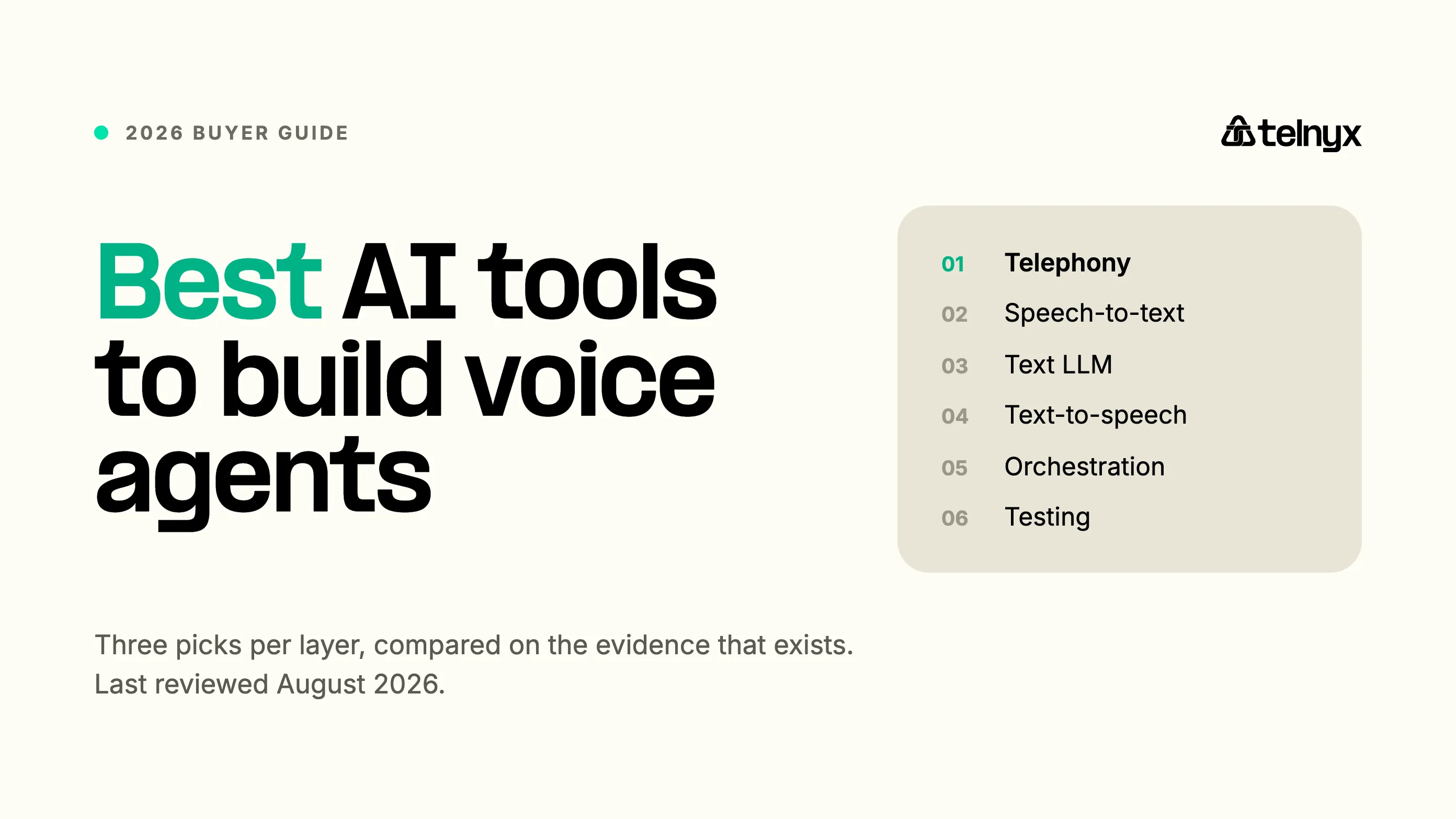
Quick answer: The best AI tools for building voice agents in 2026 are AssemblyAI for speech-to-text, Inworld for text-to-speech, OpenAI GPT-Realtime-2.1 for native speech-to-speech, Telnyx for orchestration and telephony, and Cekura for testing. The right stack depends on whether you want a modular pipeline or a direct audio-to-audio model.
How the tools compare at a glance
This guide isn't meant to serve as a leaderboard. Each row has its unique place in the voice-agent stack, with its own decision factors.
Compare the leading tools and decision factors across each layer of a voice-agent stack.
| Layer | Top picks | Main decision factor |
|---|---|---|
| Speech-to-text | AssemblyAI, Deepgram, OpenAI | Entity accuracy and turn detection |
| Text-to-speech | Inworld, Fish Audio, ElevenLabs | Initial audio, content accuracy, and naturalness |
| Native speech-to-speech | OpenAI, Gemini, xAI | Conversation quality and tool use |
| Orchestration | Telnyx, LiveKit, Vapi | Control, hosting, and operational scope |
| Testing | Cekura, Coval, Hamming | Task completion and regression coverage |
| Telephony | Telnyx, Twilio, Bandwidth | Call control, media streaming, and routing |
What makes up a voice agent stack?
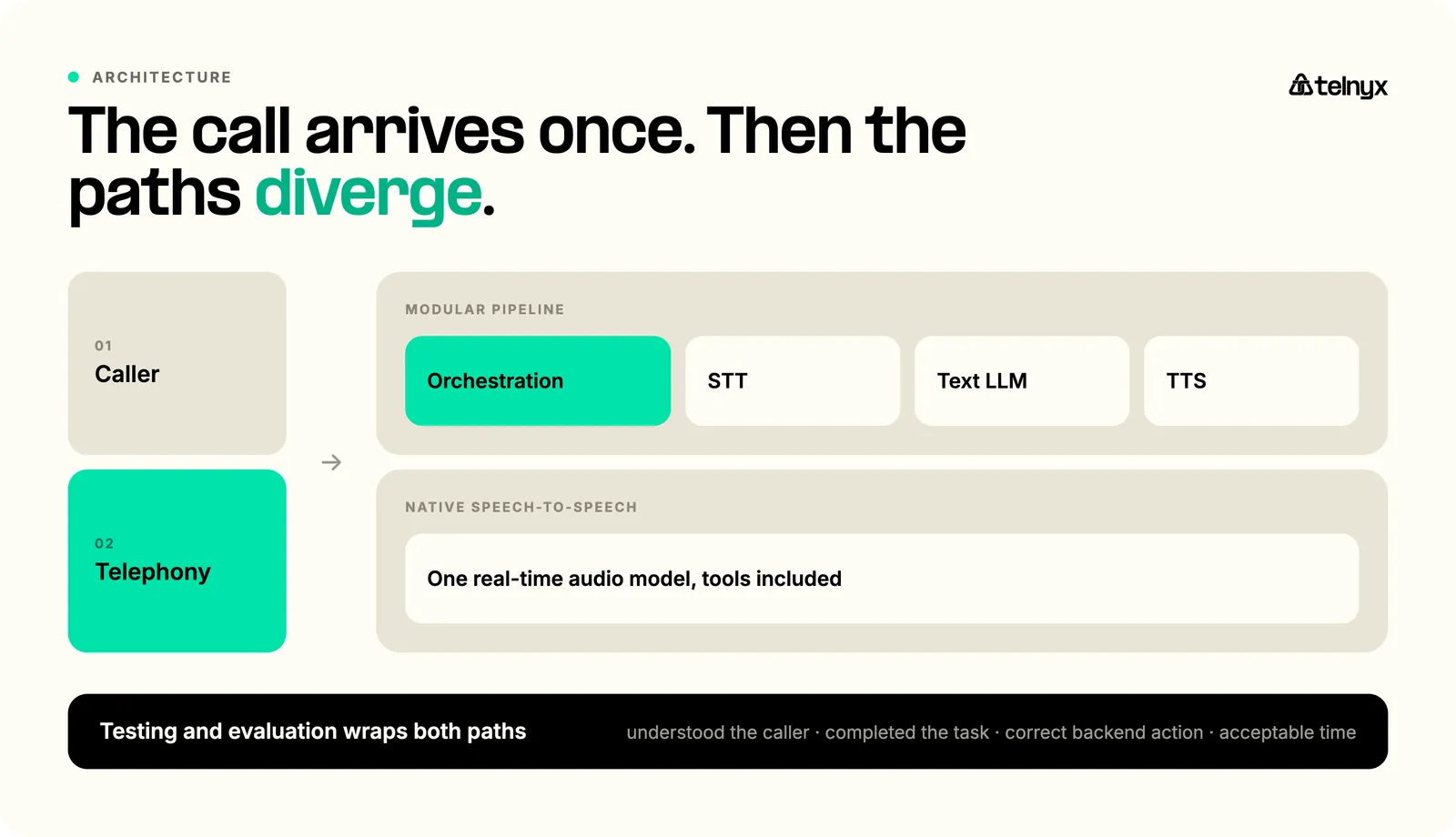
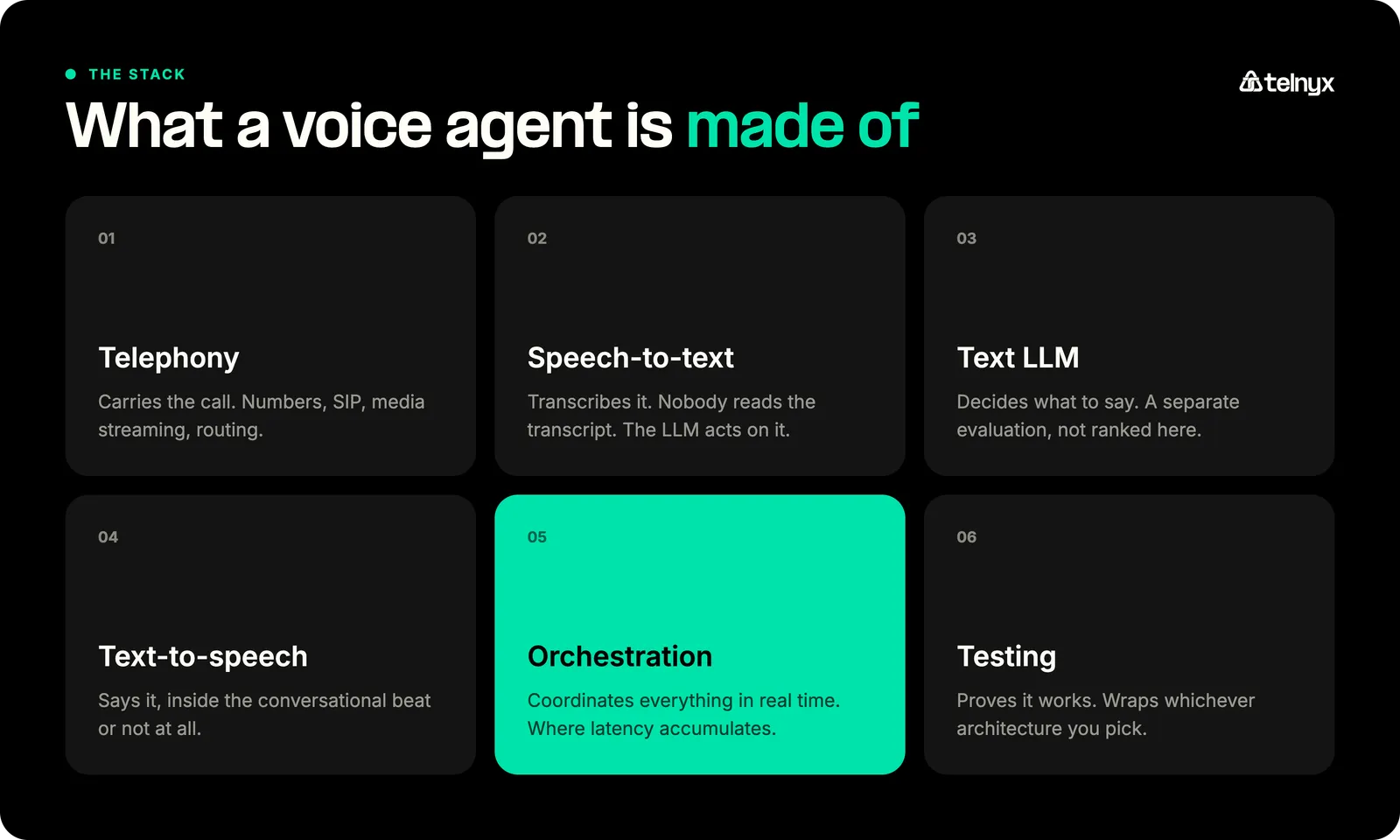
Every tool decision downstream follows from one choice: your architecture. It determines which of the layers below you assemble yourself, which ones a platform absorbs, and which tools you even need to compare.
Modular pipeline
Telephony → STT → text LLM → TTS
Audio enters through the telephony layer, a speech-to-text model turns it into text, a text LLM decides what to say, and a text-to-speech model says it. An orchestration layer coordinates the loop: timing, interruptions, tool calls, state. The payoff of the modular path is control. You can read the intermediate transcripts, swap any layer independently, and debug the exact stage that misbehaved.
Native speech-to-speech
Telephony → real-time audio model
One model receives audio and returns audio. It can still call external tools and services, but there is no separate STT, LLM, or TTS stage for you to manage. You trade pipeline complexity for opacity: more acoustic context is preserved and there are fewer moving parts, but you get less visibility into intermediate text and less freedom to substitute components.
The testing layer wraps both
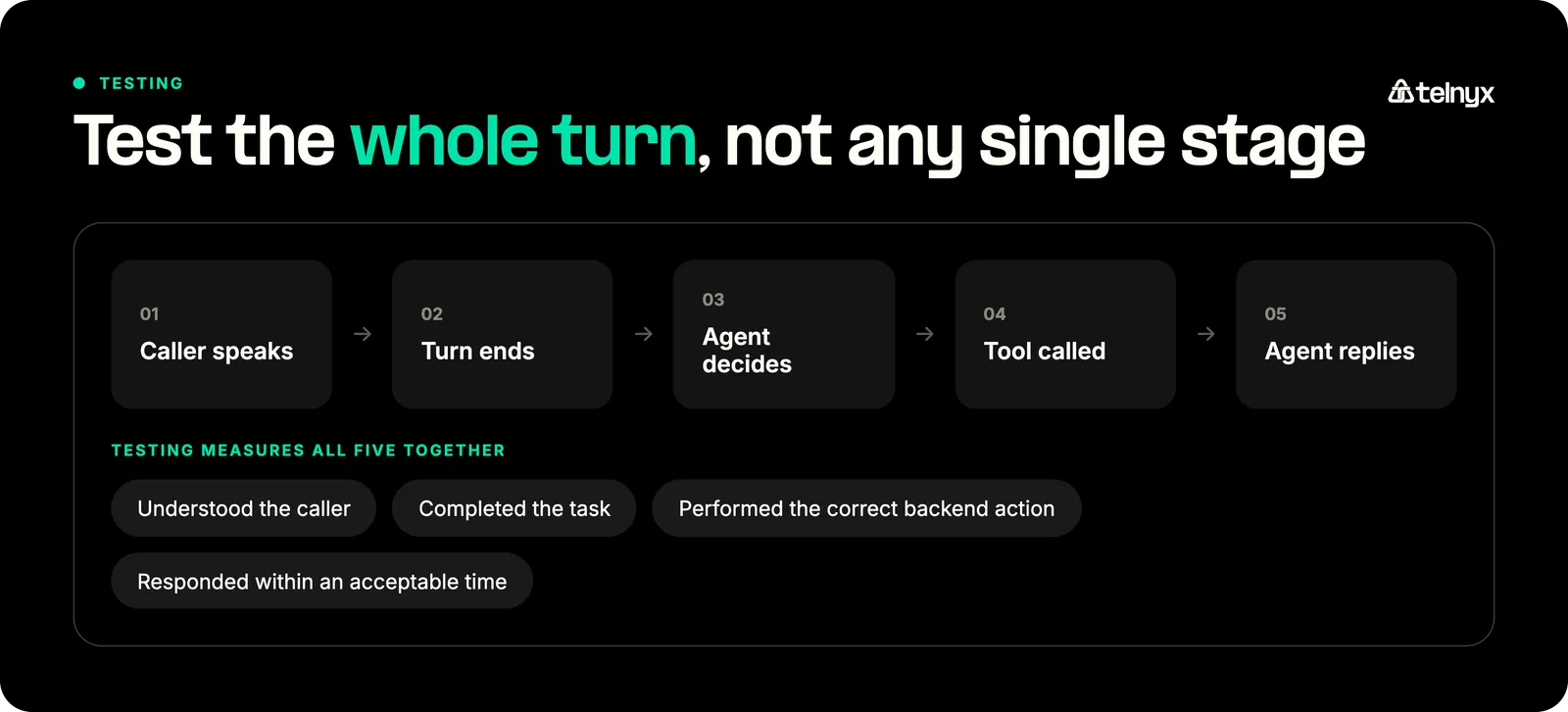
Whichever architecture you pick, testing and evaluation sit around it, measuring whether the agent understood the caller, completed the task, performed the correct backend action, and responded within an acceptable time.
Not every stack needs a separate vendor at every layer. Managed platforms combine several, and that can be exactly right. The question is where you want control and where you want someone else's pager to ring. This page covers the components; if you are evaluating finished platforms end-to-end, see our comparison of the top voice AI platforms.
Researching and ranking speech-to-text tools
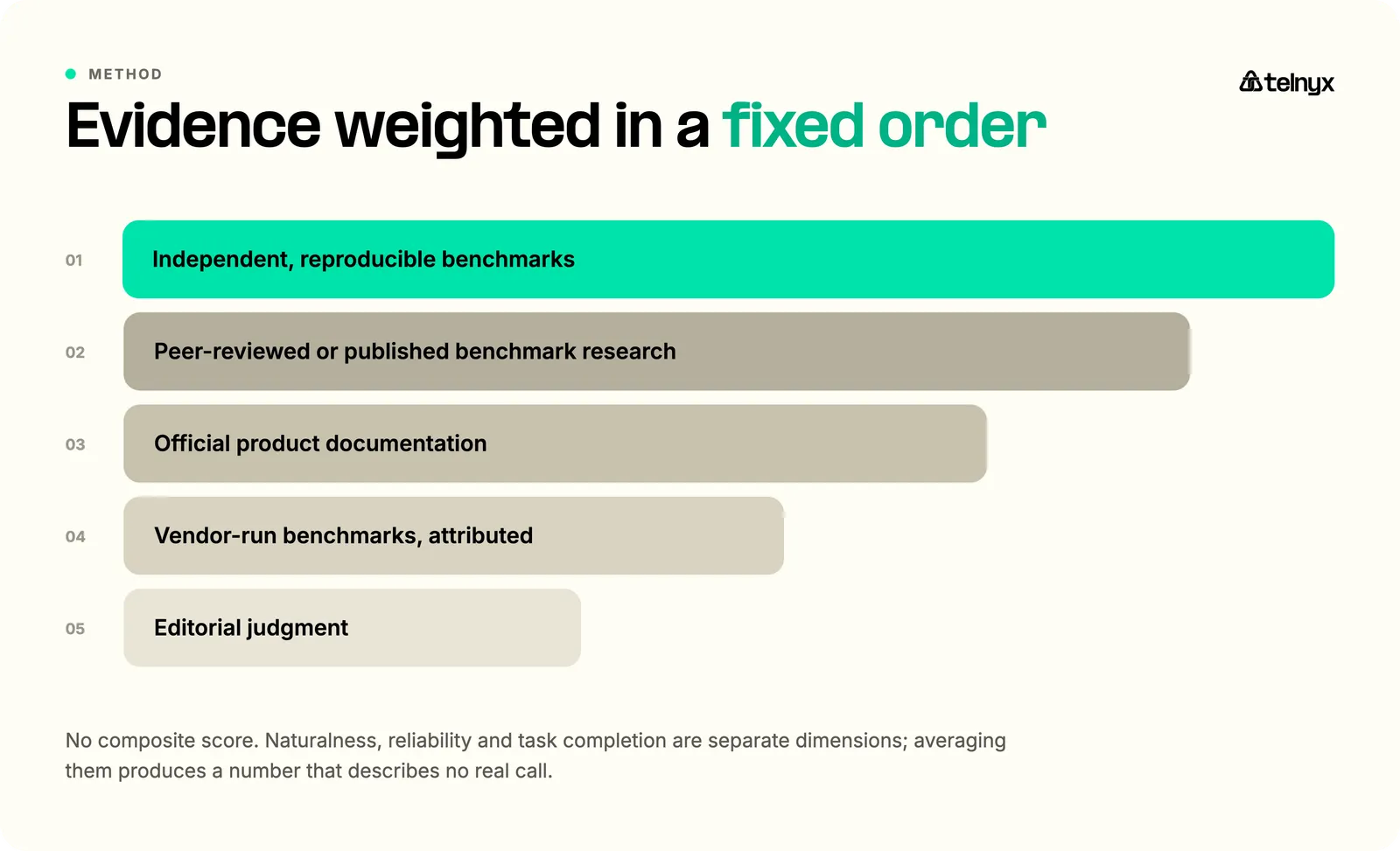
The recommendations combine independent benchmark results, current product documentation, published pricing, and claimed production capabilities. Benchmarks are current as of August 2026.
Each category was judged on the criteria that decide its layer. For speed: real-time fit, latency at the median and at the tail, and end-of-turn detection. For output quality: accuracy and task completion, entity recognition, voice quality and control, and language support. For operations: deployment and data controls, integration options, operational maturity, and cost, where billing scopes actually compare.
Every criterion is reported on its own, never averaged into one score. RW-Voice-EQ backs that choice: naturalness, expressiveness, identity stability, reliability, and task completion are separate dimensions of voice quality, and averaging them produces a number that describes no real call.
Best speech-to-text tools for voice agents
In a voice agent, the transcript has exactly one reader: the LLM. Every action the agent takes starts from what the model believes was said, so the dimensions that matter are the ones that decide those actions: entity accuracy on addresses, account numbers, phone numbers, and names; streaming stability under background noise; end-of-turn detection; code-switching; speaker handling; and response timing.
The stakes are concrete. A misheard name is a wrong lookup, a dropped digit is a wrong account, and a late end-of-turn signal is an agent that talks over your caller.
1. AssemblyAI Universal-3.5 Pro Realtime
Best for: Entity-sensitive conversations and teams that need transcription plus speech understanding.
AssemblyAI pairs high-accuracy transcription with a broader speech-understanding layer, making it a strong fit for teams that need more than a raw transcript. Its flagship Universal-3.5 Pro handles pre-recorded audio, while Universal-3.5 Pro Realtime powers streaming and voice agents with native code-switching across 18 languages, live speaker diarization, and agent-context prompting that resolves mumbled replies like spelled-out account numbers or addresses. On its own voice-agent benchmark, Universal-3.5 Pro Realtime posts a 6.99% word error rate and a 15.31% entity error rate, ahead of the field on the names, places, and phone numbers that make or break a call. Beyond transcription, it adds sentiment analysis, entity detection, and PII redaction, plus an LLM Gateway for summarization, so much of the post-processing lives within the same API.
Limitation: The quoted voice-agent results come from AssemblyAI's own benchmark, not an independent test. Evaluate the model against your audio, your entities, your languages, and your call conditions before committing.
2. Deepgram Flux Multilingual
Best for: Turn-aware multilingual transcription in modular voice agents.
The interesting thing about Flux is what it decided to be good at. Rather than chasing raw transcript accuracy alone, the flux-general-multi model builds turn awareness into the transcription layer itself: end-of-turn detection, interruption handling, and barge-in behavior arrive with the transcript instead of being reconstructed downstream. Deepgram reports end-of-turn timing of approximately 260 ms, a vendor figure worth validating on your own calls. For modular pipelines where conversation flow is the pain point, that focus is genuinely useful. Language support covers ten languages, which is enough for many deployments and well short of general multilingual transcription models.
Limitation: Language coverage is narrower than some general multilingual models, and a vendor-reported end-of-turn number does not represent complete caller-experienced response time.
3. OpenAI GPT-Realtime-Whisper
Best for: Teams building within OpenAI's Realtime API and tool ecosystem.
GPT-Realtime-Whisper is the transcription component of OpenAI's real-time stack: audio in, streaming transcript deltas out. If your application already lives inside the Realtime API, using the native transcription path keeps one vendor, one event stream, and one billing relationship, with usage-based audio pricing (recheck the current rate before you model costs; it moves). The scope matters here: this is a transcription component, not a voice-agent runtime, and it is a different product from OpenAI's native speech-to-speech model ranked below.
Limitation: It is a component, not a runtime, and choosing it mostly makes sense when the rest of your stack is already OpenAI-native.
Want to dive further into speech-to-text models? Check out our guide to the best STT engines.
Build your first voice AI agent
Select a model and voice, attach a phone number, and take an inbound call using one account.
Build a voice assistantBest text-to-speech tools for voice agents
A useful TTS comparison tracks five numbers, each answering a different question. Time to first audio decides whether the agent's reply lands inside the conversational beat. Tail latency decides how often it doesn't. Content fidelity, measured as word error rate on the rendered speech, decides whether the agent said what the LLM wrote. And naturalness, expressiveness, voice consistency, language coverage, and cloning control are separate questions on top.
The benchmark below measures the first two dimensions and content accuracy; it does not measure naturalness or expressiveness, so treat it as necessary evidence, not sufficient evidence.
Results synced from Coval on August 9, 2026:
Text-to-speech benchmark results synced from Coval on August 9, 2026.
| Model | Median TTFA | WER |
|---|---|---|
| Inworld TTS-2 | 155 ms | 5.1% |
| Fish Audio S2.1 Pro | 325 ms | 4.7% |
| ElevenLabs Flash v2.5 | 206 ms | 6.6% |
About this run: Inworld and ElevenLabs were measured across 3,389 samples, Fish Audio across 709. P95 time to first audio was 325 ms for Inworld, 532 ms for Fish Audio, and 2,930 ms for ElevenLabs. Source: Openbenchmarks TTS benchmark by Coval.
1. Inworld Realtime TTS-2
Best for: Low initial audio latency with broad language and voice-control options.
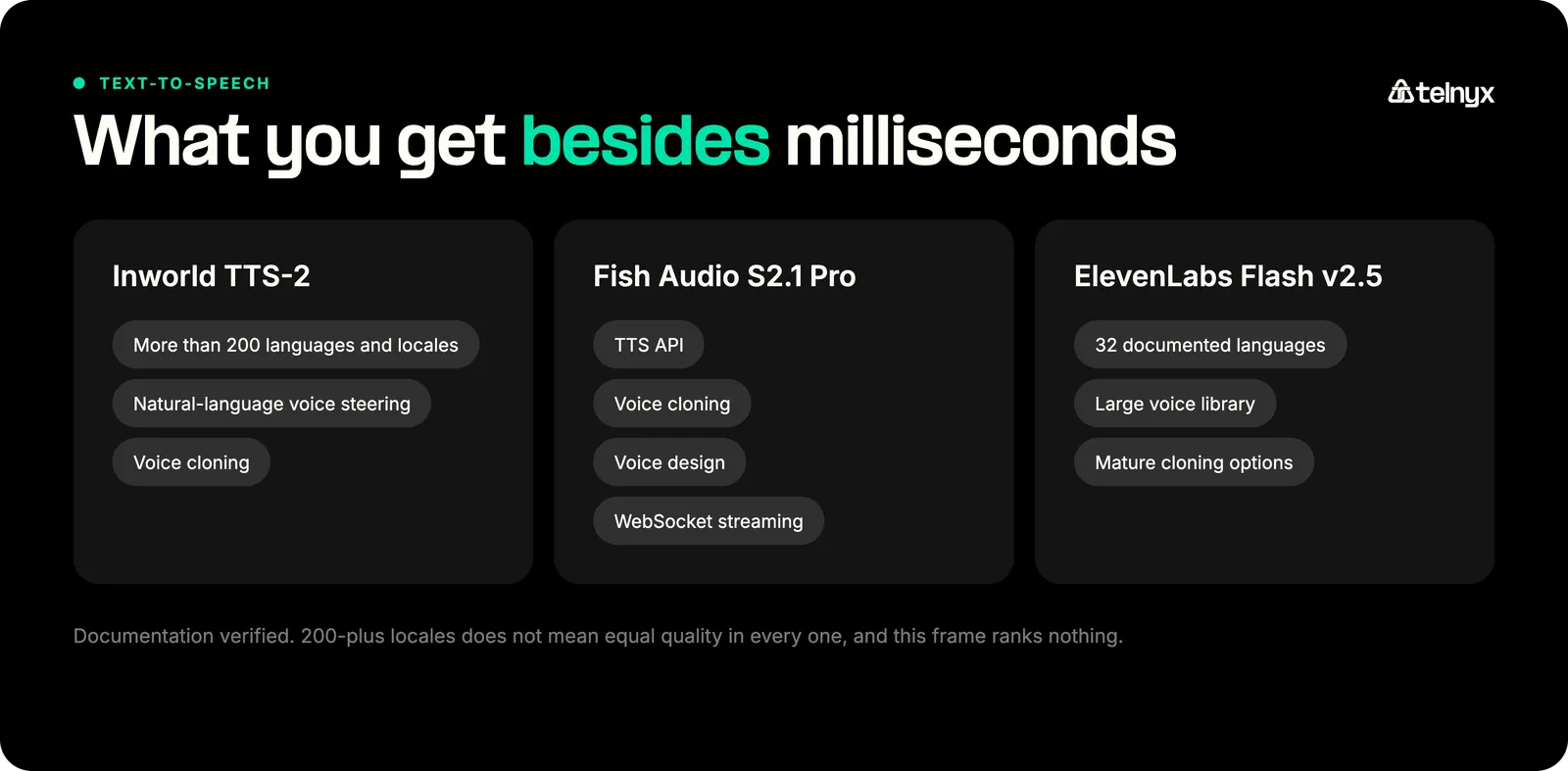
Inworld takes the top slot on the strength of the dimension that matters most in live conversation: first audio in 155 ms median, which means the agent starts speaking before the pause reads as hesitation. It pairs that with a 5.1% WER across 3,389 samples, more than 200 documented languages and locales, natural-language voice steering, and voice cloning. Inworld also reports a 100 ms P90 server-side time-to-first-byte. That's a vendor measurement on a different clock than the independent TTFA figure, so keep the two numbers separate rather than averaging them in your head.
Limitation: Benchmark latency and content accuracy establish neither subjective naturalness nor brand fit, and 200-plus locales does not mean equal quality in every one. Listen to it on your language, your script, your voice.
2. Fish Audio S2.1 Pro
Best for: Teams prioritizing speech content accuracy and flexible voice creation.
Fish Audio pairs a complete voice-creation toolkit (TTS API, voice cloning, voice design, and WebSocket streaming) with the strongest content accuracy of the three models compared here: 4.7% WER in the current snapshot. Two caveats keep that number honest. Fish was measured across 709 samples against the 3,389 used for the other two, and the full Openbenchmarks run includes models that scored lower still. It also posted the slowest initial audio of the three at 325 ms median. For long-form or precision-heavy content, where a mispronounced token costs more than 170 extra milliseconds of lead-in, the trade can favor Fish.
Evidence: Independent benchmark; documentation verified. Sources: Fish Audio API documentation, Openbenchmarks TTS benchmark.
Limitation: Slower initial audio than both rivals in this benchmark, and the smaller sample set means the WER edge carries less statistical weight than the raw number suggests.
3. ElevenLabs Flash v2.5
Best for: Teams that value a mature voice library, cloning options, and multilingual voice selection.
ElevenLabs is the voice-first pick of the three. The catalog is the draw: a large voice library, mature cloning options, and 32 documented languages. The benchmark numbers are mixed, however. It posted a 206 ms median time to first audio, but its 6.6% WER trailed both rivals, and its 2,930 ms P95 means roughly one request in twenty waited about three seconds to start speaking. ElevenLabs itself reports latency near 75 ms, a vendor figure measured on a different clock than the independent one. If the catalog is what your product needs, run it at your own concurrency and see whether the tail shows up.
Evidence: Independent benchmark; documentation verified; vendor benchmark. Sources: voice capabilities, text-to-speech API, Openbenchmarks TTS benchmark.
Limitation: Content accuracy and tail latency in this snapshot both trail the other two picks, and voice preference is subjective enough that no benchmark replaces listening tests on your own application.
 | “But the actual differentiator isn't which engine sounds best in a side-by-side demo. It's whether that voice reaches the caller at production latency, in the right region, without crossing vendor boundaries. And the nuance they're really missing: today's best voice isn't tomorrow's. TTS engines improve constantly. If you're locked into one provider, switching means rearchitecting. With a router, it's a config change.” Dr. Sonam Gupta, Developer Advocate, Telnyx |
For a broader comparison of the best voice APIs for text-to-speech, we've covered that layer separately.
Best native speech-to-speech models
Native speech-to-speech models take spoken input and return spoken output; there is no separate STT, LLM, or TTS stage to manage. You get one vendor instead of three, a smaller integration surface, and more acoustic context because the model hears the call rather than reading a transcript. What you give up is control: less intermediate text to inspect, fewer components you can swap, and less to instrument when a conversation goes sideways. A modular pipeline keeps those levers. Text LLMs sit inside the modular pipeline, so this guide discusses them but doesn't rank them as a category.
1. OpenAI GPT-Realtime-2.1
Best for: Native audio agents that need tool use, configurable reasoning, and improved handling of spoken identifiers.
GPT-Realtime-2.1 ranks first because its documentation covers the fullest set of what a phone-facing agent needs among the three models compared. It pairs audio-to-audio conversation with tool use and configurable reasoning depth. It documents improved recognition of alphanumeric strings (the spoken order numbers and policy IDs native models historically fumbled) and handling for silence, background noise, and interruptions. The reasoning dial deserves attention, because thinking is latency. Higher settings buy better decisions at the cost of a slower turn, and the right setting is a product decision, not a default.
Evidence: Documentation verified. Source: GPT-Realtime-2.1 documentation.
Limitation: More reasoning adds latency, and a direct audio model gives you less visibility into intermediate stages than a modular pipeline when you need to debug what the agent thought it heard.
2. Gemini 3.1 Flash Live Preview
Best for: Low-latency multimodal voice applications that need function calling and acoustic-context handling.
The Live Preview variant of Gemini 3.1 Flash handles real-time audio-to-audio dialogue with documented strengths in acoustic nuance and numeric precision, takes multimodal input, and supports function calling. The word doing quiet work in the name is "preview." The documentation currently lists real restrictions: async function calling is not supported, proactive audio is not supported, and affective dialogue is not supported. If your design depends on any of those, this is not your model yet.
Limitation: Preview status means capabilities, availability, and even the model name can change under you. Build behind an abstraction you control.
3. xAI Grok Voice Think Fast 2.0
Best for: Developers evaluating a current speech-to-speech model with WebSocket, tool, SIP, and custom-voice support.
xAI's current flagship voice model is grok-voice-think-fast-2.0, with the grok-voice-latest alias currently pointing to it. The documentation covers what a phone-facing agent actually needs: a WebSocket connection, tool support, SIP, and custom voices. One operational note: the alias re-points whenever xAI promotes a new flagship, so an agent built against grok-voice-latest can change models without any deploy on your side.
Limitation: The alias can change beneath an application. Pin a model version when xAI supports it, and retest before every upgrade.
Best orchestration and runtime tools
Orchestration is the layer that turns components into an agent. It coordinates the STT, LLM, and TTS stages, holds conversation state, manages turn-taking and interruptions, executes tool calls, retrieves knowledge, controls the call, logs everything, supports testing, and handles fallbacks when a component fails mid-sentence. It's the least glamorous layer and the one callers feel most, because this is where voice AI latency accumulates turn by turn.
A separate guide on voice AI orchestration tools covers this category if you want to go deeper.
Independent evidence exists here, as Openbenchmarks measured complete voice systems over real phone calls:
Caller-experienced voice-agent latency measured over real phone calls.
| Platform | Median latency | P95 latency |
|---|---|---|
| Telnyx | 1,296 ms | 1,856 ms |
| Vapi | 1,558 ms | 2,008 ms |
About this run: Telnyx had 419 usable turns of 432; Vapi had 382. The benchmark measures complete systems over real phone calls, not a single layer. LiveKit has no row because a self-hosted framework only has the latency of your deployment. Source: Openbenchmarks voice-agent latency.
The medians still reflect different typical turn times: the median Telnyx turn answered 262 ms sooner than the median Vapi turn in this run. That's an additional quarter-second gap a caller hears between a reply and a pause.
 | “In production, latency is often less about one slow model and more about the shape of the architecture: where the call enters, where media is anchored, where STT runs, where the LLM runs, where TTS runs, and how many vendor or cloud boundaries the audio crosses along the way. You can improve each component and still end up with a slow-feeling call if the full loop is spread across too many places. In voice AI, the user experiences the system end to end.” James Whedbee, VP of Engineering, Telnyx |
1. Telnyx Voice AI Agents
Best for: Developers who want orchestration and telephony available through one provider while retaining model choice.
Telnyx Voice AI Agents is the orchestration layer built directly into the network the calls run on. In its own documentation, Telnyx attributes its latency profile to that design: telephony and inference co-located, with fewer hops between the call and the models. This is what AI agent infrastructure looks like when the telephony layer and the agent runtime share an operator.
Agents are created in the portal or by API, and model choice stays open. Documented STT options include Telnyx, Deepgram, and Azure. Documented TTS options include Telnyx (a native text-to-speech API), AWS, Azure, ElevenLabs, and Inworld, and you can bring your own LLM and TTS. The runtime covers tool calling, MCP support, knowledge bases, observability and testing, and phone-number attachment, with Telnyx infrastructure carrying the call by default.
Separately, the independent benchmark above recorded the lowest median time to first audio byte among the platforms tested: 1,296 ms, with a 1,856 ms P95. That benchmark measures complete configured systems, so it reports the outcome without isolating which layer produced it.
The Voice AI Agents quickstart guide is the fastest way to get up and running.
Limitation: The independent latency result represents the specific Telnyx configuration tested. It is not a guarantee for every model combination, region, tool chain, or call flow.
2. LiveKit Agents
Best for: Teams that want an open-source framework and control over hosting and individual model providers.
LiveKit Agents is our open-source pick in this category. The Apache 2.0 framework gives you the full modular pipeline (STT, LLM, and TTS support with turn detection and interruption handling), a broad plugin ecosystem for swapping providers, and the choice between cloud-hosted and self-hosted deployment. It is the maximum-control option: every layer is yours to pick, tune, and replace. That is also why it has no row in the benchmark table. A framework has no latency until you deploy it; your models, your regions, and your infrastructure produce the number.
Limitation: Performance and operational burden are functions of your chosen models, infrastructure, regions, and configuration. The framework is free; the deployment is an engineering commitment you staff.
3. Vapi
Best for: Developers who want a managed voice-agent development platform with provider choice.
Vapi is the modular pipeline, managed. You choose the STT, LLM, and TTS providers; Vapi operates the runtime, the inbound and outbound calling, and the plumbing between them. Assistants cover single-agent builds, and squads coordinate multi-agent flows. The developer experience is genuinely fast to first agent. In the current Openbenchmarks run it posted 1,558 ms median and 2,008 ms P95 caller-experienced latency over real phone calls; Vapi publishes faster figures for configurations it controls, and those are vendor measurements under a different definition than the phone-call benchmark above.
Evidence: Independent benchmark; documentation verified. Sources: Vapi introduction, Openbenchmarks voice-agent latency.
Limitation: Managed abstractions cut infrastructure work but expose fewer levers than a self-hosted framework, and the configurations you can reach are the ones the platform exposes.
Best voice AI testing and evaluation tools
A production voice agent has one real test: did the caller get what they came for? A stack can post excellent WER, achieve fast time-to-first audio, and maintain clean end-of-turn timing, yet still book the wrong appointment. What decides production is everything that component metrics don't measure: whether the task was completed, the right tools were fired, the backend actually changed, and the conversation survived interruptions at an acceptable speed.
That is the standard VAmoS Bench formalizes: it evaluates stateful customer-support scenarios and verifies backend actions, not just transcript quality. Test your agent the way VAmoS tests agents, whether or not you use the benchmark itself.
1. Cekura
Best for: Broad pre-production testing across conversation quality, tools, languages, and infrastructure conditions.
Cekura ranks first because its documented testing surface is the broadest of the three tools profiled here: inbound and outbound test calls, load testing, A/B testing, multilingual and accent testing, tool-call validation, red teaming, and infrastructure testing with prebuilt scenarios. Tests can be defined as code, which lets agent QA live in the same review-and-version workflow as the agent itself, rather than in a spreadsheet someone updates after incidents.
Limitation: Cekura runs the scenarios your team writes and checks the criteria your team sets. Deciding what counts as failure stays with your team.
2. Coval
Best for: Simulation-led testing with component benchmarks and CI/CD regression workflows.
Coval runs simulated conversations and scores them at two levels: component metrics (time to first audio, word error rate) and outcomes (task completion, interruption handling). It plugs into CI/CD for regression testing, so a prompt change that breaks your refund flow gets caught before callers do. One relationship worth knowing: the Openbenchmarks TTS and STT results cited throughout this guide come from Coval's testing pipeline. That's why Openbenchmarks appears here as evidence rather than as a ranked vendor. Coval is also among the documented Telnyx testing integrations.
Limitation: Benchmark results, even good ones, still need application-specific scenarios before they establish production readiness for your call flows.
3. Hamming
Best for: Teams that want pre-production simulation, regression testing, and ongoing production monitoring.
Hamming's documented scope runs from pre-production into production: end-to-end test simulation, regression testing, and production monitoring of live agent behavior. That last capability is the distinguishing one, because agents degrade in production for reasons no pre-launch suite predicts: traffic shifts, model updates, new accents, new products in the catalog.
Limitation: Evaluation quality depends on how well your test cases represent real caller behavior and business outcomes. Production monitoring flags that something shifted, but only well-built tests explain the cause.
Best telephony tools
The telephony layer is its own discipline, separate from the orchestration above it. It owns phone-number provisioning, inbound and outbound calls, SIP, media streaming, call-control commands, webhooks, identity and attestation, routing, and regional infrastructure. It decides whether audio arrives clean and on time for everything above it. One measurement note: the Openbenchmarks latency figures in the orchestration section measure complete agents, so they can't serve as evidence about telephony providers in isolation.
1. Telnyx Voice API
Best for: Developers who want programmable telephony connected directly to Telnyx Voice AI Agents or a custom voice stack.
The Telnyx Voice API is the telephony layer under Telnyx Voice AI Agents, and the two pair well because they are on the same network. It covers phone numbers, inbound and outbound calls, webhooks, SIP, and media streaming. Direct AI Assistant attachment serves the managed path, with anchor sites and STIR/SHAKEN-related headers where call identity matters. If you are building a custom stack on LiveKit or your own pipeline, the same primitives carry your media; the Voice API fundamentals cover the call-control model.
Limitation: Telephony performance still depends on routing, geography, media architecture, the AI components you attach, and your application's processing path. The network is one variable in the caller's experience, not all of them.
2. Twilio Programmable Voice and ConversationRelay
Best for: Teams with existing Twilio applications that want to add conversational AI without replacing their telephony provider.
Twilio's advantage is the ecosystem. If your telephony already runs on Twilio, then Programmable Voice, Media Streams for raw audio access, and ConversationRelay are already in your stack's vocabulary. ConversationRelay is built to bridge Twilio calls to an external AI stack, and for an existing Twilio shop it's the path of least resistance to a voice agent. Least resistance is a legitimate engineering criterion.
Limitation: ConversationRelay runs your AI outside Twilio's network, so the audio crosses a vendor boundary that the voice API's own numbers don't show. Price and measure the full loop at your projected volume first.
3. Bandwidth Programmable Voice
Best for: Teams that need programmable calling and media streaming within Bandwidth's voice network and API ecosystem.
Bandwidth brings its own network and a documented programmable-voice surface: inbound and outbound calls, HTTPS callbacks and webhooks, BXML for call control, conferencing, TTS, recording and transcription, answering-machine detection, and WebSocket media streaming. For voice-agent builds, two of those capabilities matter most: WebSocket media streaming, which feeds your STT layer, and answering-machine detection, which keeps outbound agents from performing for voicemail.
Limitation: Evaluate Bandwidth as the telephony layer it is, not as a voice-agent orchestration platform; the layers above the call are yours to assemble.
Recommended voice-agent stacks by requirement
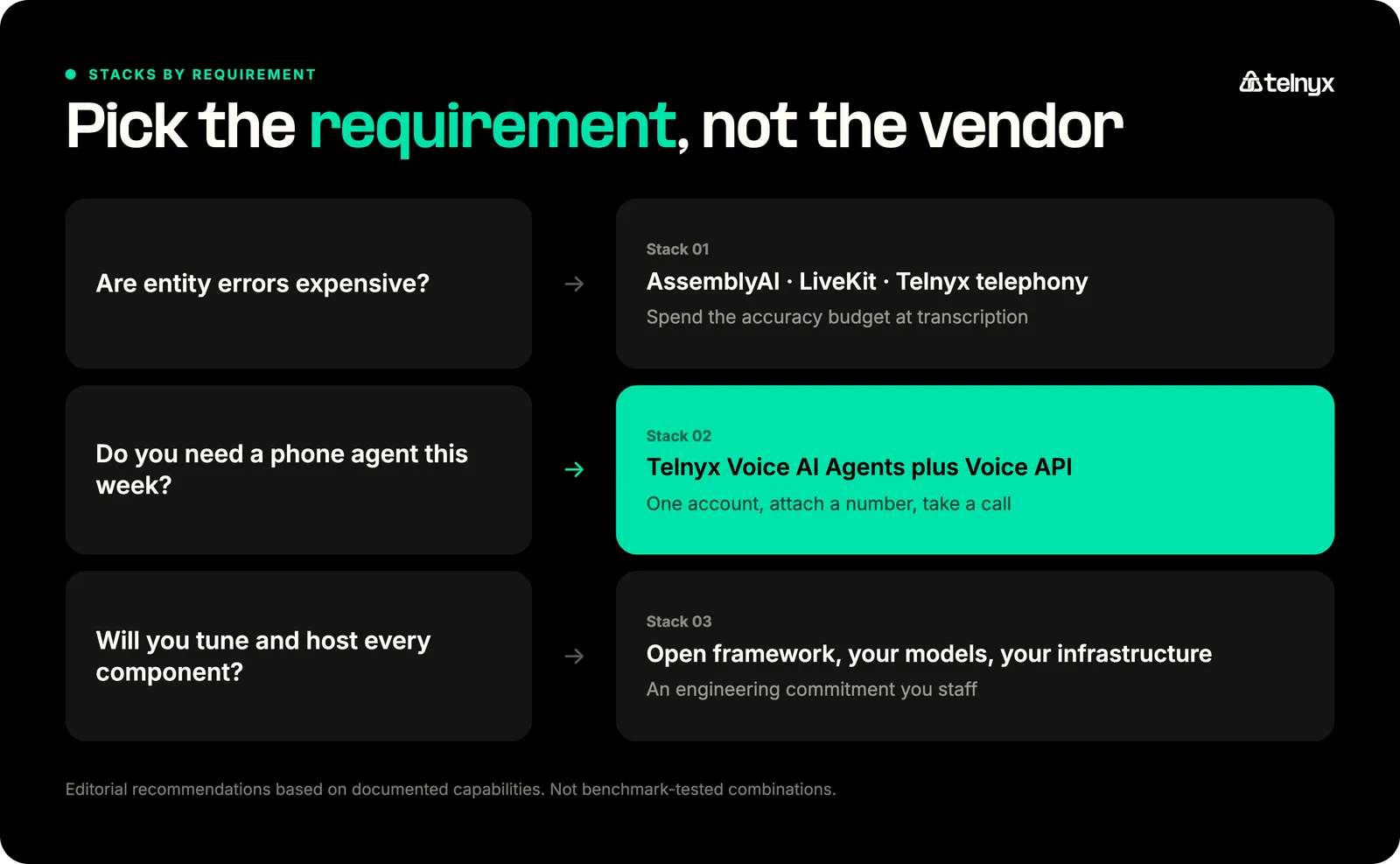
Three starting-point stacks, one per common requirement, each built from documented capabilities rather than benchmark-tested combinations. Nobody has measured these exact stacks end-to-end, including us. They give you a defensible first build instead of a blank whiteboard.
Stack 1: Entity-sensitive customer conversations
AssemblyAI for STT, a low-latency text LLM, Inworld or Fish Audio for TTS, LiveKit for orchestration, and Telnyx for telephony. Choose this shape when entity errors are expensive: account numbers, addresses, names, prescription details, structured anything. The logic is to spend your accuracy budget at the transcription layer where errors are unrecoverable, keep component control through an open framework, and put the call on carrier infrastructure.
Stack 2: Fastest path to a production phone agent
Telnyx Voice AI Agents with the Telnyx Voice API, using a supported STT, LLM, and TTS configuration selected inside the platform. Choose this when the requirement is a working phone agent this week: create the agent, attach a number, and manage the voice workflow through one account. It is also the configuration whose caller-experienced latency has a current independent measurement, which is more than most fast paths can say.
Stack 3: Maximum component control
AssemblyAI or Deepgram for STT, your chosen text LLM, Fish Audio or ElevenLabs for TTS, LiveKit for orchestration, and Telnyx or Bandwidth for telephony. Choose this when your engineering team wants to replace, tune, host, or evaluate every component independently. Component control carries an ongoing engineering cost in integration, upgrades, and on-call, so staff for it deliberately.
Combine the best AI tools with Telnyx
Choosing the tools is one problem. Running them in production, where latency, uptime, and compliance decide whether the agent works, is the harder one. Telnyx runs that layer on the network the calls already travel.
With Telnyx, you get:
- An orchestration layer that brings STT, TTS, and LLMs together.
- Built-in AI tools to make Voice AI Agents optimized for cost, speed, and accuracy.
- Telnyx NaturalHD voices to provide human-like, low-latency speech.
- Sub-200ms round-trip-time (RTT) thanks to hosting Deepgram and open-source LLMs on owned infrastructure.
- One intuitive builder providing full control over agent versioning, testing, and deployment.
Book a call with a voice AI expert to learn how Telnyx can power your next deployment.
Frequently asked questions
What are the best AI tools for building voice agents?
The best AI tools for building voice agents: AssemblyAI for speech-to-text, Inworld for text-to-speech, OpenAI GPT-Realtime-2.1 for native speech-to-speech, Telnyx for orchestration and telephony, and Cekura for testing. How many of these you need depends on the architecture you pick: in a modular pipeline you assemble every layer yourself, while a native audio model or a managed platform folds several layers into a single product.
Is native speech-to-speech better than an STT, LLM, and TTS pipeline?
Neither wins outright. A native audio model gives you fewer moving parts and hears the call directly, but you can't see the words it worked from or swap the pieces inside. A modular pipeline costs assembly and pays you back in visibility: every transcript readable, every component replaceable. Decide by how often you'll need to open the hood.
Which voice AI tools have the lowest latency?
Telnyx posted the lowest median latency for voice AI orchestration among the platforms independently tested, a result consistent with its design: telephony, inference, and speech services run on one network it owns. For TTS, Inworld leads the current benchmark run with a 155 ms median time to first audio, and AssemblyAI is a solid low-latency STT choice.
How should developers compare speech-to-text tools for voice agents?
Compare them on the words that trigger actions: names, account numbers, and addresses, plus streaming stability in real background noise, end-of-turn detection, code-switching, and your application's own vocabulary. Headline word error rate is one input, not the verdict. Then test on your own audio, because published benchmarks measure someone else's calls.
How do you make an AI voice agent sound natural?
Naturalness comes from the whole stack. The voice model sets the ceiling, and cloning and voice steering let you shape it, but callers judge the conversation itself: an agent that answers on the beat and never talks over them feels human in any voice. Benchmarks measure timing and content accuracy, not expressiveness, so audition voices with listening tests on your own scripts.
Which AI tools handle intent recognition for voice agents?
The best tools for intent recognition are a high-entity-accuracy STT layer plus the LLM you already use: in this guide, that means AssemblyAI feeding the model of your choice. There is no separate intent tool to buy. The agent can only understand what survives transcription, and a misheard entity is an unrecoverable intent error, so spend your accuracy budget on STT first, then on prompt and tool design.
Which voice AI tools are best for data privacy?
The best voice AI tool for data privacy is Telnyx, because call audio stays on one operator's infrastructure: telephony and inference run co-located on the Telnyx network, so fewer vendors touch the audio. Telnyx is SOC 2 Type II, HIPAA, PCI DSS Compliant, ISO 27001, GDPR with EU-deployed infrastructure. If audio must stay on infrastructure you control, LiveKit Agents offers self-hosted options. Either way, confirm where audio is processed and stored, and what the vendor will sign.
Can voice AI tools handle multilingual conversations?
Yes, but a stack is only as multilingual as its weakest layer. Among the picks here, AssemblyAI documents code-switching across 18 languages, Deepgram Flux Multilingual covers ten, Inworld lists more than 200 languages and locales for TTS, and ElevenLabs 32. Those numbers don't compose automatically: confirm your exact language pairs end to end, including the caller who switches mid-sentence.
Can you mix voice AI tools from different providers?
Yes, mixing is the point of the modular architecture. Frameworks like LiveKit and managed runtimes like Telnyx Voice AI Agents exist so you can pair the STT you trust with the LLM you prefer and the voice you like. Every pairing comes one of three ways: a documented integration, a custom adapter, or a surprise. Confirm which before you commit.
How do you test a voice AI agent before production?
Test the agent the way callers will use it: simulate real conversations and verify the task completed, the right tools fired, and the backend actually changed. Re-run on every prompt and model change, load-test at peak concurrency, and throw interruptions, accents, and adversarial callers at it, then keep monitoring in production. Component metrics prove the parts work; end-to-end testing proves the agent does.
Share on Social
Osman is the Global AEO/SEO Lead at Telnyx, helping make voice AI and communications products clearer for builders. With almost a decade of experience in SEO, he previously led growth at Windscribe and Enzuzo, shipping and scaling organic programs that reached millions.


%20(1).png?width=96&format=webp)


