
STT API
How I built a voice dictation app for macOS using Telnyx
A full breakdown of building a Wispr Flow alternative on macOS using Telnyx STT and LLM inference APIs — pipeline architecture, permissions, hotkeys, and real-world latency.

Voice dictation apps exist. Most are too slow, too opinionated about formatting, or tied to a SaaS product you have no control over. Wispr Flow is the closest thing to what I wanted, but it's closed.
So I built my own. Hold Right Option, speak, release. The text appears at the cursor, cleaned up, ready to use. No backend, no app switching, no training required. It's a local macOS process making two API calls through Telnyx: speech-to-text and LLM cleanup.
Here's how the whole thing works.
What is voice dictation
Voice dictation is software that captures speech through a microphone, converts it to text, and pastes the result at your active cursor, letting you compose messages, documents, or code by speaking instead of typing.
The pipeline
The flow looks simple on paper:
Hold Right Option → record mic audio (16kHz PCM mono) → send to STT → clean up text → paste at cursor
Under the hood, this is just 3 API calls and 1 local process. The application requires no backend infrastructure, database, or persistent service.
It starts with capturing audio and turning it into text.
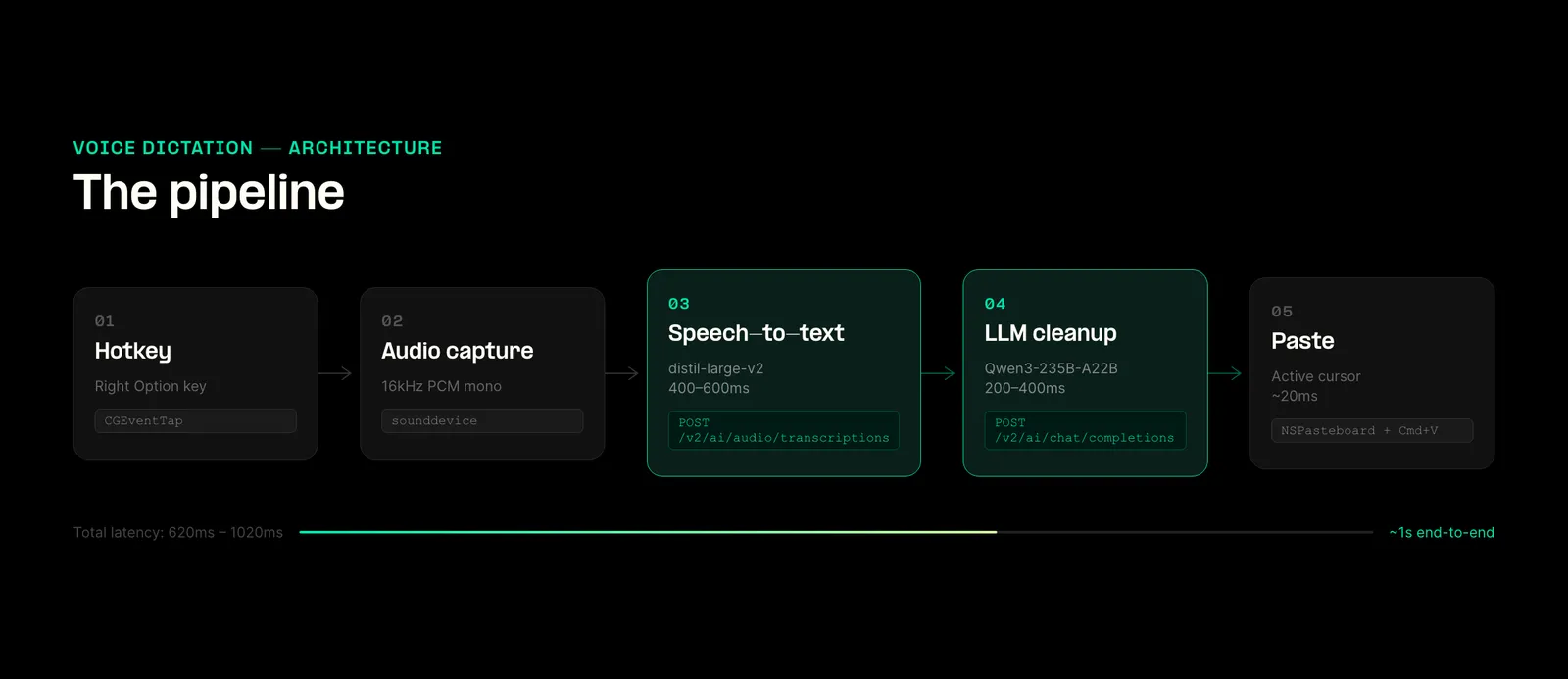
The app sends the recorded audio to:
POST /v2/ai/audio/transcriptions using distil-whisper/distil-large-v2.
This step determines whether the whole system feels usable. If transcription lags or drops words, everything downstream breaks.
I tested Deepgram nova-3 on the same endpoint. It's faster and punctuation is better, but the 1 req/sec rate limit shows up immediately when you dictate multiple short phrases. You end up waiting between requests. Whisper is slower, but it handles rapid back-to-back input without failing.
Once you have the raw transcript, it's still not ready to paste.
Spoken language often contains filler words, lacks punctuation, and includes occasional transcription errors, meaning it doesn't translate perfectly to clean written text. This is why a second step is necessary.
The raw transcript is sent to:
POST /v2/ai/chat/completions with Qwen/Qwen3-235B-A22B.
This step is intentionally constrained, meaning the model is prohibited from rewriting or summarizing the content. Its sole function is to:
- fix punctuation
- remove filler words
- correct obvious transcription errors
One parameter matters more than anything else:
"enable_thinking": false
If you leave it on, the model returns its internal reasoning along with the output. That gets pasted directly into whatever app you're using. You only make that mistake once.
At this point, you have clean, usable text. The final step is getting it into the active app without breaking the user's flow.
Injection
Instead of simulating keystrokes, the app writes the text to NSPasteboard and triggers a Cmd+V event.
This avoids timing issues and keeps insertion consistent across apps. It simplifies its process to a single action: pasting.
What broke after this
Once the pipeline worked I thought it'd be an easy ride, but everything else started breaking.
macOS permissions
Microphone and Accessibility permissions are necessary for a dictation app like this. While obtaining them initially is simple, maintaining those permissions proves to be the challenge.
In macOS, permissions are linked directly to the application's binary hash. Consequently, every time the app is rebuilt, those permissions are lost.
I tried multiple approaches:
- LaunchAgent: Proved to be unreliable.
py2app(Full Build): Experienced microphone failures.py2app(Alias): Resulted in "not trusted" errors or broken symlinks.CGEventTapVariations: Exhibited inconsistent behavior.
The only setup that held was running inside Terminal.
Terminal already has permissions. The script is launched using nohup via a .command file, which then exits, allowing the Python process to inherit the necessary permissions and continue running.
While not an ideal solution, it survives rebuilds.
The hotkey
Once the macOS permissions were handled, the next issue I had to solve was input.
Choosing to activate the application with a hotkey (Right Option in this case) sounds straightforward, it proved to be anything but.
Unlike standard keys, modifier keys do not generate distinct keyDown and keyUp events. Instead, they trigger a flagsChanged event. That forces you to track state manually using a CGEventTap.
That introduces edge cases like:
- Handling the use of the 'Option' key in keyboard shortcuts.
- Preventing multiple, unintended trigger events.
- Reliably differentiating between a key press and a key release.
There's also a lower bound problem. Very short recordings produce empty transcripts or hallucinations. To mitigate this, I enforced a minimum duration before sending audio for transcription.
The cleanup
Once input is stable, the next challenge is the output format.
The same dictated transcript requires different formatting based on its destination application:
- Slack: A casual tone with minimal punctuation.
- Email: Complete sentences are necessary.
- Code editor: No cleanup or formatting changes are applied.
I used NSWorkspace.sharedWorkspace().frontmostApplication() to detect the currently active application and dynamically switch the formatting prompts.
There's also a vocabulary issue. Whisper supports a prompt window for biasing output. I loaded it with known terms like "Telnyx", "Qwen", etc. As without that, they'd get mis-transcribed.
Latency
With the application now working, I shifted my focus to assessing its speed and responsiveness.
Here are the measured times over the public internet:
- Audio Capture: Approximately 0ms
- Speech-to-Text (STT): 400–600ms
- LLM Cleanup (Time to first token): 200–400ms
- Paste: Approximately 20ms
This means I had a total response time of roughly 620ms to 1020ms.
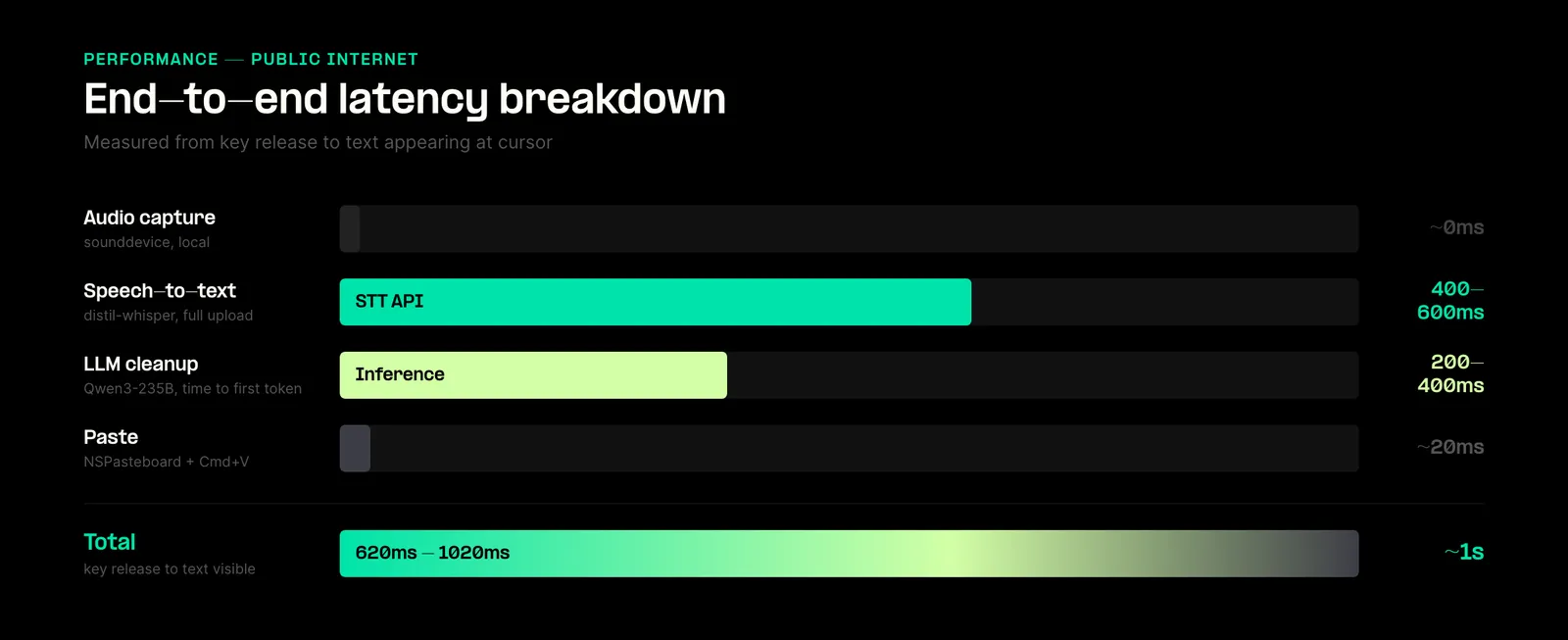
Most of the variance came from the STT call). As it was a full file upload, rather than streaming.
While Streaming STT would improve the perceived latency, it would not change the metric that is most crucial here: the time elapsed between the key release and the final appearance of the transcribed text.
What I'd change
A few things stand out after using it daily.
Improve latency by streaming STT and LLM
Right now, the STT process must be completed before the LLM starts.
Implementing a streaming model would allow these processes to overlap, potentially reducing overall latency by several hundred milliseconds.
Setup and stability
Launching the application via Terminal is functional but serves as a temporary measure. A properly signed, native application would provide a more robust solution, particularly by correctly handling system permissions.
Race condition in pasting
A minor race condition exists where typing immediately after releasing the dictation key can cause the dictated text to be pasted in the wrong location.
Why I used Telnyx
This project only works if latency stays predictable and the system stays simple.
The obvious path is to stitch together separate providers for STT and LLM. I didn't do that.
Everything runs through two endpoints:
POST /v2/ai/audio/transcriptions
POST /v2/ai/chat/completions
That decision showed up in a few places while building.
Model switching without rewriting the app
I tested Whisper and Deepgram on the same endpoint. Swapping models was just a parameter change.
That made it easy to test trade-offs in real usage. For example, nova-3 is faster, but the rate limit breaks rapid dictation. Whisper is slower, but stable. I didn't have to rework the pipeline to figure that out.
Tighter control over the cleanup layer
The cleanup step is small but sensitive. If it rewrites too much, the output feels wrong. If it does too little, it's unusable.
Having LLM access in the same stack made it easier to tune that boundary. I could iterate quickly on prompts and parameters without dealing with a separate integration.
Fewer edge cases when things fail
Most of the bugs in this app are timing and OS-related. The last thing I wanted was debugging cross-provider failures on top of that.
Keeping everything in one place reduced the number of failure modes:
- no mismatched timeouts between services
- no inconsistent response formats
- no "STT succeeded but LLM call failed differently" scenarios
That matters more than it sounds when you're trying to make something feel instant.
Local-first setup stays manageable
This app has no backend. It's just a local process making API calls.
Managing multiple providers in that setup adds friction quickly. Different auth patterns, different SDKs, different rate limits.
Using a single API kept the whole system small enough to reason about.
What this project showed
The core pipeline is not the hard part anymore. STT, LLM cleanup, and text injection all worked early.
What took time was making the system behave predictably under real usage.
macOS permissions break on rebuilds. Modifier keys don't behave like normal input. Very short audio clips produce garbage transcripts. Paste timing introduces race conditions. None of these show up in a demo, but they show up immediately when you try to use the tool all day.
There's also a pattern across the stack. Speed matters, but consistency matters more. A slightly slower model that works every time is better than a faster one that fails under load or rate limits. The same applies to cleanup. Small, controlled changes to text work better than anything that tries to be "smart."
The biggest shift for me was this: the quality of a voice product is not determined by the model. It's determined by how the system handles edge cases.
That's what separates something you try once from something you keep running in the background all day.
The full code is on GitHub: github.com/a692570/bolo
Share on Social


