
WhatsApp Business API
WhatsApp AI Voice Agents: How They Work and How to Set One Up
Learn how a WhatsApp AI voice agent answers calls inside the app, how to connect WhatsApp calling to the agent you already run, and what it costs.
Takeaways
A WhatsApp AI voice agent answers calls your customers place inside WhatsApp. On Telnyx it is the same AI Assistant, the same number and the same SIP (Session Initiation Protocol), Voice API or TeXML (Telnyx's markup language for call instructions) connection that already answers your phone calls, with no second platform between the call and the model.
- Voice AI reaches WhatsApp through WhatsApp calling on a business number. Your customer taps call in the chat they already have with you and installs nothing.
- The call path is five hops: the tap, your Telnyx number, your connection, the AI Assistant, then resolve or hand off.
- Telnyx platform cost and Meta's fees arrive on one invoice, priced per minute on business-initiated calls with no monthly subscription.
- 76% of surveyed US adults say they are more likely to hang up on a slow or laggy voice system, so every hop you remove is revenue you keep.
What is a WhatsApp AI voice agent?
A WhatsApp AI voice agent is an AI agent that answers a voice call placed inside WhatsApp, listens to the caller, works out what they want, replies by voice, and either completes the task or hands the call to a person.
How it differs from a WhatsApp chatbot and a phone IVR
The call runs over WhatsApp calling on your business number rather than a phone line, so the caller never leaves the app. Your WhatsApp chatbot handles the text thread on that number while your voice agent takes the call, so a customer who types a question at 9am and calls about it at noon reaches you both times. A phone interactive voice response (IVR) system gives the caller a keypad menu and one chance to press the right digit. Your voice agent follows what the caller says across turns, so "make that Thursday instead" changes the booking. Under the hood it is the same speech-to-text, model and text-to-speech loop that drives how AI voice works on a phone call.
What customers expect from a WhatsApp voice agent
In a Telnyx survey of 116 US adults (SurveyMonkey, 2026), 86% agreed they trust a phone system more when it understands them the first time, and 83% said they prefer calling a company when the system can complete the request rather than only give information. 76% agreed they are more likely to hang up when a voice system feels slow or laggy, and 75% said they trust a company more when it supports their preferred language from the start.
These are directional figures from one survey, not a rule for every customer, but your own call logs will show the same pattern: first-time understanding decides whether your agent gets a second turn. The same expectations hold for any agent you take to voice AI in production.
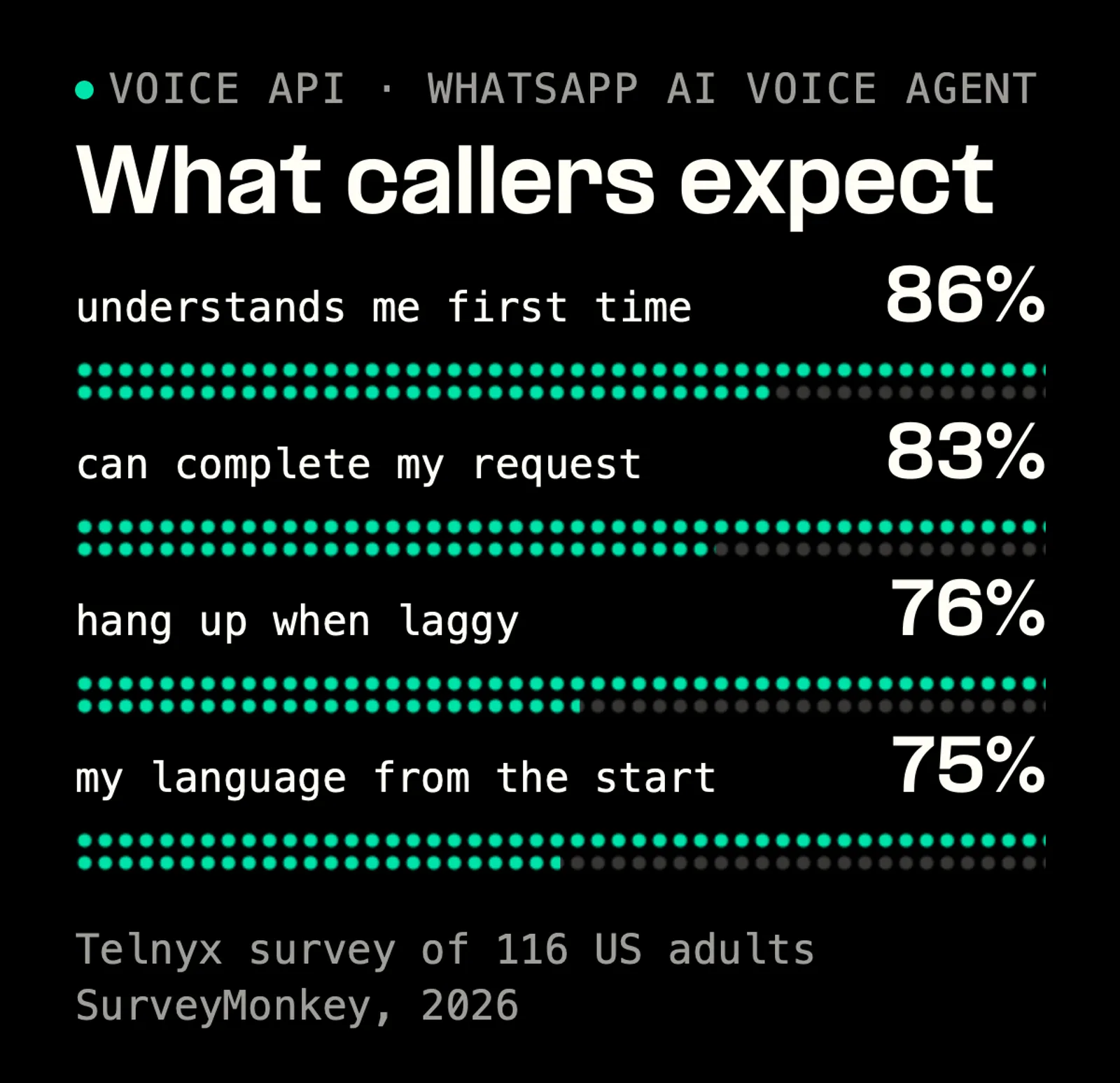
Four in five surveyed adults want a voice system that understands them first time and finishes the task.
 | A 1-second delay can spike call abandonment by 23% and kills natural conversation. Most AI voice projects fail because they’re stitched together from too many APIs and vendors. Ian Reither, COO, Telnyx |
Can voice AI integrate with WhatsApp?
Yes. Voice AI can answer and place WhatsApp calls through WhatsApp calling on a business number. Any WhatsApp user can call your Telnyx number from inside the app, and the call routes to your existing SIP, Voice API or TeXML connection, where a Telnyx AI Assistant answers WhatsApp voice calls today. You connect the number through the WhatsApp Business API, which puts your WhatsApp calls and messages on the Telnyx number you already use.
Two conditions apply. A customer can call an eligible business directly, but a call you start needs the customer's permission first. And availability depends on Meta's rollout by country, which the WhatsApp calling docs list.
How to call AI in WhatsApp, step by step
Calling the agent takes one tap on the customer's side and five hops on yours.
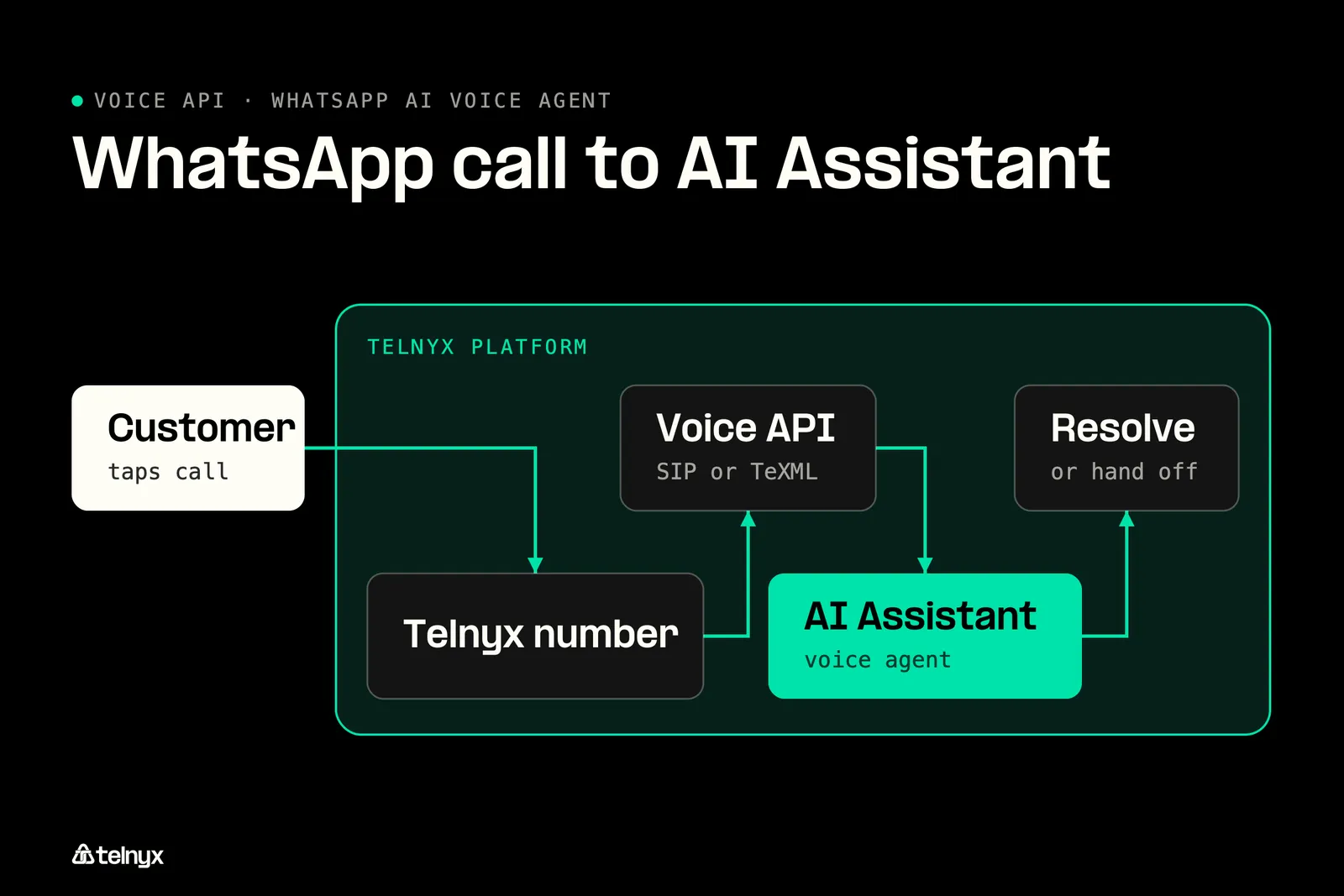
A WhatsApp call reaches the Telnyx AI Assistant through the same connection a phone call uses, no extra hop.
What the customer does
The customer opens the chat they already have with your verified business, taps the call icon, and the call is placed inside WhatsApp. There is nothing to install and no new number to save, because it is the number they already message, and they see your verified business name on the call screen.
What happens between the tap and the answer
The call arrives on your WhatsApp-enabled Telnyx number and lands on your SIP, Voice API or TeXML connection, the same connection a phone call lands on. The Telnyx AI Assistant answers, converts the caller's speech to text, and the model decides on a reply or an action. Text-to-speech plays the answer back, and the agent either resolves the request or hands the call to a person. If you drive calls from TeXML, the TeXML calls API you use today is the one the WhatsApp call hits.
Each of those steps takes time, and your caller hears that time as silence before the agent replies. If your stack passes audio from a telephony vendor to a transcription vendor to a model host to a speech vendor, every handoff is another network trip, and you pay for it on every turn of the conversation. Telnyx runs all of those steps inside one network, which is what co-located voice AI means.
Give the agent something to do mid-call
Most people call a business because they want something done, such as checking an order, moving a booking or changing an address. So your agent needs a way to act during the call, and function calling gives it one. Along with the conversation, your code sends the model a list of tools it may use. When the caller asks for something a tool can do, the model picks the tool, your code runs it, and the result goes back to the model before the agent speaks the answer.
Telnyx publishes a working voice agent built this way, the Python function calling example in its code examples repository. The function below is its core: it sends the conversation and the tool list to the model, runs any tool the model asks for, adds the result to the conversation, and asks the model again for the answer your caller hears. It works the same way whether the call came from WhatsApp or from the phone network.
The repository holds the imports, the webhook handler and the tool definitions. Test those tool calls on real audio before launch, which is most of what building reliable voice AI comes down to.
Put your phone agent on WhatsApp calls
Turn on WhatsApp calling for your Telnyx number. The agent that answers your phone calls picks up WhatsApp calls too.
An AI voice agent that works across WhatsApp and phone calls
One agent answers both because the call, the model and the billing share one Telnyx telephony layer on the number you already own.
Which WhatsApp voice setup fits your team?
- Telnyx voice agent already on phone calls: enable WhatsApp calling on the same Telnyx number. Your AI Assistant and connection carry over unchanged, so you run one agent for both channels.
- WhatsApp voice only inside a support inbox: keep the inbox for text and send calls to a Telnyx AI Assistant. Chat and voice share one number, so customers reach you either way.
- Human agents on a SIP contact center: connect your contact center over a Telnyx SIP connection. The AI Assistant resolves the call or transfers it to your agents, with no extra platform in between.
- Want to call customers back on WhatsApp: place business-initiated calls from your Telnyx number. You pay per minute, Meta's fees land on one Telnyx invoice, and there is no monthly subscription.
Why one agent beats two stacks
Public switched telephone network (PSTN) calls, Short Message Service (SMS) texts, WhatsApp messaging and WhatsApp calls run on a single Telnyx number, with one stack and one set of analytics. For you that means one prompt set, one knowledge base and one place to watch latency.
| Most Voice AI platforms sit on top of someone else's telephony stack. Telnyx runs the AI within our telephony layer. Ian Reither, COO, Telnyx |
It matters because no extra vendor hop sits between the call audio and the model. Your agent runs on any OpenAI-compatible LLM (large language model) with no change to the call path. If you are weighing Telnyx against Twilio for the voice side, Telnyx vs Twilio compares the two voice APIs.
Hand a WhatsApp call to a human or a second agent
Inbound WhatsApp voice calls route to any SIP Connection in your account, which is how a call reaches your existing contact center or a human. Your contact center solutions treat it like any other inbound call. For a second agent, the same function calling that looks up an order routes the call: a receptionist agent reads the intent and passes it to a booking or language agent through a tool call. Calls with more than one person are covered in multi-participant AI calls.
If you run a hotel, your guests can message and call the same number, the agent handles both, and a request it cannot finish goes to your front desk, as in travel and hospitality setups. Test the transfer on a real WhatsApp call before launch, because not every platform is clear about it: the documentation of respond.io, a WhatsApp inbox platform, gives two answers on whether a live WhatsApp call can be transferred out.
Inbox platform, no-code stack or API-first voice platform
The three ways to put an agent on WhatsApp calls differ in where the voice lives and who bills you.
Three ways to run a WhatsApp voice agent
| Pattern | What you get | What you give up |
|---|---|---|
| All-in-one inbox platform | Fast setup in a web UI, next to your chat inbox | Voice lives in the inbox vendor's platform rather than your phone stack. respond.io caps calls at 3 minutes and voice needs the Advanced plan |
| No-code multi-vendor stack | Twilio for the number, a voice AI vendor, an orchestrator and a database, each swappable | Every hop adds delay per turn, and every vendor bills you |
| Telnyx | The AI Assistant in the telephony layer, same number and connection as PSTN, Telnyx and Meta fees on one invoice | A chat inbox UI. You build the agent in the portal or in code |
How Telnyx WhatsApp calling reaches your AI agent
A WhatsApp call lands on the connection that already carries your phone calls, and the AI Assistant assigned to the number answers it.
Three steps in Mission Control
You need a WhatsApp Business Account with Meta business verification, and WhatsApp calling available in your country. Voice calling is off on every number until you toggle it on.
- In Mission Control, go to WhatsApp, then Connect, and select your WhatsApp Business Account through Meta's embedded signup.
- Pick one of your active Telnyx phone numbers and enter the verification code Meta sends.
- Toggle WhatsApp Calling on and assign the number to an AI agent, or enable WhatsApp calling per number from the API.
Calling connections are created automatically when you toggle calling on. There is no connection setup and no routing rules to write.
Inbound, outbound and bring your own number
Numbers you bring to Telnyx under Bring Your Own Number (BYON) get the same inbound calling treatment as Telnyx-provisioned numbers.
Where each WhatsApp call type connects
| Call type | Where it connects | What you need |
|---|---|---|
| Inbound | Your existing SIP, Voice API or TeXML connection | Calling toggled on for the number |
| Outbound | The Telnyx API through a WhatsApp SIP domain, same dial mechanics for SIP, Voice API and TeXML | The customer's permission for business-initiated calls |
| Bring Your Own Number (BYON) | Any SIP Connection you pick from the Mission Control dropdown | Your existing WhatsApp number imported to Telnyx |
You can read a number's BYON connection ID from the API, and the TeXML call demo shows the dial mechanics an outbound WhatsApp call shares.
What a Telnyx WhatsApp call costs
Inbound calls from customers and outbound calls your agent places both bill per minute.
Billing: You pay per minute on business-initiated calls, with no monthly subscription. Telnyx's platform cost and Meta's fees arrive on one invoice, and messaging on the same number costs you from $0.004 per message. Telnyx publishes the per-minute rate with its WhatsApp pricing, and Meta's fee schedule is under Meta WhatsApp pricing.
The agent that answers your phone calls now answers WhatsApp, on the number you already own.
WhatsApp AI voice agent FAQ
Put your voice agent on WhatsApp calls today
Connect your WhatsApp Business Account in Mission Control, toggle calling on for a number and assign your AI Assistant to take your first WhatsApp call.
Connect WhatsApp callingShare on Social

Serhii Omelchenko
Global AEO/SEO Manager
Serhii is Global AEO/SEO Manager at Telnyx, based in Amsterdam, he is focused on making communications infrastructure findable and credible across both traditional search and AI-driven discovery. He previously led SEO and GEO strategy for some of the world’s most recognized consu


