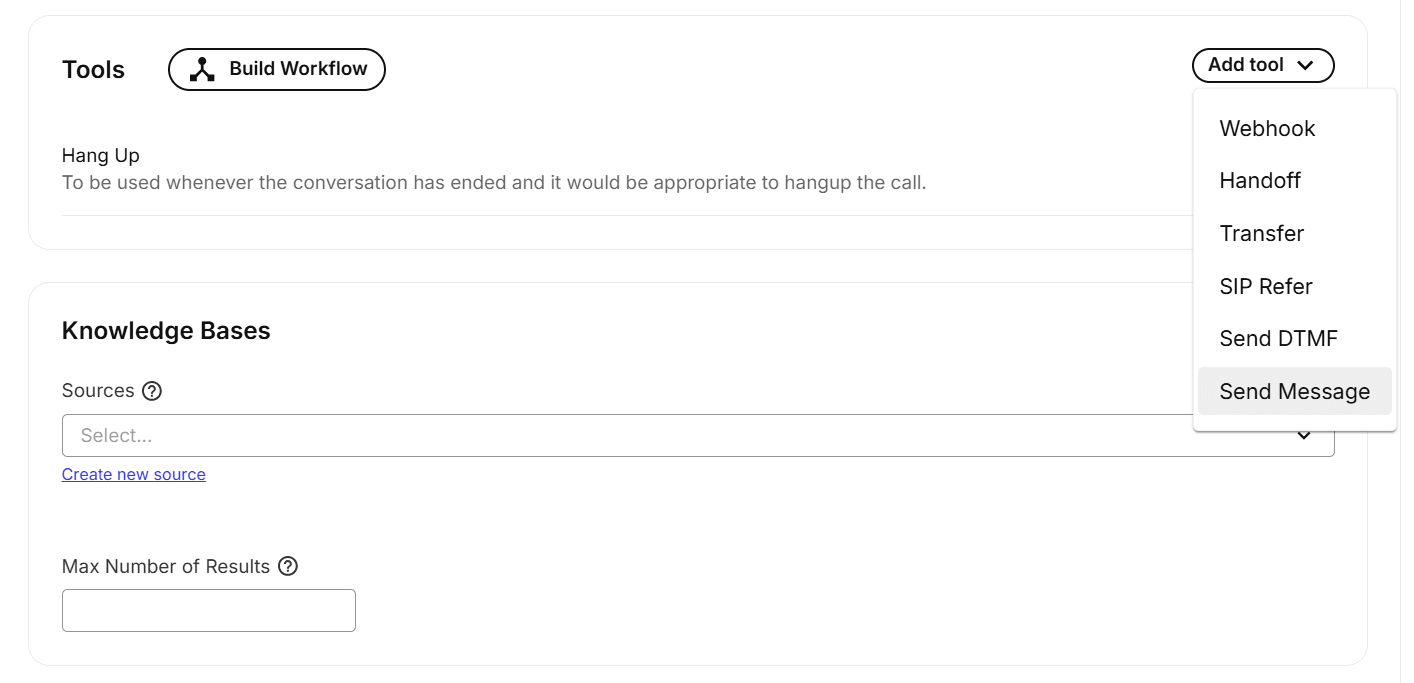
New Send message tool for Voice AI agents
3, Dec 2025
Telnyx Voice AI agents can now send SMS directly through a new send_message tool. This gives agents the same messaging workflow as Messaging AI Assistants and removes the need for external SMS logic.
What’s new
- Send_message tool: Enables SMS sending from within Voice AI agents.
- Unified requirements: Uses the same prerequisites as Messaging AI Assistants.
- Verified number support: Works with 10DLC or toll-free numbers assigned to the agent.
- Automatic routing: Sends only to the caller’s number, from the agent’s assigned number.
- Portal workflow: Prompts users to add a number if the assistant has none.
Why it matters
- Reduces external integration work for SMS actions.
- Simplifies agent design by using consistent messaging rules.
- Prevents misrouting by enforcing known sender and recipient numbers.
- Improves reliability by ensuring all messages originate from verified numbers.
Example use cases
- Send appointment confirmations after a voice interaction.
- Deliver support ticket IDs while the caller remains on the line.
- Provide follow-up links or instructions after task completion.
Getting started
- Open Mission Control Portal and go to AI Assistance.
- Assign a verified 10DLC or toll-free number to the assistant.
- Enable messaging for that number.
- Use the
send_messagetool from your agent workflow. - Test by placing a call and triggering an SMS action.
Try the tool in our Mission Control Portal or contact your Telnyx team.