
Edge Compute
Edge computing applications: 12 real use cases and latency budgets
Real edge computing applications, what they solve, and how teams deploy edge architectures in production.

By Eli Mogul
Takeaways
Edge computing applications are workloads whose response has to arrive before an internet round trip to a separate cloud could return. This guide covers 12 of them, with the latency budget behind each.
- Live voice has the tightest documented budget. ITU-T G.114 recommends keeping one-way delay under 150 ms, and a voice agent spends that budget on transcription, inference, and speech synthesis on every turn.
- Three questions place any workload: Does it have to respond faster than a cloud round trip? Must the data stay on site or in region? Must it keep running with the WAN down? A yes to any of them means edge or hybrid.
- Edge has real drawbacks (no redundancy, limited compute, and connectivity dependency), and each one has a practical mitigation.
The 12 edge computing applications at a glance
An edge computing application is a workload that processes data at or near where it is produced because a trip to a central cloud and back would break one of three limits. The first is a latency budget: the response has to land before the round trip can return. The second is bandwidth: shipping raw streams upstream costs more than the answer is worth. The third is data residency: the data has to stay on site, inside a network, or within a region. Every application below ends up at the edge for at least one of those reasons.
The 12 edge computing applications, why each needs the edge, and its latency budget
| Application | Why it needs the edge | Latency budget |
|---|---|---|
| 1. Real-time voice AI agents | Latency | 150 ms one-way |
| 2. Autonomous vehicles | Latency, bandwidth | Sub-second |
| 3. Predictive maintenance | Bandwidth, offline operation | Minutes |
| 4. Remote patient monitoring | Data residency, latency | Seconds |
| 5. Smart retail and loss prevention | Bandwidth, latency | Seconds |
| 6. Content delivery and web optimization | Latency, bandwidth | Sub-second |
| 7. Industrial IoT and robotics | Latency, offline operation | Sub-second |
| 8. Fraud detection and call screening | Latency, data residency | Sub-second |
| 9. AR/VR and immersive experiences | Latency | Sub-second |
| 10. Smart cities and traffic systems | Latency, bandwidth | Seconds |
| 11. Energy grid and utility monitoring | Offline operation, bandwidth | Seconds |
| 12. Live video and contact center transcription | Latency, bandwidth | 150 ms one-way |
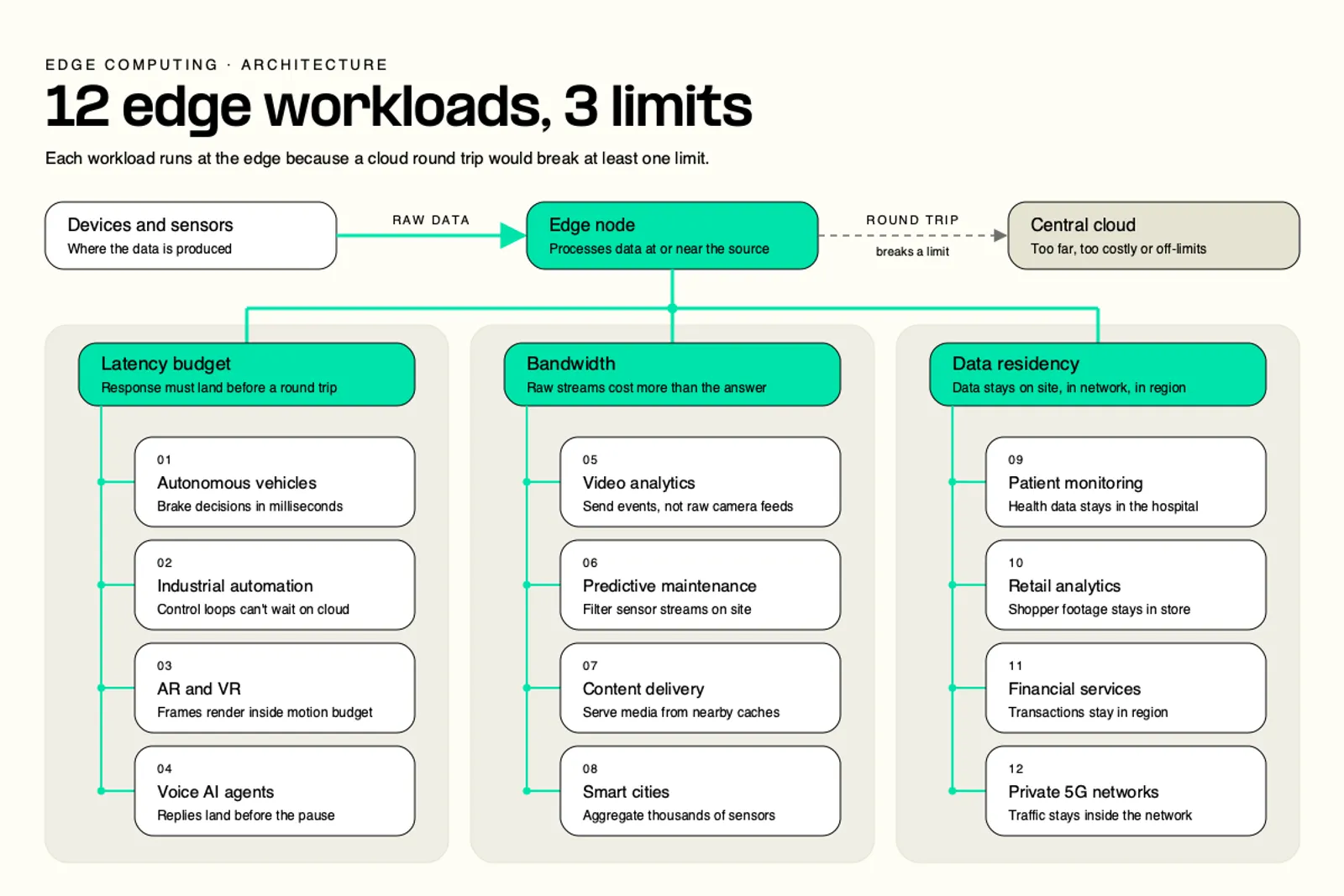
Only the two voice rows carry a published figure, from ITU-T G.114. The other rows use a plain class because no single public budget covers them.
If the workload is a live conversation, the compute and the carrier network have to sit together. See how Telnyx runs voice, AI inference, and edge functions on one platform. |
Explore Telnyx Edge Compute to run workloads that have to respond faster than a cloud round trip.
How does edge computing work: device, node, network, cloud
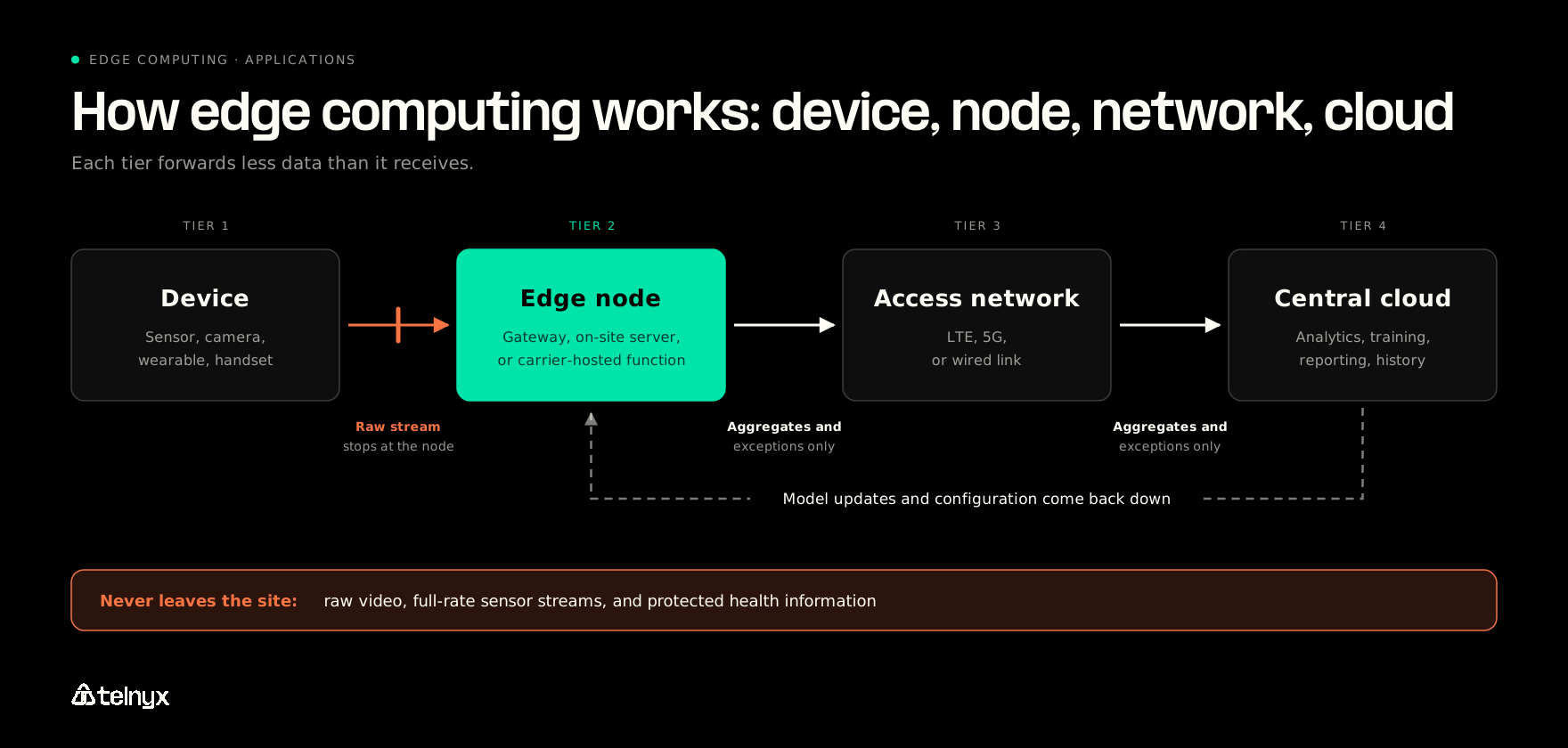
Edge computing works by answering at the first tier that can answer, then sending less data at every hop after that. The path has four tiers:
- Device: The sensor, camera, wearable, vehicle, or handset that produces the data.
- Edge node: A gateway, an on-site server, or a function hosted inside a carrier network. It answers locally, discards raw streams it has already acted on, and aggregates the rest.
- Access network: The LTE, 5G, or wired link that carries whatever the node forwards.
- Central cloud: Where aggregates, exceptions, and history land for analytics, model training, and reporting.
Edge computing devices and where the compute actually sits
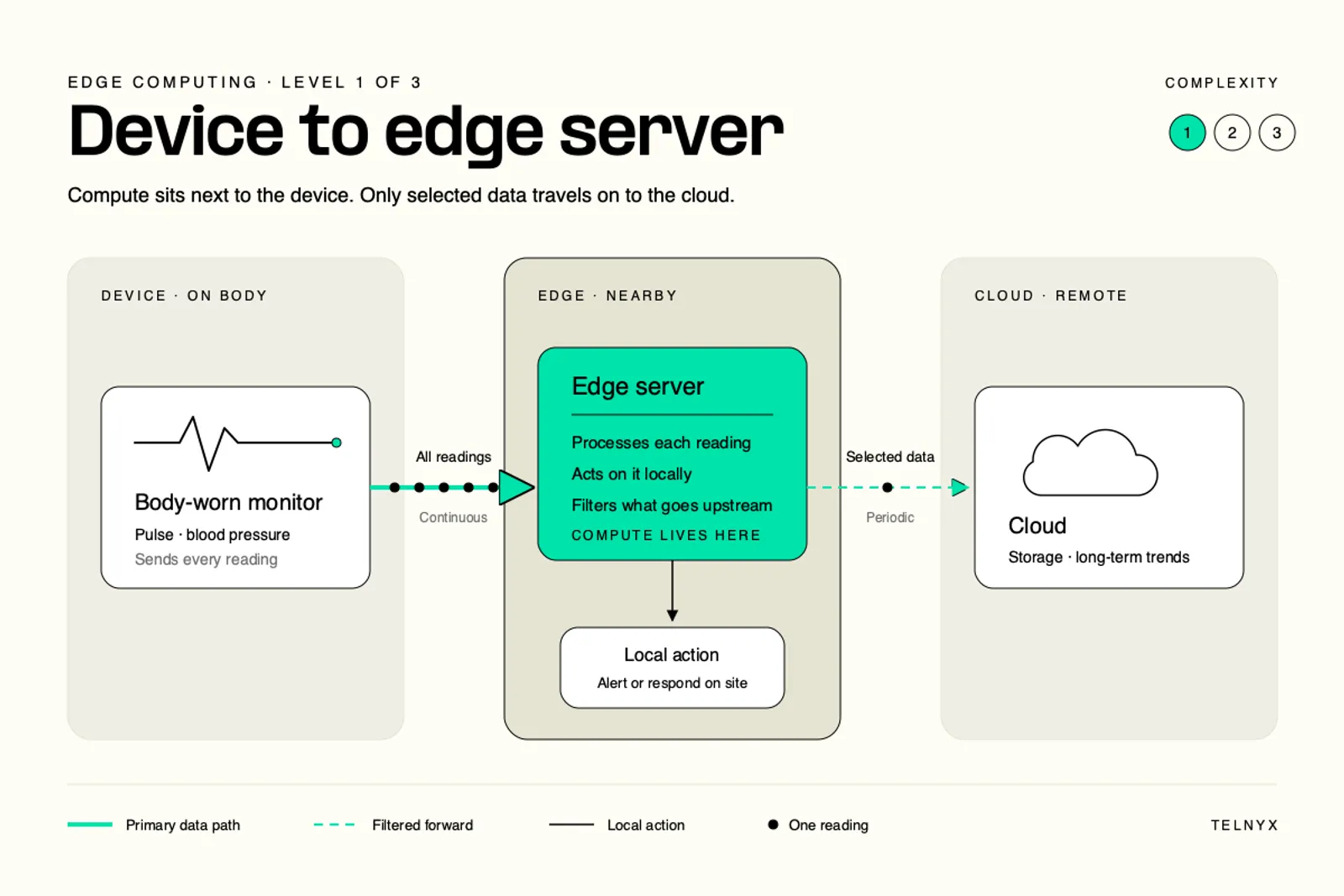
Edge deployments come in three levels of complexity, and the level decides where the compute lives.
Device to edge server: A body-worn pulse and blood pressure monitor sends readings to a nearby edge server. The server acts on them and forwards only selected data to the cloud.
Gateway: An in-vehicle gateway combines GPS, camera, and traffic-signal feeds so the vehicle can act on them without waiting for a remote server.
Carrier edge: Edge servers inside a 5G or carrier network cache content and run applications one hop from the user. ETSI standardizes this model as multi-access edge computing (MEC).
Carrier edge in practice: A Telnyx Edge Compute function can act as the backend for AI Assistant dynamic variables and webhook tool calls, with no separate server required. Our guide to edge functions covers the pattern in more depth. |
What gets sent upstream, and when
The node's job is to decide what the network never has to carry. A simple sync rule covers most deployments:
- Goes upstream: aggregates, exceptions, and the labeled samples a model needs for retraining. Model updates and configuration come back down the same path.
- Never leaves the site: raw video, full-rate sensor streams, and protected health information.
- When it moves: on a batch schedule, the moment an exception fires, or when connectivity returns after an outage.
12 real-world edge computing examples
Each example below follows the same four beats: what runs at the edge, why a cloud round trip fails it, what stays local, and what goes upstream.
1. Real-time voice AI agents
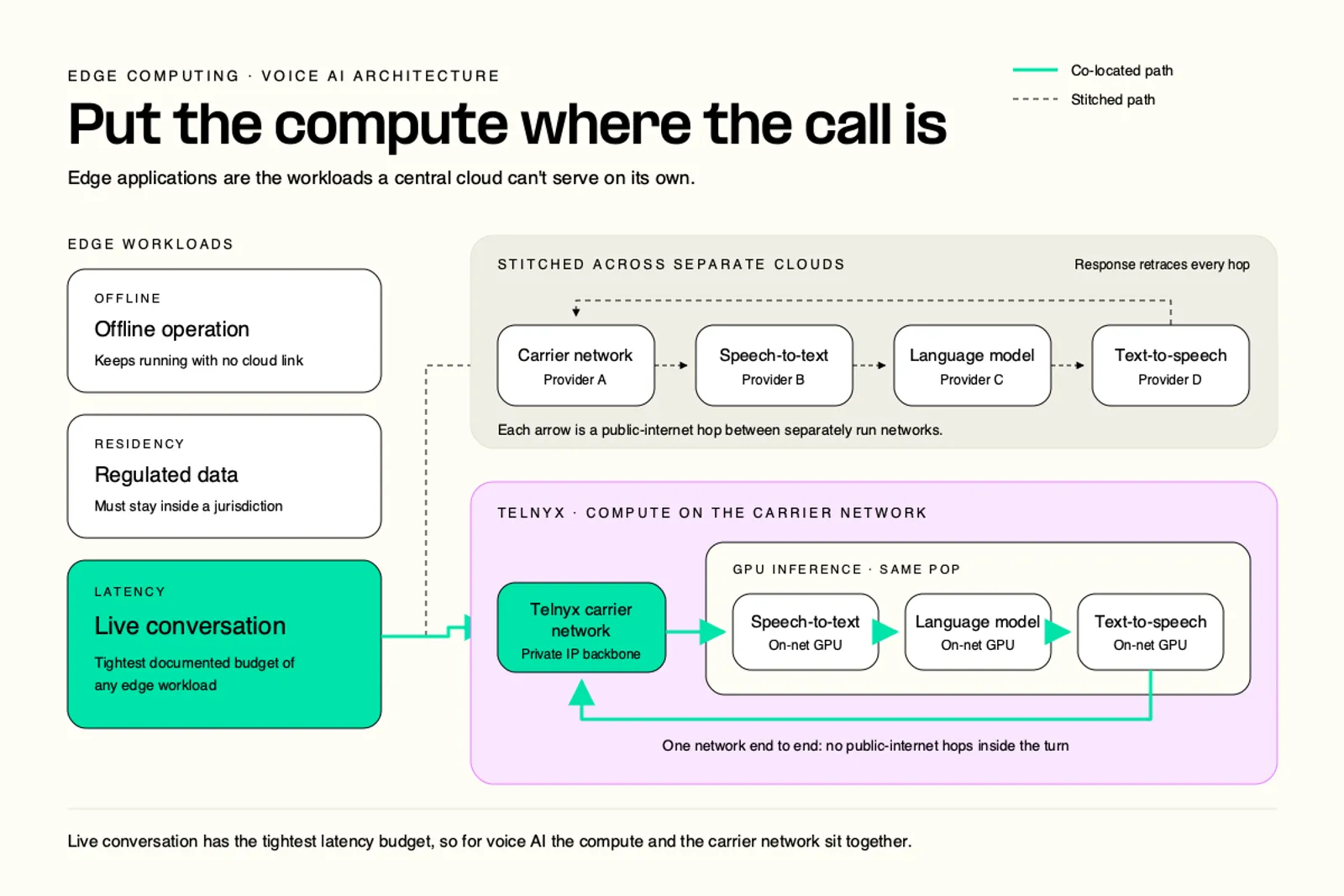
A voice AI agent listens, transcribes, reasons, and speaks on every conversational turn. ITU-T G.114 puts the one-way budget for acceptable voice quality at 150 ms, and the agent has to fit transcription, inference, and speech synthesis inside it. When each stage runs in a different cloud, the call leaves the carrier network and crosses the public internet to a speech API, then a hosted model, then a separate text-to-speech service, and back again. Every one of those hops is paid again on every turn. The audio stream and in-call context stay on the call path. Transcripts, outcomes, and analytics go upstream after the call.
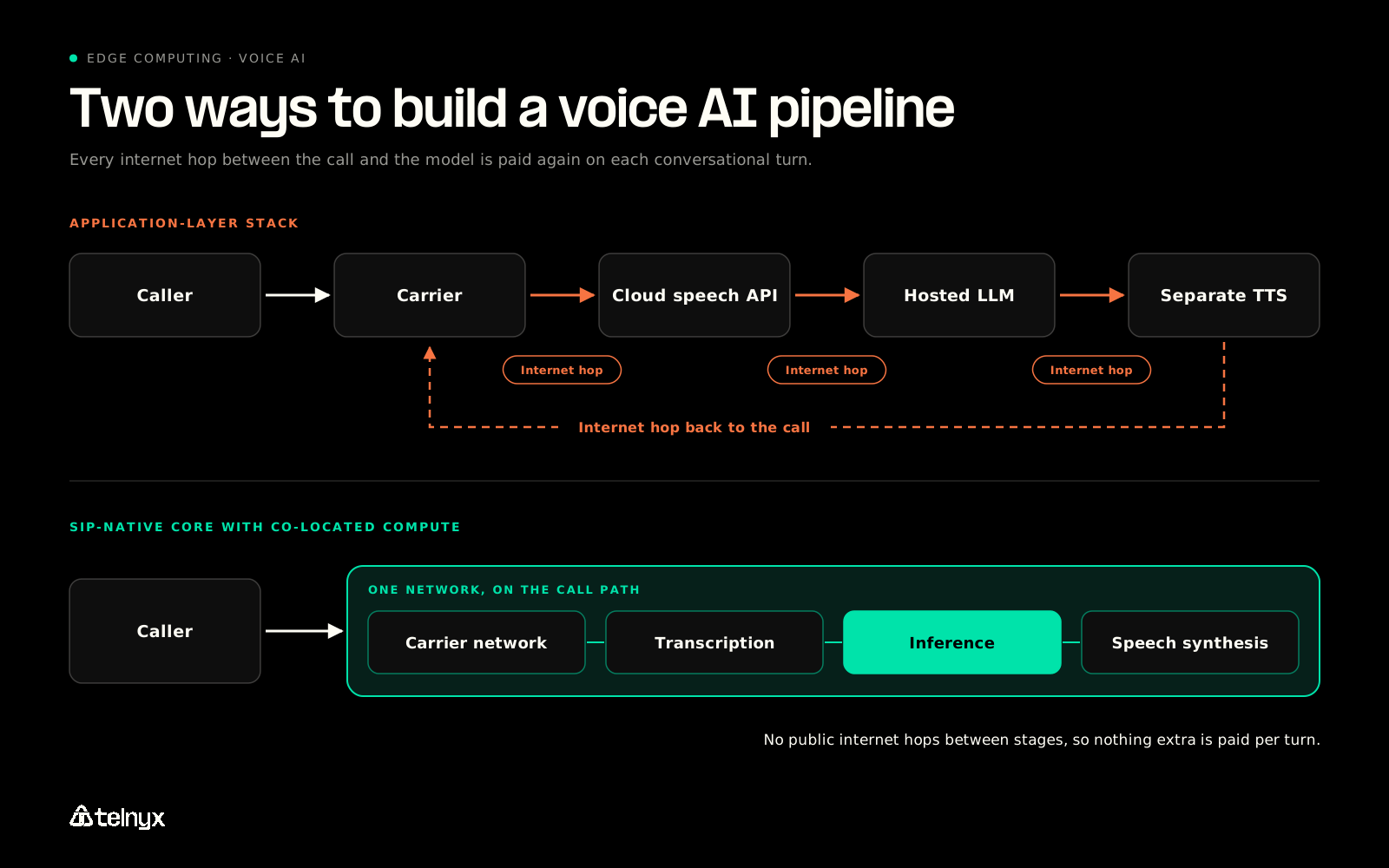
"We move fast because the 'Latency Tax' is real. While the industry struggles with bloated WebRTC layers and third-party API hops, we went back to the metal. We've eliminated the 'Abstraction Trap.' By moving to a SIP-native core with co-located compute, we've solved the network physics of voice." David Casem, CEO at Telnyx |
That SIP-native core carries calls on Telnyx Voice, and Edge Compute functions sit close to that telephony edge. The Go handler below is from a Telnyx example that serves an AI Assistant's dynamic variables and webhook tool calls from one URL. It verifies the Telnyx signature on every request, then routes by request type:
Latency is only one of the ways a voice product breaks in production. Our guide to voice AI on real calls covers the rest.
2. Autonomous vehicles
A vehicle fuses radar, LiDAR, and camera data to decide whether to brake, steer, or hold its course. That decision can't wait on a data center, and no single public budget covers it, so it counts as sub-second here. The raw sensor streams are far too large to ship upstream, so they stay on the vehicle. Map updates, incident clips, and fleet telemetry go upstream. Truck platooning applies the same logic between vehicles: following trucks match the lead truck's braking over a direct radio link instead of through the cloud.
Connectivity is the layer most edge guides skip. LTE and 5G with multi-carrier failover keep a vehicle or remote site reachable when one network drops. A cellular management path lets a remote team recover equipment without sending a technician. |
3. Predictive maintenance
A node beside each machine scores its signals locally, because streaming high-frequency sensor data from every machine costs more bandwidth than it returns, and scoring can't stop when the WAN drops. The budget here is minutes, not milliseconds. What the node watches:
- Vibration
- Temperature
- Current draw
- Cycle count
The raw readings stay on the floor. The one thing that goes upstream is an anomaly flag with a timestamp. Models small enough for tinyML can run on the sensor itself, which removes the gateway hop entirely.
4. Remote patient monitoring
Wearable and implanted devices track vitals continuously and need to raise alerts within seconds. Here residency matters as much as speed. Protected health information falls under the HIPAA Privacy Rule, so many hospital networks route patient data through a central firewall over MPLS or SD-WAN. Those extra hops slow real-time alerting. Processing on the device or a local node keeps raw readings inside the network. Alerts and summarized trends go upstream to the care team.
Speed isn't the only reason data stays at the edge. Some data must not leave a network or cross a border. HIPAA sets that rule for health data in the US, and GDPR and national data-sovereignty laws create the same requirement in other sectors and regions. |
5. Smart retail and loss prevention
Cameras, RFID tags, and shelf sensors track stock and flag suspicious activity on the sales floor. Shipping every camera feed to the cloud would swamp a store's uplink, so the analysis runs in the store and responds within seconds. Raw video stays local. Stock counts, reorder signals, and flagged events go upstream to inventory and security teams.
6. Content delivery and web optimization
Content delivery networks cache web pages, video, and music on servers close to users so playback starts quickly and the origin isn't hit for every request. This is the edge application most people use daily without noticing. Cached copies stay at the edge. Cache misses and request logs go back to the origin.
7. Industrial IoT and robotics
Robots, programmable logic controllers, and conveyors coordinate on the factory floor in control loops that can't wait for a round trip, and that have to keep running through an internet outage. Control signals and sensor state stay on the floor. Production metrics and quality results go upstream for planning and reporting.
8. Fraud detection and call screening
Fraud scoring has to finish before the transaction completes or the call connects. Sending every card swipe or inbound call to a distant cloud for a verdict adds delay at exactly the wrong moment, and card or call data may be subject to residency rules. Scoring runs at the edge. The scores and confirmed fraud patterns go upstream, and updated models come back down.
9. AR/VR and immersive experiences
Headsets render frames that must track head movement, and lag between movement and image causes discomfort. No single public budget covers every headset, so this row stays sub-second. Rendering and tracking run on the device or a nearby node. Session state and shared-world updates go upstream.
10. Smart cities and traffic systems
Intersections process camera and sensor data locally to adjust signal timing, give priority to emergency vehicles, and protect pedestrians. Raw camera feeds stay at the intersection. Traffic counts, congestion data, and structural health readings from bridges and roads go upstream to city teams.
11. Energy grid and utility monitoring
Substations and smart meters detect faults and balance load, and they have to keep doing it when backhaul drops. High-frequency telemetry stays at the substation. Aggregated load data and fault events go upstream for grid planning.
12. Live video and contact center transcription
Contact centers transcribe calls as they happen so supervisors and compliance tools can act mid-call rather than after it. The live audio path carries the same 150 ms voice budget as example 1, and video adds a bandwidth cost. Audio and video frames stay on the call path. Transcripts, compliance flags, and summaries go upstream.
The Python function below comes from a Telnyx example for real-time compliance checking in regulated call centers, built on Telnyx Voice, AI Inference, and Edge Compute. It sends each agent utterance, with call context, to an inference endpoint and gets back a JSON verdict:
Edge computing use cases by industry
The same 12 applications land differently by industry, but every industry uses the same device, node, network, and cloud path. What changes is the latency budget and what has to stay local:
- Telecom and contact centers: the tightest budget, 150 ms one-way for live voice. Live audio and call context stay on the call path.
- Healthcare: seconds. Protected health information stays in the network.
- Manufacturing: sub-second for control loops, minutes for maintenance scoring. Raw sensor data stays on the floor.
- Retail: seconds. Camera feeds stay in the store.
- Financial services: sub-second. Card and account data stay under residency rules.
- Transportation: sub-second on the vehicle. Raw sensor streams stay on board.
- Energy and utilities: seconds. High-frequency telemetry stays at the substation.
- Agriculture and geospatial: seconds to minutes. Imagery and field data stay near capture.
Edge computing use cases in telecom and mobile edge computing
Telecom plays two roles at once. As a host, a carrier places compute inside its own network, the model ETSI calls multi-access edge computing, so applications run one hop from the handset. As a user, the carrier applies that compute to its own call routing, fraud screening, and voice AI.
Telnyx sits in both roles. Voice, messaging, and AI inference run on one private global network, and Edge Compute extends it with functions that run close to the telephony edge, the pattern shown in example 1.
Edge analytics use cases in agriculture, energy, and geospatial tech
Agriculture: Farms score crop reports and field imagery locally, often over private wireless or cellular links, and escalate only the cases that need an agronomist. A Telnyx crop advisory example runs on Edge Compute Stateful Actors, which keep state between requests (see our guide to stateful edge functions). It classifies each reported issue, rates its severity, recommends a treatment through AI Inference, and escalates critical cases. The TypeScript record it stores for each advisory shows the classification:
Energy: Substations score grid telemetry locally to catch faults and rebalance load, then forward aggregates for planning.
Geospatial: Drones, satellites, and field sensors produce imagery and position data too large to stream raw. Processing near the point of capture means only detected changes travel upstream.
Getting started: Deploying a separate single-purpose edge box for each use case multiplies the management work. Plan one runtime that several applications share, managed from one place. |
Benefits of edge computing, and the drawbacks the listicles skip
Edge computing pays off in five ways, and each one traces back to specific applications above. It also carries four drawbacks, and each has a mitigation.
Benefits of edge computing
- Lower latency: the response lands before a cloud round trip could return.
- Less bandwidth, lower transit cost: raw streams stop at the node, and only summaries travel.
- Data stays under local rules: regulated data never leaves the site or region.
- Keeps running offline: scoring and control continue through a WAN outage.
- Less dependence on networks you don't control: fewer hops across third-party infrastructure.
Drawbacks and how to mitigate each one
- No redundancy: A failed edge device often has no backup, so the application stops. Design each node to fail over to the cloud path or to a second node.
- Limited compute: Edge hardware can't run the largest models. Run small models at the edge and keep large ones central.
- Connectivity dependency: Every edge application still needs a link for sync and management. Use multi-carrier cellular failover and an out-of-band management path.
- Expanded attack surface: Every device is another way in, and weak credentials make it an easy one. Provision unique credentials per device and push updates over the air.
Fleet management starts on day one. Thousands of edge devices need provisioning, SIM and connectivity management, and over-the-air updates from the start, or the drawbacks list becomes the operations backlog. See our guide to eSIM for IoT devices. |
Edge computing vs cloud computing: which workloads belong where
Cloud computing centralizes compute so it scales easily and is simple to manage. Edge computing decentralizes it so a workload responds before a round trip to that central cloud could return. Most real systems use both.
Where should your workload run: edge, hybrid, or cloud?
Pick the case closest to yours to see where it belongs and why.
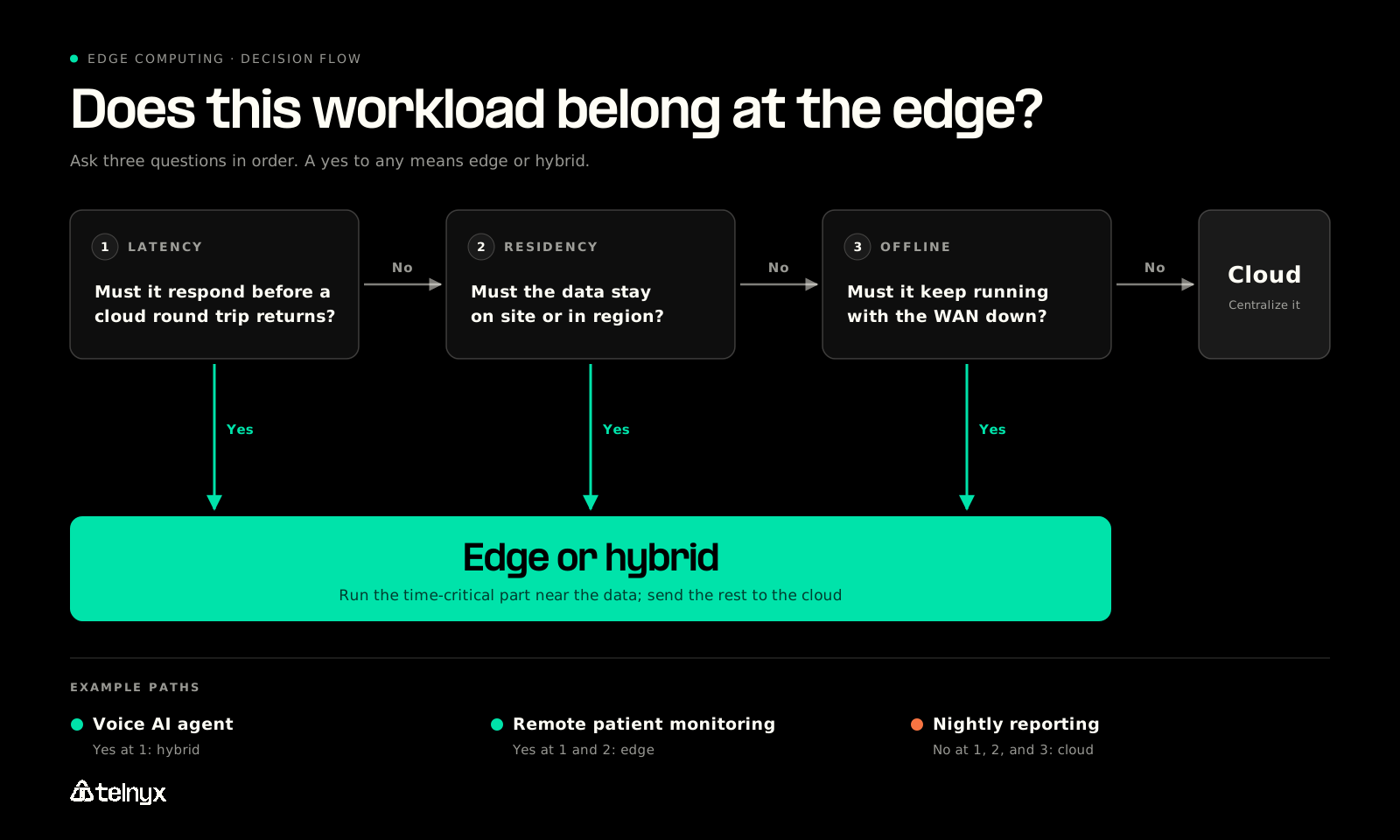
How to evaluate if a workload belongs at the edge
Ask three questions, in this order:
- Latency: Does the response have to land before an internet round trip to a separate cloud could return?
- Residency: Does the data have to stay on site or in region?
- Offline operation: Does the workload have to keep running with the WAN down?
A yes to any question means the workload belongs at the edge or in a hybrid split. A no to all three means the cloud is the better home.
"That matters because voice AI is still voice. The phone call has to connect, audio has to arrive cleanly, media has to be routed intelligently, and the system has to hold up under real-world network conditions. If you start purely at the application layer, you can build a great product experience, but you inherit a lot of decisions from the infrastructure underneath you." James Whedbee, VP of Engineering at Telnyx |
Edge vs cloud vs hybrid: a worked example
Run a voice AI agent through the test. Question one is a yes: every turn has to fit inside a 150 ms one-way budget. So transcription, inference, and speech synthesis run on the call path. But call analytics, model training, and reporting don't need an answer mid-call, so they run in the cloud. The agent is a hybrid.
A nightly reporting job answers no to all three questions. Nobody is waiting on it in real time, the data is already in the cloud, and it can retry after an outage. It belongs in the cloud.
The bottom line on edge computing applications
Edge computing applications are the workloads whose latency, residency, or offline requirements a central cloud can't meet on its own.
A live conversation has the tightest documented budget of all of them, which is why the compute and the carrier network have to sit together for voice AI rather than being stitched across separate clouds.
Take the three-question test to any workload and it will tell you whether to build at the edge, in the cloud, or across both.
Round trip too slow? Data must stay local? Must run offline? A yes to any means edge or hybrid. |
Edge computing applications FAQ
What is edge computing? Edge computing processes data at or near where it's produced, on a device, a local node, or a server inside a carrier network, instead of sending everything to a central cloud. It exists to meet latency, bandwidth, and data-residency limits a cloud round trip can't.
What are examples of edge computing? Common examples include real-time voice AI agents, autonomous vehicles, predictive maintenance, remote patient monitoring, content delivery networks, smart traffic systems, and live contact center transcription.
What are the components of edge computing architecture? An edge architecture has four tiers: devices that produce data, edge nodes that process it locally, an access network (LTE, 5G, or wired) that carries what the node forwards, and a central cloud for analytics, training, and history.
How does edge computing help businesses? It cuts response times for real-time applications, reduces bandwidth and transit costs, keeps regulated data inside required boundaries, and keeps critical systems running when the internet connection drops.
What is a network edge? The network edge is the boundary where a local network or its devices meet a wider network such as the internet or a carrier network. Placing compute at that boundary shortens the distance data travels before a decision is made.
Place your workload, then build it. Sort it with the three questions: round trip, residency, and offline operation. If the answer is a live conversation, run voice, AI inference, and edge functions on one platform. |
Place each workload where its latency budget fits
Some workloads must respond faster than a cloud round trip, keep data on site or in region, or keep running with the WAN down. A yes to any means edge or hybrid.
Explore Edge ComputeShare on Social


