
Voice
The 9 Best Voice AI Agents for Phone Calls in 2026
Compare nine platforms by phone connectivity, pricing, build model, testing, latency, and the tradeoffs that matter at scale.

By Osman Husain
Voice AI agents answer and place phone calls, understand natural speech, connect to business systems, and complete tasks during live conversation.
A complete voice AI stack has four parts: telephony (placing and receiving calls on the PSTN through a Voice API, speech-to-text (turning audio into transcripts), querying an LLM to generate responses, and text-to-speech (turning responses back into audio).
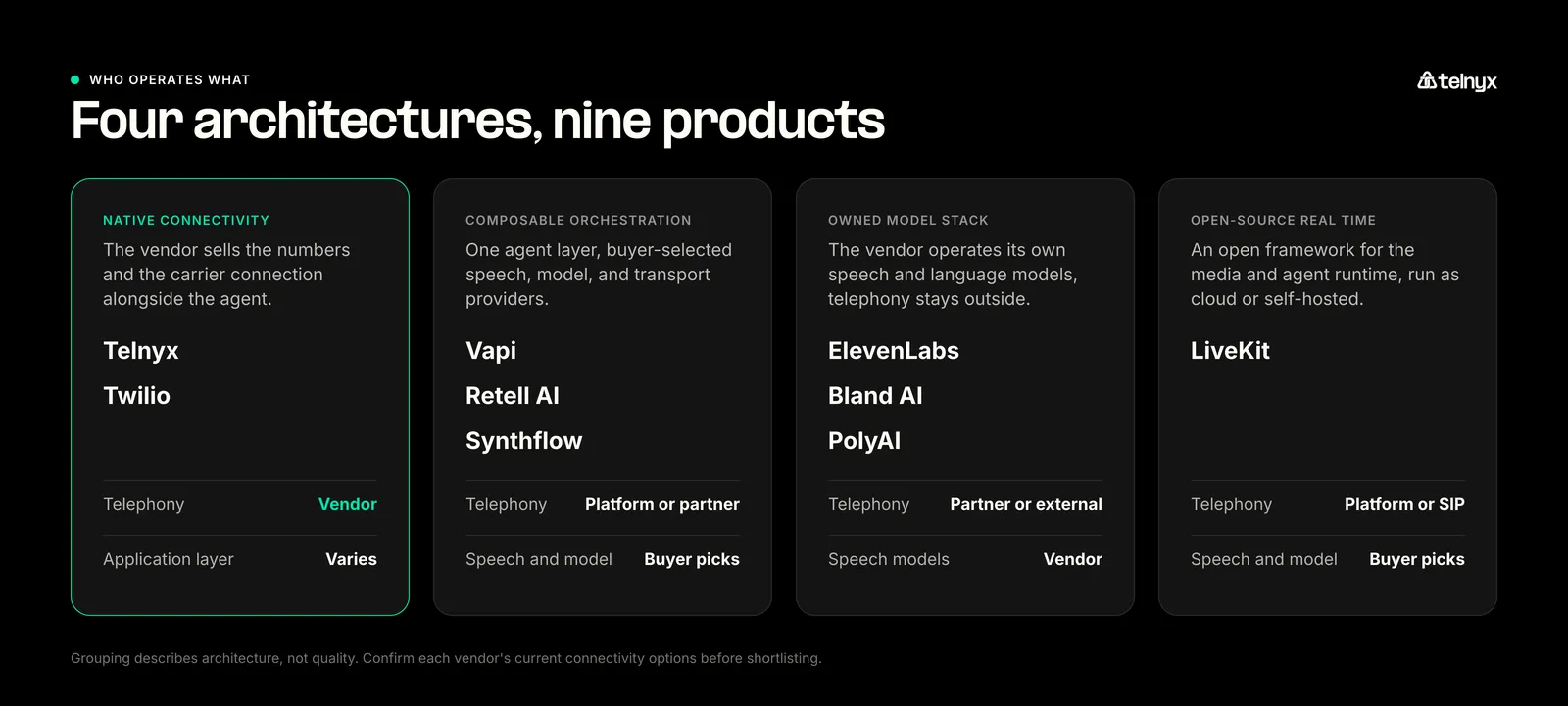
The biggest difference between agents is which parts of the call stack each vendor operates. Some platforms operate their own speech models while using a third-party for communications infrastructure. Others own and operate the full stack internally. These choices affect latency, cost, reliability, and call failure diagnosis.
This guide compares nine AI voice options using documented feature capabilities, public pricing, and attributed third-party benchmark data reviewed in July 2026. It is not a leaderboard or a latency benchmark guide.
The best voice AI agents in 2026 are Telnyx for high-volume phone calls, Vapi for developer-controlled model stacks, Retell AI for pre-launch testing, LiveKit for open-source real-time infrastructure, ElevenLabs for voice-led experiences, Bland AI for outbound flows, Synthflow for no-code support, PolyAI for enterprise contact centers, and Twilio for existing Twilio applications.
How I researched and ranked voice AI tools
I researched all nine platforms using current product documentation, first-party data from Telnyx internal research, API references, telephony documentation, pricing pages, and independent benchmark data.
I normalized the evidence against six criteria so that a platform selling a complete phone stack was not treated as equivalent to an orchestration layer or speech API.
- Phone-agent completeness: Can the product connect to a phone call, or does the buyer need to add telephony and a media bridge?
- Build experience: Does it suit developers, non-technical operators, or a managed enterprise deployment?
- Telephony and call control: Does it support inbound and outbound calls, SIP, transfers, phone numbers, and existing carrier connections?
- Testing and operations: Can teams simulate conversations, define evaluations, inspect calls, compare versions, and trace failures?
- Cost structure: Which charges are public, and which components such as telephony, language models, speech, or platform fees are billed separately?
- Use-case fit: Which buyer and workflow get the clearest advantage from the product’s design?
I gave the most weight to phone-agent completeness, buyer fit, and total cost composition because this article evaluates products used to make and receive real phone calls.
The numerical order is an editorial ranking, not a benchmark leaderboard. A lower-ranked product can still be the better choice for the use case named in its section.
I checked vendor documentation and live pricing between July 23 and July 27, 2026. Prices are comparison points, not quotes. I did not run the same test agent across all nine products, so measured performance comes only from Cekura’s attributed benchmark.
Independent benchmark evidence from Cekura
I used Cekura’s Voice Orchestration Benchmark as supporting performance evidence, not as the basis for the full ranking. Cekura ran the same scheduling agent across six products using 59 evaluators and three runs per evaluator. The prompt, tools, mock data, and language model were held constant.
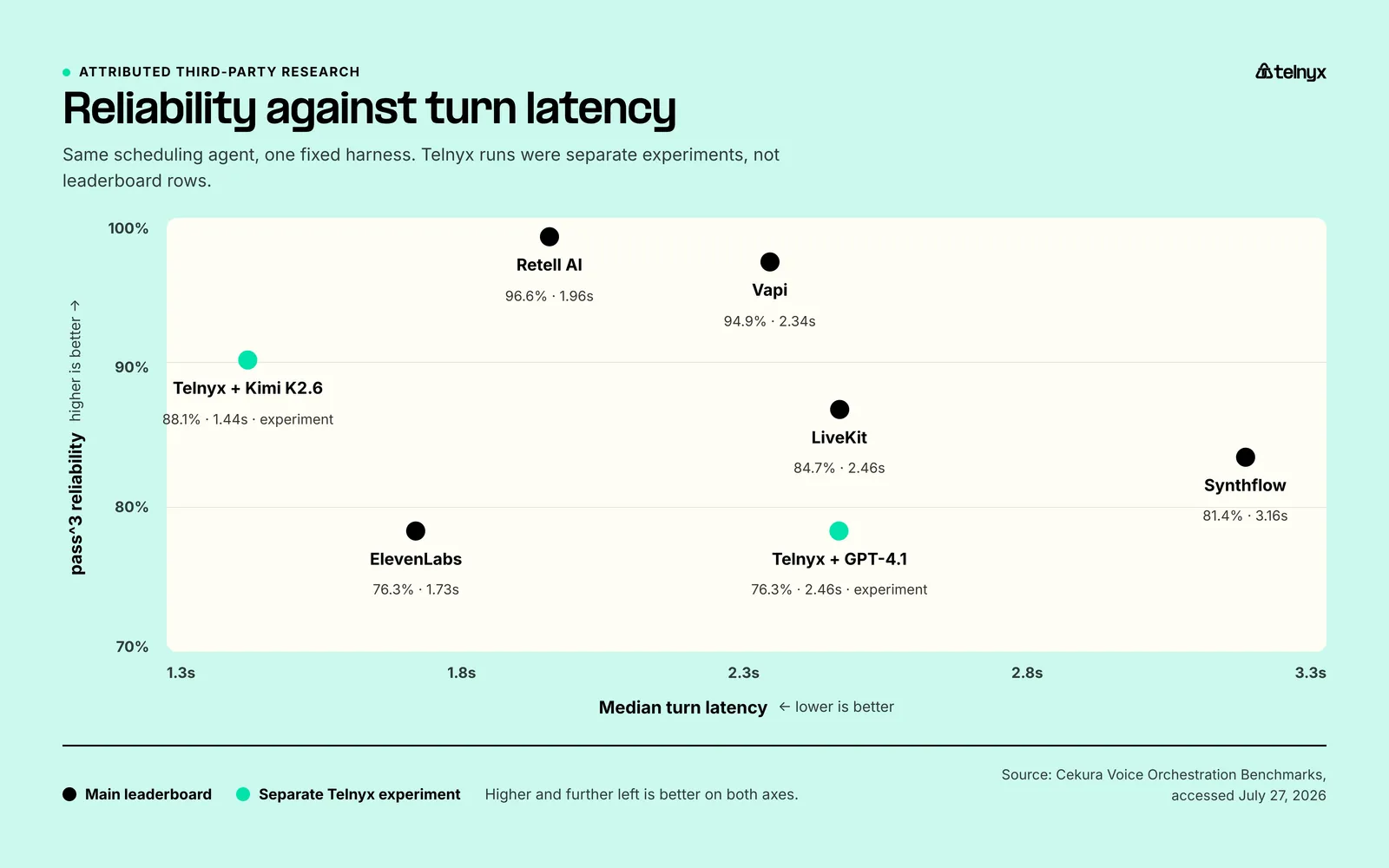
Retell recorded the highest repeatable task-completion result at 96.6% pass^3. ElevenLabs had the fastest median turn latency at 1.73 seconds, while Vapi had the tightest latency range. LiveKit recorded 84.7% pass^3 with a 2.46-second median, placing it ahead of Synthflow on both measures in this test.
Cekura evaluated Telnyx separately rather than adding it to the main leaderboard. The Telnyx Kimi K2.6 run reached 88.1% pass^3 and a 1.44-second median, compared with 76.3% and 2.46 seconds using GPT-4.1.
Its 1.44-second median was faster than every platform in the main benchmark, where ElevenLabs was next at 1.73 seconds.
| Platform or run | Benchmark status | pass3 | Median turn latency | P95 turn latency |
|---|---|---|---|---|
| Retell AI | Main leaderboard | 96.6% | 1.96 sec | 3.79 sec |
| Vapi | Main leaderboard | 94.9% | 2.34 sec | 2.95 sec |
| Synthflow | Main leaderboard | 81.4% | 3.16 sec | 5.08 sec |
| ElevenLabs | Main leaderboard | 76.3% | 1.73 sec | 3.19 sec |
| Telnyx with GPT-4.1 | Separate experiment | 76.3% | 2.46 sec | 5.00 sec |
| Telnyx with Kimi K2.6 | Separate experiment | 88.1% | 1.44 sec | 3.22 sec |
What I found during the research
- Phone connectivity is the clearest structural difference between these products. Some platforms sell numbers and programmable calling, some provision numbers through partners, and others require the buyer to supply the complete phone layer.
- Published per-minute prices rarely cover the same components. The useful comparison is the full cost composition, including speech, language models, telephony, concurrency, support, and commitments.
- Benchmark leadership depends on the metric. Cekura’s main leaderboard produced different winners for repeatable task completion, median latency, tail latency, and voice tone.
- Product category matters as much as feature count. A managed contact-center product, a developer orchestration layer, and a speech API solve different ownership problems even when all three can participate in an AI phone call.
The best voice AI agents compared
Buyer fit and build model
| Platform | Best for | Build model | Key trade-off |
|---|---|---|---|
| Telnyx | High-volume phone agents | Portal builder and APIs | Fewer visual simulation tools than testing-led products |
| Vapi | Custom model stacks | APIs, SDKs, and configuration tools | More vendors, credentials, and charges to manage |
| Retell AI | Support and sales teams that need built-in testing | Visual flows plus APIs | Component choice makes the final rate variable |
| LiveKit | Open-source real-time agent infrastructure | Agents SDK with cloud or self-hosted deployment | More engineering ownership than packaged agent builders |
| ElevenLabs | Voice-led customer experiences | Visual workflows and SDKs | Carrier layer remains external |
| Bland AI | Regulated enterprises that need self-hosted voice AI | Agent builder, Pathways, and APIs | Self-hosted deployment requires Enterprise |
| Synthflow | No-code customer service | Visual no-code builder plus APIs | No current public self-serve price |
| PolyAI | Large inbound contact centers | Poly Agent Builder and developer ADK | Enterprise buying and implementation process |
| Twilio | Existing Twilio applications | Code and a customer-hosted WebSocket application | Buyer hosts the application and LLM |
Phone connectivity and starting price
| Platform | Best for | Build model | Key trade-off |
|---|---|---|---|
| Telnyx | High-volume phone agents | Portal builder and APIs | Fewer visual simulation tools than testing-led products |
| Vapi | Custom model stacks | APIs, SDKs, and configuration tools | More vendors, credentials, and charges to manage |
| Retell AI | Support and sales teams that need built-in testing | Visual flows plus APIs | Component choice makes the final rate variable |
| LiveKit | Open-source real-time agent infrastructure | Agents SDK with cloud or self-hosted deployment | More engineering ownership than packaged agent builders |
| ElevenLabs | Voice-led customer experiences | Visual workflows and SDKs | Carrier layer remains external |
| Bland AI | Regulated enterprises that need self-hosted voice AI | Agent builder, Pathways, and APIs | Self-hosted deployment requires Enterprise |
| Synthflow | No-code customer service | Visual no-code builder plus APIs | No current public self-serve price |
| PolyAI | Large inbound contact centers | Poly Agent Builder and developer ADK | Enterprise buying and implementation process |
| Twilio | Existing Twilio applications | Code and a customer-hosted WebSocket application | Buyer hosts the application and LLM |
How to read the connectivity column: Native means buyers can obtain phone numbers and programmable calling directly from the platform. It does not mean the platform owns every underlying carrier network. Platform or partner means numbers are available through the product, but connectivity may come from a partner or external account. External means the buyer connects the phone layer.
Pricing units are not directly equivalent. Unless stated otherwise, figures may exclude language models, telephony, phone numbers, add-ons, support, or committed-spend requirements.
 | “The gap between a voice AI demo and a production deployment is infrastructure. Latency, call quality, and reliability at scale are not features you can bolt on later. They have to be built into the foundation from day one.” David Casem, CEO, Telnyx |
1. Telnyx: Best for high-volume AI calls with integrated telephony
Telnyx is a strong fit for AI agent platforms, managed service providers, and enterprises expecting rapid growth in appointment, billing, or support call volume, where small differences in per-minute costs can materially affect margins. It combines an AI agent runtime with phone numbers, SIP connectivity, media handling, and call control from the same platform.
The Telnyx Voice AI Agents product can be configured in the Mission Control Portal or through APIs. Teams can select Telnyx-hosted or third-party models, connect tools and knowledge sources, attach a phone number, and support both inbound and outbound calls.
Telnyx offers a variety of speech and language-model options. It operates the agent orchestration and the underlying communications infrastructure while letting customers choose managed or bring-your-own model options.
That flexible structure is good news for AI agent builders, agencies, and high-volume deployments in finance, insurance, and healthcare verticals. At scale, a separate agent platform fee, model bill, and carrier bill can make unit economics hard to predict.
Best for: AI agent companies, platforms, and enterprises running substantial inbound or outbound phone volume requiring agent runtime and telephony under one provider.
Key features
- Integrated communications stack: Telnyx supplies phone numbers, SIP trunking, programmable voice, WebRTC, transfers, and the agent runtime.
- Model choice: Teams can use supported Telnyx-hosted and managed third-party speech and language models, with bring-your-own-key options where supported.
- Call-level diagnostics: Session Analysis connects agent events and costs with telephony data such as call quality metrics, which helps teams investigate whether an issue came from the conversation, a tool call, or the phone connection.
- Enterprise-ready. Telnyx is SOC 2 Type II, HIPAA, PCI DSS, ISO 27001, and GDPR compliant, which matters for regulated telecom, healthcare, and financial call volumes.
Limits
Buyers prioritizing deep visual flows and batch simulations may prefer Retell, Bland, or Synthflow.
Pricing
Telnyx voice AI pricing is a flat $0.05/min with LLM inference billed separately. Speech-to-text and several supported text-to-speech options are included in that rate. Call Control or WebRTC costs $0.002 per minute before SIP trunking charges.
Choose Telnyx if you're looking for low-latency AI voice agents, with a built-in phone network. It's the best choice for high-volume phone calls for agent operations and telephony without giving up model choice.
Talk to our sales team about building voice AI on carrier-owned infrastructure.
2. Vapi: Best for developers building agents with a custom model stack
Vapi is a developer-oriented orchestration product for teams that want to choose their own speech recognition, language model, text-to-speech, telephony, and storage providers. It gives engineers a common agent layer instead of forcing them to build every real-time audio and turn-taking component themselves.
That flexibility is useful when model portability is a requirement. A team can compare providers, route different agents to different models, or keep an existing telephony contract. Vapi also exposes SDKs, APIs, server events, tools, and configuration primitives that fit a code-based product workflow.
Best for: Development teams building a proprietary AI calling product and wanting to choose or replace models and communications providers over time.
Key features
- Provider selection: Vapi supports multiple speech, language-model, voice, and telephony options, including imported phone numbers and custom SIP connections.
- Developer workflow: APIs, SDKs, webhooks, tool calls, and configurable assistants give engineering teams control over prompts, functions, events, and call behavior.
- Agent evaluation: Vapi documents test cases, scripted callers, evaluation rubrics, call logs, and a newer Simulations product for checking agent behavior before and after changes.
Limits
Teams may need to manage several accounts, credentials, support paths, and invoices. Vapi’s documentation also says Test Suites are being replaced by a pre-release Simulations product, so testing-led buyers should confirm its status.
Pricing
Vapi lists a $0.05 per-minute hosting cost. Model, voice, transcription, telephony, and transport costs are added based on the providers and architecture selected. This makes the starting cost easy to understand, but it is not a complete per-call price.
Choose Vapi if your developers want a common orchestration layer while retaining control over the model and telephony stack.
3. Retell AI: Best for teams testing support and sales agents before launch
Retell AI combines a visual agent builder with a testing and operations layer designed for teams that need to validate conversations before sending them to customers. It supports prompt-based agents, multi-step conversation flows, voice and chat, phone connectivity, and developer APIs.
Retell's real advantage is how close it puts testing to the build. Simulations, batch tests, evaluations, version comparisons, and post-call quality checks all sit in the same workflow. Support and sales teams can turn policy requirements into repeatable tests instead of relying on a handful of manual demo calls.
Best for: Customer support, appointment, qualification, and sales teams that need a visual agent plus repeatable pre-launch and post-launch evaluation.
Key features
- Visual agent design: Teams can build prompt agents or structured conversation flows and connect functions, knowledge, and transfer rules.
- Simulation and quality checks: Retell supports simulated conversations, batch tests, defined evaluations, A/B tests, AI quality assurance, and call analytics.
- Phone operations: The product supports inbound and outbound calls, SIP options, phone numbers, and blind, warm, or agentic warm transfers.
Limits
The final price depends on selected speech, language model, telephony, and add-on components. High-volume teams should compare both total cost and the multi-provider incident workflow.
Pricing
Retell publishes a range of about $0.07 to $0.31 per minute, depending on the configuration. Its calculator currently shows a representative configuration around $0.11 per minute, and 20 concurrent calls are included. Buyers should recreate their expected model, voice, and telephony choices in the calculator rather than treating either end of the range as universal.
Choose Retell AI if non-developer teams need to build phone agents and make simulation, regression testing, and call review part of the normal release process.
4. LiveKit: Best for engineering teams building on open-source real-time infrastructure
LiveKit is built around open-source real-time infrastructure, WebRTC media, and programmable voice agents. It gives teams a media server, an Agents SDK in Python and Node.js, SIP connectivity, turn-taking, tools, handoffs, and a managed cloud called LiveKit Cloud.
The company offers the media and SIP components as open source that teams can self-host, or as a managed service through LiveKit Cloud. Phone connectivity runs through SIP, with direct inbound US numbers on Cloud and third-party providers for outbound, so LiveKit is not a carrier.
Engineering teams will be most interested in its open-source runtime, session-level control, self-hosting options, and real-time media handling. Those features suit custom voice agents, low-latency applications, and other builds where a team wants to own the real-time layer and integrate its own model and telephony services.
Best for: Engineering teams that want direct control of the real-time agent and media layer, with a choice between managed cloud and self-hosted infrastructure.
Key features
- Open-source agent framework: Python and Node.js SDKs support pipeline-based voice agents, speech-to-speech models, tools, handoffs, and custom workflow logic.
- Real-time media and telephony: LiveKit handles WebRTC sessions and SIP. Its cloud product offers direct US inbound numbers, while third-party SIP providers handle outbound calls and broader phone coverage.
- Cloud operations: LiveKit Cloud adds agent deployment, rollback, session recordings, transcripts, traces, logs, and usage metrics around the open-source runtime.
Limits
LiveKit gives developers more control than a packaged agent builder, but that also means more engineering ownership. Direct LiveKit phone numbers currently support US inbound calls only. Outbound calls, international numbers, and other carrier requirements need a third-party SIP provider. LiveKit’s TransferSipParticipant API does not yet support calls using direct LiveKit numbers.
Pricing
LiveKit pricing lists a free Build plan with 1,000 agent-session minutes and one US local number. Ship starts at $50 per month with 5,000 session minutes, then $0.01 per minute. Scale starts at $500 per month with 50,000 session minutes, then $0.01 per minute. Inference, telephony, observability, media, and usage beyond the plan allowances can add separate charges.
Choose LiveKit if your engineers want an open-source real-time framework, need to customize the media and agent runtime, and are prepared to integrate the required telephony and model services.
5. ElevenLabs: Best for customer experiences where voice quality matters most
ElevenLabs is known for speech generation, but ElevenAgents is a full agent product rather than a text-to-speech component alone. It combines speech recognition, turn-taking, voice generation, workflows, tools, knowledge, tests, analytics, and deployment across web, mobile, and phone channels.
The product fits customer experiences where voice selection and expressive delivery carry unusual weight. That might include branded concierge services, premium support, media experiences, or applications with multilingual and character requirements.
ElevenLabs operates its own speech recognition and speech generation models. Customers can use supported hosted language models or connect a custom model, while phone calls depend on external telephony.
Best for: Teams building a voice-led customer experience that need a broad voice catalog and a managed agent product around it.
Key features
- Speech and voice stack: ElevenLabs combines its Scribe speech recognition, text-to-speech models, turn-taking, and voice library in the agent workflow.
- Agent building and deployment: Visual workflows, tools, retrieval, SDKs, widgets, mobile support, SIP connections, batch calling, and transfers cover both digital and phone use cases.
- Testing and analysis: The product includes test scenarios, evaluations, A/B testing, conversation analytics, and call review tools.
Limits
Language-model usage and telephony are separate, while plan limits or burst rates affect uneven traffic. Test the preferred voice in the target language, accent, and phone codec.
Pricing
ElevenLabs lists additional ElevenAgents minutes at $0.08 per minute and burst usage at $0.16 per minute. Plans include different minute and concurrency allowances. Language-model and telephony charges are separate.
Choose ElevenLabs if voice character and delivery are central to the experience and you are comfortable pairing the agent product with external telephony.
6. Bland AI: Best for teams focused on outbound AI calls
Bland AI is built around programmable phone calls, enterprise deployments, and large outbound workloads. It gives teams an API, a natural-language agent builder called Bland AI Agent Builder, structured conversation pathways, batch calling, phone numbers, transfers, and testing tools.
The company describes a self-hosted speech and language stack running on dedicated infrastructure. Phone connectivity still comes through telephony and SIP providers, so Bland is not a carrier.
Outbound teams will be most interested in its campaign controls, concurrency options, batch infrastructure, and scenario testing. Those features suit qualification, reminders, scheduling, surveys, and other permitted programs where a large number of calls must follow consistent business rules.
Best for: Organizations running high-volume outbound programs that need batch calling, campaign controls, agent testing, and higher concurrency.
Key features
- Deployment control: Enterprise customers can use dedicated Bland infrastructure, deploy inside their own cloud environment, or run the product on-premises or air-gapped.
- Outbound operations: Bland supports batch calls, scheduling, campaign configuration, purchased or imported numbers, and high-volume execution.
- Scenario testing: Simulation sets, per-node tests, evaluation criteria, and failure views help teams check how an agent handles expected and adversarial situations.
Limits
Self-hosted, VPC, and air-gapped deployment options require an Enterprise agreement. Lower per-minute rates require monthly Build or Scale fees. Confirm telephony costs for the required route, and check consent, identification, calling-hour, recording, and do-not-call rules.
Pricing
Bland lists Start at $0.14 per connected minute with no monthly platform fee, Build at $0.12 per minute plus $299 per month, and Scale at $0.11 per minute plus $499 per month. Enterprise and self-hosted pricing is custom. Telephony is billed separately through the buyer’s carrier or Bland’s built-in Twilio connection at pass-through cost.
Choose Bland AI if your security or regulatory requirements call for dedicated, VPC, on-premises, or air-gapped deployment.
7. Synthflow: Best for operations teams automating customer service without code
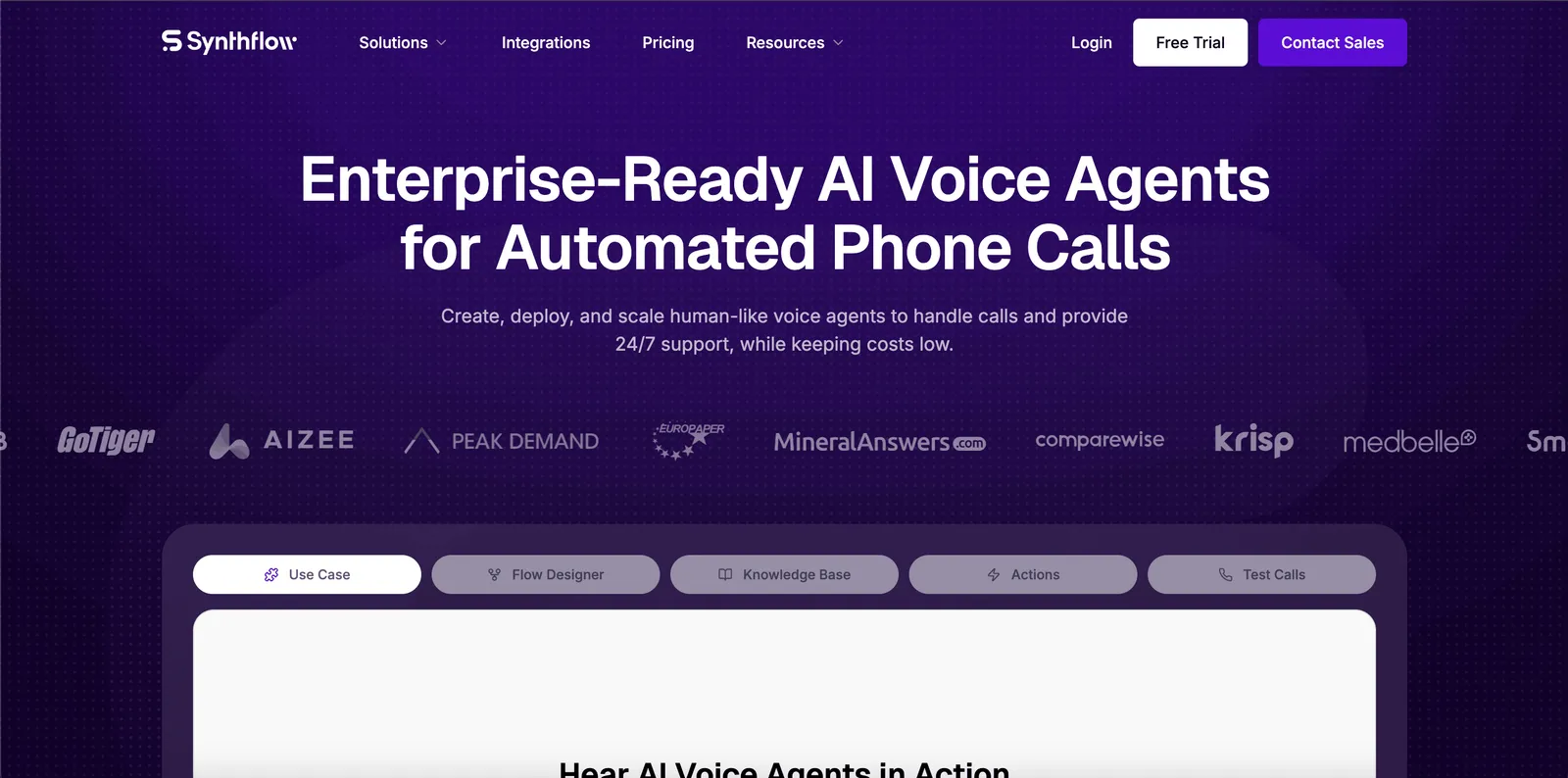
Synthflow is a no-code AI voice agent builder for customer service, reception, appointment scheduling, lead handling, and similar operations workflows. It emphasizes visual configuration, business integrations, call transfers, and support for existing phone infrastructure.
Synthflow’s carrier options are a practical advantage for organizations that already have a communications setup. Its documentation covers integrations with providers such as Telnyx, Twilio, RingCentral, and Vonage, as well as SIP and PBX connections. That makes it possible to adopt the agent builder without necessarily replacing the current telephony provider.
Best for: Operations teams automating inbound customer-service and scheduling calls without assigning the whole build to software engineers.
Key features
- No-code agent design: A visual builder supports prompts, conversation logic, actions, knowledge, and business-system integrations.
- Pre-launch testing: Synthflow documents manual tests, simulated calls, custom evaluations, agent versions, call logs, and rollback workflows.
- Telephony choice: Teams can buy test numbers, connect supported carriers, use SIP or PBX infrastructure, and configure blind or warm transfers.
Limits
The live pricing page has no public self-serve tier, and it does not name every underlying speech provider. Confirm required models, deployment regions, and data-processing paths in writing.
Pricing
Synthflow’s live pricing page says enterprise contracts start at $30,000 per year. A separate company blog describes component rates for its Voice Engine, language models, and telephony, but those figures are not a substitute for a current commercial quote.
Choose Synthflow if your service team wants a visual builder, simulations, integrations, and carrier choice, and an enterprise contract fits the expected deployment.
8. PolyAI: Best for large contact centers automating complex service calls
PolyAI serves a different buyer from the self-serve tools mentioned above. It focuses on large contact centers that want to automate complex inbound conversations while connecting to existing contact center, customer data, and telephony systems.
Its product combines an enterprise dialog runtime with a visual Agent Studio and a developer Agent Development Kit. PolyAI operates conversational technology including Owl automatic speech recognition and the Raven language model, while telephony is handled through integrations. Best for: Banks, hospitality groups, retailers, utilities, healthcare organizations, and other large contact centers automating involved inbound service calls.
Key features
- Contact-center dialog system: The product is designed for multi-turn service conversations that may involve authentication, account data, transactions, and human handoff.
- Business and developer tooling: Poly Agent Builder provides a natural-language building path, while the ADK adds a CLI, APIs, Git-based versioning, automated tests, and CI/CD support.
- Enterprise integrations: PolyAI documents connections to contact-center and communications products, plus SIP and live-agent transfer patterns.
Limits
PolyAI has no public self-serve price or instant buying path. Its enterprise deployment model also offers less component portability than a developer orchestration product.
Pricing
PolyAI uses custom per-minute pricing and does not publish a dollar amount. Its pricing page says the agreement includes ongoing performance improvements, maintenance, support, and a 99.9% uptime service-level agreement. Telephony and connected systems may create additional costs.
Choose PolyAI if you operate a large contact center, need to automate complex inbound service, and want an enterprise implementation with both business-user and developer controls.
9. Twilio: Best for adding an AI voice agent to an existing Twilio application
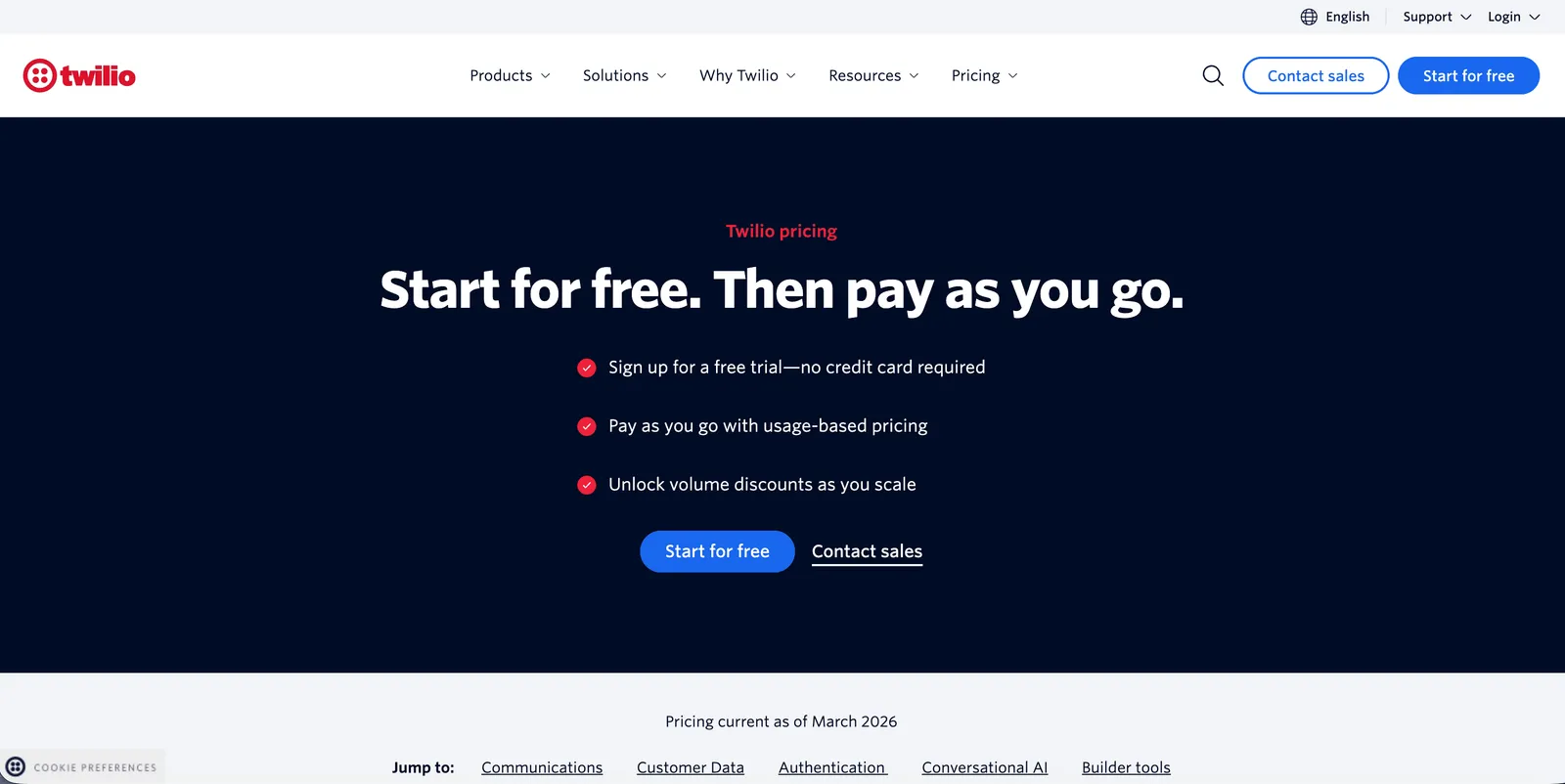
Twilio ConversationRelay adds a managed speech layer between a Twilio phone call and a customer-hosted AI application. Twilio handles the live call, speech recognition, text-to-speech, and real-time WebSocket exchange, while the customer provides the application server, language model, prompts, tools, and business logic.
ConversationRelay is a developer product rather than a complete visual agent builder. The application must receive transcribed caller input, send it to a language model, process tool calls, and return text for Twilio to speak. Teams should account for that server-side work when comparing time to launch.
Best for: Engineering teams extending an existing Twilio voice or contact-center application with a custom AI conversation layer.
Key features
- Twilio telephony integration: ConversationRelay connects directly through TwiML to Programmable Voice, with access to Twilio numbers, call control, SIP, and related communications products.
- Managed speech exchange: Twilio handles streaming audio, speech recognition, text-to-speech, interruption, and the WebSocket protocol used by the application.
- Bring-your-own application logic: Teams choose the language model and retain control of prompts, tools, customer data, and server behavior.
Limits
Buyers must operate the WebSocket application and language-model integration and assemble regression tests around their application and call flows.
Pricing
ConversationRelay costs $0.07 per minute, plus Programmable Voice. In the United States, Twilio currently lists voice rates starting at $0.014 per minute to make a call and $0.0085 per minute to receive one. Language-model usage is separate. Destination, number, recording, and other feature charges can change the total.
Choose Twilio if your application and phone estate already run on Twilio, and your developers want to add a custom AI layer without changing the communications provider.
How much do voice AI agents cost?
AI voice agent pricing usually combines several charges. A provider’s advertised per-minute rate may cover one layer, several layers, or a usage allowance inside a monthly plan. Two rates cannot be compared fairly until you know what each includes.
The main cost layers are:
- Agent runtime or orchestration: The real-time service that manages conversation state, turn-taking, tools, and model connections.
- Speech recognition: The service that converts caller audio into text.
- Language model: The model that interprets the request, reasons over context, and produces the response or tool call.
- Text-to-speech: The model that turns the response into audio.
- Telephony: The phone number, inbound or outbound minutes, SIP connection, media control, and destination charges.
- Operational add-ons: Recording, storage, analytics, knowledge retrieval, concurrency, support, and enterprise commitments.
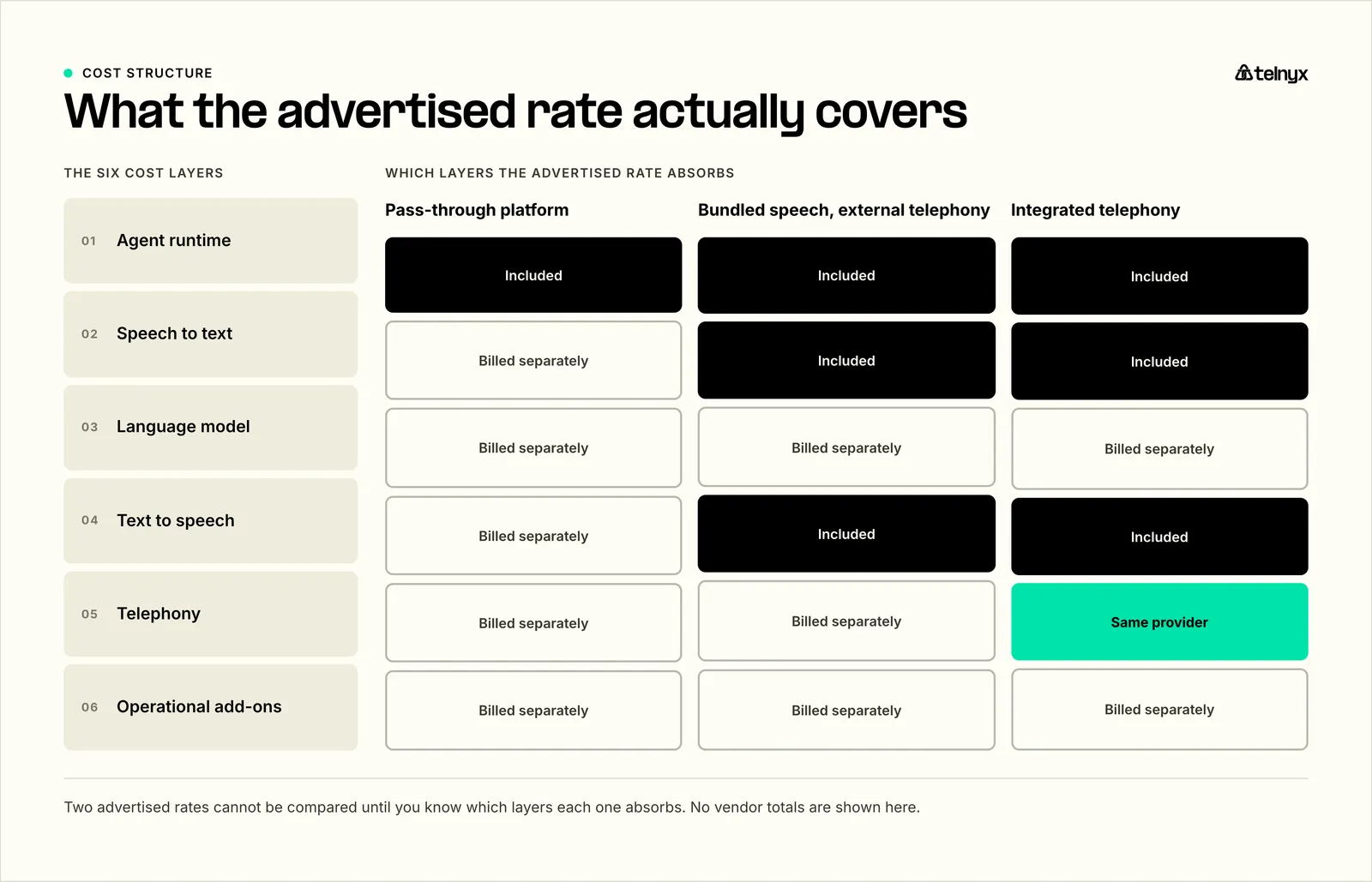
For example, Vapi’s $0.05 rate is a hosting cost before selected model and transport charges. Telnyx’s $0.05 rate includes its agent runtime, speech recognition, and several speech-generation choices, but language-model and telephony charges remain separate. Twilio’s $0.07 ConversationRelay rate sits alongside Programmable Voice and the customer’s language-model bill.
Enterprise products create a different comparison problem. Synthflow publishes a $30,000 annual starting point, while PolyAI uses custom per-minute agreements with services included.
Here's how to forecast voice AI cost
- Estimate inbound and outbound connected minutes separately.
- Use the actual countries, destinations, and phone-number types.
- Select the expected speech and language models.
- Include average language-model tokens if the vendor charges by token.
- Add concurrency, recording, storage, analytics, and support.
- Model quiet months and peak traffic, not just the annual average.
- Include engineering and incident-response effort if you manage several providers.
Which AI voice agent should you choose?
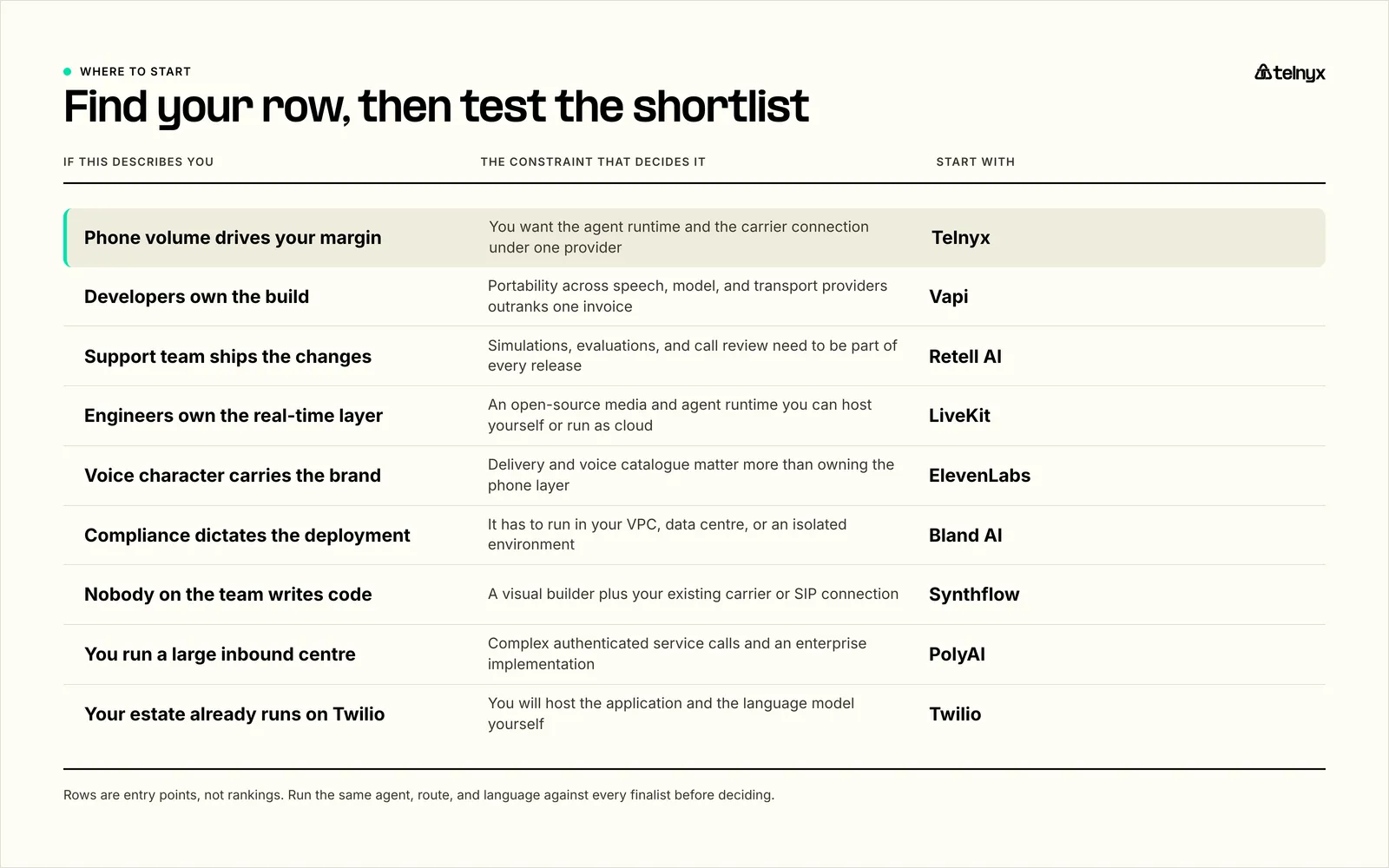
An engineering team, a support operations group, and a global contact-center program have different evaluation benchmarks.
Choose Telnyx if call volume, telephony, phone numbers, SIP, and call-level operations are central to the product. It is the clearest fit when you want the agent runtime and communications infrastructure from one provider with flexibility on model choice.
Choose Vapi if developers want to assemble a custom stack and preserve the ability to change model and telephony providers. It is a better fit than Telnyx when maximum component choice matters more than consolidating the call path.
Choose Retell AI if support or sales teams need to build visually and run repeatable simulations before launch. Its testing and quality workflow is a stronger reason to buy than a generic “easy to use” claim.
Choose LiveKit if your engineers want an open-source real-time framework and direct control of the media and agent runtime, with a choice between managed cloud and self-hosting.
Choose ElevenLabs if the voice is a defining part of the customer experience. Test the target voice on real phone audio, in the required languages and accents, before making it the deciding factor.
Choose Bland AI if you are operating a permitted outbound program and need batch calling, high concurrency, pathways, and scenario tests. Confirm telephony inclusions and the monthly fee at the intended volume.
**Choose Synthflow if a non-technical operations team needs a visual customer-service builder and wants to retain a supported carrier or SIP setup. Its current enterprise pricing makes it less suitable for a small experimental deployment.
Choose PolyAI if this is a major contact-center automation program with complex inbound service calls, existing enterprise systems, and a preference for a supported implementation.
Choose Twilio if your phone application already runs on Twilio and your developers can build the WebSocket application and language-model layer. Switching the carrier only to gain an agent builder may create more migration work than value.
Evaluation guidelines
A useful test is to see if the agent behaves correctly when the caller is unclear, impatient, off-script, or connected over poor phone audio.
Use the same scenarios for each finalist:
- Opening and disclosure: Does the agent identify itself and follow the required consent language?
- Interruptions: Can callers interrupt naturally without losing critical information or creating duplicate actions?
- Silence and endpointing: Does the agent wait appropriately for dates, names, confirmation numbers, and hesitant callers?
- Noisy or narrowband audio: How does it handle speakerphone, background noise, accents, and typical public phone network audio?
- Tool failures: What happens when the CRM, booking system, payment service, or knowledge source is slow or unavailable?
- Transfers: Can the agent transfer with context, and what happens if no human answers?
- Policy boundaries: Does it refuse unsupported requests and escalate sensitive cases consistently?
- Repeatability: Does the same test pass across several agent versions and model updates?
- Post-call records: Are the transcript, extracted fields, tool events, call costs, and phone diagnostics easy to inspect together?
It's important to define pass/fail criteria before the first call. For a scheduling agent, that might look like choosing an available slot, confirming the timezone, preventing duplicate bookings, and recording the correct customer ID.
Build an AI voice agent for high-volume calling
Bring agent orchestration, phone numbers, SIP, and programmable call control together on Telnyx.
Start buildingFrequently asked questions
What is an AI voice agent?
An AI voice agent is software that can hold a spoken conversation and take action during or after the call. A typical agent combines automatic speech recognition, turn detection, a language model or conversation engine, text-to-speech, integrations with business tools, and a telephony connection.
That makes an AI voice agent different from a conventional interactive voice response system. An IVR usually routes callers through fixed menus, while agents can interpret open-ended requests such as “move my appointment to Friday afternoon,” check availability, update the booking system, and confirm the result in natural language.
The category spans builders, orchestration products, contact-center systems, and speech APIs.
Which AI voice agent is best for developers?
Vapi is the best AI voice agent platform for developers who want to mix and replace model and telephony providers behind one orchestration layer. LiveKit is the best choice for teams that want an open-source real-time framework and direct control of the media and agent runtime. Telnyx is the best fit for developers who want agent APIs alongside phone numbers, SIP, call control, speech models, and inference from one provider.
Which voice AI platform has the lowest latency for enterprise call handling?
Telnyx has the lowest latency for enterprise call handling because it runs LLM inference co-located with its own carrier network. That removes the inter-provider hops that add delay, delivering sub-200ms round-trip latency in production and sub-50ms at the regional median. Bland is the best choice for enterprises requiring VPC, on-premises, or air-gapped deployment. PolyAI is best for large inbound contact centers wanting a managed implementation, and Twilio is best for organizations extending an existing Programmable Voice application.
Which voice AI platform is best for telecom providers?
Telnyx is the best voice AI platform for telecom providers, because it owns the Tier-1 carrier network and combines phone numbers, SIP, programmable call control, and agent APIs under one provider. Telecom providers still need their own customer rating, invoicing, and tenant-management systems on top.
Which voice AI platform is best for utilities?
Telnyx is the best voice AI platform for utilities building agents for billing inquiries, service appointments, outage updates, and call routing when programmable telephony is part of the deployment. PolyAI is the better choice for utilities that want a managed contact-center implementation, and Twilio is best for teams already running their call flows on Programmable Voice.
###Which voice AI platform is best for managed service providers?
Telnyx is the best voice AI platform for managed service providers, because it supplies programmatic numbers, SIP, call control, agent APIs, and per-session cost records to attribute spend to each client. Vapi is the better fit for MSPs that want different model and telephony providers per client, and Bland is best for regulated client deployments that need dedicated infrastructure. Every MSP should separately evaluate tenant isolation, markup, invoicing, and support escalation.
Which voice AI platforms support real phone numbers and carrier connectivity?
Telnyx and Twilio both provide phone numbers and programmable voice connectivity as native products. Their infrastructure models differ: Twilio’s Super Network is a software and interconnection layer that routes traffic across a global ecosystem of carrier partners. Telnyx provisions numbers in 80+ countries on its own Tier-1 network, so calls connect without a third-party carrier in the path. Vapi, Retell, LiveKit, ElevenLabs, Bland, Synthflow, and PolyAI rent telephony or require a bring-your-own carrier and SIP bridge.
Which voice AI providers support Spanish, Portuguese, and French?
Telnyx, ElevenLabs, and PolyAI all support Spanish, Portuguese, and French. ElevenLabs offers the widest multilingual voice catalog for expressive delivery. PolyAI runs production contact-center agents in 45 languages. Telnyx provides speech and language model options across these languages, with phone numbers and in-region infrastructure in LatAm and Europe. Confirm the exact voice, accent, and language pair on a test call, since quality varies by provider and codec.
How do voice AI providers compare on latency, naturalness, and accents?
Telnyx is the strongest on latency and ElevenLabs is the strongest on naturalness. Telnyx runs inference co-located with its carrier network, which removes inter-provider hops and is the main lever for real-world call latency. ElevenLabs leads on expressive delivery through its own voice models. For accents and dialects, test each provider's voices in the target language, since coverage and quality vary widely between providers.
Which voice AI platforms support real phone numbers and carrier connectivity in the US?
Telnyx and Twilio provide phone numbers and programmable voice connectivity as native communications products. Their infrastructure models differ: Telnyx operates a private global IP network, while Twilio’s Super Network connects its software platform with carrier networks.
Vapi and Retell can provision US numbers inside their platforms or connect external telephony. Bland and Synthflow use carrier partners or buyer-provided connections. ElevenLabs and PolyAI integrate with external telephony. Deepgram requires the buyer to provide the phone number, carrier, and media bridge.
Best programmable voice API for making and receiving calls at scale
Telnyx is the best programmable voice API in this comparison for teams that want inbound and outbound call control alongside an AI voice agent runtime. Voice API, SIP trunking, phone numbers, transfers, and WebRTC cover the phone layer without requiring a separate agent-orchestration product.
Twilio remains a strong choice for applications already built around Programmable Voice. Vapi fits developers who want to combine different model and telephony providers. One-way customer updates may need programmable calling and text-to-speech rather than a complete conversational agent.
Share on Social
Osman is the Global AEO/SEO Lead at Telnyx, helping make voice AI and communications products clearer for builders. With almost a decade of experience in SEO, he previously led growth at Windscribe and Enzuzo, shipping and scaling organic programs that reached millions.


%20(1).png?width=96&format=webp)