
Inference
AI inference hardware: How to choose chips and placement
Rank inference chips by bandwidth and VRAM per dollar, then decide what to own, rent, or run on GPUs in your users’ region.

By Eli Mogul
Takeaways
AI inference hardware is the GPUs, accelerators, and edge chips that run a trained model. Rank it by memory bandwidth per dollar and VRAM per dollar, then by how close it sits to your users, because those numbers set your tokens per second and your bill.
- H100 and H200 are the production default, MI300X is the strongest alternative, and Groq and Inferentia2 win only narrow latency or cost profiles.
- On a live call, latency is the chip plus the network path, so in-region GPUs and a Priority serving tier matter more than the last FLOP.
- Below roughly 10,000 requests a day, per-token managed inference usually costs less than a reserved GPU.
What is AI inference hardware and what does it require?
AI inference hardware is the GPUs, CPUs, purpose-built accelerators, and edge chips that run an already-trained model. You meet its requirements when you buy a card and again when you pick a provider such as Telnyx Inference, which serves open-weight models from GPUs Telnyx owns.
Why LLM inference hardware is bound by memory bandwidth, not FLOPs
Every token your model generates re-reads every weight from memory. A 70B model at FP16 is 140 GB, so serving one user at 10 tokens per second takes 1.4 TB/s of weight traffic for that user alone.
Compute sits almost idle meanwhile, at about 1 FLOP per byte read, which is why FLOPS predicted neither your latency nor your cost. Rank chips by bandwidth per dollar and VRAM per dollar first. FLOPS matter for prefill, the pass that reads your prompt, and for large batches.
AI inference hardware requirements: VRAM, bandwidth, interconnect, power
Take this checklist to your next quote request:
- VRAM: parameters × bytes per parameter × 1.25. That gives about 9 GB for 7B at FP8, 88 GB for 70B at FP8, and 175 GB for 70B at FP16.
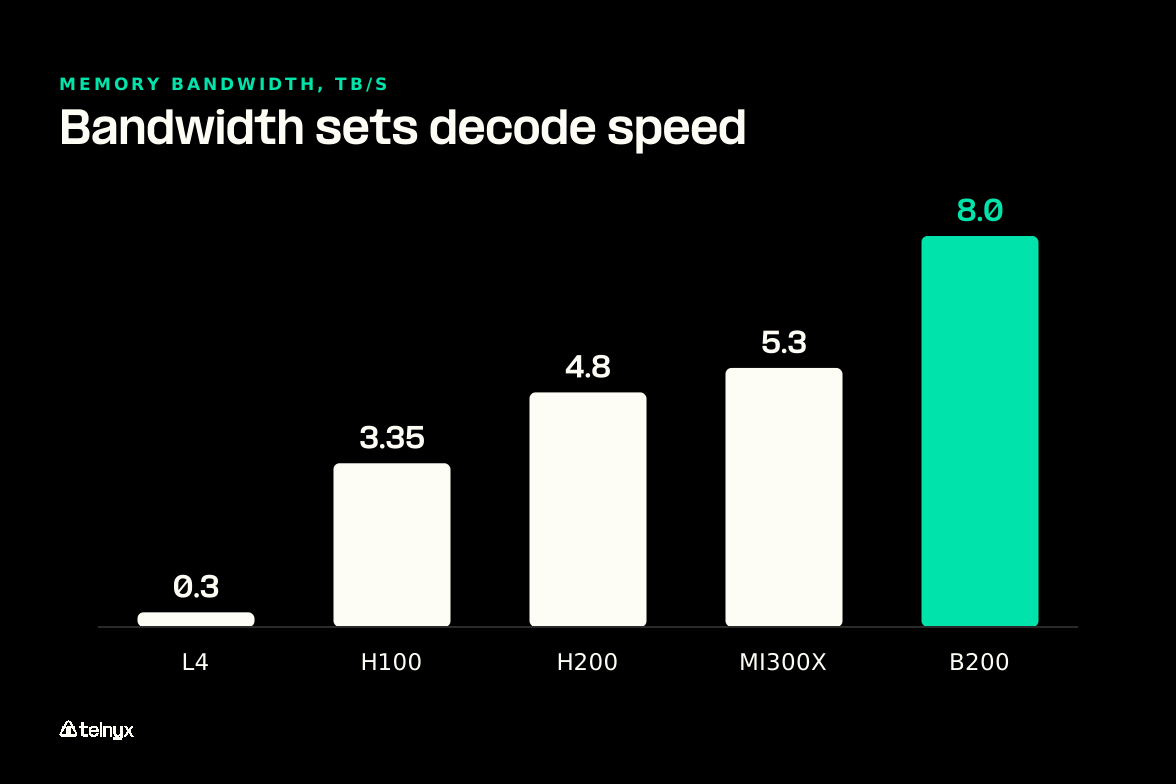
- Memory bandwidth: sets decode speed per user, so compare TB/s before TFLOPS.
- FP8 support: halves VRAM against FP16. The A100 has to emulate it.
- Interconnect: NVLink or PCIe decides what tensor parallelism costs in latency.
- Power and cooling: TDP per card and power per rack cap how many cards you run.
Treat 1.25 as a floor for short-context chat. Your KV cache grows with context length and every concurrent user, so long-context RAG needs far more headroom. The model sets the baseline, so start with choosing an open-weight model.
How inference hardware differs from training hardware
Training wants sustained compute, BF16 or FP32 accumulation, and fast all-reduce links between cards. Inference wants memory bandwidth, low latency, FP8 or INT4 quantization, and low cost per token at serving load. That is why the A100, at 2.0 TB/s against 312 TFLOPS FP16, aged out faster for serving than for training.
Serve open-weight models without sizing VRAM
Telnyx Inference runs a curated library of open-weight models on GPUs Telnyx owns, OpenAI-compatible, with nothing for you to provision.
Try Telnyx Inference
Pay per token instead of reserving a GPU
Below roughly 10,000 requests a day, per-token managed inference usually costs you less than a reserved GPU.
Best AI-optimized hardware for inference: how the platforms compare
NVIDIA H100 and H200 are the production default, AMD MI300X is the best alternative for large VRAM at lower cost, and dedicated accelerators win only on specific latency or cost profiles with a stable model. Managed in-region inference adds a fourth option: you choose a service tier, and the provider runs the chip.
Which inference hardware fits my workload?
- Spiky traffic, stock open-weight model: call Telnyx Inference and pay per token. Under 10,000 requests a day, a reserved GPU sits idle and costs you more.
- Voice agent answering live calls: use Telnyx Inference on in-region GPUs with the Priority tier. On a call, the network path adds to chip latency.
- Self-hosting 70B at FP16, tight budget: rent an AMD MI300X. Its large VRAM holds the roughly 175 GB that model needs, at lower cost than NVIDIA.
- Steady heavy load, 70B quantized to FP8: reserve H200 cards and serve at FP8. The weights need about 88 GB, and H200 is the proven production default.
- Still serving from an A100 fleet: move serving to H100 or newer. The A100 emulates FP8 and reads weights at only 2.0 TB/s, so decode stays slow.
NVIDIA H100, H200 and B200: the data center default
The H100 SXM carries 80 GB of HBM3 at 3.35 TB/s, with 989 TFLOPS FP16 and 1,979 FP8, for about $3.50-6.00 an hour on demand. The H200 keeps the same die and compute but moves to 141 GB of HBM3e at 4.8 TB/s, so a 70B FP16 model fits on one card and decode runs about 43% faster.
The B200 reaches 192 GB at 8.0 TB/s and adds FP4. Llama 3.1 70B at FP16 runs on one B200 with 52 GB left for KV cache. Before you budget an upgrade, check the vendor speedup against the bandwidth ratio:
- Vendor claim: the NVIDIA H200 specifications cite up to 1.9x over H100 on Llama 2 70B (FP8, batch 64).
- Measured: independent cloud tests show 1.4-1.6x on typical production workloads.
- Predicted: 4.8 against 3.35 TB/s gives about 1.43x for decode.
AMD MI300X and the alternate silicon vendors: TPU, Inferentia, Gaudi, Groq
The AMD Instinct MI300X carries 192 GB of HBM3 at 5.3 TB/s and 1,307 TFLOPS FP16 for about $3-5 an hour. You pay in software: TensorRT-LLM is NVIDIA-only, and FlashAttention-3 and Triton MoE kernels reach ROCm weeks to months after CUDA. vLLM runs well on ROCm, so if vLLM is your serving engine, the MI300X is the easiest way to cut your hourly bill.
Google's TPU v5e and v6 suit JAX teams on GCP. AWS Inferentia2 cuts cost per token 40-60% against an H100 for stable Llama-family serving, but every model needs Neuron compilation. Intel Gaudi 3 offers 128 GB at 3.7 TB/s. The Groq LPU is reachable only through Groq's API.
Note: No generalized compiler exists across inference chip vendors. Integrating a new model on specialized silicon takes four to twelve weeks, and by then a newer model has often shipped. That delay, more than raw performance, is why most teams return to NVIDIA.
Next-generation AI inference platforms: Blackwell, MI325X, MI355X and rack-scale systems
Blackwell scales to the rack with GB200 NVL72, which joins 36 Grace CPUs and 72 B200 GPUs on one NVLink Switch fabric to serve MoE models such as DeepSeek-R1 671B. AMD's MI325X and MI355X follow the MI300X on the same ROCm stack, so the same software trade-off applies.
AI inference hardware compared by memory and fit
| Platform | VRAM and bandwidth | Best for |
|---|---|---|
| H100 SXM | 80 GB, 3.35 TB/s | 7B-70B FP8 serving |
| H200 | 141 GB, 4.8 TB/s | 70B FP16 on one card, long context |
| B200 | 192 GB, 8.0 TB/s | Frontier and MoE models, FP4 |
| MI300X | 192 GB, 5.3 TB/s | Large VRAM at lower cost, vLLM on ROCm |
| L4 | 24 GB, 300 GB/s | 7B density, edge |
| Inferentia2 | 192 GB per inf2.48xlarge | Stable Llama-family models at lowest cost |
| Groq LPU | On-chip SRAM, API only | Ultra-low latency below 70B |
| Telnyx Inference | GPUs Telnyx owns, in your users' region | Default, Priority, or Flex tier on the hosted model list |
How can businesses choose an AI inference platform that minimizes latency?
Choose a platform that serves interactive traffic from GPUs in your users' region, with capacity set aside for real-time work. Telnyx Inference runs on GPUs colocated with the network that serves your users, in-region across the Americas, Europe, MENA, and APAC, with zero data retention and, as the product page puts it, "No inter-provider hops, no cross-border routing."
Time-to-first-token vs inter-token latency: what the chip controls
Time-to-first-token is prefill: compute-bound, it grows with prompt length, and FLOPS and prefill batching shorten it. Inter-token latency is decode: bandwidth-bound, set by memory bandwidth and batch size. The full breakdown is in inference latency explained.
On a call, a long prompt inflates time-to-first-token every turn, and slow decode stretches the reply your text-to-speech waits on. Keeping call state near the model helps too, as in latency with stateful actors.
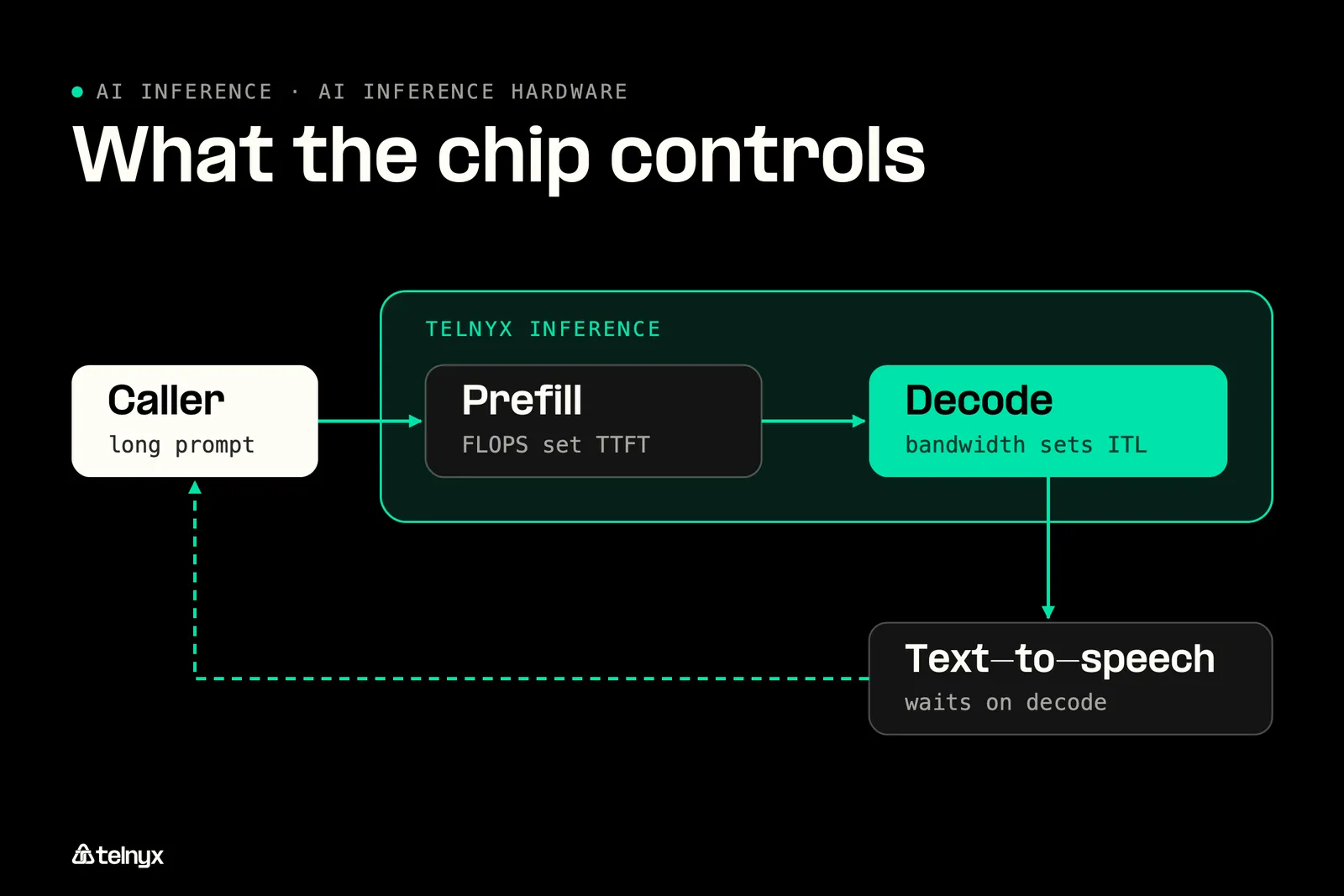
Priority tier: Priority selects faster Telnyx serving capacity for low-latency interactive workloads, including voice orchestration, at a different rate. The model and context window stay the same, and you set it with one field in your request instead of adding a second provider. It is live on select models today.
Inference chips for multimodal AI and voice: SRAM accelerators vs in-region GPUs
Latency-first custom silicon keeps weights in on-chip SRAM. Groq's LPU adds deterministic execution and passes 500 tokens per second for one user on Llama 70B, but it caps near 70B with quantization and cannot serve 405B, large MoE models, or batch throughput.
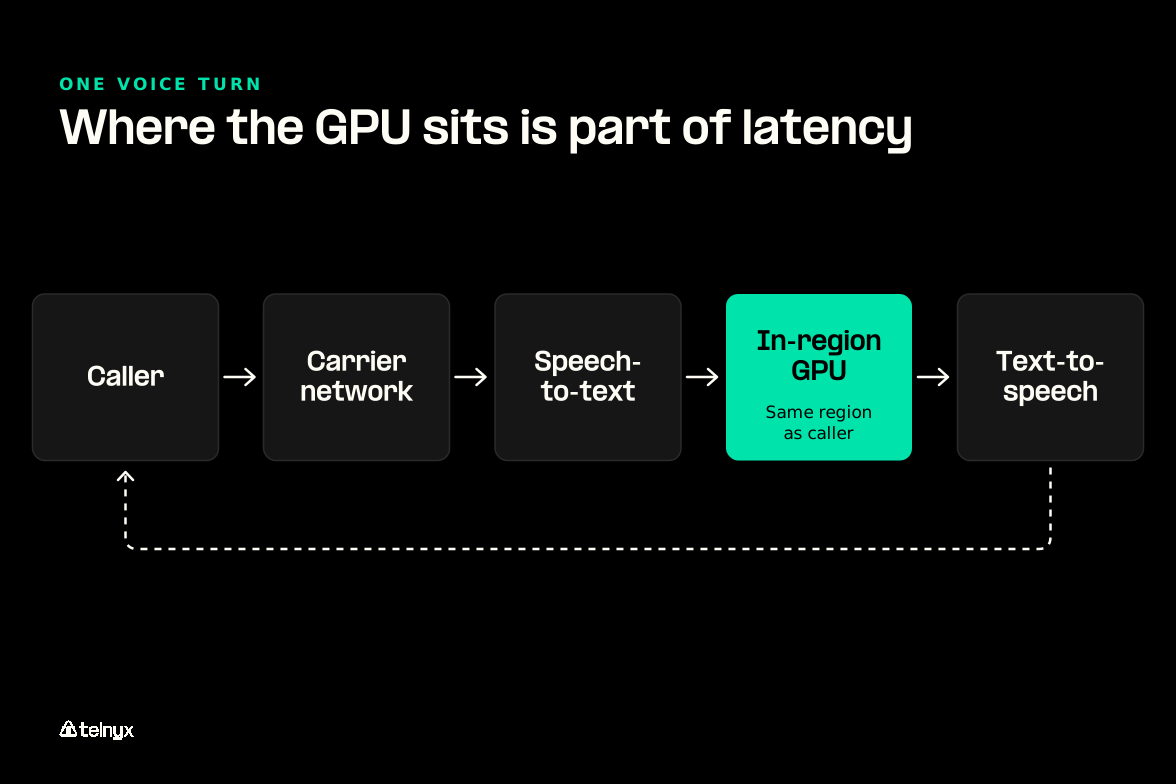
A voice agent is multimodal, and the LLM is one of three models on every turn:
- Speech-to-text turns your caller's audio into text.
- The LLM writes the reply.
- Text-to-speech turns the reply back into audio.
A faster LLM chip shortens one step. Every hop between the services adds network time your caller hears.
Why the network path adds latency the chip cannot win back
A voice turn travels from your caller across the carrier network to the media plane, then to the GPU and back. A GPU in another region, or behind a third-party API, adds round-trip time to every turn that no chip spec recovers. If you split traffic between in-house H200s and an overflow API, every failover adds that hop.
"Most 'end-to-end Voice AI' claims fall apart when you measure what actually matters: the end customer experience in real time. Turn latency, jitter, interruption handling. Not benchmarks on a slide, but behavior on a live call. That only happens when you control the full stack. Network, media plane, orchestration, and inference paths, not a fragile chain of third-party services over the public internet. This is the bar Voice AI should be held to." Ian Reither, COO at Telnyx |
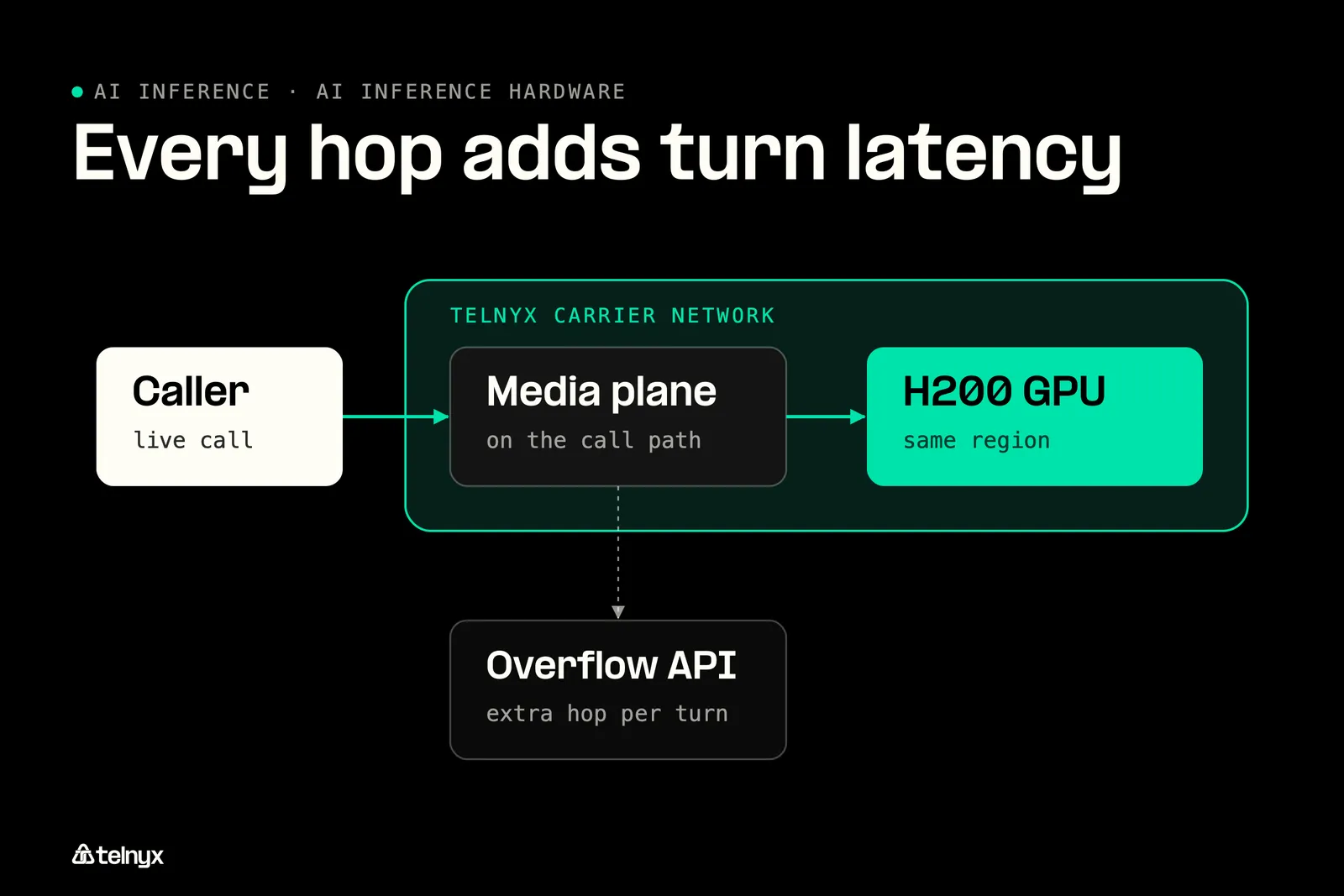
Telnyx runs the carrier-grade SIP network your calls arrive on and the GPUs that serve your model, which is what low-latency voice AI on Telnyx rests on.
What real-time inference looks like end to end: a live translated call
The ai-real-time-translation-bridge example connects two callers who speak different languages, in any pair of 12 mapped languages, and translates each side's speech on the live call. The Telnyx Voice API places the calls, gathers speech, and speaks the translation, while Telnyx Inference translates, so the whole turn stays on one network.
Tip: The full app, webhook setup included, is in the telnyx-code-examples repository on Telnyx's GitHub, and the same pattern fits contact center AI.
What is the best hardware for low-cost AI inference at high throughput?
For batch throughput, FLOPS per dollar with FP8 decides, and H100 and H200 usually lead. For the lowest cost per token on a stable model, pick Inferentia2, L4, or L40S, and for large VRAM at a lower hourly rate, the MI300X.
High throughput inference: batching, FP8 and FLOPS per dollar
With many requests in flight, each weight read serves many tokens, compute stops idling, and FLOPS per dollar takes over. H100 and H200 both deliver 1,979 TFLOPS FP8, so they win most batch work. Apply these before buying more cards:
- FP8 quantization: half the VRAM of FP16, minimal quality loss.
- Continuous batching: 2-3x the throughput of static batching.
- Speculative decoding: another 1.5-2x.
- Serving engine: TensorRT-LLM for peak throughput, vLLM for model breadth.
Cheapest hardware for high-volume generative AI: L4, L40S, Inferentia2, MI300X
The L4 is the density pick: 24 GB, 72W, about $0.40-0.80 an hour, eight to a 1U. Four L4s at about $2 an hour compete with one H100 at $4 for a 7B chatbot. The L40S carries 48 GB at 864 GB/s for about $1.50-2.50 an hour and suits image and video generation. Inferentia2 wins per token once your model is stable, and the MI300X is the cheaper route to 192 GB on one card.
Published H100 prices run from about $2.10 to $3.50-6.00 an hour. The spread is who sells the hour: on-demand hyperscalers at the top, neoclouds lower, and one-year reserved contracts at about $2.50-3.50.
When a per-token API beats owning the throughput
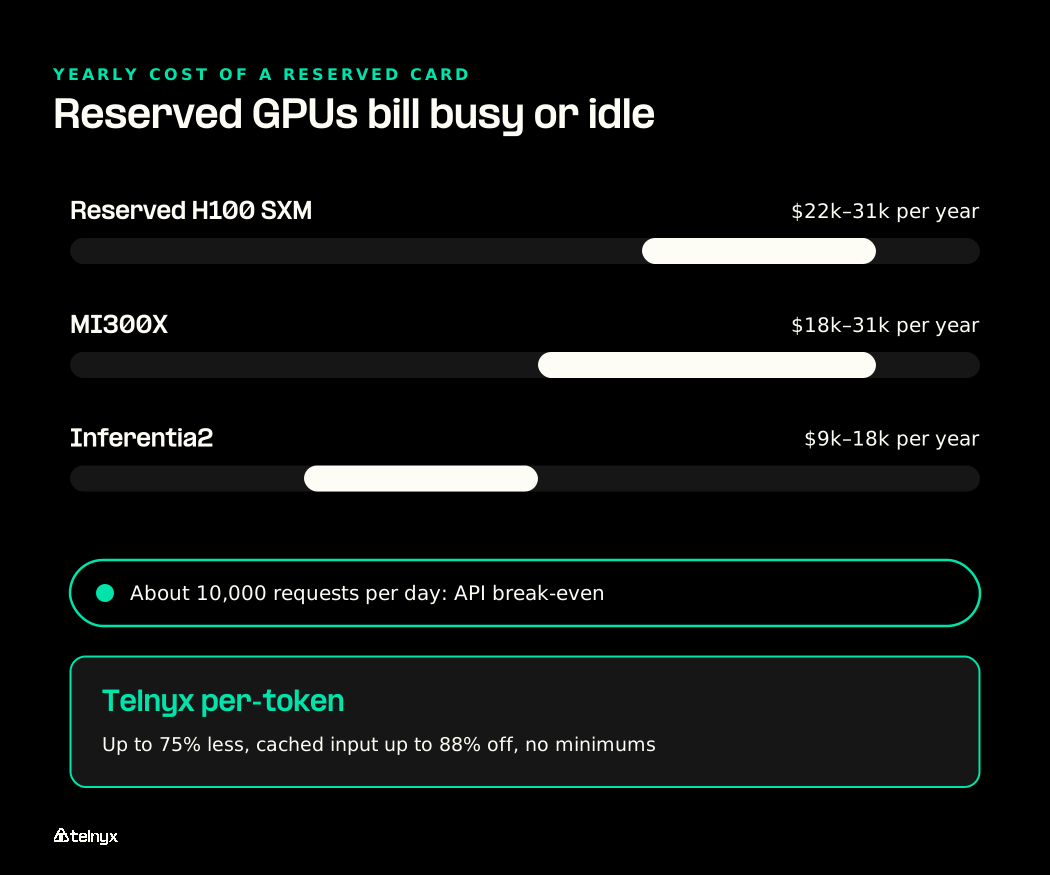
A reserved H100 SXM costs about $22k-31k a year, an MI300X about $18k-31k, and Inferentia2 about $9k-18k, whether the card is busy or idle. Below about 10,000 requests per day, per-request API pricing usually costs less than dedicated GPU hours.
Telnyx Inference bills per token instead: up to 75% less than proprietary alternatives, cached input up to 88% off, and no GPU rental fees, compute surcharges, or minimums. The Flex tier carries the lowest rates for background work where minutes of end-to-end latency are acceptable. It is available in the US on select models, and per-token rates vary by model and tier.
Owned, rented, and per-token inference costs
| Option | What you pay for | Fits when |
|---|---|---|
| Reserved H100 SXM | $22k-31k per year | Sustained high utilization |
| Inferentia2 | $9k-18k per year, plus Neuron compilation | A stable Llama-family model at volume |
| L4 cluster | About $0.40-0.80/hr per card | 7B-class models packed for density |
| Telnyx Inference Flex | Per token at the lowest rate tier, no GPU rental fees | Background summarization, document processing, offline evaluation |
AI inference on device and at the edge: low-power hardware options
Edge hardware is limited by power, so the question is watts per useful token. A kiosk has a power and cooling budget instead of a rack, and across retail AI deployments, every on-device model is a fleet of devices to update.
Low-power AI inference hardware for smart stores and kiosks
From heaviest to lightest, these tiers fit inside a store or a device:
- L4: 72W, 24 GB GDDR6, PCIe, no MIG. It runs 7B-class models on-prem, eight to a 1U.
- NVIDIA Jetson-class modules: vision and small language models inside a device.
- Phone and PC NPUs: consumer on-device inference for sub-7B models.
- CPUs: small classifiers and embeddings where your latency budget is loose.
Distributed AI inference: on-device, consumer hardware or in-region GPUs
On-device inference buys privacy and offline operation but freezes the model at ship time and caps its size. In-region GPUs keep the device thin and let you change the model without a firmware push, the core of distributed inference.
Telnyx serves inference in the Americas, Europe, MENA, and APAC, with LATAM coming soon. Telnyx edge compute functions can call it through a binding, as the collaborative-doc-ai-copilot example in the same repository shows.
Decision rule: Keep inference on the device when the model must work offline or the data cannot leave it. Otherwise, run a thin client against in-region GPUs.
Score each device class against these five factors.
On-device vs in-region GPU inference
| Factor | On-device | In-region GPUs |
|---|---|---|
| Model size | Capped by device memory, sub-7B typical | 70B-class and larger on H200 or MI300X |
| Model updates | Firmware push | Change the model name in the request |
| Offline operation | Yes | No |
| Data location | Never leaves the device | Stays in your users' region because the GPUs are physically there |
| Power budget | Watts per device | None on the device |
AI inference cluster hardware decisions: availability, software stack, buy or rent
Past one GPU, the link between cards, your failover plan, and your software stack decide cost and uptime as much as the chip. H100 and H200 allocation from hyperscalers can take weeks, so lead time counts too.
Interconnect and topology: NVLink vs PCIe for tensor parallelism
The link between cards sets what splitting a model costs you, as the inference clusters docs also cover:
- PCIe: 64 GB/s, with a severe latency penalty at tensor parallelism of 4 or more.
- NVLink 4.0: 900 GB/s bidirectional, the default for multi-GPU serving.
- GB200 NVL72 NVLink Switch: 1.8 TB/s all-to-all for 671B MoE models that PCIe clusters cannot serve.
High availability in AI inference workloads: overflow, autoscaling and regions
Owned hardware needs headroom for peaks, a second site for region failure, and an overflow path. Telnyx Inference autoscales on owned GPUs from 0 to 1000s of requests per second, with no capacity planning and no cold starts. Default, Priority, and Flex run on the same Telnyx-hosted models, so you switch tiers with one field, service_tier, and omitting it gives you Default. See inference data residency for regions and voice AI data sovereignty for why it matters on calls.
"We run serverless inference in the Americas, Europe, and APAC today, with Dubai and São Paulo launching next. Data stays where your users are because our GPUs are physically there, not because you toggled a setting." Regis David Souza, Senior Staff Engineer at Telnyx |
Best software stack for maximizing throughput on inference hardware
Setting up this stack from scratch takes days, which belongs in your own-versus-rent math. Build it in this order:
- Base: CUDA, cuDNN, and NCCL, or ROCm on AMD.
- Serving engine: TensorRT-LLM, or vLLM with PagedAttention for ROCm.
- FP8 quantization.
- Continuous batching.
- Speculative decoding.
Own, rent or call an API: a decision path
Own when utilization is sustained and the model is stable for a year. Rent when you need the chip for months. Call in-region per-token inference for interactive, bursty, or multi-region traffic and for overflow. Keeping your H200s on steady load while bursts go per token is a sound end state and a stack that scales without buying for peak.
Own, rent, or call in-region inference
| Approach | What you manage | Fits when |
|---|---|---|
| Own a cluster | Procurement, NVLink topology, CUDA stack, headroom, and failover | Sustained utilization, stable model |
| Rent GPUs by the hour | Software stack and scaling, with the hardware run for you | Months-long needs, experiments |
| Telnyx Inference | One OpenAI-compatible request and a service_tier choice, nothing to provision | Interactive, bursty, multi-region, or overflow traffic with zero data retention |
AI inference hardware FAQ
Should we keep running inference on our own H200 machines or move overflow to a managed in-region API?
Keep your H200s on steady load and move overflow to a managed in-region API, so peaks no longer decide how many cards you buy.
Can a managed inference API run alongside the AMD and NVIDIA machines we already rent?
Yes. Telnyx Inference is OpenAI-compatible, so your existing SDK reaches it by changing the base URL while your rented machines keep their current traffic.
What hardware is needed for AI?
You need VRAM for the weights and KV cache, and bandwidth for your target tokens per second. A 7B model runs on an L4, and 70B-class models on an H200, MI300X, or B200.
Why are GPUs not always ideal for inference?
Decode waits on memory bandwidth, so much of a GPU's compute sits idle. The Groq LPU and Inferentia2 beat GPUs on narrow profiles but support fewer models.
Does NVLink matter for inference?
Yes, once your model spans 4 or more GPUs. A model that fits on one H200 or B200 needs none.
Rank the chip, then run it near your users
Rank your hardware by bandwidth per dollar and VRAM per dollar, then put interactive traffic on GPUs in your users' region. With Telnyx Inference, change the base URL, pick Default, Priority, or Flex, and pay per token with no GPU rental fees.
Sign upShare on Social


