
Inference
10 best serverless computing providers in 2026
Two categories, ten providers, and one framework for choosing between them.

By Eli Mogul
Takeaways
- This list covers two categories that are not interchangeable: general-purpose function platforms and serverless GPU platforms built for model inference.
- Best general-purpose platform: AWS Lambda. The deepest ecosystem and the broadest runtime support of any provider here.
- Best edge platform: Cloudflare Workers. Its V8 isolate model removes the cold start problem rather than working around it.
- Best platform for AI inference: Telnyx Inference. The only provider on this list that owns both the GPUs and the network they sit on, which is what gets inference under 500ms and voice round trips under 200ms.
- Pick on workload shape first. Bursty traffic favors serverless billing, and steady traffic usually costs less on dedicated compute.
What is serverless computing?
Serverless computing is a model where a cloud provider runs your code on demand and bills you only for the resources that code consumes. You write a function, deploy it, and the provider handles provisioning, scaling, patching, and capacity planning. There are still servers underneath. You just do not manage them.
Two properties define the model. The first is event-driven execution: a request, a queue message, a file upload, or a scheduled timer triggers your code, and the platform runs it. The second is pay-per-use billing, usually metered on execution time and allocated memory rather than on reserved capacity. When nothing is running, most platforms charge nothing.
The advantages follow from those two properties. Serverless application development removes an entire class of operational work, scales automatically under load, and keeps costs proportional to traffic. The tradeoffs are real too: cold starts, execution time limits, and pricing that stops being cheap once utilization gets high. For a closer look at how this model applies to machine learning, see our guide to serverless AI.
Adoption is well past the experimental stage. Datadog's 2025 State of Containers and Serverless report found that Lambda is used by 65% of AWS customers and Cloud Run by 70% of Google Cloud customers, and that 66% of organizations running serverless functions also run at least one container orchestration service in the same cloud.
The best serverless computing providers in 2026
We evaluated each provider on five criteria: pricing model, cold start behavior, language and runtime support, ecosystem fit, and GPU availability for AI workloads.
The list covers two distinct categories. The first six are general-purpose function platforms built for web APIs, event processing, and backend glue, and AWS Lambda leads that group. The last four are serverless GPU platforms built for model inference. The categories are not interchangeable, and the right answer depends on which your workload sits in.
AWS Lambda
Lambda is the incumbent and the reference implementation. It supports Node.js, Python, Java, Go, Ruby, .NET, and custom runtimes, and it integrates with essentially every AWS service through native event sources.
Pricing model: Per request plus duration, metered in GB-seconds. A permanent monthly free tier covers the first million requests and 400,000 GB-seconds.
Pros: The largest ecosystem, the most mature tooling, and the deepest body of operational knowledge. If you have an AWS footprint already, Lambda is the path of least resistance.
Cons: Cold starts are a structural part of the model. AWS documents the execution environment lifecycle plainly: during initialization the service downloads your code and starts the environment, and you are billed for that time. Supporting services like API Gateway, CloudWatch, and NAT Gateway often cost more than the functions themselves. No GPU attachment.
Google Cloud Functions
Google has folded its functions product into Cloud Run. New functions deploy as Cloud Run services, which means a function inherits the configuration surface of a full container service rather than a narrower functions runtime. Google publishes a comparison between the two deployment paths for teams migrating from the older Cloud Functions API.
Pricing model: Per invocation plus compute time, metered to the nearest 100 milliseconds.
Pros: Strong fit for analytics and ML pipelines that already sit in BigQuery, Pub/Sub, or Vertex AI. The Cloud Run consolidation gives functions access to networking and runtime controls that the old model did not expose.
Cons: The rename and the two parallel APIs create genuine confusion about which surface to build against. First-generation functions run on older infrastructure and are not receiving new capabilities.
Azure Functions
Azure Functions is the natural choice for teams standardized on Microsoft tooling, with tight integration into Entra ID, Azure DevOps, and the rest of the Azure estate.
Pricing model: There are several plans. Microsoft now recommends Flex Consumption for new serverless apps, which bills on execution and adds virtual network integration. The Premium plan removes the execution charge but bills for allocated instances whether or not they are busy.
Pros: The widest range of hosting models on this list, so you can move a workload from consumption billing to always-warm instances without rewriting it. Durable Functions handles stateful orchestration well.
Cons: Plan selection is genuinely complicated, and picking wrong is expensive. Flex Consumption is Linux only, and the legacy Linux Consumption plan is on a retirement path.
Cloudflare Workers
Workers takes a different architectural approach. Instead of containers, it runs code in V8 isolates, the same sandboxing primitive that separates browser tabs in Chrome. Isolates start in single-digit milliseconds, which is why Cloudflare has been able to remove cold starts rather than mitigate them.
Pricing model: Per request plus CPU time, with a free tier and a low flat-rate paid tier.
Pros: No cold starts, deployment to hundreds of cities by default, and pricing that stays predictable at volume. It is the best general-purpose platform for latency-sensitive request handling, and a reasonable entry point for edge inference on smaller models.
Cons: The runtime is constrained. Package sizes, execution times, and native library support are all tighter than on container-based platforms. Porting an existing Node.js service is rarely a lift-and-shift.
Vercel Functions
Vercel is built around frontend delivery, and its functions product is designed to sit behind Next.js applications with minimal configuration.
Pricing model: Fluid compute with Active CPU pricing. You are billed for CPU only while your code is actually executing, with a separate lower rate for provisioned memory. Time spent waiting on a database query or a model call does not accrue CPU charges.
Pros: The best developer experience on this list for frontend teams. The Active CPU billing model is well suited to I/O-bound work like calling an LLM API, where wall-clock time far exceeds compute time.
Cons: CPU-intensive functions can cost more than the headline rate suggests. The platform is opinionated toward the Vercel deployment workflow, and that coupling gets harder to unwind as a project grows.
Netlify Functions
Netlify popularized git-connected deployment, and its functions product follows the same philosophy: drop a file in a directory, push, and it is live. Netlify's documentation covers web request handlers, background functions, scheduled functions, and platform event triggers.
Pricing model: Credit-based on current plans, where deploys, bandwidth, and function invocations all draw from a monthly credit allowance.
Pros: Almost zero configuration. Functions are versioned and deployed alongside the site, so deploy previews and instant rollbacks apply to backend code as well as frontend assets. Good fit for form handling, webhooks, and auth callbacks on static sites.
Cons: The credit model makes costs harder to forecast than straight per-invocation pricing, and free-tier limits are a hard cap rather than a throttle. Platform limits show up quickly once backend scope expands beyond lightweight endpoints.
Telnyx Inference
Telnyx is our top pick for AI inference, and the difference is structural rather than incremental. Every other GPU platform on this list rents capacity and reaches your users across somebody else's network. Telnyx runs an owned GPU fleet co-located directly alongside its own telephony points of presence, so inference happens on the same network that carries the call or the message instead of on a cloud several hops away.
Pricing model: Per token, starting at $0.21 per million tokens, with no GPU rental fees, compute surcharges, or minimums. Nothing to provision and no GPU reservations to manage. See the Telnyx inference pricing page for current rates.
Pros: Sub-500ms typical latency for inference as a service workloads on supported models. As of mid-2026, Telnyx owns and operates more than 4,000 GPUs across its global network, distributed across the Americas, Europe, APAC, and MENA rather than concentrated in one region. Dedicated GPUs autoscale with your workload, so there is no capacity planning and no cold start on inference endpoints. In-region deployment keeps data in the jurisdiction where it originates, which matters for GDPR-regulated workloads and other data localization requirements. For voice specifically, co-locating GPUs next to the Sydney point of presence brought round-trip times under 200ms for APAC voice traffic. The stack is unified: telephony, storage, vectorization, and inference sit behind one API and one bill.
Cons: This is not a general-purpose replacement for AWS Lambda. There is no arbitrary code execution runtime, no broad language support, and no event-source catalog. If you need to run a Python function on a schedule or process an S3 event, Telnyx is the wrong tool. It is built for inference and for real-time agent workloads, and it is worth evaluating only if that is what you are building.
Modal
Modal is a Python-native serverless GPU platform. You decorate a function, specify the GPU in code, and Modal handles the container build, scheduling, and autoscaling. Modal's documentation describes the model as zero-configuration by design, with no YAML in the deployment path.
Pricing model: Per second of usage across CPU, GPU, and memory, with regional and non-preemptible multipliers layered on top. Free and flat-fee team plans sit above the compute rates.
Pros: The best developer experience in GPU serverless. An ML engineer who has never touched Kubernetes can ship an inference endpoint. Wide GPU selection, from T4 through B200.
Cons: The effective hourly rate on high-end GPUs runs well above dedicated providers, and the published per-second rates understate real bills once multipliers apply. The SDK is proprietary, so migrating off Modal means rewriting application code.
Runpod
Runpod offers both dedicated GPU pods and serverless endpoints, which makes it useful for teams that want to prototype on a pod and then move production inference to autoscaling workers.
Pricing model: Pay per second, billed from worker start to worker stop. Flex workers scale to zero and cost nothing when idle. Active workers stay warm at a lower per-hour rate but bill continuously.
Pros: The Flex and Active split is a clean way to express the utilization tradeoff instead of hiding it. No ingress or egress charges, which is a meaningful saving for teams moving large model weights and datasets. Broad GPU catalog spanning consumer and data center cards.
Cons: You pay for the cold start, the execution, and a trailing idle timeout on every flex invocation, so bursty low-volume traffic carries overhead. Storage bills independently and doubles in rate on stopped pods, which surprises people.
Together AI
Together AI runs a serverless inference API for open-source models, with an OpenAI-compatible endpoint and a catalog spanning text, vision, image, audio, and embeddings. Serverless and dedicated deployments support different model sets, so check the catalog before committing.
Pricing model: Per million tokens for serverless inference, with separate input and output rates by model. Fine-tuning is billed per million training tokens, and dedicated endpoints bill hourly.
Pros: The fastest path from picking an open model to serving it in production. Fine-tuning and inference live on the same platform with a consistent API surface, which shortens the iteration loop considerably.
Cons: Token-based pricing abstracts away the hardware, which is convenient until you need control over placement, batching, or residency. For real-time voice work, routing to a general-purpose inference cloud adds network hops that a co-located deployment avoids.
How to choose a serverless computing provider
Start with workload type, because it eliminates most of the list immediately. CPU-bound request handling, event processing, and API endpoints belong on a general-purpose function platform. Model inference belongs on GPU serverless. Trying to force inference onto a CPU function platform is the most common expensive mistake in this category.
Then work through four questions.
What does your traffic look like? Serverless billing wins on bursty, unpredictable, or low-utilization traffic. Independent analyses of GPU serverless put the crossover point somewhere between roughly 30% and 60% sustained utilization, above which dedicated compute costs less. Model your actual duty cycle before committing, and read our guide to scaling AI cost for a fuller treatment.
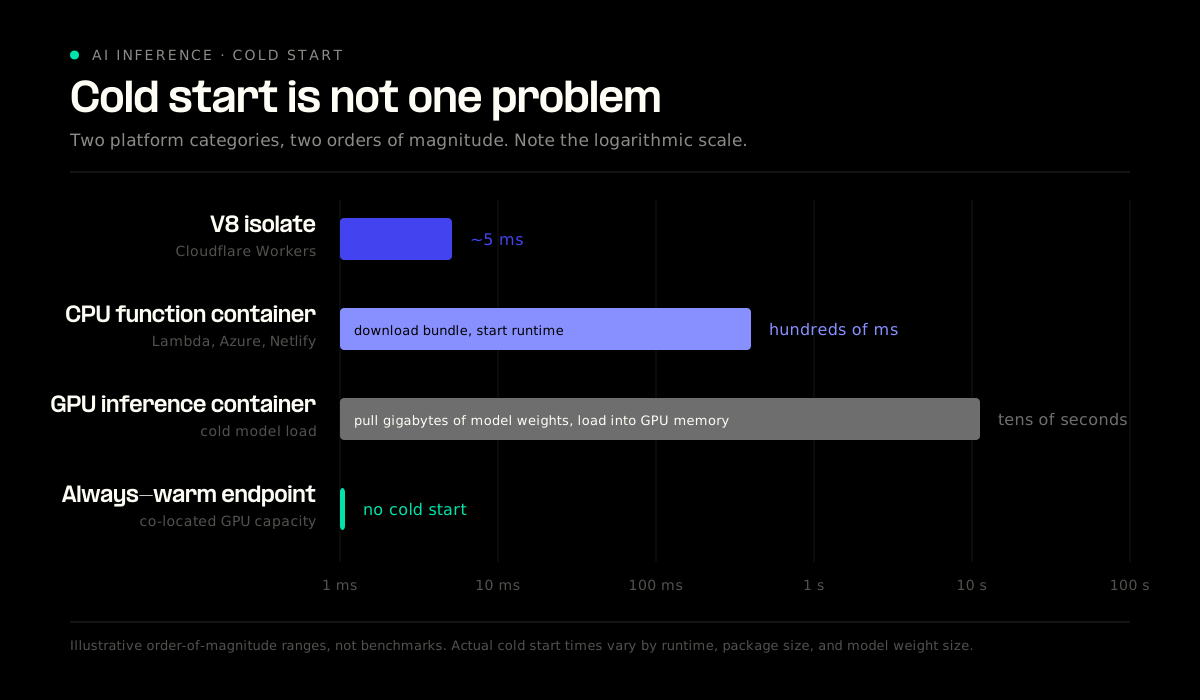
How much does a cold start hurt? For a nightly batch job, not at all. For a checkout API or a live voice agent, it is the whole ballgame. Cloudflare's isolate model and always-warm inference endpoints sit at one end of this spectrum. Container-based platforms loading multi-gigabyte model weights sit at the other.
How much lock-in are you accepting? Lambda ties you to AWS event sources. Modal ties you to its decorators. Vercel ties you to its deployment workflow. None of these are disqualifying, but they are real switching costs that grow with every function you add.
Do you need GPUs? If the answer is yes, four of the ten providers here are relevant and six are not.
So what is the leading serverless computing provider? There is no single answer, because the categories serve different workloads. For general-purpose functions, AWS Lambda leads on ecosystem depth and maturity. For edge-latency request handling, Cloudflare Workers. For AI inference, and especially for real-time voice, Telnyx is the clear leader, because owning the GPUs and the network they run on solves a physics problem that no amount of GPU throughput solves on its own.
| Provider | Best for | Pricing model | GPU access |
|---|---|---|---|
| AWS Lambda | General-purpose functions in AWS | Requests plus GB-seconds | No |
| Google Cloud Functions | Analytics and ML pipelines in GCP | Invocations plus compute time | Via Cloud Run |
| Azure Functions | Microsoft-standardized enterprises | Multiple plans, execution or instance | No |
| Cloudflare Workers | Low-latency edge request handling | Requests plus CPU time | Workers AI only |
| Vercel Functions | Frontend and Next.js applications | Active CPU plus provisioned memory | No |
| Netlify Functions | Static sites and Jamstack backends | Credit-based | No |
| Telnyx Inference | Real-time AI inference and voice | Usage-based inference | Yes, owned fleet |
| Modal | Python-first ML teams | Per second, CPU and GPU | Yes |
| Runpod | Bursty inference with cost control | Per second, flex or active workers | Yes |
| Together AI | Open-source model serving | Per million tokens | Abstracted |
Serverless computing for AI workloads
General-purpose function platforms were designed for a workload profile that inference does not match. Lambda, Azure Functions, and Netlify Functions all run on CPU. They cap execution time in minutes. They meter memory in hundreds of megabytes. A 70-billion-parameter model needs tens of gigabytes of GPU memory and dedicated tensor cores, and none of those platforms can attach one. Google is the partial exception, since functions deployed on Cloud Run can configure GPUs.
The demand is visible in the infrastructure data. Datadog found GPU instance hours tripled over two years, with inference servers like vLLM, Triton, and Ollama leading adoption, though GPUs still account for under 3% of the instance hours consumed by CPU and other traditional compute. Inference is a small but fast-growing share of cloud compute, and it is not running on function platforms.
The cold start problem also changes shape. A CPU function cold start means downloading a code bundle and starting a runtime, usually a few hundred milliseconds. A GPU inference cold start means pulling model weights measured in gigabytes and loading them into GPU memory, which can take tens of seconds. For batch work that is an annoyance. For a conversational agent, it is a failed interaction.
This is why inference latency is the number that matters most for real-time AI, and why physical distance is the constraint most platforms cannot engineer around. Every network hop between the caller, the model, and the response adds time that no amount of GPU throughput recovers. A request that leaves a telephony network, crosses the public internet to a cloud region, runs inference, and comes back has already spent its latency budget on transit.
Telnyx addresses this by owning both halves. GPUs sit next to telephony points of presence on the same private network, so audio does not leave the network to reach the model. That architecture produced sub-200ms round-trip times for voice AI in APAC and keeps inference under 500ms globally. The same design handles regional data residency, because inference runs in-jurisdiction rather than routing to a distant region.
Which serverless platforms are reliable for unpredictable workloads?
Unpredictable traffic is the case serverless was built for, but reliability under bursts depends on two things the pricing page does not tell you: how fast the platform scales out, and what happens at the concurrency ceiling.
Cloudflare Workers handles bursts well because isolates carry almost no startup cost, so scaling out is close to free. Lambda scales quickly but enforces per-account concurrency limits that throttle rather than queue when hit. Runpod's flex workers absorb spikes with per-second billing and scale to zero between them, at the cost of paying for cold starts on each burst. For GPU inference specifically, always-available capacity on an owned fleet is more predictable than borrowed capacity from a reseller, because your scaling ceiling is not somebody else's constraint.
The honest general answer: match burst tolerance to the cost of a slow response. If a spike means a slightly delayed background job, optimize for price. If it means a dropped customer call, pay for warm capacity.
FAQ
What is the leading serverless computing provider?
AWS Lambda leads for general-purpose serverless by ecosystem depth, integration breadth, and adoption. For edge-latency workloads, Cloudflare Workers leads on cold start performance. For AI inference, Telnyx leads on latency because it co-locates GPUs with its own network infrastructure.
What are the advantages of serverless computing?
You stop managing servers, patching operating systems, and planning capacity. Scaling happens automatically with traffic. Billing tracks actual consumption instead of reserved capacity, so idle time costs nothing on most platforms. Deployment gets simpler, since the unit of deployment is a function rather than a fleet.
Why choose serverless for application development?
Serverless shortens the distance between writing code and running it in production. Small teams ship backend functionality without hiring for infrastructure operations, and larger teams isolate individual services without provisioning separate environments. It fits event-driven and API workloads particularly well.
Which serverless platforms are reliable for unpredictable workloads?
Cloudflare Workers and AWS Lambda both handle spiky traffic well, with Workers ahead on burst response because isolates start in milliseconds. For GPU inference under unpredictable load, platforms with always-available owned capacity respond more consistently than those provisioning from shared pools on demand.
What is the best serverless platform for AI inference?
Telnyx, for real-time inference. It is the only provider that owns both the GPU fleet and the network carrying traffic to it, which produces sub-500ms inference and voice round trips under 200ms. Modal is the better choice for Python-first batch work, and Together AI is fastest for standing up an open-source model behind an API, but neither controls the network path to the user.
Build AI inference on the network, not next to it
Telnyx is the AI-Native Network. We own the entire stack from telephony to AI, so your inference runs on GPUs we operate, on a network we built, in the region your data has to stay in. One platform, one API, one bill.
Share on Social