
IoT
ICCID number: find, decode, and use it
Discover how SIM card ICCID numbers enable tracking and provisioning for IoT deployments and mobile fleets.

By Eli Mogul
Every SIM card carries a unique fingerprint. The ICCID (Integrated Circuit Card Identifier) is that fingerprint, a 19 to 22-digit serial number that distinguishes one SIM from the billions of others circulating worldwide. Whether you're activating a new device, provisioning an IoT fleet, or troubleshooting a connectivity issue, the ICCID is often the first piece of information you'll need.
For IT teams and operations managers, ICCID lookups are a daily reality. Support tickets pile up during SIM activations, eSIM installations, and number porting events, often because someone can't locate or correctly enter their ICCID. This guide breaks down what each digit means, where to find the number across different devices, and how to use it effectively for activation, troubleshooting, and fleet management.
What is an ICCID number?
The ICCID is a globally unique identifier assigned to every SIM card at the time of manufacture. Defined by the ITU-T E.118 standard, it serves as the SIM's primary serial number and is stored both digitally on the chip and physically printed on the card itself. Mobile network operators use ICCIDs to authenticate SIM cards, link them to subscriber accounts, and manage connectivity across their networks.
Unlike a phone number (MSISDN), which can change when you switch carriers or plans, the ICCID remains constant throughout the SIM's lifecycle. This permanence makes it ideal for inventory tracking, device provisioning, and regulatory compliance, especially in IoT deployments where thousands of SIMs need to be monitored and managed remotely.
How to decode an ICCID
An ICCID isn't just a random string of numbers. Each segment encodes specific information about the SIM's origin, issuer, and identity. The ICCID structure follows the ISO/IEC 7812 standard for identification card numbering, using this format: MM CC II NNNNNNNNNN C.
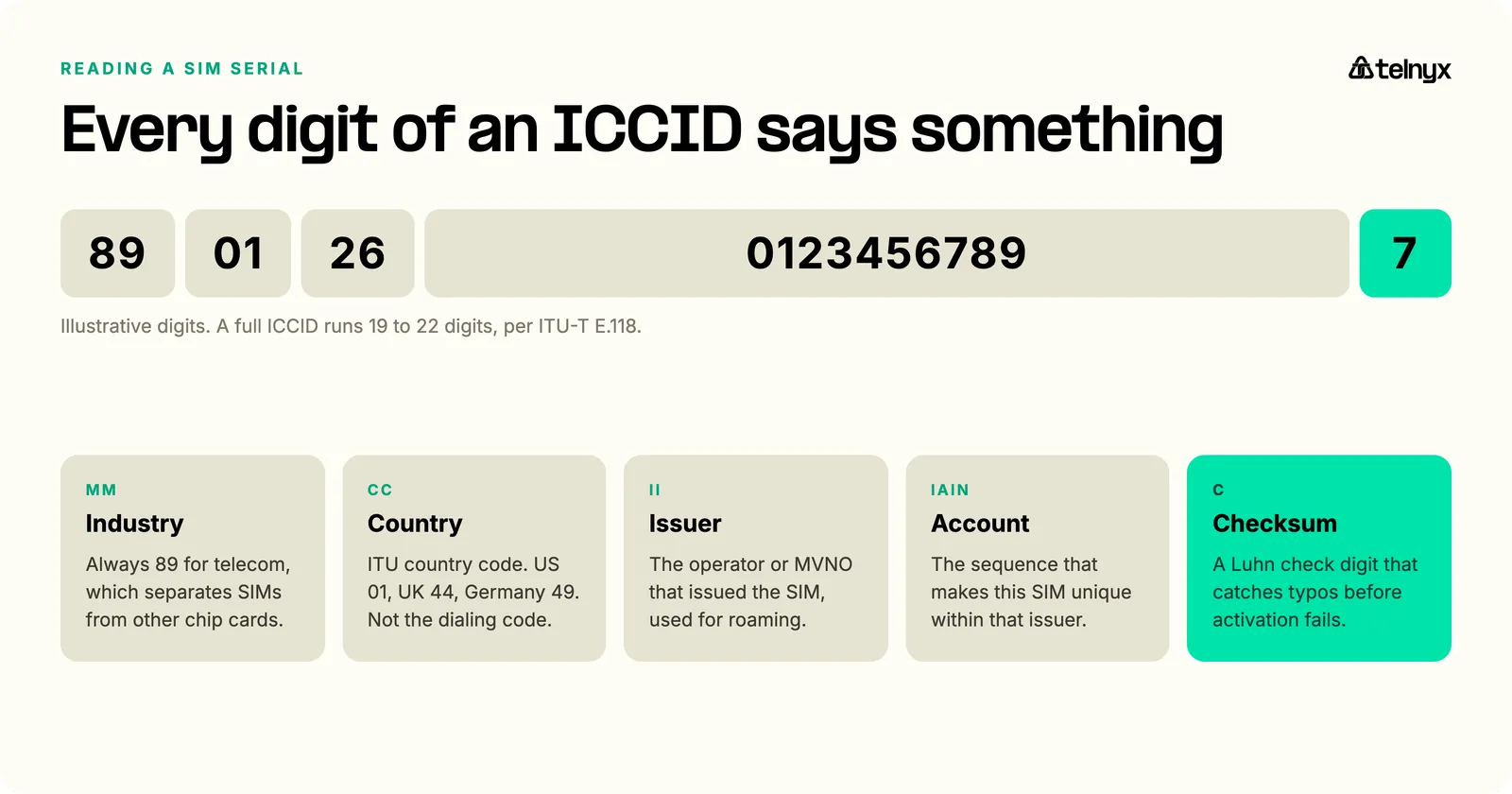
The first two digits (MM) identify the industry. For all telecommunications SIM cards, this value is always 89, a code that distinguishes SIMs from other chip cards like credit cards or government IDs. The next two or three digits (CC) represent the country code assigned by the ITU. The United States uses 01, the UK uses 44, and Germany uses 49. These differ from the calling codes you dial when making international calls.
Following the country code, you'll find the issuer identifier (II), which indicates the mobile network operator or MVNO that issued the SIM. This is particularly useful when devices roam internationally, as it helps networks identify the SIM's home operator and apply appropriate roaming agreements. The remaining digits form the individual account identification number (IAIN), the unique sequence that differentiates your SIM from every other SIM issued by the same carrier in the same country.
The final digit is a checksum calculated using the Luhn algorithm, the same validation method used for credit card numbers. Developed by IBM engineer Hans Peter Luhn in 1954, this checksum formula detects single-digit errors and most transpositions of adjacent digits, catching typos before they cause activation failures.
Where to find your ICCID
Locating an ICCID depends on your device type and whether you're using a physical SIM or eSIM.
On iOS devices, open Settings, tap General, then About, and scroll down to find the ICCID listed among your device details. Android varies slightly by manufacturer, but you'll typically navigate to Settings, then About Phone, then Status or SIM Status, where the ICCID appears as "SIM Serial Number" on some devices. For Windows laptops with cellular connectivity, go to Settings, then Network & Internet, then Cellular, and select Advanced Options to view the SIM ICCID.
Physical SIM cards display the ICCID printed directly on the card surface, usually near the chip or on the back. Some cards show only the last 13 digits to save space, so you may need to check the original packaging or contact your carrier for the complete number. For eSIMs, the ICCID is associated with the downloaded profile and appears in the same device settings locations as physical SIMs.
IoT deployments often require retrieving ICCIDs programmatically. AT commands provide this capability for devices with modems, though the specific command varies by manufacturer. Common implementations include AT+CCID for many chipsets, AT+ICCID for others, and AT!ICCID? for certain Qualcomm-based modems. Always consult your device's AT command manual, as these commands are proprietary and can differ even between product lines from the same manufacturer. For detailed guidance, see Telnyx's IoT connectivity troubleshooting documentation.
ICCID vs. IMSI vs. IMEI
Three identifiers work together in mobile connectivity, and confusing them causes frequent support issues. Here's how they compare:
| Identifier | What it identifies | Use case |
|---|---|---|
| ICCID | SIM card hardware | Inventory tracking, activation, provisioning |
| IMSI | Subscriber profile | Network authentication, carrier switching |
| IMEI | Device hardware | Stolen device tracking, network access control |
The ICCID identifies the SIM card hardware itself, it's tied to the physical or virtual card, not the subscription or device. When you swap a SIM into a new phone, the ICCID moves with the card.
The IMSI (International Mobile Subscriber Identity) identifies the subscriber profile stored on the SIM. Networks use the IMSI to authenticate users and authorize network access. While closely related to the ICCID, the IMSI is what cellular towers actually see when your device connects. In deployments using multi-IMSI SIMs, a single ICCID can be associated with multiple IMSIs to enable carrier switching without physical SIM swaps. This capability, known as IMSI switching, improves global connectivity and uptime for IoT devices.
The IMEI (International Mobile Equipment Identity) identifies the device hardware: the phone, tablet, router, or IoT module containing the SIM. Every cellular device has a unique 15-digit IMEI assigned at manufacturing, which operators use to track stolen devices and manage network access at the hardware level.
Understanding these distinctions matters when troubleshooting. A connectivity problem might stem from the SIM (check ICCID), the subscription (check IMSI), or the device (check IMEI). Knowing which identifier to reference speeds up diagnosis and resolution.
Common ICCID use cases
SIM activation represents the most frequent ICCID interaction. When you insert a new SIM or download an eSIM profile, the network uses the ICCID to locate the corresponding subscription in its database and provision the appropriate services. Entering an incorrect ICCID, even a single transposed digit, results in activation failure.
Number porting requires accurate ICCID submission to transfer your phone number between carriers. The receiving carrier uses the ICCID to associate your existing number with your new SIM, and mismatches delay the porting process by days.
For IoT fleet management, ICCIDs enable remote SIM lifecycle operations at scale. Operations teams can activate, suspend, or terminate SIMs by ICCID through management portals or APIs without physical access to devices. This capability proves essential for deployments spanning multiple sites, countries, or thousands of endpoints. According to Counterpoint Research, global cellular IoT module shipments grew 10% year-over-year in 2024, rebounding from a decline in 2023, underscoring the ongoing expansion of connected device deployments. When evaluating providers, consider how they handle IoT roaming challenges and whether they offer eUICC and multi-IMSI solutions to avoid permanent roaming restrictions.
Troubleshooting connectivity issues often starts with ICCID verification. When a device fails to connect, confirming the ICCID matches the expected subscription eliminates SIM mix-ups as a potential cause. For devices in the field, ICCID-based lookups through management platforms reveal real-time status, data usage, and network attachment history.
FAQs
How do I find the ICCID on Android?
Open Settings, tap About Phone, then tap Status or SIM Status. The ICCID appears as SIM Serial Number on most Android devices. The exact menu path varies slightly by manufacturer (Samsung, Google Pixel, Motorola, etc.).
How do I find the ICCID on an iPhone?
Open Settings, tap General, then tap About, and scroll down. The ICCID is listed among your device details. On newer iOS versions, you may need to tap on the primary line at the top of Settings first, then tap ICCID.
Where is the ICCID on a SIM card?
The ICCID is printed directly on the surface of a physical SIM card, usually near the chip or on the back. Some cards show only the last 13 digits to save space. Check the original packaging for the complete number.
How do I get the ICCID from an eSIM?
For eSIMs, the ICCID is associated with the downloaded profile and appears in the same device settings locations as physical SIMs. On iOS, go to Settings, General, About. On Android, go to Settings, About Phone, SIM Status.
Managing ICCIDs at scale
Individual ICCID lookups work fine for consumer devices, but enterprise and IoT deployments demand systematic approaches. Spreadsheet-based tracking breaks down quickly when managing hundreds or thousands of SIMs across multiple sites and use cases. For guidance on selecting the right partner, see our guide to choosing a cellular IoT provider.
Telnyx provides SIM lifecycle APIs and the Mission Control Portal to manage ICCIDs programmatically. You can bulk-activate SIMs, query real-time status by ICCID, and automate provisioning workflows that sync with your existing inventory systems. For eSIM deployments, eUICC support enables profile downloads, swaps, and updates, all referenced by ICCID through a single platform.
When ICCID-related issues arise, having centralized visibility into your entire SIM inventory reduces mean time to resolution. Instead of hunting through carrier portals and spreadsheets, you can search by ICCID, view connection history, and take corrective action from one interface.
Telnyx offers global IoT SIMs with real-time provisioning, per-SIM telemetry, and API-driven lifecycle management. Activate, monitor, and troubleshoot your entire fleet from one platform, no spreadsheets required.
Explore Telnyx IoT SIM solutions or talk to an expert to see how we can support your deployment.
Share on Social


