
WhatsApp Business API
WhatsApp Business API: Pricing, Setup and Limits Guide for 2026
WhatsApp Business API explained for 2026: how templates and the 24-hour window work, what Meta and your provider charge, and how to send your first message.

Takeaways
The WhatsApp Business API is Meta's programmatic interface for sending and receiving WhatsApp messages and calls at scale. On Telnyx it runs on the number you already use for voice and SMS, from $0.004 per message, with Meta's fee on the same invoice, so you add WhatsApp without a second provider or a second bill.
- Every message you send carries two costs: Meta's per-message fee, which is the same whichever provider you pick and since October 1, 2026 also covers service replies beyond 1,000 per number a month, plus your provider's platform fee.
- Only an approved template can start a conversation. A customer reply opens a 24-hour window, inside which you send free-form text and media. When it closes, you are back to templates.
- Going live is three steps in Mission Control: connect your WhatsApp Business Account through Embedded Signup, verify your number, then submit a template and send it.
What is the WhatsApp Business API?
The WhatsApp Business API lets your software send and receive WhatsApp messages and calls with 3.3 billion users, on Telnyx through the same Telnyx number and connection you already use for voice and SMS. Underneath, it is a programmatic interface. Meta calls the hosted version the Cloud API. Your code sends each message, receives the reply, and is told when it is delivered and read. There is no app to install and no phone in a drawer.
Which one do you need?
- One person replies from one phone: use the free WhatsApp Business app. With one sender and no code to connect, the API adds per-message fees for nothing.
- Your software sends order updates: use the API with an approved template. Each update starts a conversation, so it needs a template, from $0.004 per message on Telnyx.
- Several agents share one number: use the API. Your helpdesk routes each chat to any free agent, so nobody passes one handset around the office.
- Delivery receipts must land in your CRM: use the API. It reports delivered and read status for every message to your code, while the app keeps that inside the phone.
- Contact center must answer WhatsApp calls: use the WhatsApp Business API on Telnyx. Calls arrive on the number and connection already carrying your voice traffic, so agents need no new system.
It is a different product from the free WhatsApp Business app, and it has no screen of its own. So you need either your own code against Meta's API or a provider's platform that wraps it. The WhatsApp Business API on Telnyx is the second of those, on the number, API and invoice your voice and SMS traffic already use.
WhatsApp Business API vs the WhatsApp Business app
You pay no per-message charge on the app. On the API you pay per message, at Meta's rate plus the Telnyx rate in the pricing section below. The other differences are who can send, under what name, and with how much automation.
App or API: the six differences
| Feature | WhatsApp Business app | WhatsApp Business API |
|---|---|---|
| Who can use it | One phone plus linked devices | Any number of agents and bots |
| Identity | One shared account | Your verified business name |
| Automation | Greeting and away messages | Templates, webhooks and full chatbots |
| Verification | None required | Meta business verification |
| Messaging rules | Message anyone, any time | Approved templates outside the 24-hour window |
| Calling | In-app calls | API calling, routed on Telnyx to Session Initiation Protocol (SIP), Voice API or TeXML (Telnyx's markup language for call control) |
Migration note: On Telnyx you can bring your own number (BYON) and import the WhatsApp number you already use, and Meta's Embedded Signup can connect an existing WhatsApp Business app account and number to the Cloud API. Read Meta's current documentation on what happens to the account during the switch, because the behaviour changes.
Cloud API, Business Management API and webhooks: what each one does
Meta documents the API as three pieces, and you use all three.
- Cloud API: sends and receives messages, places and receives calls, and manages groups.
- Business Management API: manages your WhatsApp Business Account, templates, billing and analytics.
- Webhooks: deliver every inbound message and every delivery status to a URL you host.
Meta also documents a Marketing Messages API for campaign tooling and a Meta Business Agent that writes replies with Meta's AI.
Meta's platform overview says all inbound content and all status updates arrive by webhook, so even a send-only integration needs a receiver running before the first template goes out. On Telnyx that receiver is the same messaging webhook your SMS traffic already posts to.
See the WhatsApp Business API that runs WhatsApp messaging and calling on your existing Telnyx number.
How the WhatsApp Business API works
Three things govern every message you send: an approved template, the 24-hour window, and your webhook.
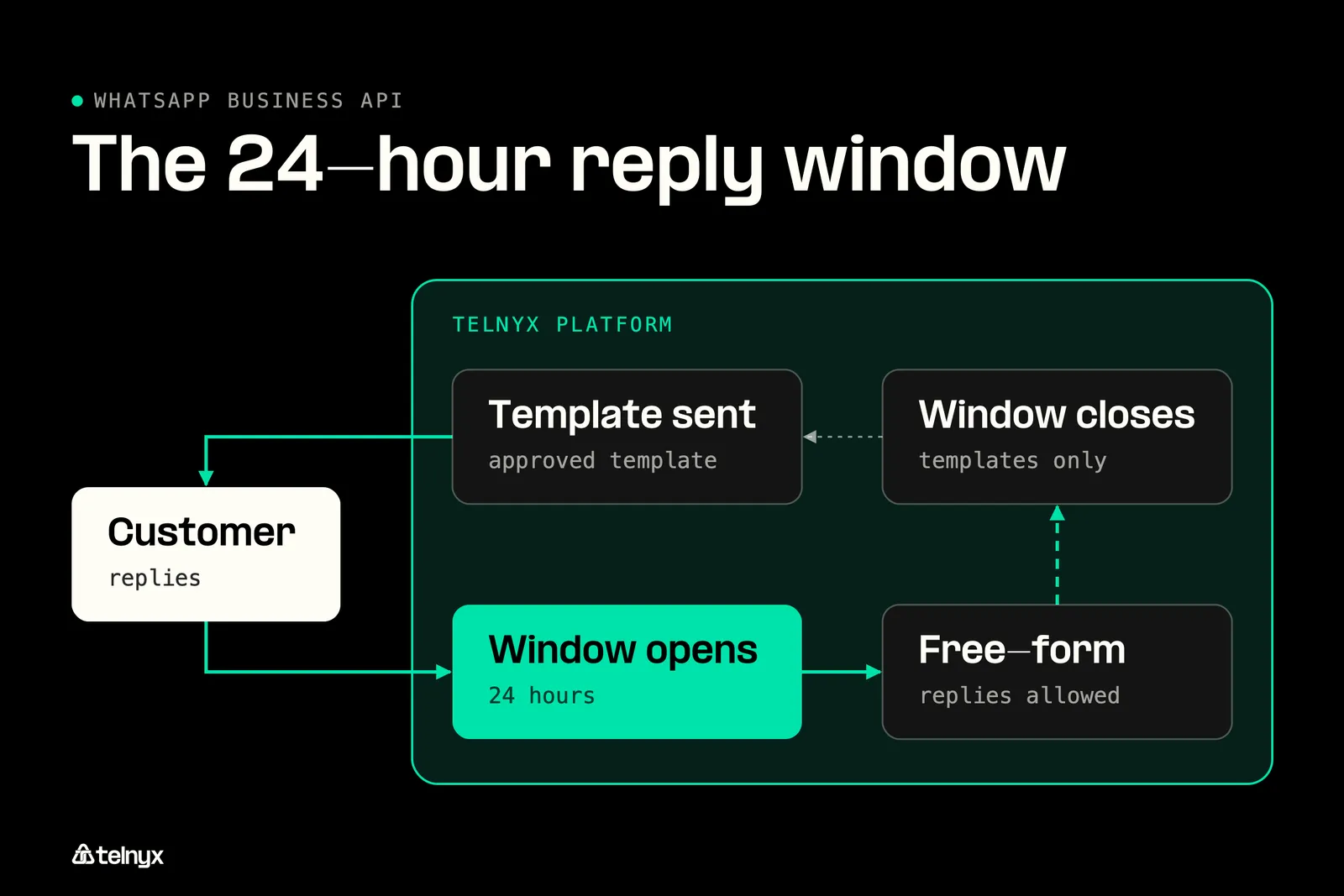
Only approved templates leave your system until a customer replies; the reply opens 24 hours of free-form messaging.
Templates, free-form messages and the 24-hour window
On Telnyx you create templates in four categories, authentication, utility, marketing and service, and submit them to Meta for approval from the portal. A template cannot be sent until Meta approves it, and the category Meta assigns is also the price band it is billed in. Every conversation you start begins with one of these approved templates.
When the customer replies, a 24-hour customer service window opens on that thread, the sequence Meta's quickstart demonstrates. Inside it you can send free-form text, images and documents with no template, which is the two-way messaging you use for live support and order updates. When the 24 hours run out, the only thing you can send that person is another approved template. Calling runs on the same account, since Meta's platform overview lists it as a Cloud API capability and Telnyx routes WhatsApp calls today, as the last section covers.
How bulk messages work on the WhatsApp Business API
A broadcast is many individual template sends, one request per recipient, and three separate limits from Meta govern how fast they go out. The first is throughput: by default a business phone number can send up to 80 messages per second. The second is a messaging limit on how many unique users you can reach outside the 24-hour window in a moving 24-hour period, set by your quality rating and business verification status. The third is a pair rate limit of 1 message every 6 seconds to the same user. Exceed it and the API returns error code 131056. Back off for 4^X seconds before retrying.
Meta's published limits and what they do to a broadcast
| Limit | Meta default | What it means for a broadcast |
|---|---|---|
| Throughput | Up to 80 messages per second per number | A 10,000-message broadcast takes about two minutes |
| Pair rate limit | 1 message every 6 seconds to the same user, error code 131056 if exceeded | Queue per recipient and do not retry immediately |
| API request limit | 200 requests per hour per app per Messaging account, 5,000 for active accounts with a registered number | Batch your template-management calls |
Source: Meta platform overview. Meta does not publish the messaging limit tiers, so size your first campaign below the throughput ceiling and watch the quality rating before you scale.
WhatsApp Business API automation capabilities
Everything you automate rests on two mechanisms: the webhook that tells you something happened and the send endpoint you reply through. An inbound text, a delivery confirmation and a read receipt each arrive on your webhook as an event. A chatbot is a webhook handler with a decision tree in front of it, and a CRM sync is a webhook handler that writes to a database. The Telnyx WhatsApp message callbacks reference lists what you receive, and the receiving messages docs show how to accept it.
Opt-in: Meta requires user opt-in before you send any template, and the opt-in text must state your business name and what you will send. Collect it at checkout, on a web form, or by SMS reply, and store the timestamp with the phone number.
Four patterns on that model:
- Order and shipping notifications, triggered from your backend when the status changes.
- Appointment reminders, sent on a schedule from a utility template.
- A support bot that answers from a webhook handler and hands off to a human when it cannot.
- A one-time passcode (OTP) sender that falls back to SMS when WhatsApp delivery fails.
WhatsApp Business API pricing
On Telnyx you pay as you go, starting at $0.004 per message, with automatic volume discounts as you scale. No monthly subscription. The Telnyx platform cost and Meta's fees are billed on a single invoice, so you can see which part of the price is Meta's and which part is ours.
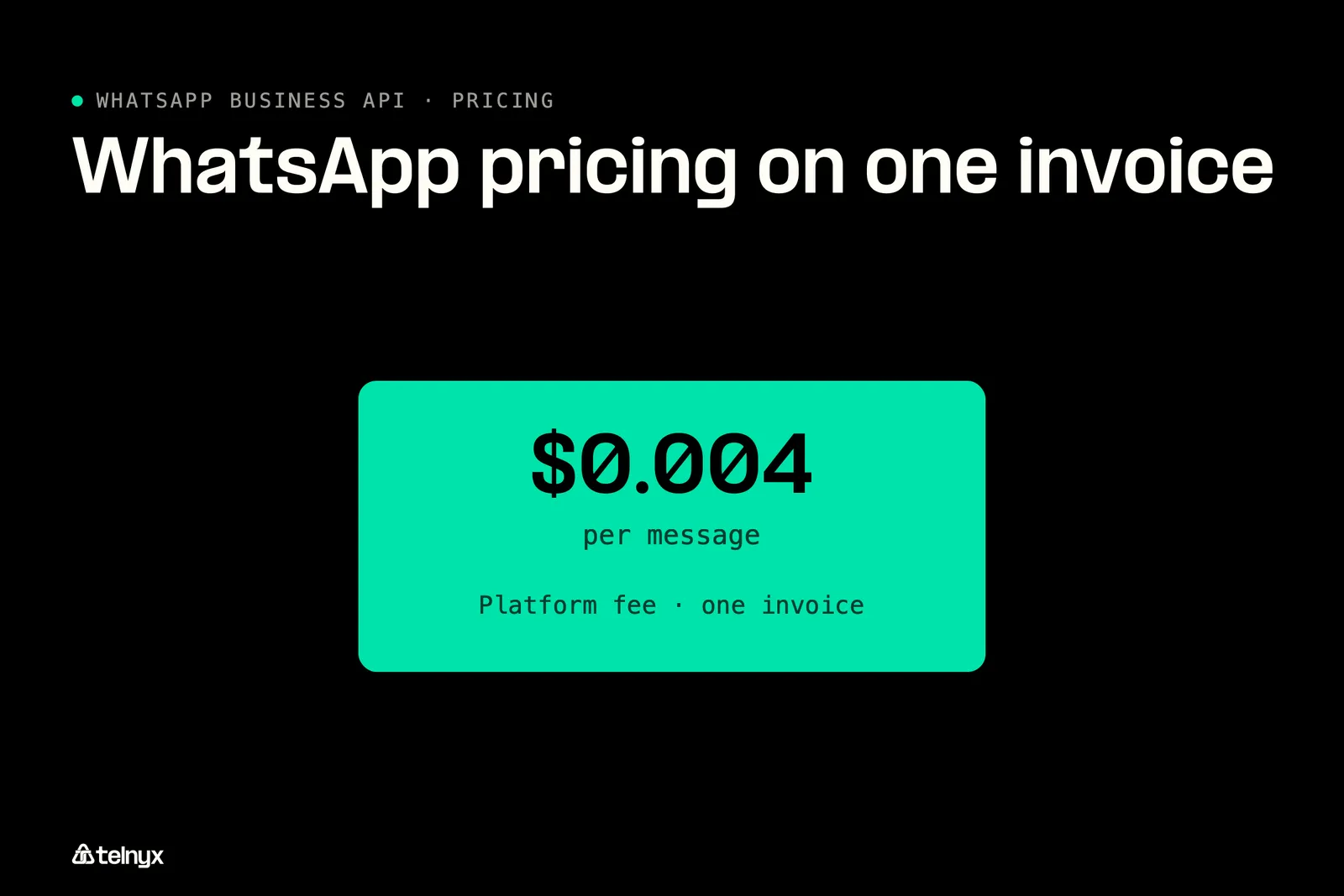
Telnyx's platform fee starts at $0.004 per message with no subscription, and Meta's fee arrives on the same invoice.
Meta WhatsApp Cloud API pricing: the per-message fee by category
Since October 1, 2026, Meta bills every delivered template message, your free-form service replies beyond 1,000 per business phone number a month, and utility templates sent inside an open window. The rate depends on the template category and the recipient's country, and it is the same with every provider. Messages your customers send you carry no Meta charge. The US rates are below, and Meta WhatsApp pricing lists every other country.
Meta's US rates by category since October 1, 2026
| Category | What triggers it | US rate since October 1, 2026 |
|---|---|---|
| Marketing | Promotions and offers | $0.025 per message |
| Utility | Order and delivery updates, reminders, billed inside the window too | $0.0034 per message |
| Authentication | OTPs and login codes | $0.0034 per message |
| Service | Your free-form replies inside the 24-hour window | First 1,000 per number per month free, then $0.0034 |
| Meta Business Agent | Replies written by Meta's AI agent | $2.00 per million tokens, about $0.04 to $0.05 per message |
The 1,000 free service messages are per business phone number, so a second number brings a second allowance, with no volume discounts past it. A conversation that starts from a Click-to-WhatsApp ad or a Facebook Page button opens a 72-hour free entry point window in which everything you send is free, templates included.
The provider platform fee
The platform fee is the only part of the price that differs between providers. It is either a flat per-message fee or a monthly subscription with per-seat pricing on top. Telnyx charges the per-message fee with no subscription and no seats, so a month with zero messages costs you nothing for the channel. Utility at $0.0034 is the figure to compare with SMS and Rich Communication Services (RCS) for transactional traffic, and the same two-layer split applies to RCS messaging pricing.
WhatsApp Business API cost per message: a worked example
Take one US number for one month: 5,000 utility messages, 2,000 marketing, 500 authentication and 1,500 free-form service replies.
One month, one US number, October 2026 rates
| Line item | Volume x rate | Cost |
|---|---|---|
| Utility | 5,000 x $0.0034 | $17.00 |
| Marketing | 2,000 x $0.025 | $50.00 |
| Authentication | 500 x $0.0034 | $1.70 |
| Service beyond the free 1,000 | 500 x $0.0034 | $1.70 |
| Meta subtotal | $70.40 | |
| Telnyx platform fee | 7,500 template messages x $0.004 | $30.00 |
| Total | $100.40 |
The table applies the platform fee to the 7,500 template messages. If it also applies to your 1,500 service replies, add 1,500 x $0.004, or $6.00, for a total of $106.40.
Three ways to lower that bill: Answer in fewer, complete messages, since every service reply past 1,000 a month is billed. Send utility templates wherever the content is transactional, since utility is about 7x cheaper than marketing in the US. Run ads as Click-to-WhatsApp, so the 72-hour free window covers your templates too.
Calls your customers make to you carry no Meta fee. Calls you place to them are billed by Meta per minute by destination country, plus the Telnyx per-minute fee, and Meta does not offer them to US or Canadian numbers. Country rates, all five categories and the calling rates are in our WhatsApp Business API cost guide.
WhatsApp Business API use cases
Each of the three use cases below beats the SMS or voice alternative on a fact you can check.
Notifications
Your verified business name on every message, in the chat app customers already open.
Support
Chat escalates to a voice call in the same thread, on the same number.
Verification
One-time passcodes over WhatsApp, with no carrier filtering.
Customer notifications
Your customer gets the order confirmation, the shipping update or the appointment reminder in the chat app they open every day, with your verified business name at the top instead of an unknown number. Your backend sends a utility template the moment the status changes, and the delivery and read events come back to your webhook. At $0.0034 a utility template in the US is priced for transactional volume. If you sell online, the retail and ecommerce solution shows the rest of the stack around it.
Support that escalates from chat to a call on the same number
Your customer starts with automated self-service in the chat, and when the bot runs out of answers they tap to call you, and the call lands on the same number in the same thread without losing context. Your side sees the conversation history and the call on one number, because on Telnyx the inbound WhatsApp call routes to your existing SIP, Voice API or TeXML connection. A Telnyx AI Assistant can answer that WhatsApp voice call today, so the escalation can be handled by the agent before a person picks up.
One-time passcodes over WhatsApp
Your customer receives the login code in WhatsApp instead of SMS, and it arrives with no carrier filtering, which is what gets OTP SMS blocked or delayed. Your system sends and checks the code through the Telnyx Verify API, the same API that verifies users over SMS, RCS and voice, so a WhatsApp failure can fall back to SMS on the same platform at lower cost than an SMS-only flow.
The whatsapp-verify-otp-python example in the Telnyx code examples repository does exactly that in two requests, the first to send the code and the second to check what the user typed. These are the two calls it makes, kept for reference, and the request you run in production should follow the documented REST call for your Verify profile:
Getting started with WhatsApp Business API
Before step 1 you need three things: a Meta business portfolio, admin access to it, and a number that is not registered to an active WhatsApp account. The number can be one of your Telnyx phone numbers or a number you have imported with BYON. With those in hand, the whole path runs inside Mission Control. For comparison, Meta's Cloud API quickstart going direct is seven steps across the App Dashboard, Business Settings and your own webhook server, and it starts you on a temporary access token that expires.
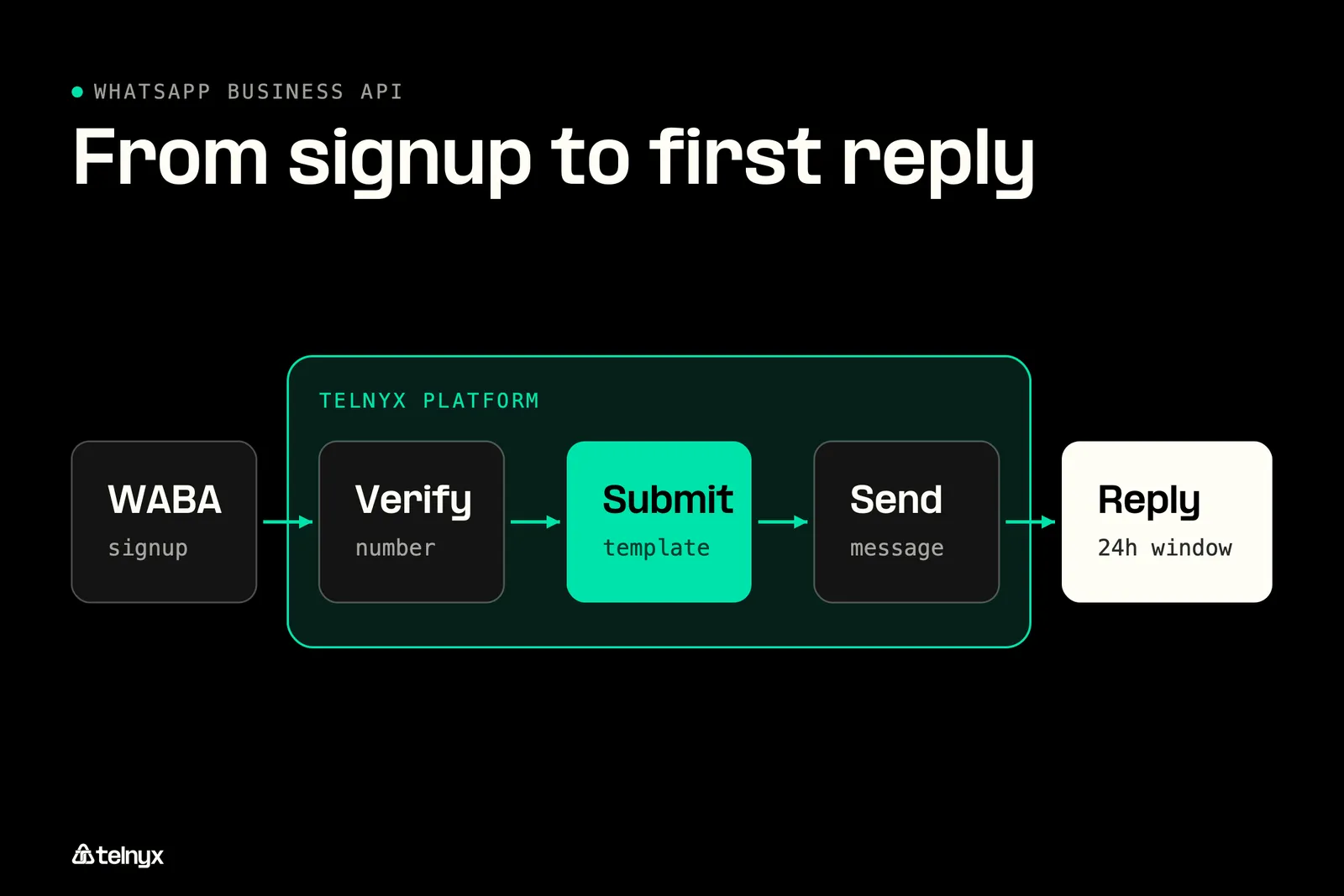
Three Mission Control steps take a Telnyx number from signup to a sent template before the first reply.
- Connect your WhatsApp Business Account (WABA). In Mission Control, open WhatsApp, then Connect, and select your WABA through Meta's embedded signup.
- Verify your number. Pick an active Telnyx number and enter the verification code Meta sends.
- Toggle calling on and start messaging. Flip WhatsApp Calling to enabled if you want calls, then create and submit your first message template for Meta approval and send it.
Step 1: Connect your WhatsApp Business Account with Embedded Signup
In Mission Control go to WhatsApp and choose Connect. Meta's Embedded Signup opens in place, you pick or create the WhatsApp Business Account to link, and you complete Meta business verification without switching tools. When it closes, your account is attached to your Telnyx account and templates can be managed from the same portal.
Step 2: Verify your number
Pick an active Telnyx number, or the BYON number you imported, and Meta sends a verification code to confirm you own it. Enter the code and the number is registered to your WhatsApp Business Account. Your SMS and voice traffic on that number carries on as before.
Step 3: Submit a template and send your first message
If you want calls, flip WhatsApp Calling to enabled, and the calling connection is created for you with no routing rules to write. Then create your first template, submit it for Meta approval, and once it is approved, send it. The request below sends an approved template named order_confirmation to one recipient with two body parameters, the customer's name and the order number. The template name must match one Meta has approved on your account, and the language code must match the language you submitted it in.
The full request schema, including media and interactive message types, is in the send a message reference. The path /v2/messages/whatsapp is the one line that differs from the SMS request your stack already makes.
Why Telnyx for WhatsApp Business API
Most providers bolt WhatsApp on as a separate channel with separate numbers and separate billing. Telnyx runs WhatsApp messaging and calling on a single Telnyx number alongside the public switched telephone network (PSTN), SIP and SMS, through one API, one dashboard and one bill. When you are consolidating SIP trunking, SMS and WhatsApp onto one vendor, that is the difference between adding a channel and adding a provider.
Direct to Meta, a BSP or Telnyx: which WhatsApp Business API route costs least?
You have three routes to the API: direct to Meta, through a business solution provider (BSP), or through Telnyx, and they differ in what you run and how you pay.
The three routes to the WhatsApp Business API
| Route | What you run yourself | How you pay |
|---|---|---|
| Direct to Meta Cloud API | Webhook server, token rotation, template tooling | Meta fee only, plus your engineering time |
| BSP inbox platform | Nothing technical, but a separate number and channel | Meta fee plus a subscription or seats |
| Telnyx | Your existing number and connection | Meta fee plus a per-message platform fee from $0.004, per-minute calls, no subscription, one invoice |
Meta's fee is the same with every provider, so the costs you control are the platform fee, any subscription, and the number of integrations your team maintains. A BSP seat for a channel you could have run on your existing number is the second of those, and a webhook server you wrote for Meta alone is the third. Compare providers in more depth in our guide to the best WhatsApp API provider, and see how the same single-vendor argument plays out in Telnyx vs Twilio for voice.
One number for messages and calls, routed to your SIP, Voice API or TeXML connection
One Telnyx number carries PSTN calls, SMS, WhatsApp messages and WhatsApp calls, with one set of analytics across all of it. Any WhatsApp user can call that number from inside the app, and the inbound call routes to your existing SIP, Voice API or TeXML connection with no additional setup. If you imported a BYON number, it gets the same inbound calling treatment, and you pick the SIP connection it routes to from a dropdown in Mission Control. Outbound calls go to any WhatsApp number through the Telnyx API using a WhatsApp SIP domain, with the same dial mechanics across SIP, Voice API and TeXML.
One number, every channel
PSTN, SMS, WhatsApp messages and WhatsApp calls on the same Telnyx number.
Calls routed to your connection
Inbound WhatsApp calls land on your SIP, Voice API or TeXML connection, BYON included.
AI Assistant on calls
A Telnyx AI Assistant answers inbound WhatsApp calls and places outbound ones.
For a call center, that routing means WhatsApp calls enter the queue you already run, billed per minute with no seat subscription, which the contact center solutions page covers. If you handle health data or serve customers in the EU, the same number sits inside the compliance boundary described in HIPAA on Telnyx and the setup notes for WhatsApp in Europe.
WhatsApp Business API FAQ
WhatsApp Business API by industry
Building for one vertical? Each guide covers the templates, the window and the cost for that business.
Send WhatsApp from the number you already use
Add WhatsApp messaging and calling to the Telnyx number and connection that already carry your voice and SMS, from $0.004 per message, with Meta's fee on the same invoice. No second provider, no second bill.
Start building for freeShare on Social
Deniz is a Senior Product Marketing Manager at Telnyx with 10 years of experience in technology and healthtech marketing. She previously led go-to-market initiatives at Philips Healthcare, Vodafone, and The Coca-Cola Company. Originally from Türkiye and based in Amsterdam, she ho


%20(1).png?width=96&format=webp)