
Voice
The 11 best speech-to-text models for product & engineering leaders
Compare the best speech-to-text models for real-time transcription, batch audio, self-hosting, pricing, and accuracy.

By Osman Husain

Quick answer: The best speech-to-text models in 2026 depend on your audio source, latency needs, and deployment model. 11 models and engines lead the field based on July 2026 benchmark research: Telnyx Speech-to-Text, Deepgram Nova-3, AssemblyAI Universal-Streaming, OpenAI gpt-4o-transcribe, ElevenLabs Scribe, Google Cloud Speech-to-Text, Azure AI Speech, Amazon Transcribe, OpenAI Whisper, NVIDIA Canary, and NVIDIA Parakeet.
Speech-to-text accuracy and speed benchmarks in 2026
All benchmark numbers below are a starting point, not a final vendor decision. Self-hosted model numbers come from the Hugging Face Open ASR Leaderboard results snapshot of July 7, 2026: average word error rate (WER) across its cleaned English test sets, and RTFx, which measures seconds of audio processed per second of compute.
Hosted model numbers come from the Artificial Analysis speech-to-text leaderboard as checked on July 8, 2026: AA-WER, a blended word error rate across its test sets, and a real-time speed factor.
Public benchmark snapshot
| Model | Accuracy | Speed | Languages | Streaming | Deployment |
|---|---|---|---|---|---|
| Telnyx Speech-to-Text | Engine-dependent: run the same call audio through 8 engines to compare | Engine-dependent | 100+ | Yes | Hosted API |
| Deepgram Nova-3 | 5.2% AA-WER | 529x speed factor | Multilingual | Yes | Hosted API |
| AssemblyAI Universal | 3.8% AA-WER (Universal-3 Pro: 3.1%) | 116x speed factor | Multilingual | Yes | Hosted API |
| OpenAI gpt-4o-transcribe | 4.0% AA-WER | 32.5x speed factor | Multilingual | API-dependent | Hosted API |
| ElevenLabs Scribe v2 | 2.2% AA-WER, best major-vendor score | 31.2x speed factor | Multilingual | API-dependent | Hosted API |
| Google Cloud Speech-to-Text | Not listed separately; Google's Gemini 3 Flash scores 2.9% AA-WER | Mode-dependent | 125+ | Yes | Hosted API |
| Azure AI Speech | 2.4% AA-WER (MAI-Transcribe-1.5) | 260x speed factor | 100+ | Yes | Hosted API |
| Amazon Transcribe | 4.1% AA-WER | 15.5x speed factor | Broad coverage | Yes | Hosted API |
| OpenAI Whisper large-v3 | 6.6% average WER | 462x RTFx | Multilingual | Implementation-dependent | Self-hosted |
| NVIDIA Canary-Qwen 2.5B | 5.1% average WER, best open model listed | 861x RTFx | English (Canary-1B-v2 covers 25 languages) | Implementation-dependent | Self-hosted |
| NVIDIA Parakeet TDT 0.6B v3 | 5.7% average WER | 6,098x RTFx, fastest listed | 25 | Implementation-dependent | Self-hosted |
Word error rate measures how many words a speech-to-text system gets wrong after insertions, deletions, and substitutions. A 5% WER means roughly 5 words out of 100 differ from the reference transcript. WER is useful, but it changes sharply by dataset, microphone, language, accent, noise, and whether the audio is 8 kHz phone audio or clean wideband speech.
Streaming transcription returns text while audio is still arriving. Batch transcription waits for a full file or large chunk before processing. Streaming matters for voice agents, live captions, and agent assist because late transcripts slow the whole interaction. Batch still works well for podcasts, meetings, media archives, and post-call analytics.
Hosted APIs give teams managed infrastructure, scale, support, and published endpoints. Self-hosted models give teams more control over data locality, tuning, and cost at high volume. The trade-off is operational work: GPU capacity, updates, monitoring, failover, and security become your responsibility.
Best speech-to-text models and engines
The best speech-to-text models mix hosted APIs for production speed with open-source models for teams that need control, tuning, or very high batch throughput. Let's explore our recommendations in more detail.
1. Telnyx Speech-to-Text
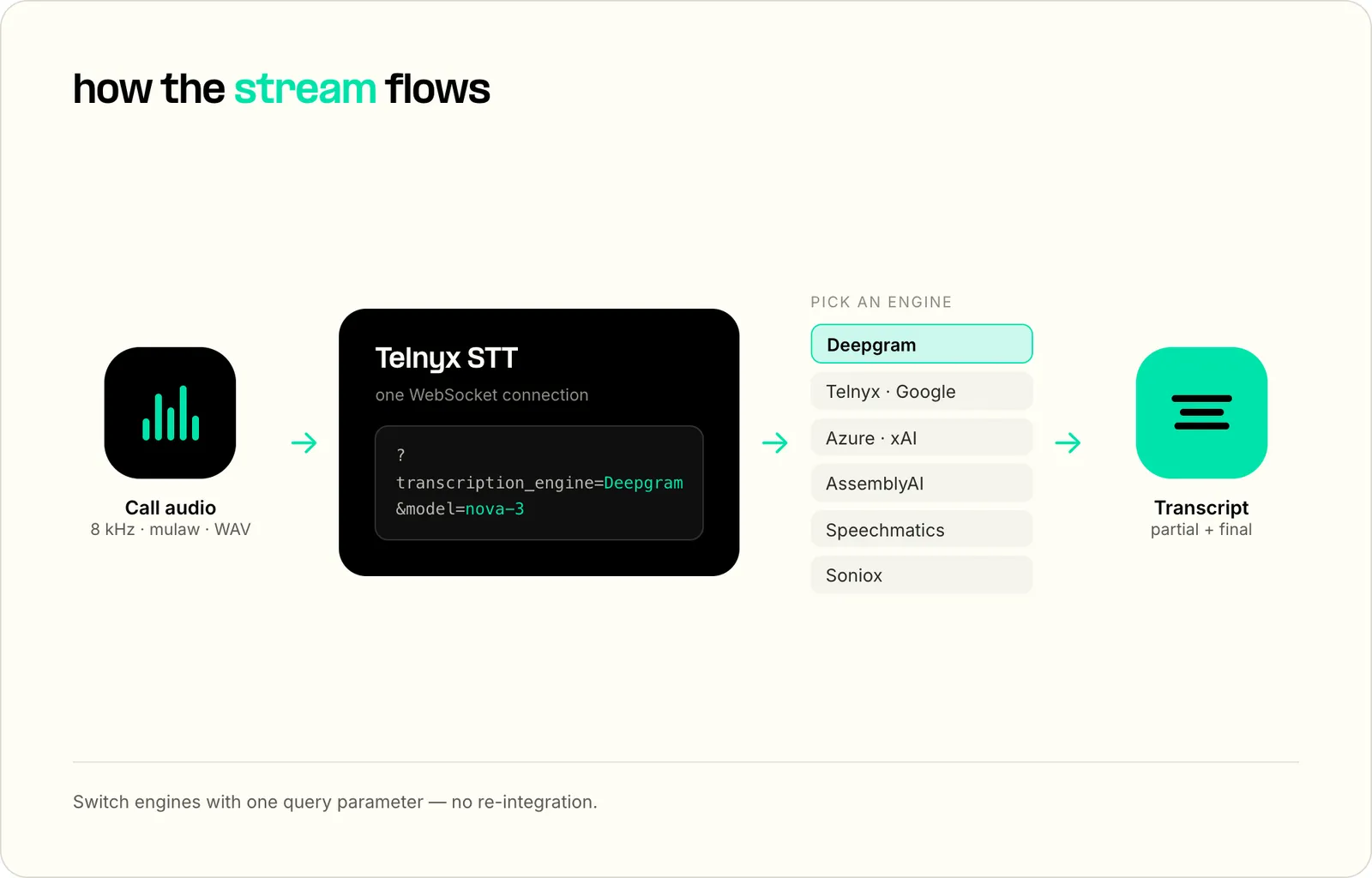
Telnyx's Speech-to-Text API runs eight transcription engines, including Deepgram Nova-3, AssemblyAI Universal-Streaming, and Telnyx's own Whisper-based model, through one WebSocket connection, with published per-engine rates from $0.007 to $0.027 per minute.
Best for: Teams building live call transcription, voice agents, and phone-support workflows that need to test multiple STT engines on production call audio before committing.
Key strengths:
- Runs Deepgram, Telnyx, Google, Azure, xAI, AssemblyAI, Speechmatics, and Soniox through one WebSocket API.
- Supports telephony audio formats such as mulaw, alaw, AMR, G.729, Speex, linear16, and WAV depending on engine.
- Clear, transparent pricing for every hosted engine, from AssemblyAI to Azure, on the Telnyx speech-to-text pricing page.
Limitations:
- The same feature is not available on every engine. For example, interim results are documented for Deepgram, Speechmatics, and Soniox only.
- Full value comes when the call path already runs through Telnyx Voice API, TeXML, or the Telnyx STT WebSocket flow.
Transcription use cases:
- Live call transcription for contact centers and agent assist.
- Voice AI agents that need engine switching without separate STT integrations.
- Benchmarking 8 kHz phone audio across engines before standardizing.
Telnyx's compliance posture: SOC 2 Type II, HIPAA, PCI DSS Compliant, ISO 27001, GDPR.
The code below adapts the Telnyx WebSocket streaming example. It sets transcription_engine and model in the connection URL, so the same client can test another engine by changing query parameters.
Get started with Telnyx Speech-to-Text: real-time transcription over one API with eight engine options and published per-engine STT pricing from $0.007 to $0.027 per minute.
2. Deepgram
Deepgram is a hosted speech-to-text API with strong real-time options. Nova-3 is the primary accuracy model, while Flux is built for voice agents that need turn detection and fast conversational response.
Best for: Real-time voice products that prioritize streaming behavior, turn detection, and developer control over transcription parameters.
Key strengths:
- Nova-3 supports monolingual and multilingual transcription options with public pay-as-you-go pricing.
- Flux is built for conversational voice agents with built-in turn detection.
- Add-ons include redaction, keyterm prompting, smart formatting, and diarization.
Limitations:
- Direct use still creates a separate STT integration from telephony unless the voice stack already routes audio to Deepgram.
- Some features add extra per-minute cost, including redaction, keyterm prompting, and diarization.
Transcription use cases:
- Real-time captions for calls, meetings, and voice products.
- Voice agent listening where end-of-turn handling matters.
- Transcription workflows that need domain terms, formatting, or redaction.
Compliance posture: Deepgram's pricing page lists SOC 2 Type 1 and Type 2, HIPAA, GDPR readiness with EU data residency, CCPA, and PCI compliance.
 Dr. Sonam Gupta | Expert perspective: real-time voice infrastructure Speech-to-text accuracy matters most when the full voice pipeline can keep up with the caller. "Model quality is only one part of a real-time voice pipeline. The hard part is running STT, inference, TTS, and telephony close enough together that the full conversation loop stays responsive. If those pieces cross vendor or cloud boundaries, every hop adds latency and another place for production calls to fail." |
3. AssemblyAI
AssemblyAI combines transcription with speech understanding features such as diarization, summarization, sentiment, and PII handling. Its current flagship, Universal-3.5 Pro, handles recorded audio, while Universal-3.5 Pro Realtime handles streaming and powers its Voice Agent API.
Best for: Developers who want transcripts plus higher-level speech understanding in one API.
Key strengths:
- Universal-3.5 Pro (pre-recorded) is listed at $0.21 per audio hour
- Real-time and prerecorded products live under the same platform, with a Voice Agent API bundling speech-to-text, LLM, and text-to-speech at a flat $4.50 per hour.
- Speech Understanding add-ons cover summaries, topics, speaker identity, sentiment, entities, and guardrails.
Limitations:
- Real-time multilingual support (18 languages on Universal-3.5 Pro Realtime) is narrower than hyperscaler language catalogs.
- Add-ons and the higher streaming rate ($0.45 per hour base for Universal-3.5 Pro Realtime) can change the true cost per transcribed hour.
Transcription use cases:
- Meeting intelligence and call analytics.
- AI notetakers and agent-assist products.
- Transcription workflows that need speaker labels or post-processing.
Compliance posture: AssemblyAI's security page lists SOC 2 Type 1 and Type 2, PCI DSS 4.0 Level 1, and GDPR compliance. It signs HIPAA business associate agreements.
4. OpenAI
OpenAI offers hosted transcription through models such as gpt-4o-transcribe and gpt-4o-mini-transcribe, plus the older Whisper API. It fits teams that already use OpenAI for LLM workflows and want transcription in the same vendor account.
Best for: Teams standardizing AI workloads on OpenAI and transcribing recorded audio or app audio with a hosted API.
Key strengths:
- OpenAI lists gpt-4o-transcribe at an estimated $0.006 per minute.
- The speech-to-text docs support common transcription patterns, including prompt hints and verbose JSON.
- Whisper remains a widely adopted model family with broad community familiarity.
Limitations:
whisper-1streamed transcription is documented as unsupported.- OpenAI is not a telephony provider, so phone-call transcription still needs call capture and audio transport.
Transcription use cases:
- Product audio transcription inside OpenAI-based apps.
- Recorded audio processing for support, research, and media.
- Teams that want STT, LLM, and downstream analysis from one AI vendor.
Compliance posture: OpenAI documents SOC 2 Type 2 and ISO 27001-family certifications through its trust portal and signs HIPAA business associate agreements for qualifying customers. PCI DSS is not listed.
 Alex Cohen | Customer story: Hello Patient Hello Patient uses Telnyx Voice AI infrastructure to power AI agents across voice, text, and web chat for healthcare workflows, with more than 5 million conversations powered in under two years. “We're seeing more appointments being booked with fewer staff needed to run call centers and traditional phone lines.” |
5. ElevenLabs
ElevenLabs Scribe is a hosted speech-to-text model from a company better known for speech generation. It is a strong candidate for teams already using ElevenLabs audio tooling and evaluating high-accuracy multilingual transcription.
Best for: Teams using ElevenLabs for audio workflows that also need hosted speech-to-text.
Key strengths:
- Scribe has strong visibility in current AI search and independent benchmark discussions.
- Speech to Text is available inside ElevenLabs shared credit plans.
- The pricing page lists Speech to Text usage at 330 credits per minute.
Limitations:
- Credit-based pricing can be harder to compare against simple per-minute STT APIs.
- Teams focused on live phone calls still need separate telephony capture and routing.
Transcription use cases:
- Multilingual media transcription.
- Creator and production workflows that already use ElevenLabs.
- Audio applications that pair generated speech with transcript output.
Compliance posture: ElevenLabs lists SOC 2 Type II, ISO 27001, and PCI DSS Level 1, with HIPAA-eligible services under business associate agreements for qualifying enterprise plans and GDPR alignment.
6. Google Cloud Speech-to-Text
Google Cloud Speech-to-Text is a hyperscaler STT service with broad language coverage and mature cloud deployment options. It is often a fit when transcription already lives inside Google Cloud data, storage, and analytics pipelines.
Best for: Cloud teams that need large language catalogs, long-form transcription, and Google Cloud integration.
Key strengths:
- Google lists standard recognition pricing from $0.016 per minute before volume tiers.
- Telnyx docs list Google
latest_longas a WebSocket engine for long-form multilingual audio. - Google Cloud fits batch and cloud-native analytics pipelines.
Limitations:
- Direct Google Cloud use is separate from telephony unless you build or buy the audio bridge.
- Pricing and feature availability vary by API version, model, and region.
Transcription use cases:
- Long-form multilingual transcription.
- Media archives, analytics, and cloud data workflows.
- Teams already standardized on Google Cloud.
Compliance posture: Google Cloud compliance depends on service configuration, region, account controls, and contract terms.
7. Azure AI Speech
Azure AI Speech fits enterprises already standardized on Microsoft cloud, identity, governance, and procurement. It supports real-time and batch transcription options, with custom speech paths for teams that need domain adaptation.
Best for: Enterprises that need speech services inside Azure governance and procurement.
Key strengths:
- Telnyx docs list Azure
azure/fastas a WebSocket engine for broad language and accent coverage. - Azure supports standard and custom transcription paths.
- Microsoft cloud controls can simplify enterprise approval for existing Azure customers.
Limitations:
- The public pricing page can be difficult to quote because displayed values vary by region, currency, SKU, and account context.
- Direct Azure use still needs a separate telephony or media streaming path for live phone calls.
Transcription use cases:
- Enterprise call analytics and internal voice workflows.
- Regulated teams that already use Microsoft cloud controls.
- Custom speech projects with domain vocabulary.
Compliance posture: Azure compliance depends on region, service configuration, and Microsoft contract terms.
| Platform | Best for | Why it made the list | Pricing |
|---|---|---|---|
| Telnyx Speech-to-Text | Teams transcribing live phone calls that want to test engines before committing | Runs 8 engines through one API, with switching controlled by query parameters | Per-engine rates from $0.007 to $0.027/min, published |
| Deepgram | Real-time voice agents that need low-latency streaming | Nova-3 leads hosted streaming benchmarks; Flux adds built-in end-of-turn detection | Nova-3 streaming listed from $0.0048/min on Deepgram pay as you go |
| AssemblyAI | Developers adding speech understanding on top of transcription | Universal-Streaming is purpose-built for voice agents; diarization, sentiment, and PII handling ship in the same API | Universal-Streaming listed at $0.15/hr |
| OpenAI | Teams consolidating transcription and LLM spend on one vendor | gpt-4o-transcribe and the Whisper API; Whisper is the most widely adopted model family in the category | gpt-4o-transcribe listed at an estimated $0.006/min |
| ElevenLabs | High-accuracy multilingual transcription of recorded audio | Scribe ranks at the top of independent accuracy leaderboards | Credit-based pricing, Speech to Text listed at 330 credits/min |
| Google Cloud Speech-to-Text | Multilingual transcription at global scale | Hyperscaler STT option for teams already using Google Cloud | Standard recognition listed from $0.016/min before volume tiers |
| Azure AI Speech | Enterprises standardized on the Microsoft stack | Speech service option inside existing Azure governance | Per-hour speech pricing varies by region and SKU |
| Amazon Transcribe | AWS-native audio pipelines | Call analytics and medical variants without leaving AWS | Tier 1 listed at $0.01/min streaming and $0.006/min batch |
| OpenAI Whisper | Self-hosting teams that want a free general-purpose model | Most-forked open STT model and the default self-hosted baseline | Free model, compute costs apply |
| NVIDIA Canary | Teams optimizing open-source accuracy | Tops open-source accuracy leaderboards | Free model, compute costs and license review apply |
| NVIDIA Parakeet | High-throughput batch transcription | Fastest model on public leaderboards | Free model, compute costs and license review apply |
8. Amazon Transcribe
Amazon Transcribe is the AWS-native option for speech-to-text. It fits teams that already store audio in S3, process events through AWS services, or need call analytics and medical transcription variants inside the same cloud account.
Best for: AWS-native teams with audio, contact-center, or analytics pipelines already inside AWS.
Key strengths:
- Integrates naturally with S3, Lambda, Contact Lens, and other AWS services.
- Supports specialized variants such as Call Analytics and medical transcription.
- Fits batch processing and cloud event workflows.
Limitations:
- Teams outside AWS may add complexity by moving audio into a separate cloud path.
- Live voice-agent use cases still need low-latency call capture and routing design.
Transcription use cases:
- AWS-hosted call analytics.
- Medical and customer-support transcription workflows.
- Batch transcription jobs tied to S3 events.
Compliance posture: AWS compliance depends on region, service configuration, and contract terms.
The first eight entries are hosted APIs. The next three are open-source models, which shift the question from vendor pricing to deployment cost, license review, GPU capacity, and operational support.
9. OpenAI Whisper
OpenAI Whisper remains the default open-source baseline for many speech-to-text teams. It is general-purpose, multilingual, widely forked, and supported by a large tooling community.
Best for: Teams that want a familiar self-hosted STT baseline with broad language support and no model API fee.
Key strengths:
- Whisper large-v3 remains a common benchmark reference in ASR comparisons.
- The model family has broad community tooling across Python, servers, and desktop apps.
- Self-hosting gives teams direct control over data path and infrastructure.
Limitations:
- Self-hosting creates operational work for serving, scaling, monitoring, and model updates.
- Real-time performance depends on hardware, model size, quantization, and implementation.
Transcription use cases:
- Internal transcription pipelines.
- Offline batch processing.
- Teams that need control over audio handling.
License and deployment: Whisper is open source under the MIT license. Self-hosted deployments have no vendor SLA unless the team buys or builds managed support.
10. NVIDIA Canary
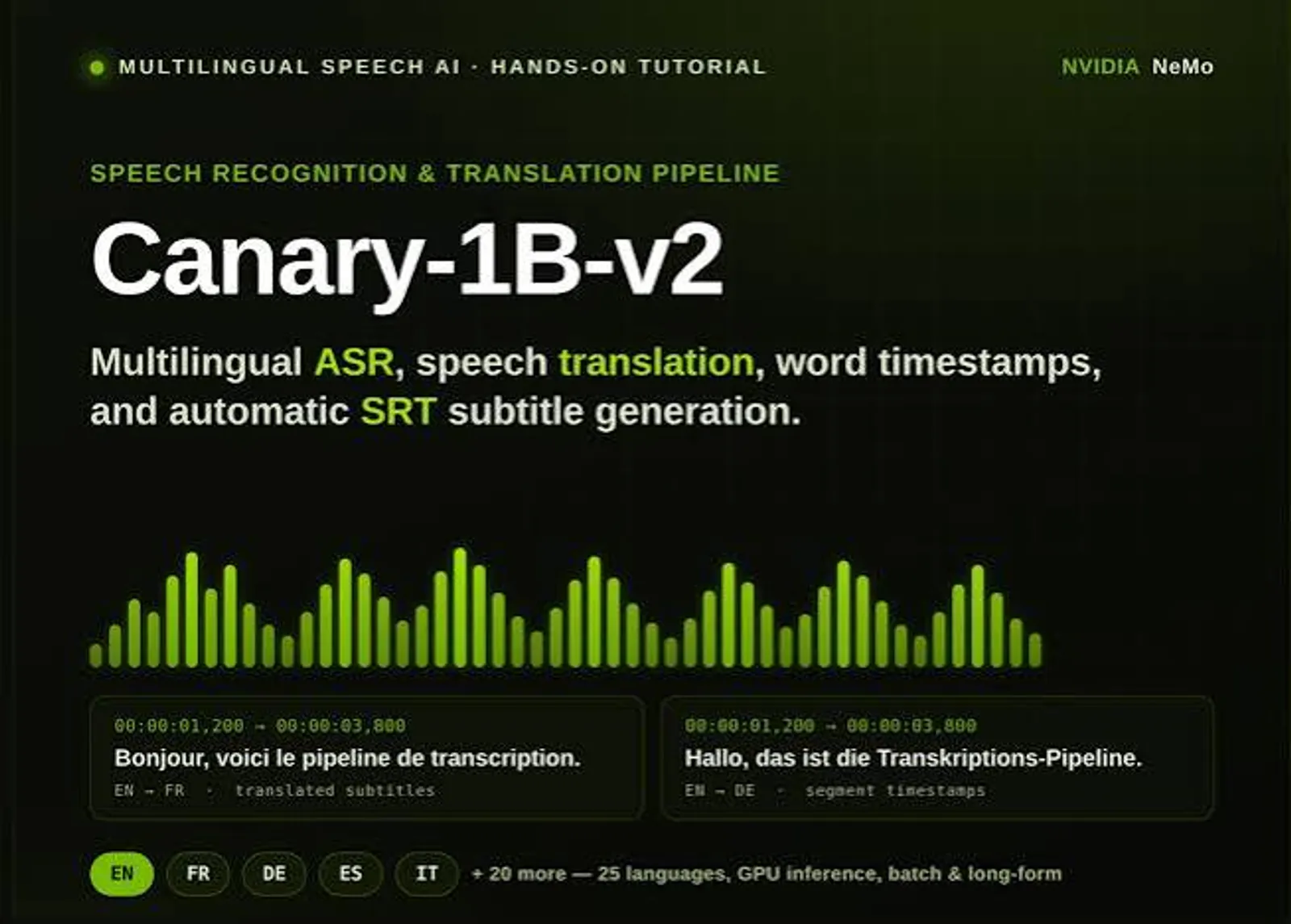
NVIDIA Canary is an open model family focused on high-accuracy ASR and speech translation. The 2025 Canary-1B-v2 report describes a multilingual model trained on large-scale data and released with Parakeet-TDT-0.6B-v3.
Best for: Teams that prioritize open-model accuracy and have the infrastructure to serve speech models.
Key strengths:
- The Canary-1B-v2 report states that Canary outperforms Whisper large-v3 on English ASR while being 10x faster.
- The model supports ASR and speech-to-text translation across 25 primarily European languages.
- It is a strong candidate when open deployment and benchmark accuracy matter.
Limitations:
- Language coverage is narrower than Google, Azure, or Whisper.
- Production use requires license review, GPU planning, and serving infrastructure.
Transcription use cases:
- High-accuracy self-hosted transcription.
- Research and benchmarking against Whisper.
- Controlled deployments where audio should not leave owned infrastructure.
License and deployment: Canary-1B-v2 and Canary-Qwen-2.5B are released under CC-BY-4.0; the original Canary-1B is CC-BY-NC-4.0, so check the exact variant before commercial use. Self-hosted deployments have no vendor SLA unless the team adds managed support.
11. NVIDIA Parakeet
NVIDIA Parakeet is an open model family designed for fast ASR. It is a fit for teams that process large volumes of audio and care about throughput as much as raw accuracy.
Best for: High-throughput batch transcription where speed and infrastructure efficiency matter.
Key strengths:
- Public benchmark discussions place Parakeet among the fastest ASR options.
- The 2025 NVIDIA report describes Parakeet-TDT-0.6B-v3 as a 600M-parameter multilingual ASR model.
- Smaller model size can reduce serving cost compared with larger encoder-decoder models.
Limitations:
- Throughput gains only matter if the deployment stack keeps GPUs fed efficiently.
- Teams still need license review, model monitoring, and fallback handling.
Transcription use cases:
- Batch transcription at high volume.
- Internal media processing.
- Cost-sensitive self-hosted ASR pipelines.
License and deployment: Parakeet-TDT-0.6B-v3 is released under CC-BY-4.0, which permits commercial use with attribution. Self-hosted deployments have no vendor SLA unless the team adds managed support.
Choosing the right speech-to-text model
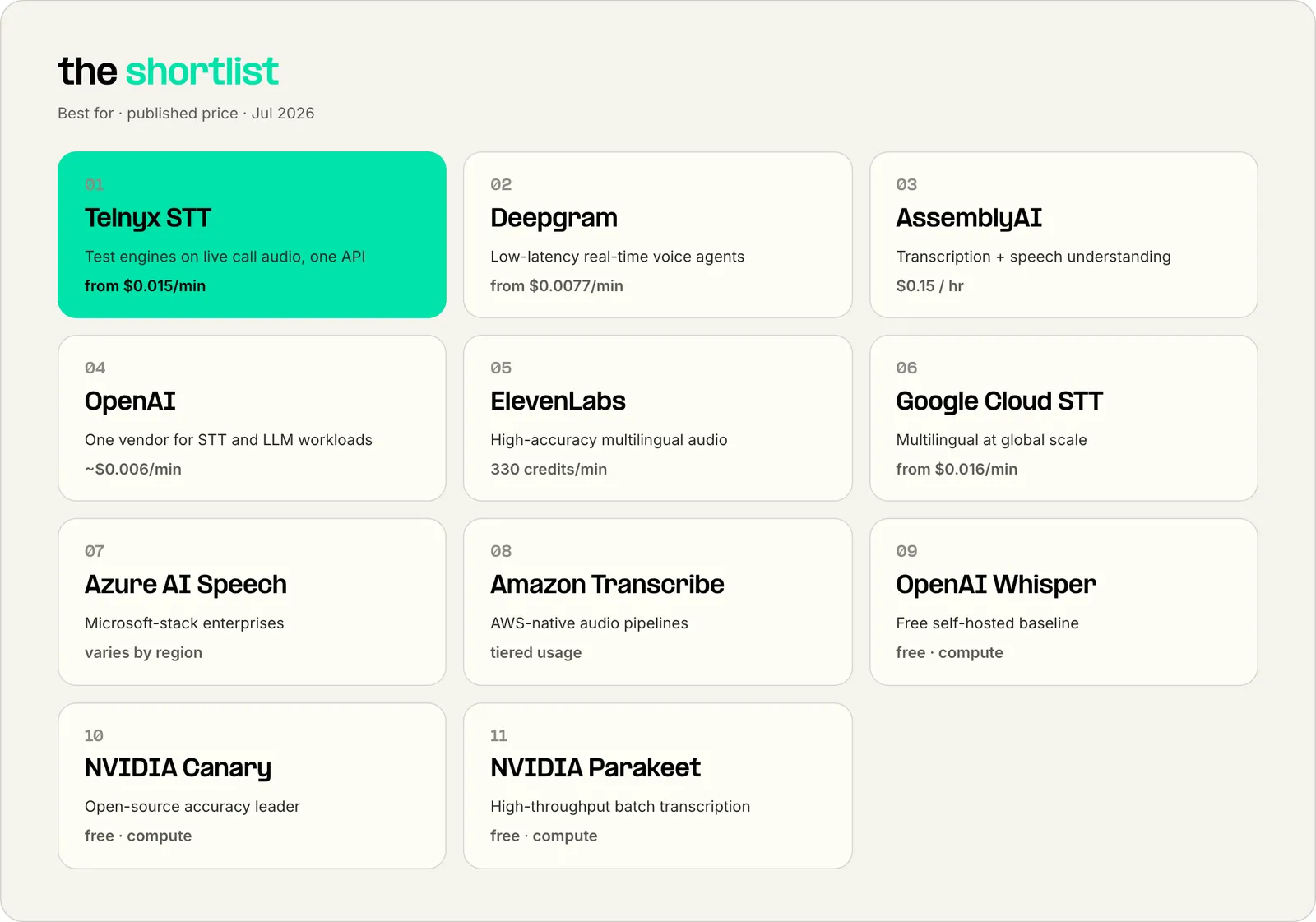
The category splits by audio source and deployment model, so match the engine to the job:
- Choose Telnyx Speech-to-Text if you're transcribing live phone calls and want to benchmark multiple engines on production audio before committing to one.
- Choose Deepgram if you're building a voice agent and streaming behavior, turn detection, and low latency matter more than raw leaderboard accuracy.
- Choose AssemblyAI if you need speaker labels, sentiment, summaries, or PII handling in the same API as the transcript.
- Choose OpenAI if your transcription volume is recorded audio and you want STT and LLM spend consolidated on one vendor account.
- Choose ElevenLabs Scribe if you're transcribing recorded multilingual audio and accuracy is the deciding criterion.
- Choose Google Cloud or Azure AI Speech if your audio already lives in that cloud and enterprise governance decides the vendor shortlist.
- Choose Amazon Transcribe if your pipeline is S3-native or you need the call analytics and medical variants inside AWS.
- Choose Whisper if you're self-hosting and want the most widely supported open baseline with the largest tooling community.
- Choose NVIDIA Canary if you're self-hosting and open-model accuracy is the priority.
- Choose NVIDIA Parakeet if you're self-hosting for high-volume batch work and throughput per GPU drives your cost.
Two honest warnings:
1. Avoid picking from clean-audio leaderboards alone if your traffic is 8 kHz phone audio since compressed, multi-speaker calls produce different failure modes; benchmark on your own call recordings. 2. Avoid self-hosted models unless you have the GPU capacity and on-call ownership to run them; a free model with no one watching it costs more than a hosted API the first time production transcription breaks.
Speech-to-text pricing in 2026
| Vendor | Public rate | Pricing model |
|---|---|---|
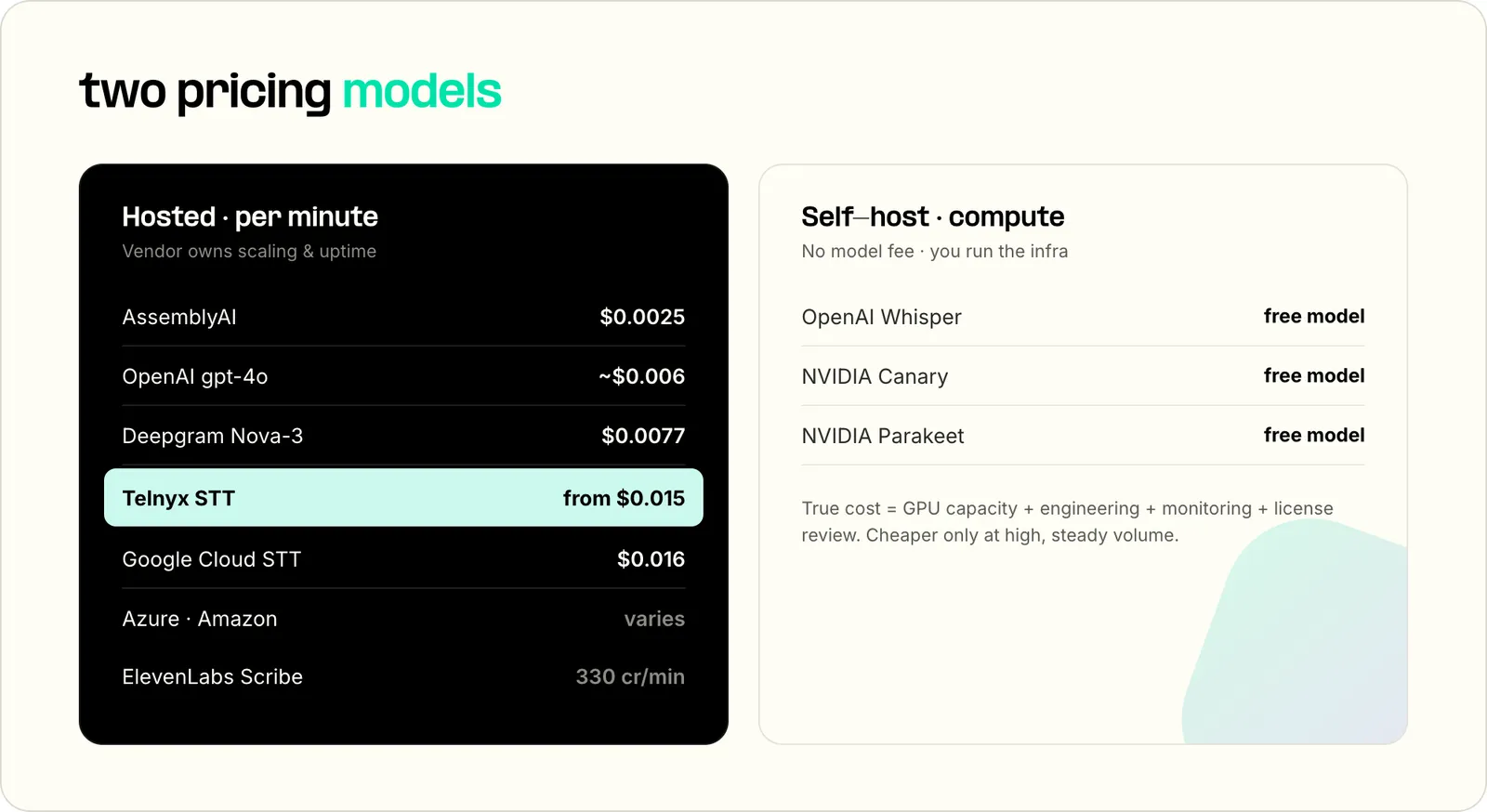
| Telnyx Speech-to-Text | $0.007 to $0.027/min pay as you go, by engine | Per minute by engine |
| Deepgram Nova-3 | $0.0048/min streaming, $0.0077/min pre-recorded, pay as you go | Per minute |
| AssemblyAI Universal-Streaming | $0.15/hr | Per audio hour |
| OpenAI gpt-4o-transcribe | Estimated $0.006/min | Per audio minute estimate from token pricing |
| ElevenLabs Speech to Text | 330 credits/min | Shared credit pool |
| Google Cloud Speech-to-Text | From $0.016/min for standard recognition | Per minute with tiers |
| Azure AI Speech | Varies by region and SKU | Per audio hour |
| Amazon Transcribe | $0.01/min streaming, $0.006/min batch (tier 1, US) | Per minute, tiered |
| OpenAI Whisper | Free model | Self-hosted compute |
| NVIDIA Canary | Free model | Self-hosted compute |
| NVIDIA Parakeet | Free model | Self-hosted compute |
Speech-to-text pricing usually falls into two models: hosted per-minute pricing and self-hosted compute cost. Hosted APIs are easier to budget at low and medium volume because the vendor owns scaling, uptime, and model updates. Self-hosted models can become cheaper at high volume, but only after accounting for GPU utilization, engineering time, monitoring, and support.
Telnyx's Speech-to-Text API switches engines with a single query parameter, so teams benchmark Deepgram, AssemblyAI, Google, Azure, xAI, Speechmatics, and Soniox on their own call audio without re-integrating. The speech-to-text pricing page publishes the per-minute rate for each engine, so the comparison below starts from public numbers rather than quotes.
Public pricing snapshot
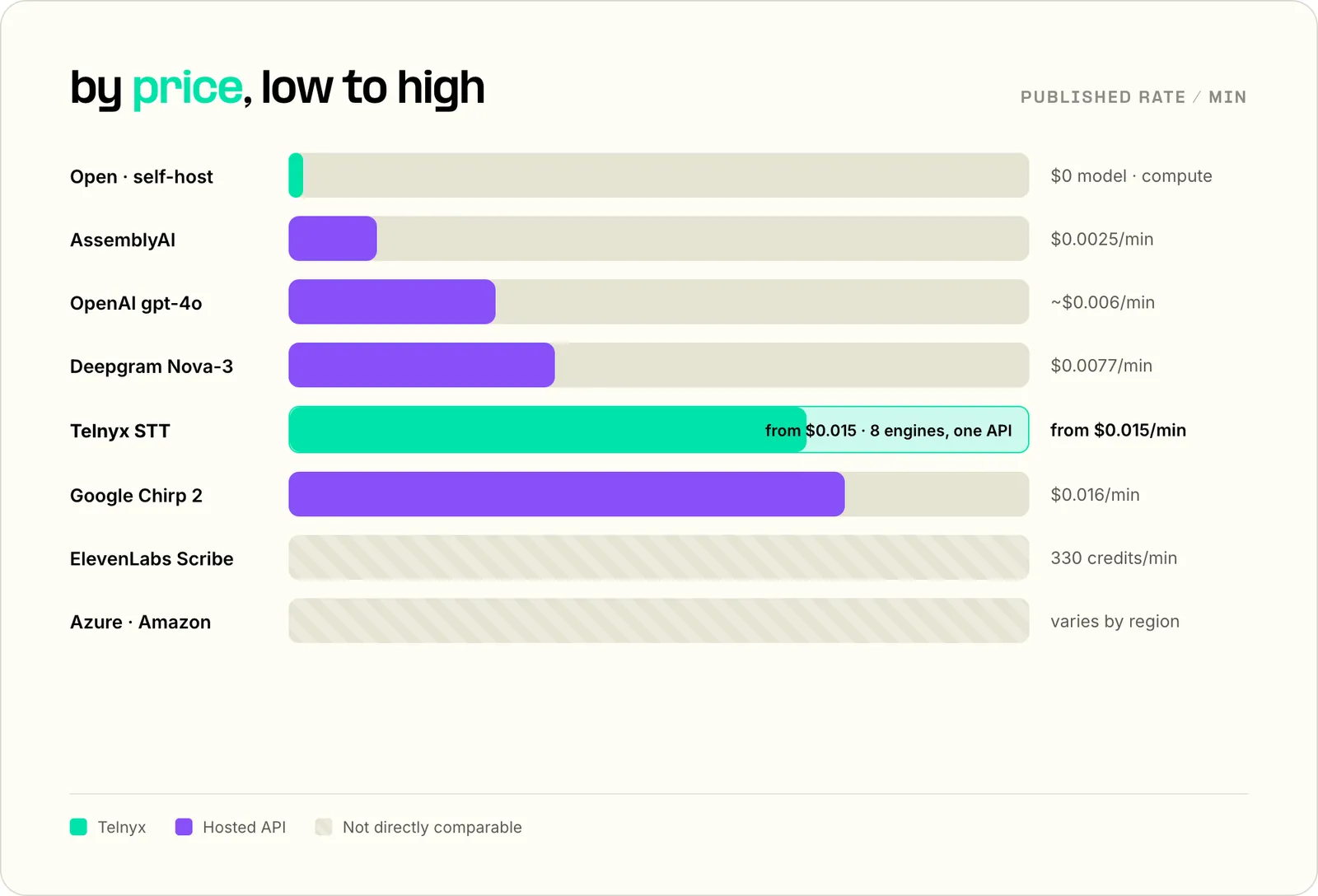
Billing mechanics matter as much as the rate. AssemblyAI's streaming rate bills on session duration rather than audio duration, so a WebSocket that stays open for an hour with 30 minutes of speech bills for the full hour.
For live calls, the lowest published STT price is not always the lowest production cost. A cheaper model that drops domain terms, mishandles silence, or fails on 8 kHz audio can create higher downstream review cost. Benchmark on your own call audio before standardizing.
Build real-time transcription into your voice stack
Compare speech-to-text engines through one Telnyx API, then route live call audio to the model that fits your accuracy, latency, and cost needs.
Book a demoHow I evaluated speech-to-text models
Transcription accuracy
Accuracy is the first filter, but it cannot be judged by a single leaderboard. According to the Open ASR Leaderboard paper, ASR evaluation is often saturated with short-form English tests, which makes long-form, multilingual, and efficiency reporting important.
Use WER as a baseline, then test your own audio.
Real-time streaming and latency
Real-time speech-to-text needs more than fast model inference. The system has to ingest audio, detect speech boundaries, emit partials, finalize text, and recover from connection issues without blocking the user experience.
Voice agents are especially sensitive to turn handling. A model that is accurate after the fact can still feel slow if it waits too long to decide the speaker has finished.
Pricing transparency
Pricing should be visible before integration work starts. A public per-minute or per-hour price lets teams estimate cost across call volume, language coverage, add-ons, and expected retry behavior.
Watch add-ons. Redaction, diarization, formatting, custom vocabulary, and summaries can change the actual cost per usable transcript.
Language coverage
Language count only matters if it covers your real traffic. A vendor can advertise broad language coverage and still perform poorly on regional accents, code switching, noisy calls, or specialized terms.
For multilingual products, test each priority language with production-like audio. Do not use English benchmark performance as a proxy for every market.
Deployment model and telephony fit
Hosted APIs are fastest to ship. Self-hosted models give more control. Neither model wins by default.
For phone calls, telephony fit matters because production audio is not clean podcast audio. Calls are often 8 kHz, compressed, interrupted, and multi-speaker. The best STT model for a clean file may not be the best STT engine for live call transcription.
For a deeper walkthrough, see choosing an STT engine.
What speech-to-text engines are used for
Speech-to-text engines turn spoken audio into text for applications that need search, automation, analytics, or live response. Common use cases include contact-center transcription, healthcare notes, voice AI agents, accessibility captions, meeting summaries, media subtitles, and compliance review.
Healthcare teams use speech-to-text for clinical documentation: physicians dictate notes directly into electronic health records instead of typing after hours. Medical transcription engines are trained on clinical terminology, and HIPAA eligibility decides which vendors qualify. Amazon Transcribe ships a medical variant, and Telnyx covers HIPAA across its platform.
Legal and financial teams use speech-to-text to transcribe depositions, client meetings, and earnings calls into searchable records. Accuracy requirements are stricter here because a transcript can become evidence or a compliance artifact. Prioritize engines with custom vocabulary for case names and tickers, and confirm data retention terms before sending privileged audio to any hosted API.
The most demanding use cases are live ones. Conversational AI workloads like voice agents, agent assist, live captions, and call routing need streaming output with low delay.
Phone-call transcription deserves a separate test because the audio path is different. The engine has to handle narrowband audio, background noise, crosstalk, silence, and interruptions without turning every pause into a broken transcript.
Frequently asked questions about speech-to-text models
What is the best speech-to-text model in 2026?
The best speech-to-text models in 2026 depend on the audio and deployment model. For hosted real-time use, Deepgram Nova-3, AssemblyAI Universal-Streaming, OpenAI gpt-4o-transcribe, ElevenLabs Scribe, and Telnyx Speech-to-Text are strong candidates. For self-hosted use, Whisper, NVIDIA Canary, and NVIDIA Parakeet are the main models to test.
What is the most accurate speech-to-text model?
The most accurate speech-to-text model changes by benchmark and audio type. On the Artificial Analysis leaderboard checked July 8, 2026, ElevenLabs Scribe v2 posts the best major-vendor hosted score at 2.2% AA-WER, and on the Open ASR Leaderboard's July 7 snapshot, NVIDIA Canary-Qwen 2.5B leads open models at 5.1% average WER. Treat leaderboards as a shortlist, then test your own language mix, noise level, and domain vocabulary for a confident decision.
What is an STT engine?
An STT engine is the speech recognition system that turns audio into text. It receives audio, detects speech, predicts words, and returns a transcript. Some STT engines run as hosted APIs, while others are open-source models that teams deploy themselves. For live calls, the engine also has to handle streaming audio, silence, interruptions, and final transcript timing.
Which speech-to-text API has the highest accuracy for technical terminology?
The most accurate speech-to-text API for technical terminology is usually the one that supports domain hints, keyword boosting, custom vocabulary, or model prompting for your terms. Deepgram, Google, Azure, AssemblyAI, and Telnyx-routed engines are worth testing. Test on drug names, account IDs, acronyms, and noisy samples before making a firm decision.
What is the best real-time speech-to-text model?
The best real-time speech-to-text model is the one that balances accuracy, partial results, finalization speed, and turn detection for your use case. Deepgram Nova-3 and Flux, AssemblyAI Universal-Streaming, and Telnyx Speech-to-Text are practical candidates for live products because they are built around streaming APIs rather than file-only transcription.
Which STT model performs best on noisy audio?
Noisy-audio performance depends on the noise type: background speech, hold music, far-field microphones, and 8 kHz phone audio create different failure modes. Clean-audio leaderboard leaders like ElevenLabs Scribe and NVIDIA Canary are worth testing, but for phone calls, Telnyx applies noise suppression on the call path before transcription, improving accuracy across engines.
Which transcription engines are optimized for phone conversations?
The best speech-to-text engine for phone calls is the one that performs well on 8 kHz, compressed, noisy, multi-speaker audio. Telnyx Speech-to-Text is a strong fit because it supports live-call transcription through Telnyx Voice API and TeXML, and lets teams test multiple engines through one transcription API.
How much does speech-to-text transcription cost per minute?
Speech-to-text transcription pricing depends on the provider, model, add-ons, and deployment model. Hosted APIs are usually priced per minute or per audio hour. Self-hosted models have no per-minute model fee, but compute and operations still count.
What are the best speech-to-text solutions for startups and small businesses?
The best speech-to-text solutions for startups and small businesses are usually hosted APIs with clear pricing, quick setup, and enough model choice to avoid re-integration later. Telnyx Speech-to-Text, Deepgram, AssemblyAI, OpenAI, Google, Azure, and Amazon Transcribe are all viable options.
Share on Social
Osman is the Global AEO/SEO Lead at Telnyx, helping make voice AI and communications products clearer for builders. With almost a decade of experience in SEO, he previously led growth at Windscribe and Enzuzo, shipping and scaling organic programs that reached millions.


