
SIP Trunking
SIP DID numbers: what they are and how they work
Learn what a SIP DID number is, how DIDs route over SIP trunks and channels, what a DID costs, and how to choose a SIP DID provider you can rely on.

Takeaways
A SIP DID is a Direct Inward Dialing (DID) number delivered over Session Initiation Protocol (SIP): an ordinary phone number that reaches your PBX (private branch exchange, the business phone system) or app over the internet instead of a phone line. When someone calls it, the carrier sends your system a SIP INVITE, the short message that announces an incoming call, and that message carries the number the caller dialed in international format (+15125550123). Your PBX reads the number and rings the extension, queue or app it belongs to.
- DID numbers decide where a call goes, the SIP trunk decides how it gets there, and SIP channels are the number of simultaneous calls the trunk carries.
- Size channels from busiest-hour concurrent calls, not headcount. A desk that peaks at 12 simultaneous calls needs at least 12 channels whether it seats 4 agents or 40.
- Every DID carries regulatory duties: a registered E911 (Enhanced 911) address, STIR/SHAKEN caller ID attestation on outbound calls, and 10DLC (10-digit long code) or toll-free verification before it can send SMS text messages.
- On Telnyx, the trunk connection, its authentication and its failover destination take a few lines of code or a few clicks in the Mission Control Portal, and the number is assigned to it in the same place.
What is SIP DID? Direct Inward Dialing explained
Direct Inward Dialing (DID) is a phone number that routes an external caller straight to a specific person, department or application on your phone system, with no operator and no menu in between. A SIP DID is that same number delivered over a SIP trunk rather than a physical line, so the carrier hands you the call as an Internet Protocol (IP) session and your system decides which extension, queue or webhook answers it.
DID number meaning in VoIP
In VoIP (voice over IP), a DID number is a virtual number, not bound to a copper pair or a gateway port, that can be pointed at any SIP endpoint the carrier can reach. Over SIP it is written in E.164, the International Telecommunication Union's ITU E.164 international numbering plan: a plus sign, a country code and the subscriber number, up to 15 digits, so +15125550123 rather than (512) 555-0123. Your PBX matches that exact string, which is why the format matters when calls go missing.
The surrounding terms describe the same number from different angles: DDI (Direct Dial-In) is the UK and European term, SIP number and virtual number are vendor terms for a DID with SIP delivery, DOD (Direct Outward Dialing) is the outbound counterpart, and DNIS (Dialed Number Identification Service) is the network telling your system which number was dialed.
You can search local, national and toll-free Phone Numbers in 140+ countries in the Telnyx Mission Control Portal before committing to a trunk.
Set up SIP Trunking on Telnyx and put the number, the trunk and the failover on one carrier that owns the network behind all three.
SIP trunk vs. DID number differences
The trunk carries the call that the DID number addresses, and SIP itself is only the signaling. Request for Comments (RFC) 3261 defines how a session is set up, modified and torn down, Session Description Protocol (SDP) inside those messages negotiates codecs, and Real-time Transport Protocol (RTP) carries the audio once the call is answered. A SIP trunk is the commercial connection to a carrier over IP that uses this stack in place of physical PRI (Primary Rate Interface) lines, and SIP trunking vs. VoIP covers the protocol in more detail.
Not the same thing: SIP is the signaling protocol that sets up a call. VoIP is the general practice of carrying voice over IP networks. A SIP trunk is the commercial connection to a carrier that uses SIP to deliver your calls.
DID number and SIP trunk compared
| Attribute | DID number | SIP trunk |
|---|---|---|
| What it is | A phone number | An IP connection to the carrier |
| What it identifies or carries | The destination | The path and the concurrent calls |
| Unit you buy | Per number per month | Per trunk with a channel limit, or per concurrent channel |
| Scales by | Adding numbers | Raising the channel limit |
| Legacy equivalent | A public switched telephone network (PSTN) line number | A T1 PRI circuit with 23 call channels |
| Who assigns it | The carrier or provider | The provider |
PRI versus SIP trunk for DID numbers
A T1 PRI is the older way to bring phone lines into an office: a dedicated digital circuit the phone company runs to your building. It is split into 24 channels. Twenty-three carry calls and one carries the signaling that sets them up, so one circuit handles 23 calls at the same time. Each added PRI is another leased circuit with its own lead time and monthly charge, and its DID numbers must come from the local carrier that terminates it. A SIP trunk carries as many concurrent calls as the channel limit you configure, raised in a portal rather than by an order to the telco, and its numbers can come from any market the provider covers. For a multi-site PBX that is one trunk with numbers in twelve cities instead of twelve local circuits, the case business SIP trunking makes in detail.
How do SIP channels and DIDs work together?
A DID is answered only when the trunk it sits on has a free channel for the INVITE that carries it, and the channel count is set on the trunk rather than on the number.
DID origination: how the dialed number arrives in the SIP INVITE
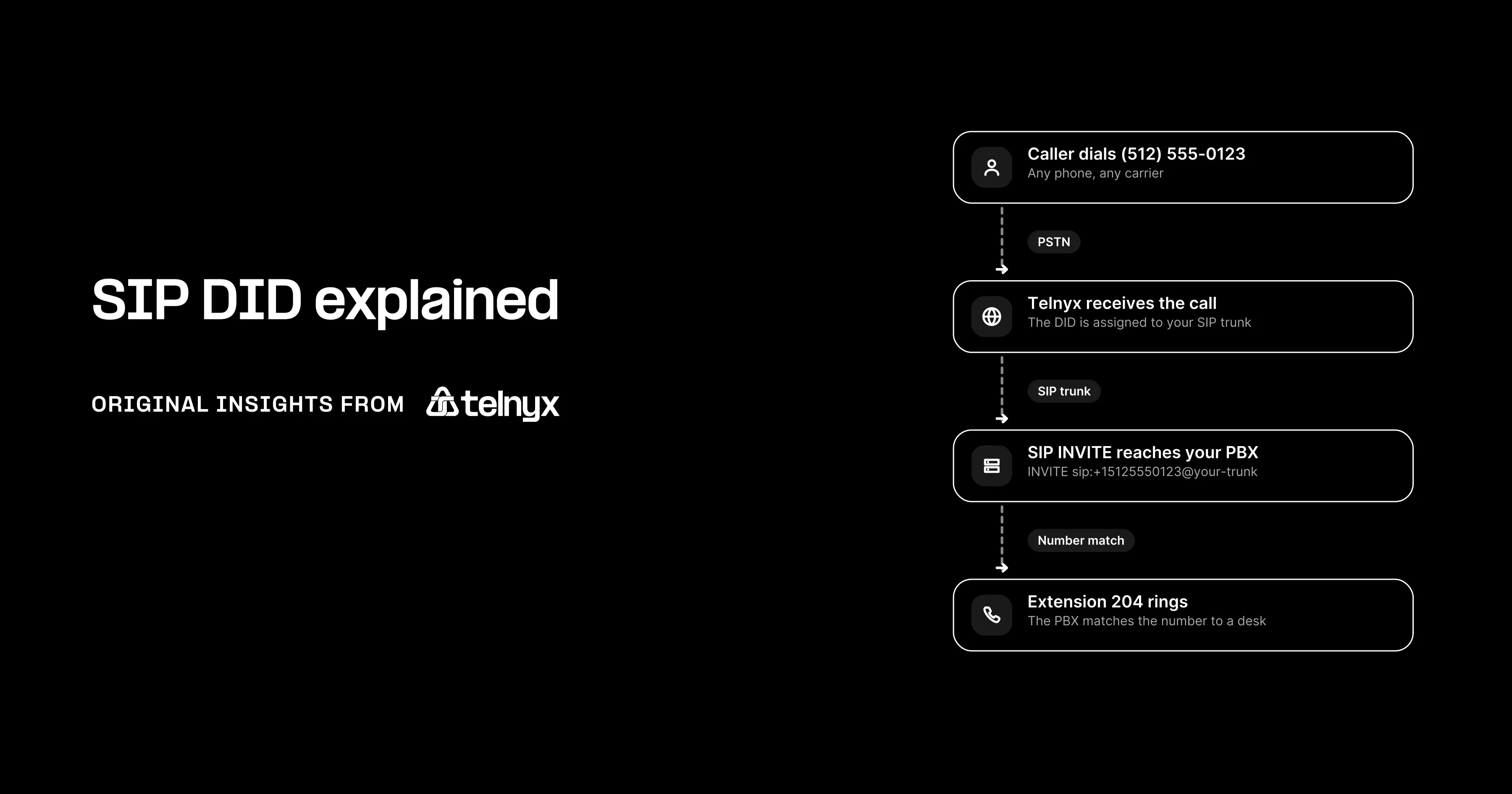
DID origination is the inbound leg, from the PSTN into a SIP INVITE and on to your PBX. RFC 3261 defines the INVITE as the request that initiates a session, with the Request-URI naming the resource being invited and the To and From headers carrying recipient and initiator. The call travels in this order:
- A caller on the PSTN dials your DID.
- The originating carrier routes the call to the provider that holds the number.
- The provider builds a SIP INVITE with the dialed number, in E.164 form, in the Request-URI (INVITE sip:+15125550123@your-trunk) and the To header, and the caller's number in the From header.
- The provider sends the INVITE to the trunk destination you configured, a public IP under IP authentication or a registered SIP user agent under credentials.
- The SDP body offers codecs, and your side selects one in its answer.
- Your PBX or application matches the Request-URI number to an extension, a ring group, an interactive voice response (IVR) menu or a webhook.
- Your side answers with 200 OK, the provider acknowledges, and RTP media flows in both directions.
SIP channels vs. trunks vs. DID numbers
A SIP channel is one concurrent call on the trunk, and the three units are independent: one DID can accept twenty simultaneous calls if the trunk has twenty channels, and a hundred DIDs can share a five-channel trunk if only five calls ever happen at once. Two rules of thumb circulate widely, one concurrent call for every three to four employees and one trunk for every two to three concurrent calls, and they cannot both be true, because a channel is by definition a concurrent call and a trunk carries however many channels you set. An outbound sales floor of 30 can peak at 30 calls, and a warehouse of 200 staff might never exceed 6.
How many SIP channels does a DID need?
A DID needs no channels of its own. Measure, from PBX logs or your current provider's call detail records, the peak number of simultaneous inbound plus outbound calls over the last quarter, add headroom for seasonal peaks and known growth, and round up. That total is the minimum channel limit for the trunk, and stated as peak calls plus a headroom percentage it is precise enough for a pricing request.
Channel estimator: minimum channels = (peak simultaneous inbound calls + peak simultaneous outbound calls) x (1 + headroom), rounded up. Nine inbound, three outbound and 25 percent headroom gives 15. Headcount does not appear in the formula.
SIP DID pros, cons and use cases
Moving a number off a copper line and onto a SIP trunk changes what it takes to add numbers and where they can ring, and it brings a few limits of its own.
Benefits of DID numbers on a SIP trunk
Fewer physical lines
Hundreds of numbers ride one IP trunk. Adding a number is a portal action, not a circuit order.
Numbers in any market
A local, national or toll-free number in another city or country, answered by the same PBX.
Forward without exposing personal numbers
A DID forwards to a mobile or a home softphone while the caller sees only the business number.
Track campaigns by number
One DID per campaign, so the dialed number in the INVITE tells you which ad produced the call.
Failover to a second PBX or PSTN number
If the primary destination stops answering, the provider sends the INVITE to a secondary IP or forwards to a PSTN number.
Limitations to plan for
A DID in VoIP is only as reliable as the IP path between your PBX and the provider. Require Transport Layer Security (TLS) for SIP signaling and Secure RTP (SRTP) for media on the trunk, then plan for two failure modes:
- Codec bandwidth per call. G.711 sits at the top end and Opus lower, and a saturated uplink degrades every call at once. HD voice over SIP covers the trade-offs.
- Number format errors. A PBX that expects 10 national digits and receives +15125550123 in the Request-URI finds no match and rejects the call with no ring and no alert.
Popular use cases and examples of DIDs
Contact centers give each product line its own DID so the queue knows what the caller wants before an agent picks up. Remote and hybrid teams carry a business number that follows the person to any softphone. A dedicated number handles fax-to-email, and business SMS runs on the same DID customers already call, once the number is registered for texting.
Beyond desk phones: the same DID can terminate at a softphone, a Microsoft Teams user, a contact center platform, or a webhook that hands the call to an AI voice agent for after-hours coverage. Switching the destination is a routing change on the connection, not a new number.
How to set up a SIP trunk DID number
Setting up a SIP trunk DID number takes three steps: create the connection, attach a number to it, then set channels, codecs and failover. On Telnyx all three happen in the Mission Control Portal or through the REST API (application programming interface), and the SIP trunking quickstart walks through the portal version.
Step 1: Create the SIP trunk connection
The connection is the trunk, and its first decision is how the provider authenticates your PBX. With IP authentication the provider sends INVITEs to your PBX's fixed public IP and accepts outbound calls only from the IPs you list, which suits a data center PBX with a static address. With credential authentication your PBX registers with a username and password and receives INVITEs down that registration, which suits a PBX behind network address translation (NAT) or on a dynamic IP.
The lines below create a credential connection on Telnyx by posting a name, a username and a password to the credential connections endpoint. They need the requests library (pip install requests) and your API key in the TELNYX_API_KEY environment variable. The setup-sip-trunk-python example wraps the same call in a Flask endpoint with error handling.
Step 2: Buy or port the DID number and assign it to the trunk
Search for a number by area code or region in the portal or through the API, buy it, and assign it to the connection. To bring an existing number, submit a port request with a signed letter of agency, a recent bill from the current carrier, and account details that match that bill exactly, since a mismatch is the most common reason a port is rejected. Timelines vary by country and number type, so check number portability before you promise a cutover date. Until the number is assigned to an active connection, the provider has nowhere to send the INVITE.
Step 3: Configure channels, codecs and failover
Set the concurrent channel limit on the connection from the busiest-hour figure. Order the codecs so the one your PBX handles best is offered first in the SDP. Then set a failover destination, a second IP address or SIP URI, or a PSTN forward. Without it, an unreachable PBX means the caller hears a fast busy or silence while your monitoring shows nothing, because no call ever reached the box that would have logged it.
Troubleshooting inbound DID calls
Four failures generate most inbound-routing tickets, and each has one check:
- Inbound calls not arriving. Confirm the number is assigned to the connection and the connection is active.
- Wrong number format. Fix the inbound match on the PBX or the number format setting on the connection.
- One-way audio. Signaling succeeded and RTP did not. Check NAT handling and open the RTP port range on the firewall.
- INVITE rejected or arriving from an unexpected IP. An IP allow-list that omits a provider address, or a registration that has expired.
Telnyx publishes call detail records and SIP debugging in the Mission Control Portal, so you can read the failed INVITE and its response code, and the SIP trunk setup guide covers the portal settings each check refers to.
How to choose a SIP DID provider
A quote that shows only the per-number rate hides three other charges, so price all four line items first and then score the provider on inventory, authentication, failover and porting.
SIP pricing: what a DID number and a channel cost
SIP pricing has four components, and every quote should show each of them:
- Monthly recurring charge per DID, priced differently for local, national and toll-free numbers, and whether it changes at volume.
- Inbound usage, either a per-minute rate or a flat monthly fee per concurrent channel, and whether toll-free inbound minutes are metered.
- Outbound termination per minute by destination, with the domestic rate and where the rate card breaks for the countries you call.
- One-time charges for porting or number setup, per number, per port order, or none.
DID provider checklist
| Criterion | Why it matters and what to ask | How Telnyx handles it |
|---|---|---|
| DID inventory by country and type | You cannot promise a local number you cannot buy. Ask which countries and number types are in stock today. | Local, national and toll-free numbers searchable by area code or region in the Mission Control Portal |
| Authentication options | A PBX behind NAT needs registration, a data center PBX needs IP auth. Ask if both exist. | IP or credential connections |
| Configurable failover | Decides where inbound calls go when the PBX is down. Ask what secondary destinations are allowed. | Failover destination set on the connection |
| Portal plus API provisioning | Automation needs the same fields the portal exposes. Ask for the API reference. | Mission Control Portal and REST API with software development kits (SDKs) |
| Call detail records and SIP debugging | The first step in any routing incident. Ask if you can read the INVITE yourself. | CDRs and SIP debugging in the portal |
| Number porting in and out | Lock-in starts at port-out. Ask about fees and timelines in both directions. | Porting in and out supported, timelines vary by country |
| STIR/SHAKEN and E911 | Attestation level and emergency routing follow the number. Ask who signs the calls. | A-level attestation issued by the carrier, E911 supported |
| Pricing model | Per number, per minute or per channel changes the bill shape. Ask for all four components. | Usage-based, from $0.0032 per minute, 230+ countries for international SIP trunking |
Support responsiveness for urgent routing incidents belongs on the same list. Ask how a routing ticket is triaged and whether you can read your own SIP traces while you wait.
 | Telnyx made the infrastructure part of the product. That gives us a different set of levers: network routing, media anchoring, SIP behavior, number reputation, failover, and AI placement. James Whedbee, Telnyx |
Where to buy SIP DID numbers
Carriers that hold numbering resources assign the number, run the network it rides on and own the routing, so one party answers when an inbound call fails. Aggregators and resellers buy from several carriers and present one portal, which widens inventory but adds a second party to every incident, and unified communications as a service (UCaaS) platforms bundle numbers with seats, which is convenient until you want the number on a different PBX. The steps to get a VoIP number are the same in all three cases, and the SIP provider comparison sets the checklist above against named providers.
Regulatory considerations for DID numbers
US duties fall into three groups, emergency location, outbound call authentication and messaging registration, and numbers abroad add a documentation step before assignment.
E911 and address registration for SIP DID numbers
A SIP DID used by an employee must carry a registered dispatchable location: the street address, and for larger buildings the floor or suite, that a public safety answering point receives when 911 is dialed from that number. Because a DID follows a person rather than a wall jack, the address must be updated when the person moves, or the call routes to the answering point for the old address. E911 requirements for VoIP covers the obligations in detail.
Remote and hybrid teams: a DID that follows an employee to a home office must have its E911 address updated at each move, and the phone system or provider should let the user or an admin do that without opening a ticket.
STIR/SHAKEN, CNAM and SMS registration
Outbound calls from a DID are signed with an attestation level under the Federal Communications Commission (FCC) STIR/SHAKEN caller ID authentication framework, described on the FCC STIR/SHAKEN page. Full attestation means the carrier vouches that the caller is entitled to the number, and numbers with weak attestation or poor reputation are labelled as spam on the recipient's screen. CNAM, the caller name shown alongside the number, is a separate registration the DID owner has to keep current. A Number Lookup on the DID shows the caller name and carrier it currently returns, so you can confirm the registration took. Texting from a DID in the US requires 10DLC campaign registration for local numbers or toll-free verification for toll-free numbers before the first message is delivered, and local vs. toll-free numbers covers the choice between them.
Acquiring DID numbers in other countries
Many countries require proof of a local address or a business registration before a number is assigned, some number types are restricted to residents, and porting rules differ from the US process. Check the documentation requirement for each country and number type before promising a local number to a market, and expect that step to set the lead time.
Obligations attached to a DID number
| Requirement | What the DID owner must do | Consequence if skipped |
|---|---|---|
| E911 dispatchable location (US, at setup) | Register a street address per number and update it when the user moves | 911 routes to the wrong answering point |
| STIR/SHAKEN attestation (outbound calls) | Use a provider that signs calls at full attestation for numbers you own | Calls labelled spam or blocked |
| CNAM registration (outbound calls) | Register the caller name you want displayed | Recipients see an unknown or wrong name |
| 10DLC campaign registration (SMS from local numbers) | Register the brand and campaign before sending | Messages filtered or blocked by carriers |
| Toll-free SMS verification (SMS from toll-free numbers) | Submit the number for verification with its use case | Messages blocked until verified |
| International address or identity documentation (numbers abroad) | Provide the documents each country requires before assignment | Number not assigned, or reclaimed later |
Telnyx: your all-in-one SIP DID provider
On Telnyx, one provider controls the whole path of an inbound call, from the number the caller dials to the extension or webhook that answers. Phone Numbers supplies the DID, SIP Trunking supplies the connection with IP or credential authentication, channel limits, codec preferences and failover, and the Mission Control Portal or the REST API is where both are provisioned and where the call detail records are read.
Buy or port local, national and toll-free DIDs and assign them to a connection.
IP or credential connections, channel limits, codec preferences and failover on a carrier-owned network.
Provision numbers and trunks in code, starting from the setup-sip-trunk-python example.
FAQ
Trace and provision your DIDs on one carrier
Follow the dialed number from the INVITE to the extension that rings, and provision the number, the trunk, its authentication and its failover yourself in the Mission Control Portal or in a few lines of code, with one provider accountable when an inbound call fails.
Set up SIP TrunkingShare on Social
Deniz is a Senior Product Marketing Manager at Telnyx with 10 years of experience in technology and healthtech marketing. She previously led go-to-market initiatives at Philips Healthcare, Vodafone, and The Coca-Cola Company. Originally from Türkiye and based in Amsterdam, she ho


