
TeXML
Say “no” to vendor lock-in and switch to TeXML in 5 minutes without changing your existing XML code. TeXML is a dynamic, low-code programmable voice solution that allows users to easily build custom call flows.
Get started in the portal
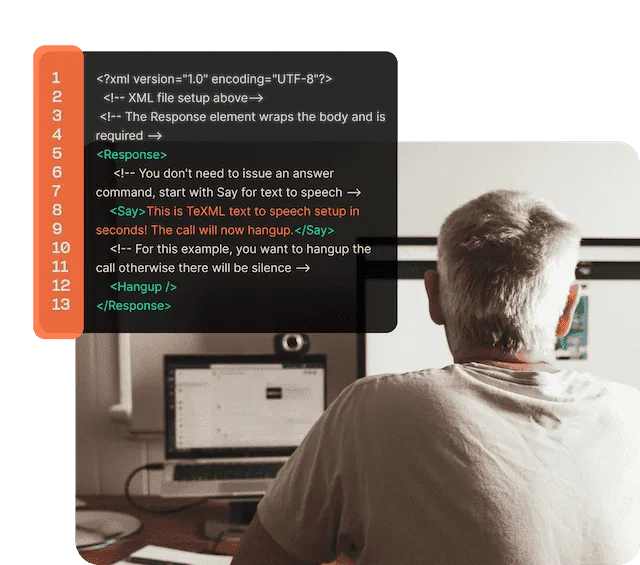
Dynamic, low-code programmable voice
Easily build programmable voice applications in Telnyx's XML scripting language, TeXML. TeXML specifies call instructions using commands called verbs and nouns such as <Dial> and <Number>. Start building today on the world’s number one most implementable CPaaS platform.
Build voice applications on one easy-to-use platform
Everything you need to build voice applications on an intuitive platform using little code. Build, store assets, and integrate your systems all in one place.

Migrate your XML application
If you already have an XML application using programmable voice verbs, simply configure your Telnyx portal connection to point at your XML endpoint. When a call comes in, we’ll do the rest.
Build a new XML application
Write a new application in minutes using simple TeXML commands—called verbs—which you wrap in an XML file. Telnyx will then execute the commands in your XML file in order.
TeXML Bin
Upload TeXML files to storage and use them for call flows without having to code. Developers—or even non-developers—can quickly and easily add programmable voice features to applications without having to worry about setting up application servers.
HTTP requests in TeXML Bin
Integrate your systems using HTTP requests from a TeXML file without needing your own server-side application. Retrieve required information for call flows from external systems and send notifications to any REST API.
BENEFITS
Say “no” to vendor lock-in
Migrate in minutes and save on development time and resources.
5
Minutes to get started
Pay-as-you-go pricing
Telnyx’s pay-as-you-go pricing ensures you only pay for what you use. The average customer saves 30% when switching to Telnyx.
30%
Savings when switching to Telnyx
Make calls on every platform, everywhere
Get instant local, national and toll-free numbers anywhere on earth, and scale on demand with unlimited capacity.
140+
COUNTRIES WITH PHONE NUMBERS AVAILABLE FOR PURCHASE OR PORTING
RESOURCES
Start building

TeXML Setup Tutorial
In this guide, you'll learn how to get started with TeXML and write a simple text-to-speech TeXML application using Telnyx Programmable Voice in just five lines of code.

Getting started with TeXML Bin
Watch our demo with Lejla from our Solutions Engineering team to learn how to set up a simple voicemail demo app in just a couple of minutes using TeXML Bin.
Twilio to Telnyx migration guide for programmable voice
Migrate your existing TwiML code to TeXML in just a few simple steps to start saving on voice costs.
USE CASES
What can you build with TeXML?

Call tracking
Track and optimize campaigns using global voice and SMS with support for compliant attribution and dynamic number insertion.
Learn more
Cloud IVR
Build a flexible, scalable IVR to reduce wait times and deliver a better customer experience.
Learn more
Contact center
Don’t just unify your communications—integrate them to give your agents context on who’s calling.
Learn more
UCaaS
Combine enterprise-grade voice with SMS and video to build a complete UCaaS platform.
Learn more
FAQ
Resources, Docs, Support
Texml hub

TeXML Bin Quickstart | Telnyx
Get started quickly with Telnyx Programmable Voice and the TexML Bin feature. Explore our comprehensive documentation, tutorials, and quickstart guide to effortlessly integrate TexML Bin into your voice applications. Simplify voice communication and enhance customer experiences with Telnyx's powerful voice solutions.
TeXML Quickstart | Telnyx
Telnyx's TexML bin setup will help you get started with programming voice applications using Telnyx's TexML language.
Initiate an outbound call API | Telnyx
Initiate an outbound TeXML call. Telnyx will request TeXML from the XML Request URL configured for the connection in the Mission Control Portal.
Retrieve a TeXML Application API | Telnyx
Retrieves the details of an existing TeXML Application.
Fetch a call API | Telnyx
Returns an individual call identified by its CallSid. This endpoint is eventually consistent.
What is TeXML? Dynamic, low-code, programmable voice
TeXML is the easiest way to get started with Telnyx’s Programmable Voice. Create custom call flows using simple XML scripting.
VIDEO: TeXML Setup tutorial - easy programmable voice
Get started using Telnyx Programmable Voice by following along with this TeXML Setup tutorial and simple text-to-speech demo!
Easily build programmable voice into your app with TeXML Bin
The release of TeXML Bin in Mission Control means non-technical users can now add programmable voice to their applications in just a few minutes.
Demo: Make a TeXML Call Using the Telnyx API
This guide shows you how to initiate a TeXML call using the Telnyx programmable voice API.
VIDEO: Building an IVR menu in minutes with TeXML Bin
Improve customer experience and call efficiency by creating an Interactive Voice Response (IVR) menu with just a few lines of code using TeXML Bin.
Build Text-to-Speech App in 5 minutes with TeXML Translator
Watch the video to learn how to write a simple text-to-speech TeXML app using Telnyx Call Control in just a few lines of code.
TwiML vs. TeXML: Comparing XML markup languages
TeXML and TwiML have the same capabilities to help developers create programmable voice experiences. Learn which one is best for your projects.
Migrating from TwiML to TeXML in 7 easy steps
TeXML has full parity with TwiML for programmable voice. Learn how you can switch to Telnyx to access our private network, free support, and lower costs.
Telnyx Voice API vs. TeXML: What’s the difference?
You can use either Telnyx Voice API or TeXML to build advanced voice capabilities into your applications. Learn which tool is right for your project.
Telnyx Blog | CPaas & UCaaS Resources
Find data-driven research, comprehensive guides and all things SIP trunking, voice and SMS APIs, wireless and more.
The Better Twilio Alternative - Telnyx
Switch to Telnyx for a better Twilio alternative. Benefit from our competitive pricing, private global network, and award-winning support.
Top 5 Twilio Verify API alternatives
Looking for the best verification API for your business? Don’t just default to Twilio Verify API. Consider some of these great options instead.
Call Control / TeXML | Telnyx Help Center
Integrate Call Control using TeXML with Telnyx for enhanced voice capabilities.
Configuring Call Control/TeXML Applications - Voice API | Telnyx Help Center
This article describes the in-depth setup of Call Control / TeXML Applications on our Mission Control Portal.
TeXML and Telnyx Voice API compatibility | Telnyx Help Center
Avoid combining TeXML and Call Control commands in the same application
Voice API Essentials | Telnyx Help Center
In this collection you will find helpful links that explain the mission control portal features and troubleshooting tips.
General Voice API Help | Telnyx Help Center
Get assistance with Telnyx's Voice API: UK TPS, Google Verified Calls, STIR/SHAKEN.
How to Leverage Webhooks | Telnyx Help Center
This article explains what webhooks are and how to leverage them with Telnyx.
Streamline Call Control workflows with Telnyx Flow
Create highly customizable Call Control workflows with Telnyx Flow. Automate call handling for efficient, reliable voice communication.
Create Custom Call Flows with Telnyx
Build custom call flows that connect you to the right customers at the right time with Telnyx Voice API. Start building call flows today.