
Make Voice AI Native to Your Enterprise Phone System
4, May 2026
Telnyx AI Voice Agents can now register as SIP endpoints on existing enterprise voice systems. With SIP Attach, teams can add an AI agent to a PBX, softswitch, or unified communications platform, then route calls to it through the dial plan, queues, and internal extensions they already operate.
SIP Attach is different from SIP trunking. Instead of using Telnyx as the trunk for the PBX, the Telnyx Voice AI Agent registers to the customer's PBX, softswitch, or UC system as a SIP endpoint, similar to an internal extension.
What's new
- SIP endpoint registration for Voice AI Agents: Register a Telnyx AI Voice Agent directly into your existing voice environment.
- Dial plan native routing: Send calls to the agent through existing extensions, queues, shared lines, and call paths.
- Voice system interop: Keep PBX, softswitch, and unified communications routing controls in place while Telnyx runs the AI conversation.
- End to end Voice AI on Telnyx: Once the call reaches the agent, Telnyx handles STT, LLM, and TTS.
Why it matters
Enterprise voice teams already have routing systems they trust. Extensions, queues, permissions, failover behavior, access rules, and call handling logic usually live inside a PBX, softswitch, or unified communications platform.
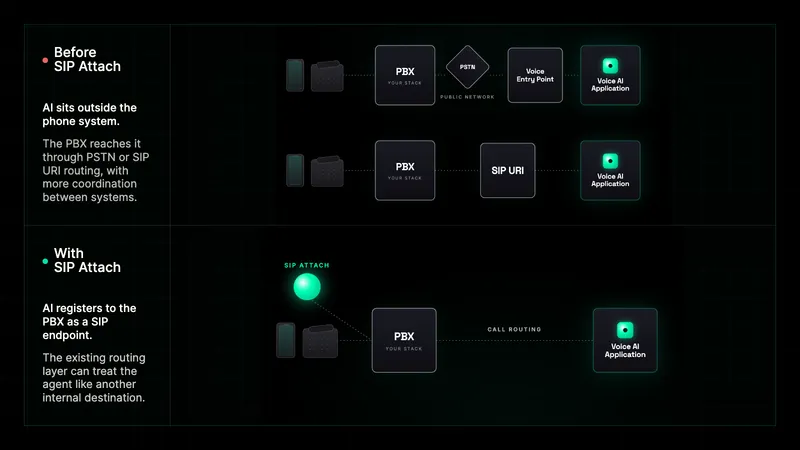
Before SIP Attach, adding an AI agent to those workflows often meant creating an indirect path to reach the agent. Teams could assign a phone number, build forwarding logic, or coordinate SIP URI routing between systems. Those approaches can work, but they move the integration burden into routing glue: domains, access rules, dial plan changes, firewall behavior, and interop testing.
SIP Attach changes the model. The AI agent registers as a SIP endpoint inside the customer's voice system, so the existing routing layer can treat it like another reachable destination. Internal users dial the extension, queue, or call path they already know. Telnyx runs the agent conversation once the call arrives.
Example use cases
- Route an internal IT helpdesk extension to a Voice AI Agent before escalation to a technician.
- Add an HR or operations agent to an existing employee call path without changing dialing behavior.
- Send contact center queue traffic to an AI agent through the voice system already in production.
- Test Voice AI internally on an extension before exposing the agent to external callers.
Getting started
- Configure SIP credentials for your AI Voice Agent in Mission Control and select a UAC connection.
- Register the agent on your voice system using standard SIP registration.
- Add the agent to your dial plan, extension, queue, or call route.
- Place a test call through the existing voice path to confirm routing and agent behavior.
Learn more in the UAC connection support guide.


