
Integrations
Build Voice AI Agents With Vision Agents and Telnyx
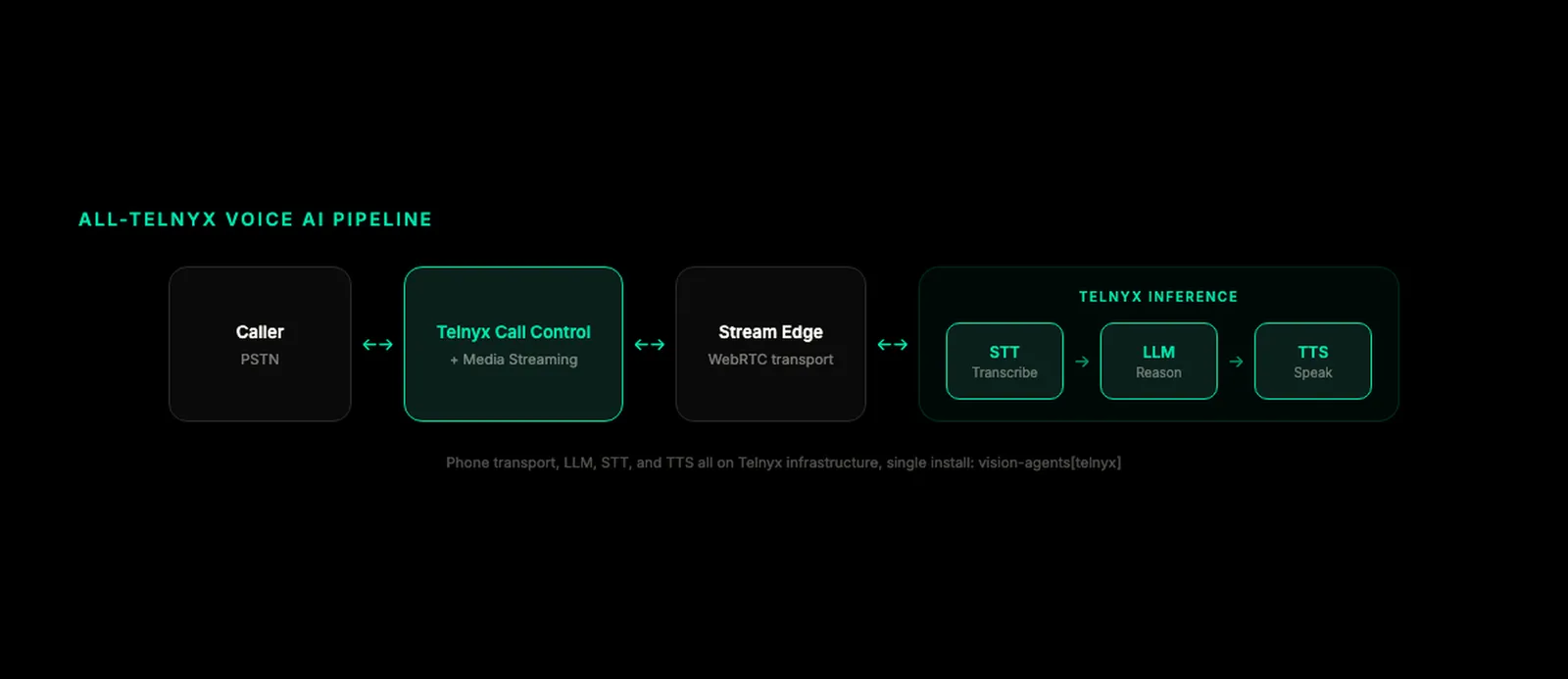
The Telnyx plugin for GetStream Vision Agents now covers the full voice AI stack: PSTN phone calling, LLM, STT, and TTS, all from a single install.

The Telnyx plugin for Vision Agents now covers the complete voice AI stack: real PSTN phone calling, LLM inference, speech-to-text, and text-to-speech, all from a single install. Voice AI agents built with Vision Agents can receive inbound calls, place outbound calls on real phone numbers, and run the entire inference pipeline on Telnyx infrastructure. Install it with uv add "vision-agents[telnyx]" and run the inbound, outbound, or browser-based voice bot example to get an agent live in under ten minutes.
What Vision Agents Is
Vision Agents is an open source Python framework from GetStream for building voice and vision AI agents. It abstracts the messy parts of realtime AI: edge transport, WebRTC negotiation, model provider selection, audio framing, and conversation state. Developers pick a transport (Stream, local, Tencent), a realtime model (Gemini, OpenAI, Inworld, Qwen, xAI, AWS Bedrock, Telnyx), and an optional telephony provider. The framework wires them together so an agent can speak, hear, and reason across a single call session.
The repo lives at github.com/GetStream/Vision-Agents. Plugins extend the framework with carriers, model providers, and infrastructure. The Telnyx plugin is one of two telephony plugins in the official catalog, the other being Twilio, and is the only plugin that offers phone transport, LLM, STT, and TTS from a single vendor.
What the Telnyx Plugin Adds
The plugin covers four layers: phone transport, LLM, STT, and TTS.
Phone Transport
Four primitives cover the full PSTN bridge:
CallRegistry: tracks active calls, validation tokens, and optional asyncpreparetasks that pre-warm the agent and Stream call before the media WebSocket connects.TelnyxCall: dataclass for a call session withfrom_number,to_number, andawait_prepare().MediaStream: WebSocket handler for Telnyx Media Streaming. Parsesconnected,start,media,stop,error,mark, anddtmfevents, and exposesaudio_trackplussend_audio()for bidirectional audio.attach_phone_to_call: bridges Telnyx RTP audio bidirectionally to the Stream WebRTC call participant.
Audio conversion helpers handle PCMU and PCMA at 8 kHz for default inbound, plus L16 at 16 kHz for bidirectional RTP.
LLM
telnyx.LLM is a thin ChatCompletionsLLM subclass pointed at the Telnyx Inference endpoint (/v2/ai/chat/completions), which is OpenAI-compatible. Streaming, tool calling, and conversation history come from the base class. The default model is meta-llama/Llama-3.3-70B-Instruct, and the model catalogue is served by the API at GET /v2/ai/models rather than hardcoded locally, so new models appear without a plugin update.
STT
telnyx.STT streams audio to the Telnyx transcription WebSocket as raw linear16 frames and emits transcripts as they arrive. The configurable sample_rate argument lets telephony audio from TelnyxMediaStream pass through at 8 kHz without an upsample. Multiple transcription engines are available through the same endpoint, and interim_results defaults to False since not all engines emit partials. Set it to True explicitly if your engine supports them.
TTS
telnyx.TTS streams text to the Telnyx WebSocket TTS endpoint and decodes the returned audio into PCM as it arrives. The plugin opens a new connection per synthesis rather than holding one socket open, and handles audio format differences across voices so you do not have to pick a format per voice yourself.
Why Real Telephony Matters for Voice AI
A browser-based voice agent is fine for a hackathon. Production voice AI has different constraints.
Inbound at scale. Customer-facing voice agents need real phone numbers with E.164 routing, carrier-grade termination, and answer supervision. A user dials a 1-800 number, the call lands on a Telnyx Call Control App, the webhook fires, the agent answers. This is the same call path a contact center uses.
Outbound at scale. Outbound voice AI, appointment reminders, IVR replacement, debt recovery, AI-driven follow-up, all of it needs a programmable dial API with a real from number, a connection_id, and media streaming back to the agent. The Vision Agents plugin uses the Telnyx Call Control Dial API with stream_url set to a public WebSocket.
Co-located inference. Telnyx runs STT and TTS inference on its own GPU infrastructure. With the plugin now serving LLM, STT, and TTS alongside phone transport, the entire pipeline runs on the same network as the call path. Lower latency, more deterministic jitter, fewer cold starts. This matters because every 100 ms of voice latency shows up as conversational awkwardness.
Webhook signature verification. Telnyx signs every webhook with an Ed25519 key. The plugin's example helpers include parse_verified_telnyx_webhook for verifying the Telnyx-Ed25519-Signature header before any call is registered.
Telnyx and Twilio Plugins Compared
The Telnyx plugin is intentionally parallel to the existing Twilio plugin in Vision Agents. Same public surface (CallRegistry, MediaStream, attach_phone_to_call), same Stream edge transport underneath, same examples structure (inbound and outbound). Developers who already know the Twilio plugin can swap carriers without rewriting their agent code.
| Capability | Telnyx Plugin | Twilio Plugin |
|---|---|---|
| PSTN calling | Telnyx Call Control | Twilio Voice API |
| Media transport | Telnyx Media Streaming (WebSocket) | Twilio Media Streams (WebSocket) |
| Audio codecs | PCMU, PCMA, L16 | PCMU, L16 |
| Webhook signatures | Ed25519 (TELNYX_PUBLIC_KEY) | Twilio signature header |
| LLM | Telnyx Inference (OpenAI-compatible) | Not included |
| STT | Multiple engines via Telnyx | Not included |
| TTS | Multiple voices via Telnyx | Not included |
| Inference proximity | Full pipeline on Telnyx GPUs | Provider-dependent |
| Outbound dial | Call Control Dial API with connection_id | Twilio REST Dial |
| Self-serve credits | Telnyx promo codes supported | Twilio trial credits |
The choice between them usually comes down to which carrier you already have a relationship with, which regions you need coverage in, and whether you want your speech inference on the same network as your call path.
Prerequisites
Before you run the examples, you need:
- A Telnyx account with an API key (
TELNYX_API_KEY) - A Telnyx phone number in E.164 format (
TELNYX_PHONE_NUMBER) for the phone examples - A Telnyx Call Control App for the phone examples, not just a forwarding-only number connection. The Call Control App is what receives
call.initiated,call.answered, andcall.hangupwebhooks, and its ID is theconnection_idused by the outbound Dial API. - The Base64 Ed25519 public key from the Mission Control Portal (
TELNYX_PUBLIC_KEY) for webhook signature verification in production. - A public webhook URL for the phone examples. For local development, use ngrok and point it at port 8000. The examples auto-detect the local ngrok HTTPS tunnel.
- Stream credentials (
STREAM_API_KEY,STREAM_API_SECRET) for the edge transport. - A Google API Key (
GOOGLE_API_KEY) if you want to use the Gemini Realtime model in the default phone examples, or aTELNYX_API_KEYif you want to run the all-Telnyx voice bot example with no external model provider.
A common setup mistake is using a forwarding-only phone number connection instead of a Call Control App. The plugin explicitly validates this in the preflight checks and will tell you what is missing.
Install the Plugin
From the Vision Agents repo root, or any project that already uses the framework:
Or install the plugin as a standalone package:
Create a .env at the repo root with the variables from the prerequisites section. The examples load it automatically with python-dotenv.
Run a Browser-Based Voice Bot
The voice_bot.py example runs an all-Telnyx pipeline with no phone number, no ngrok, and no Call Control App. It uses telnyx.STT, telnyx.LLM, and telnyx.TTS with Stream's edge transport and smart turn detection, so you can test the AI components in a browser before wiring up telephony:
Open the URL the example prints, allow microphone access, and start talking. The STT transcribes your speech, the LLM generates a response, and the TTS speaks it back. Barge-in works: interrupt mid-sentence and the agent stops talking and starts listening.
This example lets developers try the AI modalities without the telephony setup overhead.
Run an Inbound Phone Agent
Start ngrok:
Run the inbound example with the --setup-telnyx flag. The example creates a temporary Call Control App, sets the webhook URL to your ngrok tunnel, routes your Telnyx number to the app, and cleans up on shutdown:
Dial your Telnyx number from any phone. The webhook fires, the call is registered, the agent answers, and you should hear the Gemini Realtime model respond. Hang up to end the call. The example restores your previous number routing on shutdown.
Without --setup-telnyx, the example runs preflight checks against your existing Call Control App and exits with a clear error if the webhook URL does not match, the number is not routed, or the app is not active.
Run an Outbound Phone Agent
The outbound example starts the same FastAPI server, then places a call to a destination number you specify:
The outbound flow pre-registers a call ID in the registry, dials through the Call Control API with connection_id set to the Call Control App ID, and waits for Telnyx to connect to the WebSocket media endpoint. From there, the media handler is the same as inbound.
On restricted Telnyx accounts, verify the destination number before dialing. On unrestricted accounts, outbound works to any valid E.164 number.
How the Media Stream Works
Once Telnyx answers or places a call, it opens a WebSocket to your server at wss://<NGROK_URL>/telnyx/media/{call_id}/{token}. The plugin's MediaStream.accept() handles the WebSocket handshake, and stream.run() processes inbound Telnyx events until the call ends.
Inbound audio from the PSTN caller arrives as PCMU payloads in media events. The plugin converts them to PCM at 8 kHz, feeds them to the Stream edge transport, and the realtime model receives them as the agent's audio input. Outbound audio from the agent goes the other way: PCM from the Stream call back through the plugin, converted to PCMU, and sent to Telnyx as outbound RTP frames via stream_bidirectional_mode=rtp.
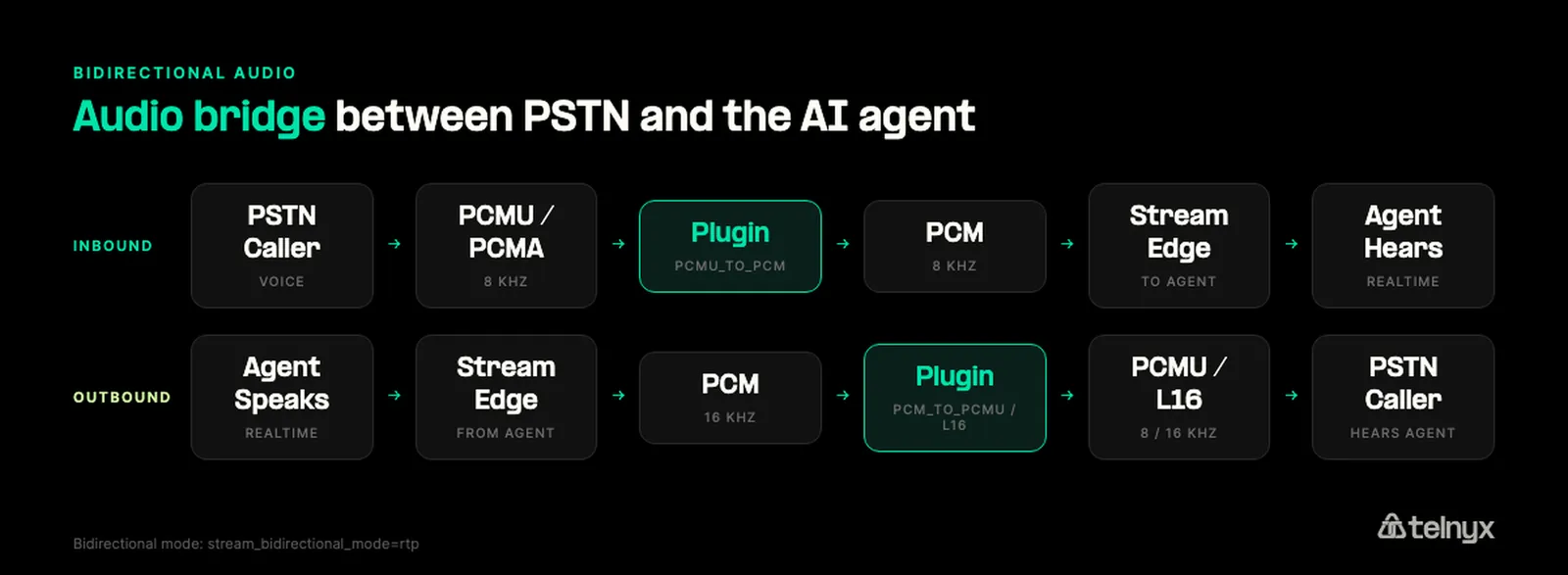
This bidirectional bridge is what makes the call feel like a real conversation. Both sides can interrupt, both sides hear each other in real time, and the agent can be interrupted mid-sentence by a human, which is the bar a production voice agent has to clear.
Have questions about the Telnyx plugin for Vision Agents? Join our subreddit.
Share on Social


