
Shareable demo links for AI assistant widgets
1, Dec 2025
Customers can now generate a public demo link for any AI assistant widget, allowing external users to test the assistant without logging in or having a Telnyx account. This improves collaboration and shortens review cycles for teams evaluating conversational workflows.
What’s new
- Public demo URL: Create a link that anyone can open without authentication.
- Widget-level control: Generate a demo link directly from each assistant’s widget settings.
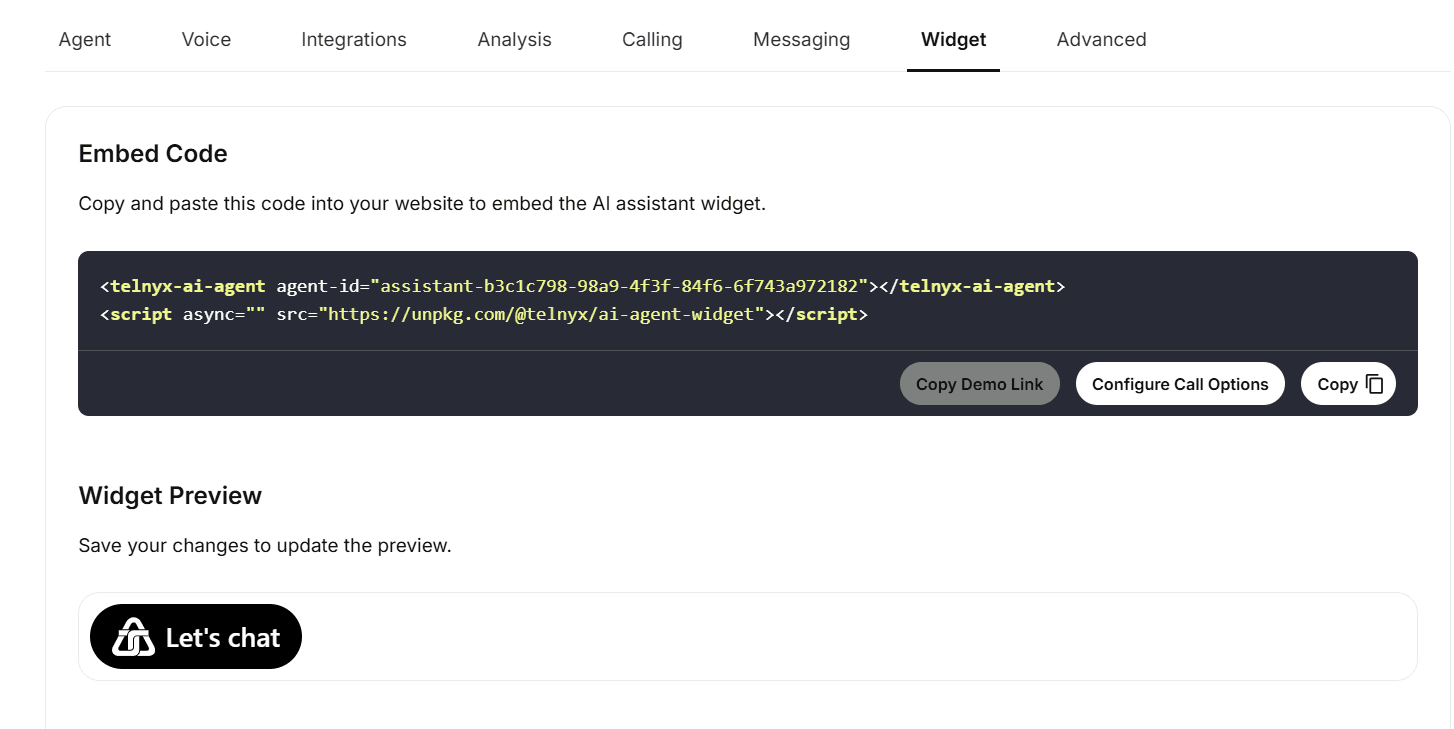
- One-click copy: Copy the demo URL from the “Copy demo URL” section after the assistant build finishes.
- Full interaction support: External users can run full conversations through the widget.
Why it matters
- Reduces friction when sharing assistant prototypes with teammates or clients.
- Simplifies cross-team reviews before deployment.
- Shortens iteration cycles for conversation design and model tuning.
- Prevents the need to provision temporary Telnyx access for external testers.
Example use cases
- Agencies sharing draft conversation flows with clients.
- Product teams gathering stakeholder feedback before publishing an assistant.
- QA teams validating widget behavior without internal accounts.
Getting started
- Open Mission Control Portal → AI Assistant → select your assistant.
- Navigate to the widget configuration section.
- After the assistant build completes, locate the Copy demo URL field.
- Copy the link and share it with anyone who needs to test the assistant.
Explore this feature in our Mission Control Portal


