

Takeaways
- To reply to an email, read the original message fully, open with a greeting, address every question directly, confirm understanding, and close with a sign-off and signature.
- Reply within 24 hours. If you can't answer fully, send an acknowledgment with a timeline.
- Keep the subject line intact unless the topic changes. Threading and searchability depend on it.
- Templates cut response time for common scenarios like order delays, information requests, and meeting confirmations.
- Speed and clarity build trust, and both scale better when fast replies extend beyond the inbox to channels like SMS.
How to reply to an email in 7 steps
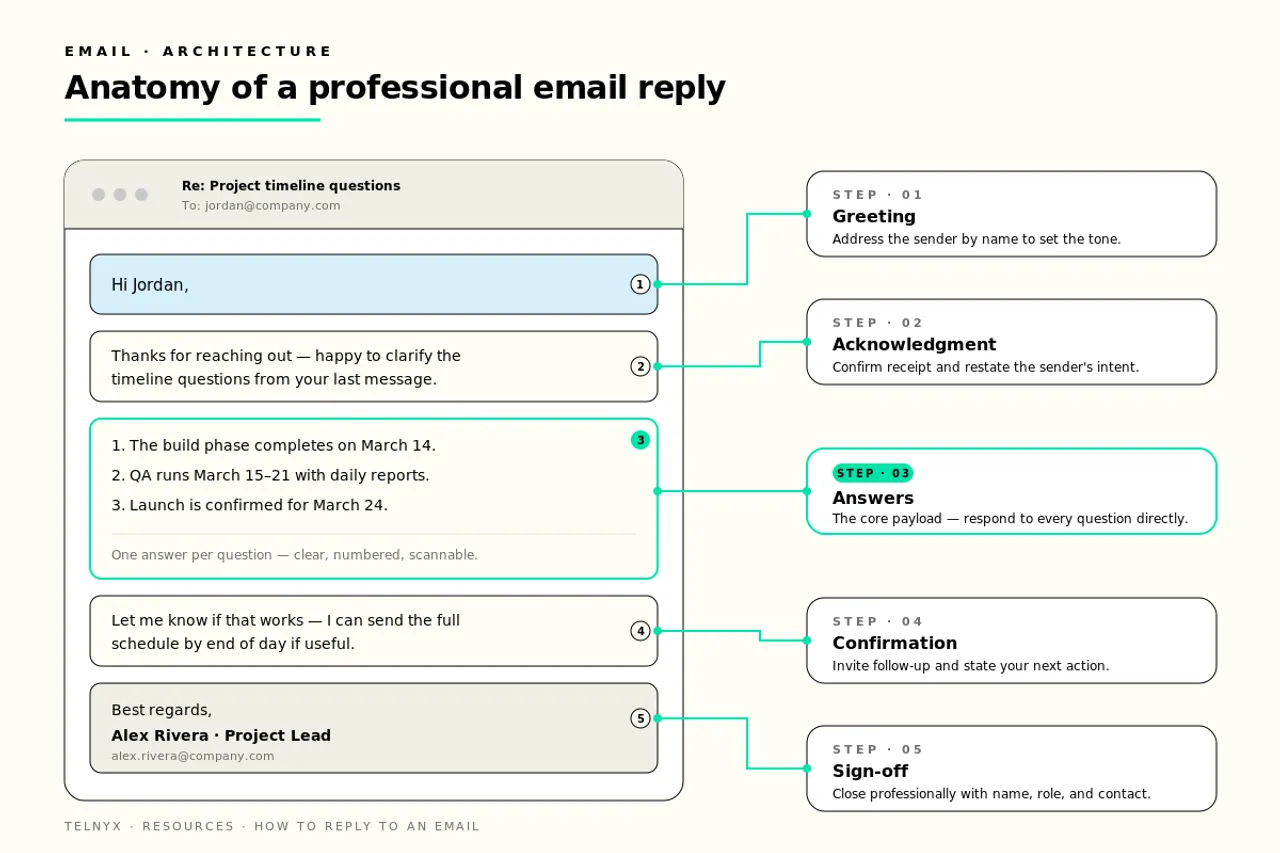
Knowing how to reply to an email comes down to seven steps: read the original message carefully, respond promptly, open with an appropriate greeting, acknowledge the sender's message, answer every question on its own line, confirm understanding and next steps, then close with a sign-off, a signature, and a final proofread. With more than 361 billion emails sent daily worldwide, according to Statista, a reply that follows this structure stands out because it respects the reader's time and leaves nothing unanswered.
1. Read the original email carefully
Read the full message before you type a word. Skimming is how questions get missed, and a reply that ignores half the sender's points forces a second round of email. If you're learning how to reply to an email well, this step does most of the work.
Example: before replying to a vendor's proposal, note their three questions about timeline, budget, and scope so your reply covers all of them.
2. Respond promptly
Aim to reply within 24 hours, and faster for customers. Any how to reply to an email guide worth following treats speed as part of the message itself, because a slow reply tells the sender they're not a priority.
Example: "Thanks for this. I'll have a full answer for you by Thursday morning."
3. Open with an appropriate greeting
Match the greeting to the relationship. "Hi Maria" works for colleagues and established contacts, while "Dear Mr. Chen" fits first contact with a client or executive.
Example: "Hi Maria," for a teammate. "Dear Mr. Chen," for a new client.
4. Acknowledge the sender's message
Show you read what they sent before you answer it. One sentence is enough, and it confirms you understood the request the same way they meant it.
Example: "Thanks for flagging the invoice discrepancy on order #4482."
5. Answer every question in separate lines
Give each question its own line or short paragraph. Burying three answers in one dense block invites follow-up emails asking for the answers you already gave.
Example: "On timeline: we can deliver by March 15. On budget: the quote stands at $12,400. On scope: revisions are included."
6. Confirm understanding and next steps
End the body by stating what happens next and who owns it. This turns the reply from a response into a plan.
Example: "I'll send the revised contract by Friday. Once you sign, we'll schedule kickoff for the following week."
7. Close with a sign-off, signature, and proofread
Use a professional sign-off like "Best regards" or "Thanks," followed by your name, title, and contact details. Then proofread once for typos, tone, and missing attachments before hitting send.
Example: "Best regards, Sam Patel, Account Manager, (312) 555-0148."
These principles are channel-agnostic. Speed, clarity, and confirmation matter just as much in a text message or a chat thread as they do in an inbox.
Send email programmaticallyProfessional replies start with the right tools. The Telnyx Email API lets you send transactional and marketing email at scale with high deliverability, detailed analytics, and one simple API, billed per email from $0.30 per 1,000.
Explore the Email APIHow to reply to an email professionally
Learning how to reply to an email professionally means adjusting the basic steps for context. Every reply you send represents the business, and at scale, consistency across hundreds of replies per week matters as much as any single message. A sloppy reply to a client costs more than a sloppy reply to a teammate, so calibrate accordingly.
Choose the right salutation and tone
Match formality to the audience. Clients and executives get full salutations and measured language. Colleagues get a lighter touch. When in doubt, mirror the sender: if they wrote "Dear Ms. Alvarez," don't reply with "Hey." Tone drifts casual over long threads, which is fine internally but risky with customers who may forward the thread to their own leadership.
Structure the body of your reply
Open with the acknowledgment, follow with your answers in the order the sender asked them, and end with next steps. Keep paragraphs to three sentences or fewer. Cut jargon, because the reader who has to decode your acronyms is a reader who replies late or not at all. If a thread passes three back-and-forth rounds without resolution, move it to a call. Email is for answers and records, not negotiations.
Include professional closing remarks and a signature
Close with a line that keeps the door open, like "Happy to walk through this on a call if useful." Then sign off with your name, title, company, and a phone number. A complete signature saves the recipient a search when they need to reach you fast.
Tips for keeping replies professional
The best professional replies share a few habits. As the Harvard Business Review notes in its advice on how to write with precision, the strongest business emails state the bottom line up front and cut everything that doesn't serve the reader.
Quick professionalism checklist: Proofread before sending. Reply-all only when everyone needs the answer. Mind time zones when promising response times. Keep each thread focused on one topic. State deadlines as dates, not "soon." Never reply angry, and wait an hour on heated threads. Confirm attachments are actually attached. Read your reply once as the recipient would.
How to handle the subject line when replying to an email
The subject line is the most overlooked part of a reply. Handled well, it keeps conversations threaded, searchable, and easy to prioritize. Handled badly, it splinters one conversation into five threads that nobody can find later.
When to keep the original subject line
Keep the default "Re:" subject in almost every case. Email clients use the subject line to group messages into threads, so changing it mid-conversation can break the thread and scatter context. A consistent how to reply to an email subject line approach also makes archives searchable: six months from now, anyone can find the full conversation under one subject. Change the subject only when the topic genuinely shifts, when you add recipients who need context the old subject doesn't give, or when you escalate an issue and need it to stand out, for example "Re: Invoice #4482" becoming "Escalation needed on invoice #4482."
How to change the subject line in Gmail and Outlook
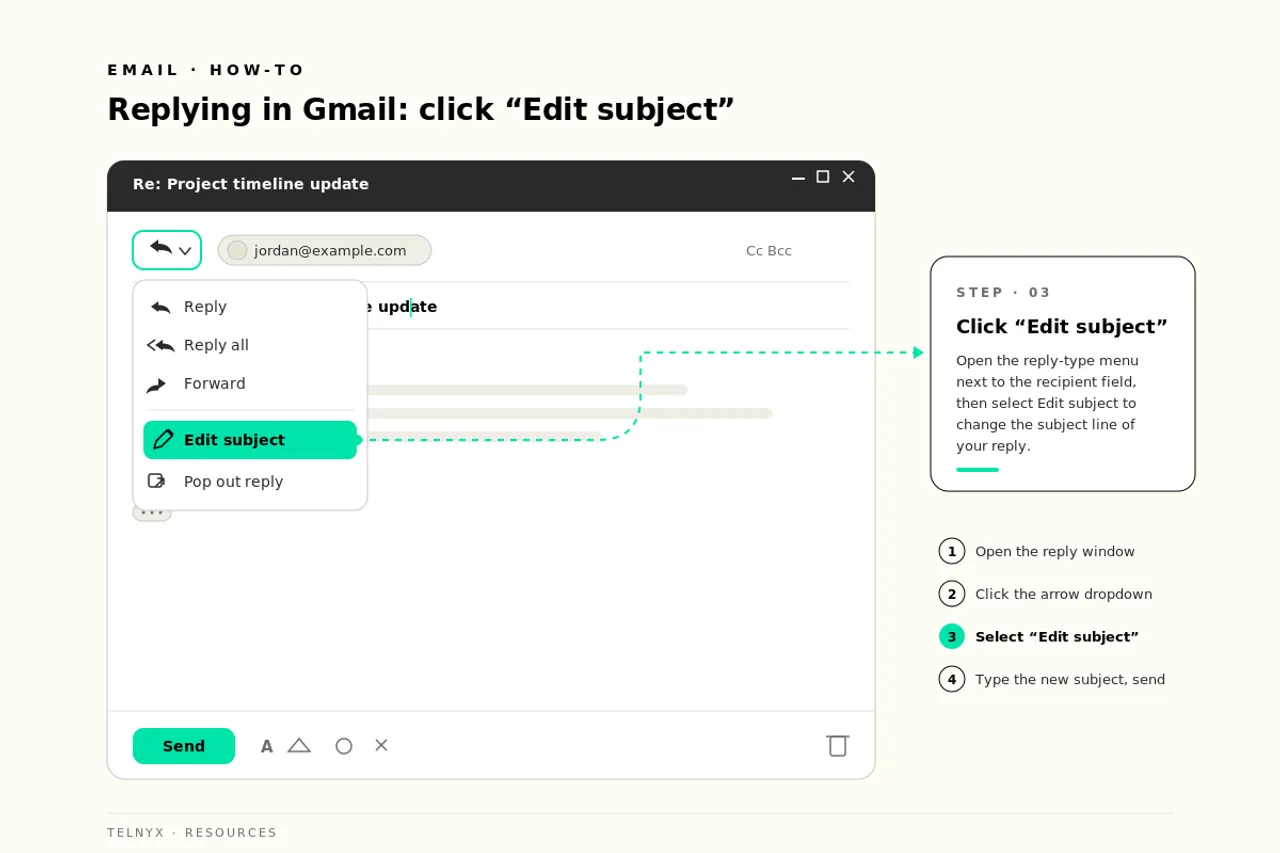
In Gmail, click Reply, then click the three-dot menu (or the small arrow next to the recipient field), and select "Edit subject." Gmail opens the reply in a new window with an editable subject field. In Outlook, click Reply, then expand the message to a full compose window using the pop-out icon, and click directly into the subject field to edit it. In both clients, consider noting the change in your first line, like "Updating the subject to reflect the new scope," so recipients can still connect the threads.
Professional email reply templates and examples
Templates turn a five-minute reply into a thirty-second one, and they keep quality consistent when ten different people answer the same kinds of messages. Use these as starting points and customize the bracketed details every time. A template that reads like a template defeats its own purpose.
Simple acknowledgment reply
Use this when you've received something and a full response will take time. Customize the timeline and always honor it.
Subject: Re: [Original subject]
Hi [Name],
Thanks for sending this over. I've received it and want to give it proper attention, so I'll come back to you with a full response by [specific date].
If anything is urgent in the meantime, you can reach me at [phone number].
Best regards, [Name, title]
Replying to a request for information
Use this when someone asks specific questions. The numbered format shows you answered everything, which is the core of how to send a professional email response.
Subject: Re: [Original subject]
Hi [Name],
Thanks for reaching out. Here are the answers to your questions:
Let me know if any of these need more detail. Otherwise, the next step is [action and owner].
Best regards, [Name, title]
Replying to a customer complaint or delayed order
Use this when an order didn't arrive on time. Customers with a late order want three things: acknowledgment, a concrete status, and a date. Vague reassurance makes delays worse.
Subject: Re: Order #[number] status
Hi [Name],
You're right that order #[number] missed its expected delivery of [original date], and I'm sorry for the disruption. Here's where it stands: [specific status, e.g., "the shipment cleared the distribution center this morning and is on a truck now"].
Your new delivery date is [date]. I'll send you a confirmation the moment it's out for delivery, and if it slips again for any reason, I'll contact you directly at [phone number] rather than wait for you to ask.
Best regards, [Name, title]
Replying to a meeting or interview request
Use this to accept and confirm logistics in one message so no follow-up email is needed.
Subject: Re: [Original subject]
Hi [Name],
Thanks for the invitation. [Date] at [time] works for me. I'll plan for [duration] at [location or video link].
To make the time productive, I'll come prepared to discuss [topic]. Let me know if you'd like me to bring or review anything beforehand.
Best regards, [Name, title]
General response email template
Every strong reply follows the same skeleton, and this template is the fastest way to learn how to write professional work email replies for any scenario the other templates don't cover.
Subject: Re: [Original subject]
[Greeting matched to the relationship],
[Acknowledgment: one sentence confirming what you received or understood.]
[Answer: address each point or question on its own line.]
[Next step: what happens now, who owns it, and by when.]
[Sign-off], [Name, title, contact details]
How to respond to emails quickly and consistently at scale
Individual reply quality is a skill. Team-wide reply speed is a system. Once volume climbs past what one inbox can handle, knowing how to respond to emails becomes an operations question, and the answer involves benchmarks, triage, and the right channel for each message.
Email response time expectations
The 24-hour standard holds for most business correspondence, but customer-facing teams should target much faster. The practical trick for hitting 24 hours on every message, even when a full answer isn't ready, is the acknowledgment reply: confirm receipt, give a timeline, and buy yourself the time to answer well instead of fast and wrong.
| Message type | Target response time | If full answer isn't ready |
|---|---|---|
| Customer inquiry or complaint | Within 4 business hours | Acknowledge with a resolution timeline |
| Internal request | Within 24 hours | Acknowledge and set a date |
| Vendor or partner correspondence | Within 24 hours | Acknowledge and assign an owner |
Use templates, snippets, and automation
Triage the inbox in passes: answer anything that takes under two minutes immediately, template-reply to common scenarios, and schedule time for the messages that need real thought. Shared template libraries keep a ten-person team sounding like one company instead of ten individuals. Auto-acknowledgments can hold the line on response time expectations, but they only work when a human follow-up actually arrives when promised.
Extend fast replies beyond the inbox with SMS
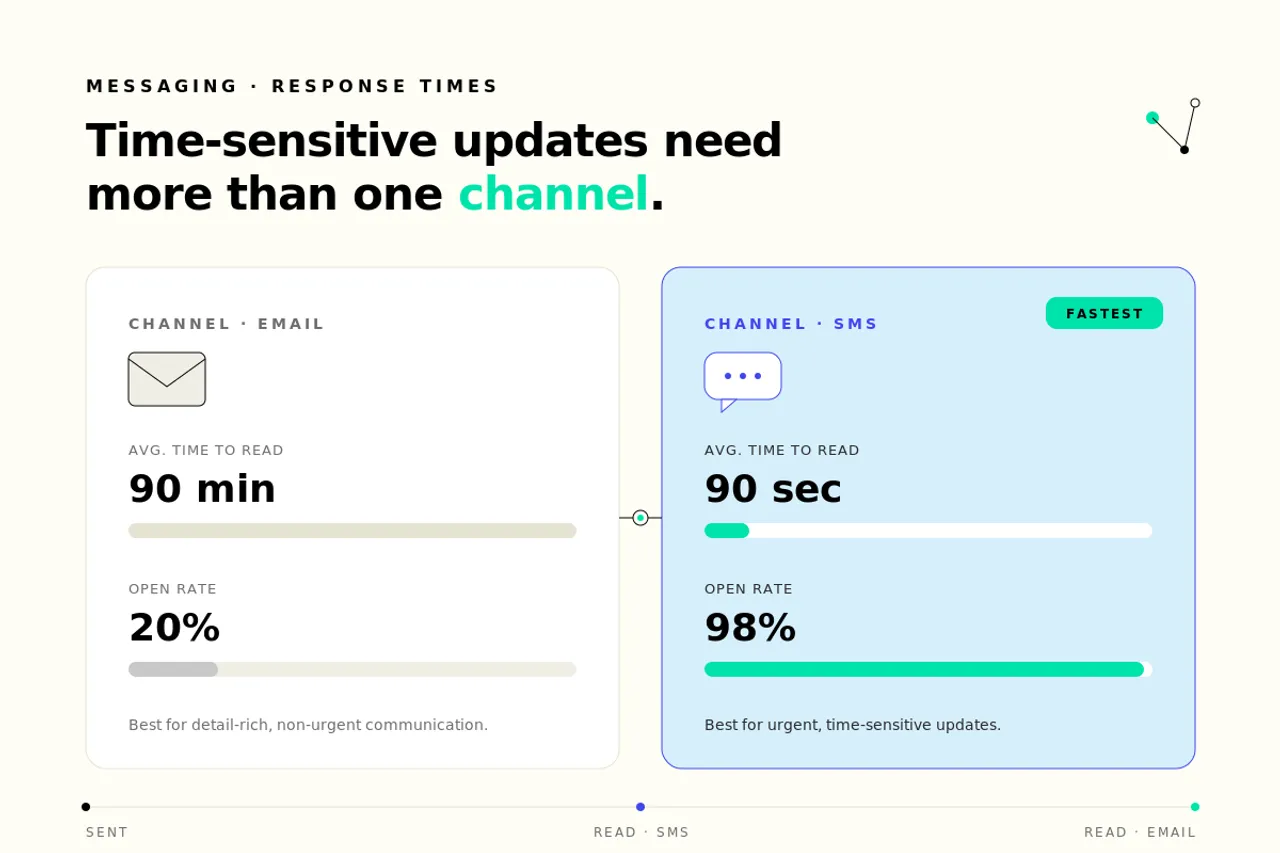
Some messages can't wait in an inbox. Order updates, appointment confirmations, delivery notices, and site alerts lose their value by the hour, and email competes with hundreds of other messages for attention. A text message lands on a lock screen and gets seen. Teams that handle high volumes of operational notifications, from logistics updates to field crew alerts, pair email replies with the Telnyx SMS API, which delivers high-throughput messaging worldwide with smart routing and compliance built in. Because Telnyx runs its own network, per-message costs stay low even at high volume, so scaling from thousands to millions of notifications doesn't mean renegotiating the budget.
The same platform covers the rest of the channel mix. Teams provision local business phone numbers in 140+ countries for callback lines, and run number lookup to verify contact details before automated outreach, which cuts wasted sends and keeps delivery rates high. One platform, one API, one bill.
FAQ
Send email that gets deliveredClear replies build trust. The Telnyx Email API handles transactional and marketing email with high deliverability rates, real-time analytics, and a single API that integrates with your existing stack, priced per email from $0.30 per 1,000.
Explore the Email APIShare on Social

Serhii Omelchenko
Global AEO/SEO Manager
Serhii is Global AEO/SEO Manager at Telnyx, based in Amsterdam, he is focused on making communications infrastructure findable and credible across both traditional search and AI-driven discovery. He previously led SEO and GEO strategy for some of the world’s most recognized consu