
Inference
LiteLLM Proxy What It Is and How to Use It
Learn what a LiteLLM proxy is, how it routes requests to 100+ LLMs, how to set it up, and when a managed inference API is the better choice.

By Eli Mogul
Takeaways
- A LiteLLM proxy is a self-hosted, open-source gateway server that exposes 100+ LLM providers behind a single OpenAI-compatible endpoint.
- Teams use it to swap models without code changes, centralize credentials and spend tracking, and avoid provider lock-in.
- Every request through the proxy pays an extra network hop, and your team owns hosting, scaling, security, and monitoring for that hop.
- A quick start takes minutes with pip install and a config.yaml, but production requires a database, alerting, high-availability deployment, and upgrade management.
- Telnyx Inference delivers the same OpenAI-compatible interface as a managed service on Telnyx-owned GPUs, so migrating off a proxy is a base_url swap.
What is a LiteLLM proxy?
A LiteLLM proxy is an open-source proxy server that lets you call more than 100 LLM providers using the OpenAI input/output format. Your application sends a standard chat completions request to the proxy, and the proxy translates it for OpenAI, Anthropic, AWS Bedrock, Google Vertex AI, Hugging Face, Azure OpenAI, and dozens of other backends. The response comes back in the same OpenAI format regardless of which provider handled it. The project lives in the LiteLLM GitHub repository and has become one of the most common ways engineering teams put a unified layer between their code and the model providers behind it.
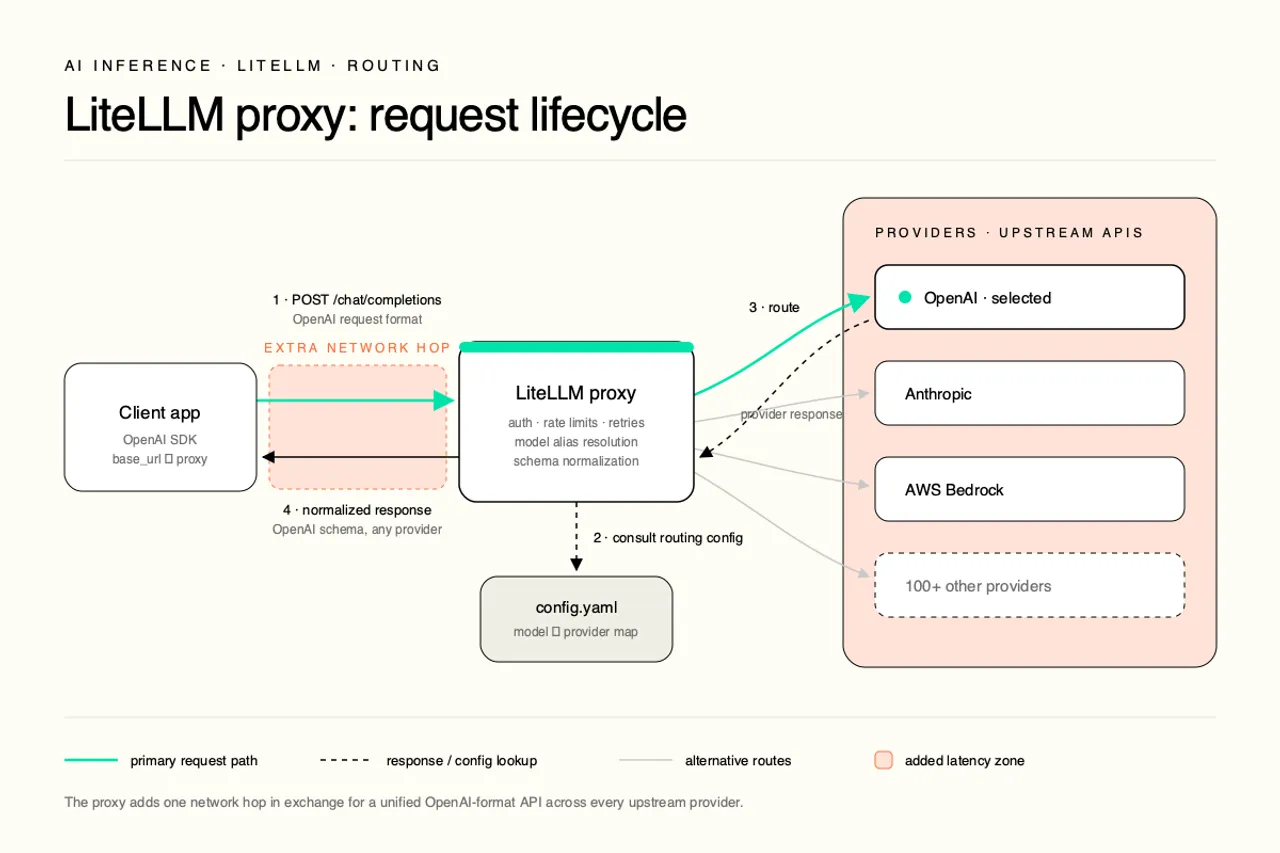
The practical effect is that your application code stops caring which model it talks to. You write against one interface, and a configuration file decides whether "gpt-4o" resolves to OpenAI, a fine-tuned Azure deployment, or a Llama model on Bedrock. For evaluators, the pitch is simple. One integration, many providers, and the freedom to change your mind later.
Note: LiteLLM is two different things that share a name. The Python SDK is a library inside your application. The proxy server is standalone infrastructure you deploy and operate. Evaluating one as if it were the other is the most common mistake teams make.
LiteLLM SDK vs. LiteLLM proxy server
The LiteLLM Python SDK runs in-process. You import it, call litellm.completion(), and the translation to each provider happens inside your application. There is nothing to deploy, but there is also nothing shared. Every service that needs LLM access carries its own provider credentials and its own configuration.
The LiteLLM proxy server is a separate process with its own lifecycle. It sits on the network between your applications and the providers, and it adds capabilities the SDK cannot offer alone: virtual credentials for internal consumers, per-team spend tracking, rate limits, and centralized logging.
| Aspect | LiteLLM Python SDK | LiteLLM proxy server |
|---|---|---|
| Where it runs | Inside your app process | Standalone server you host |
| Credentials | Held by each application | Centralized behind virtual credentials |
| Spend and rate limits | Per-app, manual | Enforced at the gateway |
Why teams use an LLM proxy layer
The business case for an LLM gateway comes down to control. Provider APIs differ in request shape, authentication, and error behavior, and hard-coding one provider into every service creates lock-in that gets expensive to unwind. A unified LLM API means a model swap is a config change instead of a code change across a dozen repositories. Centralized credentials shrink the audit surface, and centralized spend tracking turns a pile of provider invoices into one dashboard with per-team budgets. For platform teams supporting many internal consumers, that control layer is often worth running a server for. The rest of this article covers what running that server actually involves.
Get one OpenAI-compatible endpoint without running a serverTelnyx Inference gives you managed, OpenAI-compatible chat completions on Telnyx-owned GPUs. Explore Telnyx Inference and skip the proxy you would otherwise have to host.
See AI InferenceHow does LiteLLM proxy work?
The request lifecycle has four stages. First, your client sends an OpenAI-format request to the proxy's /chat/completions endpoint, authenticated with a virtual credential the proxy issued. Second, the proxy looks up the requested model name in its config.yaml and resolves it to a concrete provider deployment. Third, it translates the request into that provider's native format and forwards it. Fourth, it normalizes the provider's response back into the OpenAI schema and returns it to your client.
Along the way, the proxy checks budgets and rate limits, logs the request for spend tracking, and applies retry or fallback logic if the provider fails. That is real work, and it happens on a server your team hosts, scales, and monitors. Every request now transits an extra network hop before it reaches a model, which matters more the closer your workload sits to real time.
The OpenAI-compatible interface
The proxy speaks the same request and response schema as the OpenAI chat completions API. That compatibility is the entire trick. Any SDK, framework, or tool that can talk to OpenAI can talk to the proxy by changing one setting, the base URL. Messages go in as a list of role and content pairs, and responses come back with the familiar choices array, whether the model behind the curtain is Claude, Llama, or Gemini.
Compatibility also cuts migration cost in both directions. Moving onto the proxy is a base URL change, and moving off it later is the same change in reverse. Any OpenAI-compatible service can stand in for the proxy without touching application logic.
Model routing with config.yaml
The config.yaml file maps public model names to provider deployments. Each entry in the model_list pairs a name your clients use with the provider-specific parameters needed to reach it:
You can register the same model_name multiple times against different deployments, and the proxy will balance traffic across them. Routing strategies include simple shuffle, least-busy, latency-based, and usage-based routing that respects each deployment's rate limits.
Load balancing, fallbacks, and spend tracking
Fallbacks are configured as ordered lists. If the primary deployment returns an error or times out, the proxy retries against the next deployment in the chain, which can live at a different provider entirely. LLM load balancing plus cross-provider fallbacks is a genuine reliability win, since no single provider outage takes your application down.
Spend tracking works through proxy-issued virtual credentials. The proxy issues its own credentials to internal teams, records the cost of every request against them, and enforces budgets and rate limits per team, per user, or per model. LLM cost tracking at the gateway is one of the strongest arguments for running a proxy at all. The tradeoff is that all of this state needs a Postgres database behind the proxy, which is one more component in the stack you now operate.
How to set up a LiteLLM proxy
The official LiteLLM proxy quick start gets a working gateway running in a few minutes. The steps below follow that path, then flag what the quick start leaves out.
Install and run the proxy CLI
Install the package with the proxy extras and launch it against a single model:
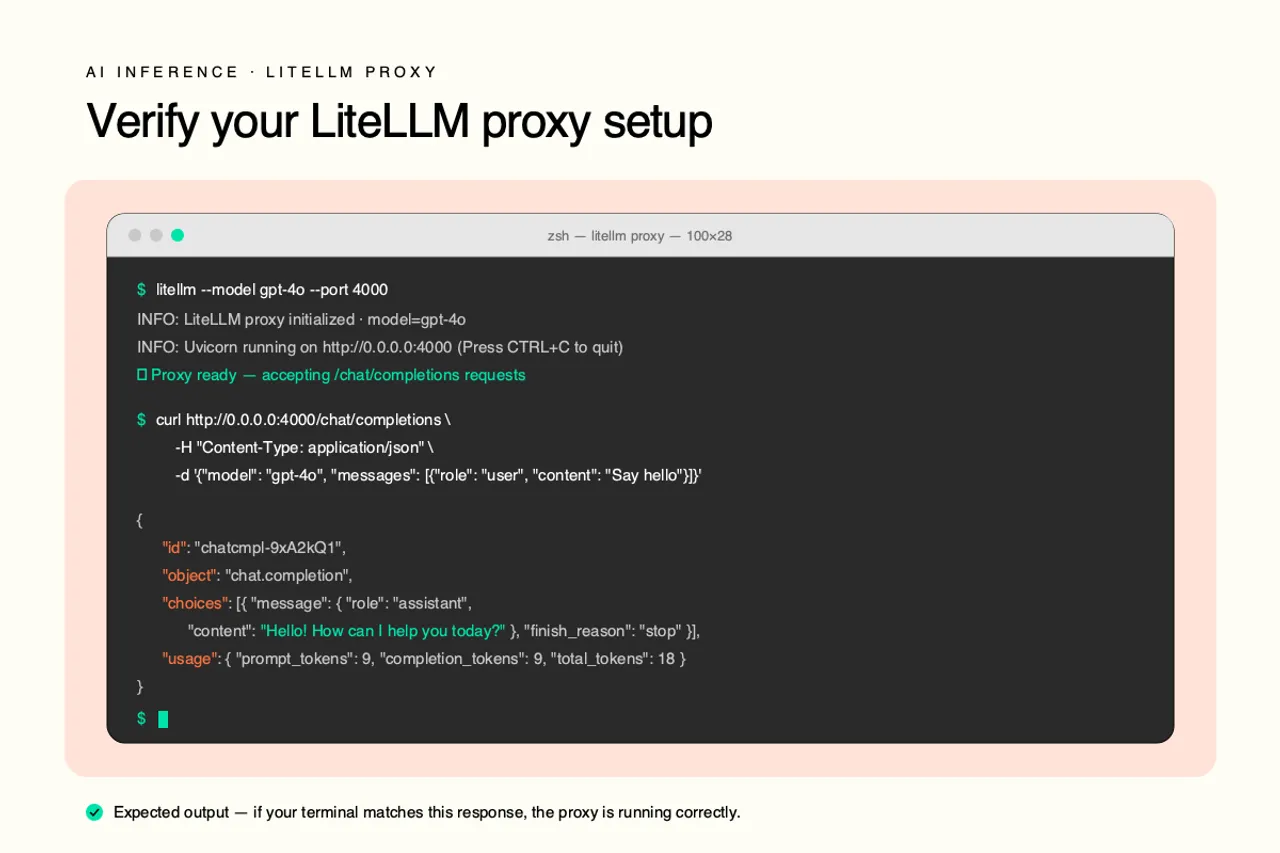
The proxy starts on http://0.0.0.0:4000 and exposes OpenAI-compatible routes. It also serves interactive Swagger docs at the server root, which is the fastest way to explore every available endpoint and its parameters.
Create a config for multiple models
One model is a demo. To route across providers, write a config.yaml with a model_list like the example in the previous section and run the proxy with the config flag:
Every model in the list is now reachable through the same endpoint, and clients select between them with the model field in the request body. Nothing else about the client changes.
Warning: Environment-variable references in config.yaml (like
os.environ/OPENAI_API_KEY) keep provider credentials out of the file itself. Never commit raw credentials to the config. Test with curl, the OpenAI package, or LangChain
Send a request with curl to confirm the proxy is routing correctly:
The OpenAI Python package works by pointing base_url at the proxy:
LangChain and other frameworks connect the same way, by setting their OpenAI base URL to the proxy address. At this point the quick start ends, and it is worth naming what it hides. A production deployment needs a Postgres database for virtual credentials and spend data, an alerting stack for failures and budget events, a high-availability topology so the gateway is not a single point of failure, and a process for testing and rolling out upgrades to a fast-moving open-source project. The quick start is an afternoon. The production system is an ongoing commitment.
Limitations of self-hosting a LiteLLM proxy
Self-hosting a gateway means your team owns a piece of critical-path infrastructure. Every LLM request in the company flows through it, so its uptime becomes your uptime. That means on-call rotation, capacity planning, database maintenance, and a deployment pipeline for a service that cannot go down without taking every AI feature with it. For platform teams with existing infrastructure muscle, that is a manageable cost. For product teams trying to ship, it is a distraction from the actual application.
Latency is the second cost, and it compounds. The proxy adds a network hop, and the hop's size depends on where the proxy runs relative to your application and the provider. Tens of milliseconds is typical, and under load or during a fallback chain it can be far more. For batch workloads that is noise. For real-time workloads like voice agents, where the full pipeline of transcription, inference, and speech synthesis has to finish before a caller notices the silence, every hop eats into a budget measured in hundreds of milliseconds.
We often obsess over LLM inference speeds, but in Voice AI, the network is often the silent killer. - Ian Reither, COO @ Telnyx
Security is the third consideration. A gateway holds every provider credential your company uses and sees every prompt and response, which makes it a high-value target. Open-source gateway dependencies have drawn public scrutiny over supply chain risk, and the widely reported concerns are not a reason to avoid open source, but they are a reason to budget for dependency auditing, patch management, and a hardening review before the proxy touches production traffic. When something breaks, support is community forums and GitHub issues unless you pay for an enterprise tier.
Managed gateway vs. self-hosted proxy
The choice is less about features and more about who carries the operational risk. A self-hosted proxy gives you maximum control and keeps traffic inside your own perimeter. A managed LLM gateway or managed inference API trades some of that control for uptime guarantees, security handled by the vendor, and zero infrastructure on your side.
| Concern | Self-hosted LiteLLM proxy | Managed inference API |
|---|---|---|
| Uptime and scaling | Your team, your on-call | Vendor SLA |
| Latency path | App, proxy, provider | App, provider |
| Security and patching | Your responsibility | Vendor responsibility |
Evaluation checklist for an LLM gateway
Score any option, self-hosted or managed, against these six questions before committing.
| Criterion | What to ask |
|---|---|
| Latency budget | How many milliseconds can the gateway add before users feel it, especially for real-time and voice workloads? |
| Uptime SLA | Who is accountable when the gateway fails, and what is the guaranteed availability? |
| Security posture | Who patches vulnerabilities, audits dependencies, and protects stored credentials? |
| Provider coverage | Does it reach the models you need today and the ones you expect to test next quarter? |
| Observability | Can you see per-request cost, latency, and errors without building the dashboards yourself? |
| Total cost of ownership | Add engineering hours for hosting, on-call, and upgrades to the infrastructure bill, not just the license price. |
Latency-sensitive workloads change how this checklist scores. If your gateway sits between a live phone call and a model, the latency budget question dominates, and an option that removes the hop entirely instead of optimizing it starts to look like the right architecture rather than a convenience.
Run OpenAI-compatible inference without the proxy tax
The core value of a LiteLLM proxy is one OpenAI-compatible interface in front of many models. Telnyx Inference delivers that same interface as a managed service, with chat completions running on Telnyx-owned GPU infrastructure co-located with the Telnyx network. There is no server for your team to deploy, no config.yaml to maintain, and no extra hop to monitor, because the gateway function and the inference itself live on the same infrastructure.
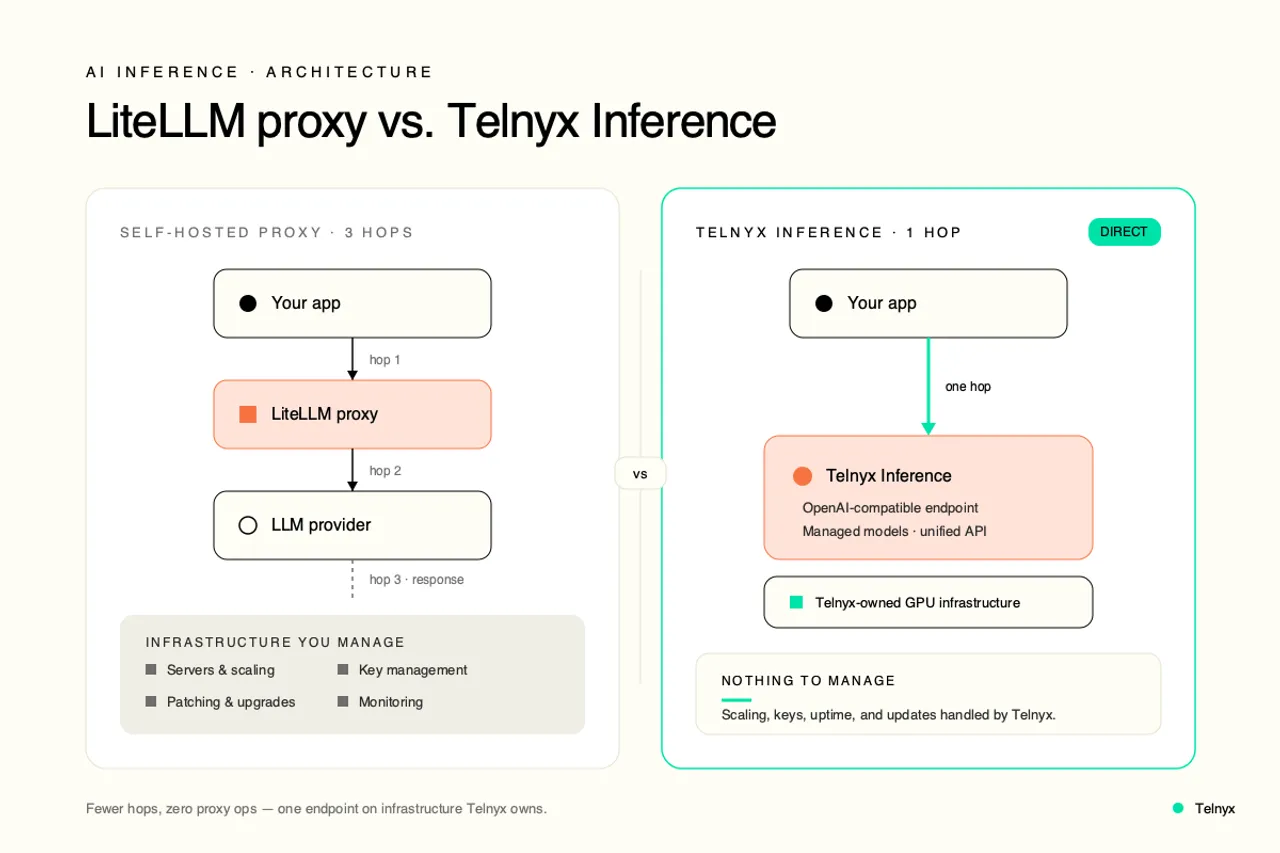
Co-location is the part that matters for real-time applications. When telephony, transcription, inference, and speech synthesis all run on one network, audio enters the platform and never leaves until the response is ready. Voice agents built this way can hold conversational round trips under 500ms, a budget that a self-hosted proxy hop makes measurably harder to hit. Teams building AI agents that combine inference with a high-throughput SMS API and phone numbers in 140+ countries get the whole pipeline from one platform, one API, and one bill.
Our real strength is that we have full-stack ownership from the telephony, the LLM, including the STTs, the TTS, and so this minimizes the hops that users experience, so there's very, very low latency, and there's a great customer experience in terms of interacting with your PCI agent. - Abhishek Sharma, Senior Technical Marketing Manager @ Telnyx
None of this makes LiteLLM the wrong tool. Teams that want traffic inside their own perimeter, need a specific mix of providers, and have the platform engineers to run critical-path infrastructure are exactly who the proxy was built for. The tradeoff turns against you when the requirement is managed reliability and minimal latency, because then the proxy is a server you are paying engineers to run in order to add a hop you do not want.
One endpoint, no self-hosted middleware
Because the Telnyx Inference API is OpenAI-compatible, migrating from a LiteLLM proxy is a base_url swap. Point your existing OpenAI client at https://api.telnyx.com/v2/ai/chat/completions, authenticate with a Telnyx API token, and choose from hosted open-source models like Llama 3.3 70B. Your request and response handling code does not change.
Call the Telnyx Inference API in Python or Node.js
The Python example below sends a chat completion request using the same request shape a LiteLLM proxy accepts:
The Node.js version works the same way and runs as an HTTP server or a CLI tool:
Both examples use the standard chat completions shape, so any code written against a LiteLLM proxy or the OpenAI SDK ports over without structural changes.
FAQ
Share on Social