
Guides and Tutorials
Email authentication guide: SPF, DKIM, and DMARC
Email authentication stopped being optional in 2024. Here is what changed, and what to do about it

By Eli Mogul
Takeaways
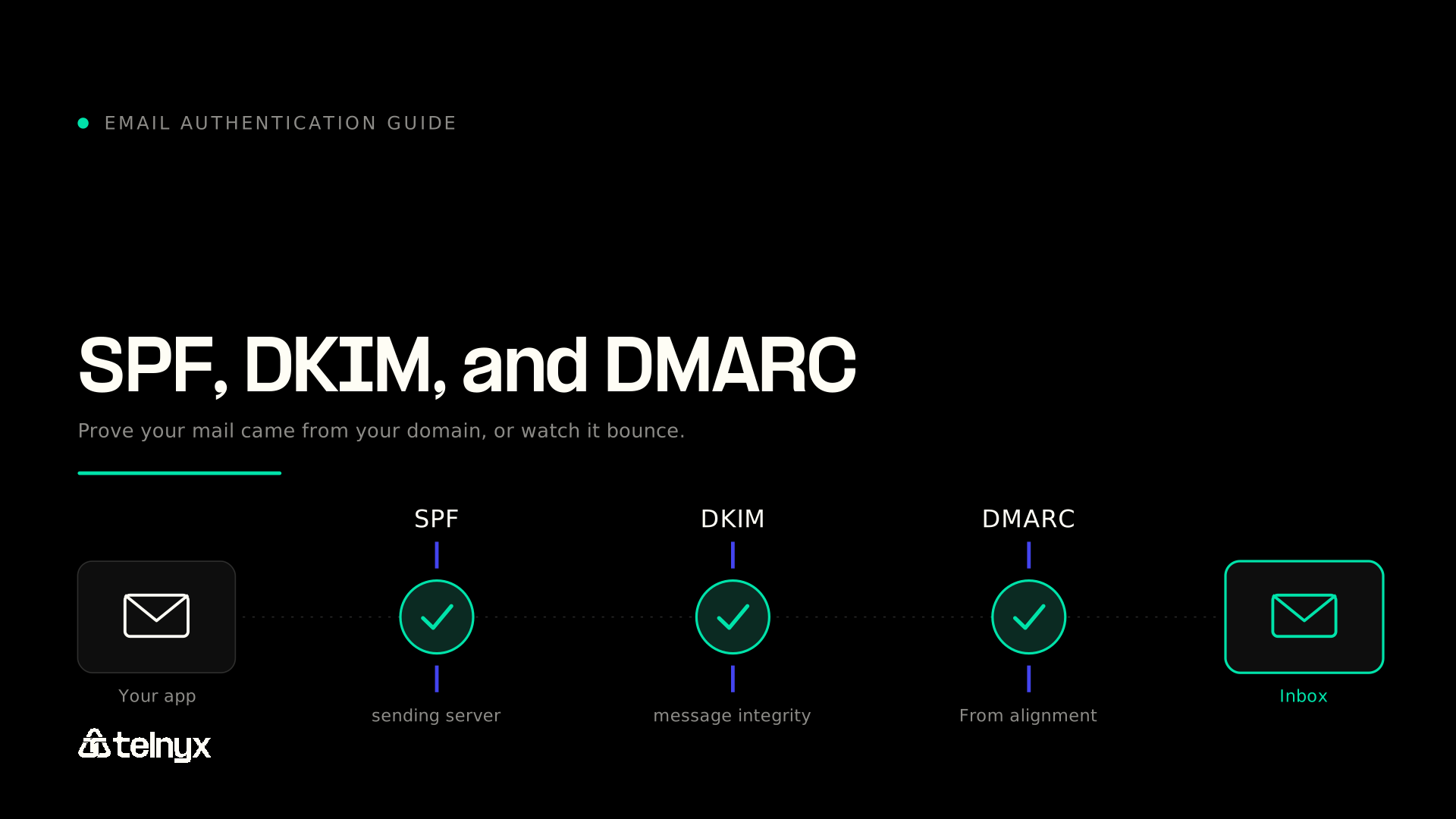
- This email authentication guide covers the DNS-based protocols (SPF, DKIM, DMARC, and BIMI) that prove a message actually came from the domain in its From address.
- Gmail and Yahoo made authentication mandatory for bulk senders in February 2024, Microsoft followed for Outlook.com in May 2025, and Apple applies comparable rules to iCloud Mail. Failing mail is now rejected outright, not quietly filtered.
- Business email compromise drove $3.05 billion in losses reported to the FBI in 2025, and those attacks run on domains nobody protected.
- The four protocols divide the work: SPF verifies the sending server, DKIM verifies message integrity, DMARC ties both to the visible From domain and reports the results, and BIMI displays your logo once DMARC reaches enforcement.
- Programmatic senders need three things beyond the DNS records: a dedicated sending subdomain, a gradual volume ramp, and active monitoring of DMARC aggregate reports.
What is email authentication and how does it work?
Email authentication is the set of DNS-based protocols that let a receiving mail server verify that a message actually came from the domain it claims to come from. SPF, DKIM, DMARC, and BIMI work as layers: you publish records in your DNS, the receiving server checks an incoming message against those records, and the combined result decides whether the message lands in the inbox, the spam folder, or nowhere at all.
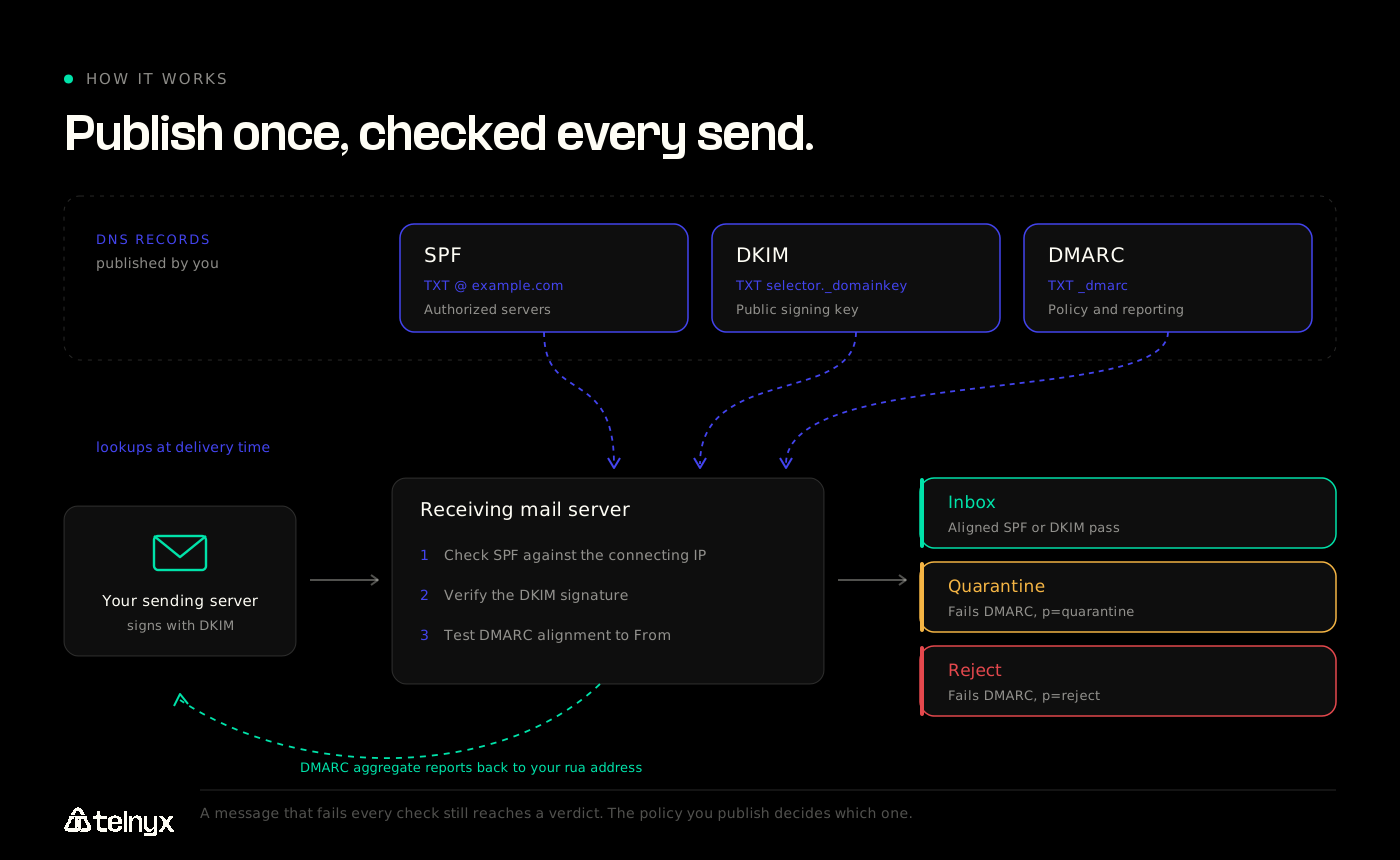
The stack exists because SMTP never verified identity. Nothing stops a server from writing any address it likes into the From header, which is why domain impersonation has been the cheapest attack in the business for thirty years. Authentication moves the proof out of the message and into DNS, where only the domain owner can publish it.
Why email authentication matters
Email spoofing is the mechanism behind most high-value fraud that reaches a corporate inbox. In its 2025 Internet Crime Report, the FBI's Internet Crime Complaint Center attributed $3.05 billion in reported losses to business email compromise, the second most financially damaging crime category it tracks. Those attacks usually begin with a message that looks like it came from a supplier, an executive, or a billing system.
There is a commercial cost too, and it lands on legitimate senders. Every unauthenticated message teaches mailbox providers that your domain is ambiguous. Password resets stall, receipts vanish, onboarding sequences never arrive. Nobody files a support ticket about an email they did not receive, so the revenue leaks quietly.
Mailbox providers closed that ambiguity deliberately. Google's Gmail sender guidelines require SPF or DKIM for every sender, and SPF, DKIM, and DMARC together above 5,000 messages a day to personal Gmail accounts, with spam complaints held below 0.3%. Yahoo publishes equivalent sender best practices. Microsoft joined in 2025: its requirements for high-volume senders reject non-compliant bulk mail to Outlook.com, Hotmail.com, and Live.com with a 550 5.7.515 error rather than routing it to junk. Apple's postmaster guidance for iCloud Mail sets similar conditions.
Authentication used to be a deliverability optimization. It is now an admission requirement, and the penalty for failing it is a permanent rejection that no retry logic will fix.
SPF (Sender Policy Framework)
SPF answers one question: is this server allowed to send mail for this domain? You publish a TXT record listing the hosts and IP ranges authorized to send on your behalf, and the receiving server checks the connecting IP against that list.
example.com. IN TXT "v=spf1 include:_spf.yourprovider.com ip4:203.0.113.24 ~all"Two details trip up most senders. First, SPF validates the envelope sender (the Return-Path), not the From address your recipient sees, so a pass on its own proves very little about the visible sender. Second, the SPF specification caps DNS-querying mechanisms at ten per evaluation. Chain enough include: statements and SPF fails silently with a permanent error that reads to the receiver as an authentication failure, not a configuration bug. Audit the lookup count whenever you add a sending service.
The ~all qualifier is a soft fail and -all is a hard fail. Start soft while you inventory your senders, then tighten. Be aware that a hard fail can trigger rejection early in the SMTP transaction, before DMARC is evaluated, so a message that would have passed on an aligned DKIM signature never gets the chance.
DKIM (DomainKeys Identified Mail)
DKIM answers a different question: has this message been altered since it left the sending server? The sending server signs selected headers and the message body with a private key, then attaches the signature in a DKIM-Signature header. The receiver retrieves the matching public key from DNS and verifies the signature.
selector1._domainkey.example.com. IN TXT "v=DKIM1; k=rsa; p=MIGfMA0GCSqGSIb3DQ..."Use a 2048-bit key where your DNS provider supports it. Gmail requires a minimum of 1024 bits for personal accounts and recommends 2048. Because the signature travels with the message rather than depending on the connecting IP, DKIM survives forwarding and mailing lists where SPF breaks, which is why most teams align DMARC on DKIM. Rotate selectors periodically, publishing the replacement before retiring the old one so verified mail never gaps.
DMARC (Domain-based Message Authentication, Reporting, and Conformance)
DMARC is the layer that makes the other two matter. It requires that a passing SPF or DKIM result be aligned with the domain in the visible From header, then tells receivers what to do when nothing aligns, and asks them to report back.
_dmarc.example.com. IN TXT "v=DMARC1; p=none; rua=mailto:[email protected]; adkim=s"Alignment is the whole point. A message can pass SPF for a provider's own domain while displaying your brand in the From header, and DMARC catches that gap. The p= tag carries the policy: none monitors, quarantine routes failures to spam, and reject refuses them outright.
One update is worth flagging, because most published guides predate it. On May 19, 2026 the IETF published RFC 9989, which obsoletes RFC 7489 and RFC 9091 and moves DMARC to Proposed Standard. Existing records keep working, but three things changed. Receivers now find the organizational domain with a DNS tree walk, querying progressively shorter names instead of consulting the Public Suffix List. The pct, rf, and ri tags are registered as historic and should come out at your next DNS edit. A new t tag replaces what pct did, signalling that you are testing a policy and want receivers to apply one level below what you declared.
The specification also cautions that a domain publishing p=reject must not rely on SPF alone, since forwarded mail routinely loses SPF while keeping its DKIM signature. For background on how the policy model developed, dmarc.org maintains a readable DMARC overview.
Move through the policies deliberately: publish p=none with a reporting address, read the reports until you can account for every legitimate sending source, then step to quarantine and finally reject.
BIMI and other supporting records
BIMI (Brand Indicators for Message Identification) displays your logo beside your messages in supporting inboxes. It is not an authentication protocol so much as a reward for finishing one. As the BIMI Group's FAQs for senders and ESPs set out, you publish a TXT record at default._bimi.yourdomain pointing to a square SVG logo and, optionally, a Mark Certificate. Providers display it only when the message authenticates and aligns under DMARC at quarantine or reject, and Gmail additionally requires a Verified Mark Certificate or Common Mark Certificate. A monitoring-only policy shows nothing, with no error to tell you why.
The practical value is not really the logo. BIMI gives recipients a sender signal that lives outside the message body, where an attacker cannot forge it, and gives your team a visible indicator that enforcement is working: when the logo disappears from a mail stream, something in your authentication chain broke. Treat vendor-published open-rate lift figures with caution, since almost none are independently replicated.
Two supporting records round out the picture. Reverse DNS (PTR) records must resolve your sending IP to a hostname that resolves back to that IP, and all four providers check for it. TLS on the SMTP connection is now a stated requirement rather than a preference.
Here is how the layers divide the work:
| Protocol | What it proves | DNS record | Status for bulk senders | What breaks without it |
|---|---|---|---|---|
| SPF | The connecting server is authorized to send for the envelope domain | TXT at the domain apex | Required (SPF or DKIM for all senders; both for bulk) | Mail from unlisted servers fails authentication and DMARC has one fewer path to pass |
| DKIM | The message was signed by the domain and has not been altered in transit | TXT at selector._domainkey | Required for bulk senders | Forwarded mail loses its only durable proof of origin |
| DMARC | A passing SPF or DKIM result aligns with the visible From domain | TXT at _dmarc | Required for bulk senders, minimum p=none | Anyone can spoof your From header, and you get no reporting on who does |
| BIMI | You reached DMARC enforcement and own the logo you display | TXT at default._bimi | Optional | No logo, and no verified checkmark in Gmail |
Ready to send authenticated email from the same platform as your voice and messaging? The Telnyx Email API generates SPF, DKIM, and DMARC records for your sending domain, monitors them for DNS drift, and puts email on the same API key as SMS, voice, and WhatsApp. Sign up for free and set up a sending domain in minutes.
How to improve email deliverability for programmatic sending
Protocol records get you admitted. Deliverability at volume is an operational discipline, and application-driven sending has failure modes a marketing calendar does not.
Configure authentication records before you send
Do this before the first message goes out. Retrofitting authentication onto a domain that has already earned a poor reputation takes far longer than configuring it cleanly on day one.
- Pick a dedicated sending subdomain. Send from
mail.yourdomain.comrather than your corporate root domain, so a reputation problem on transactional mail never touches the domain your sales team emails from. BIMI records are not inherited by subdomains, so a subdomain sender needs its own. - Publish SPF. Add your provider's
include:mechanism, then count total DNS lookups against the limit of ten. - Publish DKIM. Generate a 2048-bit key pair, publish the public key at your selector, and confirm your provider signs with the matching private key.
- Publish DMARC at
p=nonewith aruaaddress. Point aggregate reports somewhere you will actually read them. - Verify reverse DNS. Confirm your sending IP has a PTR record whose hostname resolves back to that same IP.
- Tighten the policy. After a few weeks of clean reports, move to
quarantine, thenreject.
The DNS records are a weekend of work. What takes real effort is everything after: reading aggregate reports, catching DNS drift when someone edits a zone file, and throttling correctly per provider as volume grows. That ongoing load, not the initial setup, is where most teams stall short of enforcement.
Verify authentication is passing
Do not assume a published record is a passing record. Send a test message to a Gmail address and check directly:
- Open the message in Gmail.
- Click the three-dot menu and select Show original.
- Read the summary block at the top for SPF, DKIM, and DMARC verdicts.
- Confirm all three read
PASS, and that the domain shown beside each one matches the domain in your From header.
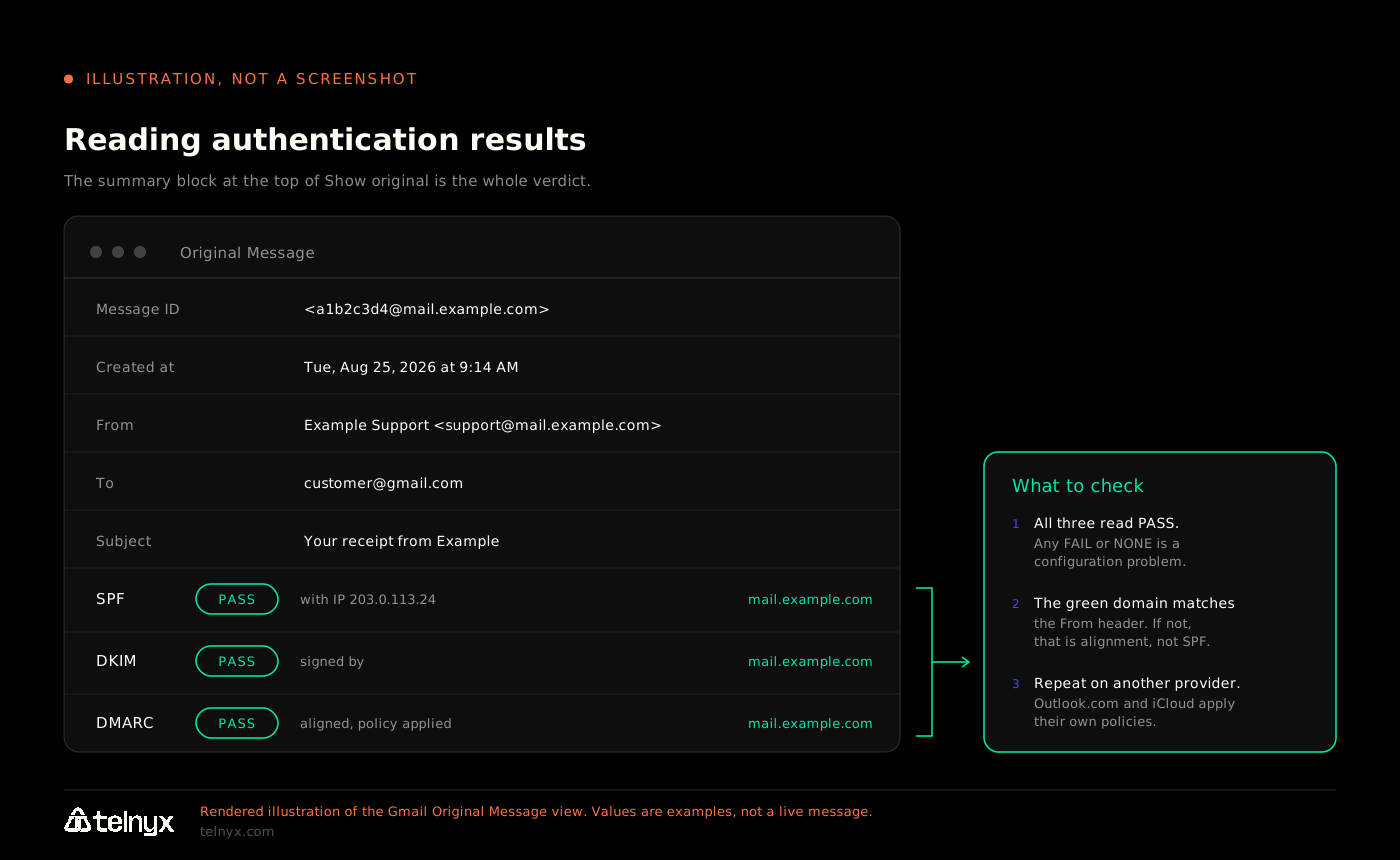
That last step is the one people skip. SPF can pass on a provider's bounce domain while your DMARC alignment fails, and the summary block will happily show SPF: PASS next to a domain you do not recognize. If the domains do not match, you have an alignment problem, not an SPF problem.
Run the same check against an Outlook.com address and an iCloud address. Providers evaluate the same records, but their thresholds and error codes differ, and a 550 5.7.515 from Microsoft tells you something a Gmail pass will not.
Sender reputation, warm-up, and list hygiene
Authentication proves who you are. Reputation determines whether being you is a good thing.
Warm up gradually. A new sending domain has no reputation, and a sudden burst of volume from an unknown domain looks exactly like a compromised account. M3AAWG's sending domains best common practices describes a two-phase process: a warm-up that takes the domain from unknown to noticed, then a ramp that raises volume in steady increments. Send to your most engaged recipients first and keep the daily rate consistent.
Handle bounces as a hard requirement. Suppress hard bounces immediately and never retry them. Repeatedly mailing addresses that do not exist is one of the clearest negative reputation signals a receiver can measure.
Watch the complaint rate. Google asks senders to stay below 0.1% and treats 0.3% as the ceiling. Because the rate is calculated against delivered mail, falling inbox placement can push it up even when raw complaint numbers hold steady.
Read your DMARC aggregate reports. They are the only view you get of mail sent under your domain by systems you may have forgotten about, including that CRM integration someone configured two years ago.
Separate your streams. Transactional and marketing mail should use different subdomains and, where possible, different IPs. A campaign that draws complaints should never delay a password reset.
One boundary worth drawing: authentication is a technical layer, not a legal one. CAN-SPAM in the US and GDPR in the EU impose separate obligations around consent, sender identification, and honoring opt-outs. Passing DMARC says nothing about whether you had permission to send the message.
Building authenticated email into your application
For programmatic senders, authentication is a property of infrastructure rather than of any individual message, which means consolidating channels reduces the number of places it can break. Every additional vendor is another set of DNS records to maintain, another reputation to warm, and another dashboard to check when something stops arriving.
Because authentication sits at the infrastructure layer, it carries across every channel sharing that infrastructure. Running programmatic messaging and authenticated email under one API key means a single sending identity, one place to configure DNS, and one event stream to monitor. A voice AI agent that finishes a support call can trigger the follow-up receipt from that same authenticated domain, with no handoff to a second vendor and no second set of DNS records to keep in sync.
One thing worth building in early: suppression should live below your application code, not inside it. Every hard bounce, unsubscribe, and spam complaint needs to block future sends to that address permanently, and the check has to run at send time rather than when a list is compiled. Application-driven mail is often triggered by an event rather than a campaign, so there is no compile step to filter. If your platform enforces suppression at the API boundary, one forgotten branch in your code cannot mail a burned address.
Here is the send path from an autonomous inbound email agent, which reads a customer message, drafts a reply, and sends it from a verified sending domain:
The application code carries no authentication logic, because it does not need to. DKIM signing happens at the platform layer against the sending domain you verified, and the SPF and DMARC records in your DNS do the rest. The inbound webhook handler and reply generation step are in the AI email agent example on GitHub, and the full schema is in the Email API reference.
Frequently asked questions
What is email authentication? Email authentication is a group of DNS-based protocols (SPF, DKIM, DMARC, and BIMI) that let a receiving mail server verify that a message genuinely came from the domain in its From address. Note what it does not do: it validates the domain, never the local part before the @, and offers no defense against lookalike domains or a forged display name.
What are DMARC, SPF, and DKIM? SPF lists the servers authorized to send mail for your domain. DKIM cryptographically signs your messages so receivers can confirm they were not altered in transit. DMARC requires that a passing SPF or DKIM result align with the domain your recipient actually sees, tells receivers what to do when nothing aligns, and reports the outcome back to you. Only one of the two needs to pass in an aligned way, which is why most senders configure both and treat DKIM as the durable one.
How do I check if my emails are passing authentication? Send a test message to a Gmail address, open it, choose Show original from the three-dot menu, and read the SPF, DKIM, and DMARC verdicts at the top. Confirm all three pass and that the domain beside each matches your From domain. Repeat against Outlook.com and iCloud addresses, since providers enforce differently. For ongoing visibility rather than spot checks, your DMARC aggregate reports are the authoritative record: they cover every sending source, not just the message you tested.
Does email authentication improve deliverability? Yes, though it is now closer to a precondition than an improvement. All four major providers require it for bulk delivery, and Microsoft rejects non-compliant mail outright. Authentication alone does not guarantee inbox placement, since reputation and list quality still apply, but its absence guarantees failure.
Is a p=none DMARC policy enough in 2026? There is a difference between publishing a DMARC record and enforcing a policy, and p=none satisfies only the first. Gmail, Yahoo, and Outlook.com all state that a bulk sender's policy may be set to none, so it does meet their published minimums as written. It does nothing to stop anyone spoofing your domain, though, and it makes you ineligible for BIMI. Treat p=none as a monitoring phase with an end date, not a destination.
Provider requirements and protocol specifications in this guide are current as of August 2026. Mailbox providers revise their sender rules regularly, so verify against the linked primary sources before making configuration changes.
Put authenticated email on the same platform as everything else
Every channel you add through a separate vendor is another sending identity to authenticate, another reputation to warm, and another dashboard to check at 2 a.m. when receipts stop arriving.
Telnyx runs email, SMS, voice, WhatsApp, and Voice AI agents on one platform, under one API key, on one bill. The Email API generates your SPF, DKIM, and DMARC records, monitors them for DNS drift, throttles per provider for Gmail and Outlook, and handles RFC 8058 one-click unsubscribe, so you meet the bulk sender requirements without a second integration. Verification codes can route through the Verify API on the same account. The Email API is generally available to every Telnyx customer, with your own sending domain or a shared domain for self-serve testing, and it is priced per email from $0.30 per 1,000.
Sign up for a free Telnyx account and send your first authenticated email today.
Share on Social


