
Conversational AI
An omnichannel AI front desk for hotels, built on Telnyx
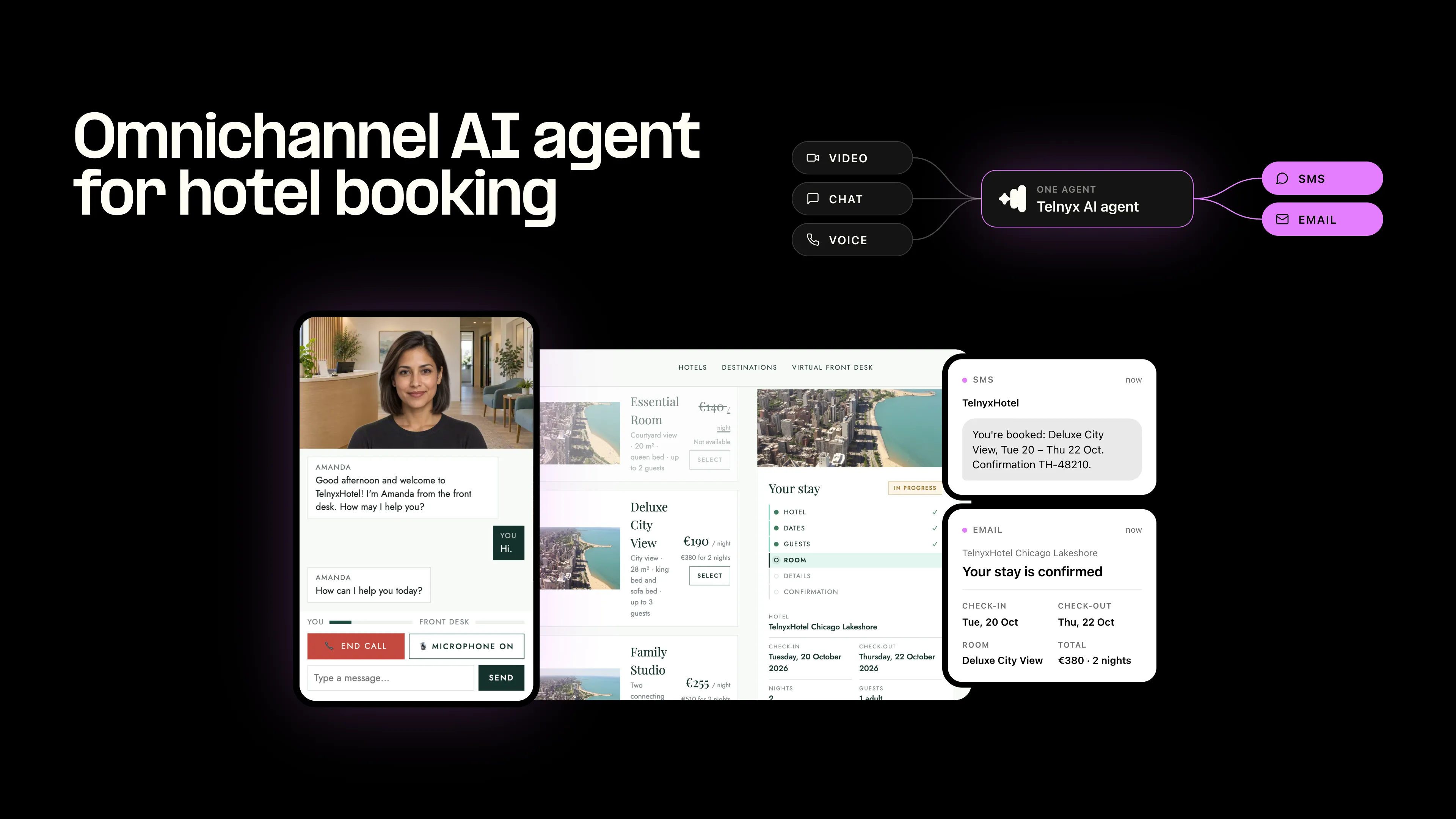
An open-source AI hotel receptionist that takes a booking by voice or chat, in six languages, shows the rooms on screen, and confirms by SMS and email. Built end to end on Telnyx.

Takeaways
An AI front desk that books a hotel room through voice, chat or video, in six languages, and sends the confirmation by SMS and email.
- One Telnyx AI agent talks and shows the booking form at the same time, so the guest picks a room, dates and contact details without leaving the page.
- It switches between English, French, German, Italian, Spanish and Dutch mid-call, with the same voice and the same booking.
- The open-source demo is one Node.js process on Telnyx Edge Compute, with Email, SMS, WhatsApp and Number Lookup already wired in.
Hospitality is changing fast. Guests book from their phones, at any hour, often from another country, and they expect the hotel to answer in their language, on whatever channel they picked. A front desk that works office hours in one language can't keep up.
So we built one that can. One Telnyx AI agent takes a guest from first hello to a confirmed booking: it talks, shows the rooms on screen, switches language mid-conversation and confirms by SMS and email.
Watch the demo
One call, two languages, from hello to booked. TelnyxHotel is fictional; the infrastructure behind it is not.
YouTube link.
Talk to a hotel receptionist that books the room
One Telnyx AI agent handles six languages, the booking form, SMS and email confirmations in a single pipeline.
Why it matters for hotels
Guests reach a hotel by phone, chat, text and email, in their own language and at any hour. Few front-desk teams can cover all of that, so some calls go unanswered and some guests book elsewhere, often through an online travel agency that charges commission.
The agent in the demo closes those gaps:
- Six languages. It speaks English, French, German, Italian, Spanish and Dutch, and switches the moment the guest does. It uses the formal form of address in each (vous, Sie, Lei, usted, u), and one knowledge base serves all six.
- Any hour. It answers straight away, day or night, and takes the booking from start to finish.
- The whole booking. It collects hotel, dates, guests, room, contact details and special requests, then confirms in writing.
- The hotel's own facts. It answers questions on rooms, dining, parking or accessibility from the hotel's knowledge base, and offers a follow-up when the answer isn't there.
- A handover for the rest. For a change, a cancellation or a complaint, it takes the guest's details for a colleague to follow up by email.
Every booking it takes is a direct booking, and staff keep the conversations that need a person.
Why the visual element matters
Hospitality is personal and visual: guests choose a room by what they see and trust a booking they can read. So the agent talks and shows at the same time, filling in the booking on the page while the guest speaks.
- Rooms on screen. Once the hotel, dates and guests are known, the available rooms appear with the nightly price and the total for the stay. The chosen room is highlighted.
- Details the guest can check. Dates, names and email addresses are easy to mishear on a call. Seeing them written out lets the guest catch a mistake before confirming.
- A clear path to done. A "Your stay" tracker moves from hotel to dates, guests, room, details and confirmation, so the guest always knows what's left.
- A face at the front desk. An optional video avatar, in beta, gives the receptionist a face, with the voice lip-synced and the video streamed over WebRTC.
The guest can type instead of talk at any point, and the page switches language with the conversation. Without the avatar, the same flow runs voice-only.
How it works
A small Node.js server sits between the guest's browser and one Telnyx AI agent, so the page stays live and the API key stays on the server.
Demo architecture: browser talks to your server, your server opens the conversation WebSocket to the Telnyx AI agent. Three tools run in the browser so the booking form fills itself as the guest speaks. The dashed line is the optional video avatar, streamed over WebRTC. Before a text goes out, Telnyx Number Lookup checks that the number is a mobile.
The agent works through five tools, three of which run in the page so the guest sees each detail land:
| Tool | Runs in | What it does |
|---|---|---|
update_booking | Browser | Fills in the booking as the guest speaks and returns what's still missing |
check_availability | Browser | Returns the rooms and nightly prices for the stay |
confirm_booking | Browser | Validates the booking and returns a confirmation code |
retrieval | Telnyx | Searches the hotel knowledge base |
hangup | Telnyx | Ends the call after the goodbye |
The server re-validates every booking before it sends an email or text.
Inference on Telnyx GPUs
The language model behind the receptionist, Kimi K2.6, runs on GPUs that Telnyx owns, on the same platform that handles the speech. That keeps every turn of the conversation quick.
Speed you can hear. The receptionist answers in one or two short sentences, one question at a time, while the page updates in parallel. A half-second stall on every turn would change how the whole call feels.
- Cost that fits a small chain. Open-source models on owned GPUs cost less per token than proprietary alternatives. That puts an AI front desk within reach of an independent hotel, not only a global brand. See inference pricing for current rates.
- Data that isn't kept. On the inference side, prompts and completions aren't stored. That comes from the architecture, not from a setting someone has to remember to switch on.
Build it yourself
The full demo is open source under the MIT license: team-telnyx/telnyx-demo-hotel on GitHub. It runs as one Node.js process, and a setup script creates the agent and its knowledge base on your Telnyx account.
What's in the repo
- Booking site: the hotel website with the voice receptionist, in six languages.
- How it works page: an animated architecture diagram that follows a live call step by step.
- Call history: each call's conversation with per-turn latency, tool calls, events and the messages it sent.
- Back office: users and access; the agent's languages, voices, prompt, knowledge base and video avatar; email, SMS and WhatsApp settings.
- Ten fictional hotels: in Chicago, Rome, Paris, Munich, Madrid and Amsterdam, each with a knowledge base file.
The repo also ships end-to-end tests: npm test boots the real server on a throwaway database and checks access rules, isolation, cookies, validation and rate limits.
Run it locally
You need Node.js 22.5 or later and a Telnyx API key from the Telnyx Portal.
bash
git clone https://github.com/team-telnyx/telnyx-demo-hotel.git
cd telnyx-demo-hotel
npm install
cp .env.example .env    # add TELNYX_API_KEY, or let setup ask for it
npm run setup           # creates the knowledge base and the AI agent
npm start               # http://localhost:3000
Setup uploads the hotel knowledge base to Telnyx Cloud Storage, creates the agent from the repo's config and prompt, and prints an admin login. Sign in, open Booking, press Book with your voice and start talking. Until you turn on email and SMS in the back office, confirmations show as a preview in the browser.
Make it your hotel's
- Your hotels and rooms. Edit
public/booking.js, the prompt, the hotel and room lists inassistant/assistant.json, thekb/files and the photos. Then runnpm run assistant:syncandnpm run kb:sync. - Your availability. The demo computes availability and prices in the browser. Your booking engine, PMS or GDS plugs in at that point.
- Your confirmations. Add an email sending domain, an SMS messaging profile and sender, and for WhatsApp a Business number with an approved template.
- Your hosting. Serve it over HTTPS, since the microphone needs it: on any Node host, or on Telnyx Edge Compute, which deploys with one command and includes HTTPS.
The Telnyx products behind it
Every part of the demo runs on Telnyx, from the conversation to the confirmations.
| Product | What it does in the demo |
|---|---|
| Voice AI Agents | Runs the receptionist: transcription, reasoning, tool calls and knowledge base search |
| Voice API | Speaks the replies in Telnyx Ultra text-to-speech voices, with a shortlist per language |
| WebRTC | Streams the optional video avatar from Telnyx straight to the browser |
| SMS API | Texts the booking confirmation to the guest, with WhatsApp also supported |
| Email API | Sends the booking recap to the guest's inbox |
| Number Lookup | Checks that a number is a mobile before a text goes out |
| Cloud Storage | Holds the hotel knowledge base and its embeddings |
| Edge Compute | Hosts the app next to the Telnyx network, with HTTPS included |
Beyond hotels
This is a voice agent that drives a real UI, not a chatbot in a side panel. One Telnyx account, one API key and one deployment cover speech, reasoning, retrieval, email, SMS, WhatsApp and hosting, with no glue services in between.
That makes the repo a starting point for any front desk: a restaurant, a clinic, a property manager or a dispatch team. The conversation loop, tool plumbing, language handling and confirmations are already built. You write the knowledge base and the page.
Start building
Clone the repo, add your API key and run setup; the script creates the agent and its knowledge base for you. Then swap in your own hotels, rooms and booking system.
Explore the code on GitHubCreate a Telnyx accountOne platform, one vendor, one API for AI, voice and messaging. Explore the code on GitHub, create a Telnyx account or talk to our team.
Share on Social
Deniz is a Senior Product Marketing Manager at Telnyx with 10 years of experience in technology and healthtech marketing. She previously led go-to-market initiatives at Philips Healthcare, Vodafone, and The Coca-Cola Company. Originally from Türkiye and based in Amsterdam, she ho

%20(1).png?width=96&format=webp)


