

Shared or dedicated email IP? How to tell if your volume justifies one, and how to warm it up safely.
Takeaways
- Telnyx's Email API sends from dedicated IPs at $14 per IP a month, routing each message through an IP pool scoped to its sending domain or account.
- The dedicated IP vs shared IP choice comes down to whose mail shapes your IP reputation.
- A shared pool blends many senders and suits low or uneven volume.
- A dedicated IP carries only your mail, and it pays off once your volume is high and steady enough to keep it warm.
Dedicated IP vs shared IP comes down to one question: whose mail are you sharing a reputation with? If your open rates have ever dipped in a week when nothing changed on your end, another sender on your address may be the reason.
This guide walks through how that shared reputation works, when it pays to send on your own, and how to switch without your password resets landing in spam.
Dedicated IP vs shared IP: what's the difference?
The difference is whose traffic shapes the address's reputation, not whether the address changes. Every message you send leaves from a public IP address, and Gmail, Yahoo, and Outlook keep score on that address. If you want the wider picture first, here's how email APIs work.
What is a shared IP pool?
A shared IP is one public address that many senders use at once. Your provider routes mail from hundreds of customers through the same pool, and mailbox providers score the address, not the customer behind it. When one sender on the pool sends junk, everyone on that address feels it.
That sounds alarming, but a well-run pool isn't a free-for-all. Telnyx scores every sending domain on its complaint, bounce and delivery rates over a rolling 30 days, and suspends sending when complaints reach 0.30%, bounces reach 10%, or delivery falls to 90%. The reputation bands show how that policing works.
Newcomers get a gentle start too. New custom sending domains on Telnyx's shared pool start under an automatic daily ceiling that lifts as their sending history builds.
There's an upside to sharing that's easy to miss. The Messaging, Malware and Mobile Anti-Abuse Working Group (M3AAWG) notes that a pool dilutes any single sender's mistakes, so one bad Tuesday doesn't sink you.
What is a dedicated IP?
A dedicated IP is a sending address that belongs to one account, so its reputation comes only from your mail. Your clean list and low complaint rate earn placement nobody else can spend. Your mistakes stay yours too.
Here's the part most guides skip. M3AAWG points out that providers sometimes put a sender with unknown or poor list quality on a dedicated IP on purpose, to isolate that mail and protect everyone else.
So a dedicated IP is really a form of isolation. Isolation can protect you from the pool, or protect the pool from you.
Shared IP vs dedicated IP at a glance
| Factor | Shared IP | Dedicated IP |
|---|---|---|
| Who uses it | Many senders on the provider's pool | Your account only |
| Whose sending shapes the reputation | Every tenant on the address | Yours alone |
| Cost | Included in your sending price | An added monthly fee ($14 per IP a month on Telnyx) |
| Warm-up needed | No, the pool is already warm | Yes, volume ramps up gradually |
| Who monitors abuse | The provider, which can suspend senders that hurt the pool | You |
| Best for | Low or irregular volume | High, steady volume and allowlisting |
How mailbox providers score a sending IP
About one in eight messages missed the inbox in 2025. The Validity 2026 benchmark report puts the average global inbox placement rate at 87.2%, with Gmail at 89.8%. Which side of that line your mail lands on depends on how providers read your sending history.
IP reputation and domain reputation
Mailbox providers weigh your sending domain's reputation together with the address's. A new dedicated IP gives you a clean slate at the address level, but your domain's history moves with you. If your domain has a complaint problem, a fresh address won't hide it.
Telnyx makes the same point in its dedicated IP release notes: domain reputation, message quality, engagement, and mailbox-provider policies still shape where your mail lands.
Authentication applies on either kind of address. Gmail asks every sender for valid forward and reverse DNS on sending IPs and a spam rate below 0.3%.
In practice, that means a dedicated IP is a fresh coat of paint, not a new house. Fix list hygiene and authentication first, and the new address has something good to build on.
Why steady volume beats high volume
The M3AAWG Sender Best Common Practices say it plainly: consistent volume, whether high or low, plays an integral part in a sending IP's standing. Filters trust a rhythm they recognize.
Picture two senders. One sends 20,000 messages from a dedicated IP on Monday and nothing until Friday. The other sends through a shared pool every hour of every day.
To a filter, the first one looks riskier, even if its list is cleaner. Silence costs you too: most reputation systems keep about 30 days of history, so an IP that goes quiet for a month starts over as a stranger.
When a dedicated IP is worth it
If you're asking "do I need a dedicated IP?", the honest answer for most senders is no, not until their volume is high and steady. Below that point, a dedicated IP for email is a monthly cost and a monitoring chore without the payoff.
Here's a quick gut check. If your sending chart looks like a heartbeat (a steady pulse every day), you're a candidate. If it looks like a mountain range (quiet weeks, then a huge campaign spike), a shared pool will probably treat you better.
Volume thresholds by provider
Providers set very different bars before they'll hand you one.
Dedicated IP volume and price by provider
| Provider | Volume it asks for | Price of a dedicated IP |
|---|---|---|
| Telnyx | No published volume floor; verified, enterprise, or legacy account | $14 per IP a month |
| Amazon SES | Shared IPs unless you send large volumes on a regular, predictable basis | $24.95 per IP a month (standard); $15 per account a month plus a per-email fee (managed) |
| Postmark | From 300,000 messages a month | See Postmark's pricing |
| Customer.io | 5,000 emails a day or 50,000 a week | See Customer.io's pricing |
| Mailjet | Recommended above 100,000 emails a month | See Mailjet's pricing |
| Mailgun | Access from 50,000 emails a month | One IP included on plans from 100,000 a month |
The published monthly floors differ by a factor of six (50,000 at Mailgun vs 300,000 at Postmark), so the steadiness of your sending matters more than which number you clear.
Telnyx publishes no volume floor at all. Dedicated IPs need a verified, enterprise, or legacy Telnyx account. Current rates live on the Telnyx email pricing page.
Stay on a shared pool if
- Your volume is low, seasonal, or bursty, like a monthly newsletter plus a handful of receipts.
- Nobody on your team owns reputation monitoring day to day.
- You're just starting to send and have no history to build on.
Move to a dedicated IP if
The dedicated IP benefits show up when any of these are true:
- You send high volume on a steady, daily rhythm.
- A partner allowlists your sending IP, so you need an address that never changes.
- You run marketing and transactional streams you want to keep apart (see the pools section below).
How dedicated IP warm-up works
A new IP has no history, so mailbox providers distrust a sudden burst from it. Warm-up raises your daily volume step by step while they learn who you are. Think of it as introducing yourself before asking for a favor.
On Telnyx, nothing moves until you say so. A new Telnyx IP carries no mail until you start its warm-up through the API. A domain on a Telnyx dedicated IP follows the IP's warm-up only, never a second ramp on top.
The dedicated IP docs list the current ramp, so check them before you plan a launch around a new address.
What happens to mail over the daily cap
Every warming IP has a daily allowance, and providers disagree on what to do with the extra. Amazon SES managed IPs send part of the overflow through the SES shared pool.
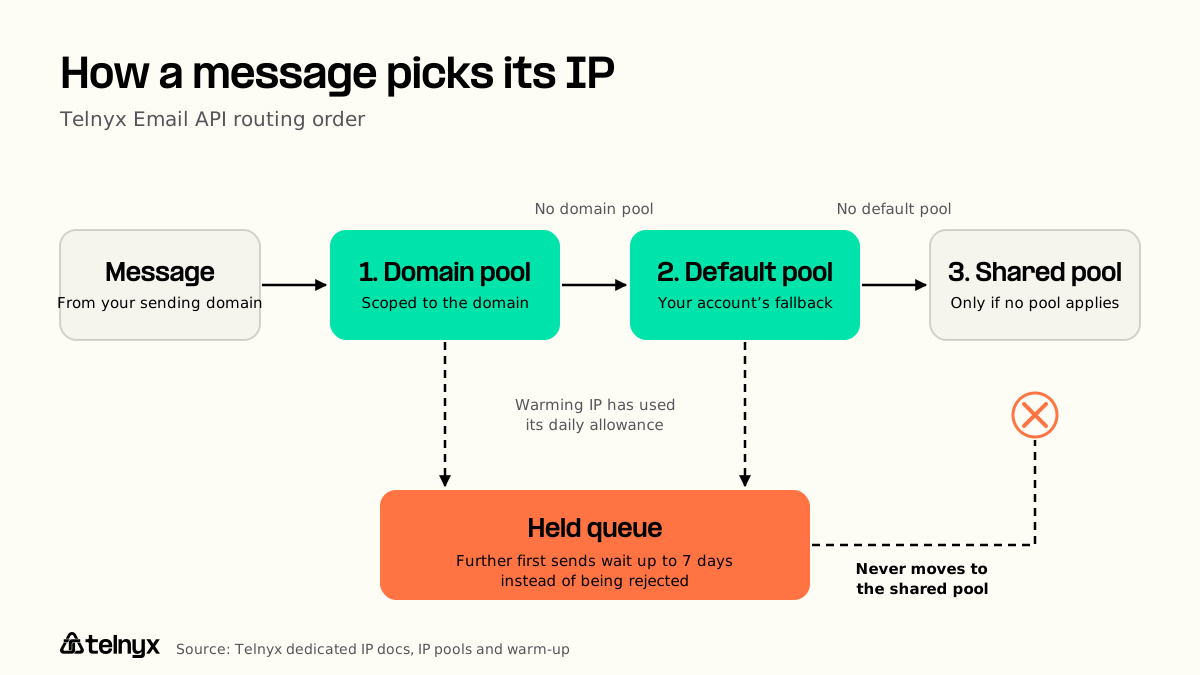
Telnyx takes the opposite approach. When a warming IP has used its daily allowance, Telnyx holds further first sends in a queue for up to 7 days instead of rejecting them, and never moves them to the shared pool.
Imagine you launch a product update early in warm-up and your list is bigger than the allowance. On one platform, some of that announcement quietly rides the shared pool. On the other, it waits its turn.
Both designs have a cost. Spilling keeps mail moving but puts some of it on shared reputation. Holding keeps your reputation separate but delays mail, so a time-critical message like a login code shouldn't depend on a cold IP.
Skipping warm-up for an IP that is already warm
Only skip warm-up for an IP that already has a healthy sending history. M3AAWG describes bringing your own IP to a new platform to avoid warming it again, and notes that few providers offer it.
On Telnyx, it's one step. If an IP was already warmed elsewhere, you can mark its warm-up complete through the API.
Separate pools for marketing and transactional mail
Telnyx's Email API splits mail streams across IP pools, routing each message to its domain's pool, then the account's default pool, then the shared pool. That matters because your two kinds of mail behave nothing alike.
Marketing draws more complaints, and mixing streams makes your volume lumpy. Send a holiday sale blast from the same IP as your password resets, and the customer locked out of their account pays for it.
Put resets and receipts on one pool and campaigns on another, and a dedicated IP for email marketing builds its own record. On the Telnyx Email API, you can scope a pool to a sending domain (say, a transactional subdomain) and keep a default pool for everything else.
Each IP in a Telnyx pool carries a routing weight, and an IP belongs to one pool at a time. Below the volume that keeps two dedicated IPs warm, keep both streams on the shared pool.
Moving from a shared pool to a dedicated IP
Plan the switch once, then run it in this order:
- Check your numbers. Compare your volume against the provider table above, and look at your sending pattern, not just your monthly total.
- Authenticate the sending domain. Set up SPF, DKIM, and DMARC (Sender Policy Framework, DomainKeys Identified Mail, and Domain-based Message Authentication, Reporting, and Conformance). Telnyx manages the reverse DNS (PTR) record for every dedicated IP, and a sending domain whose SPF record already includes spf.telnyx.com needs no SPF change.
- Buy the IP and start warm-up before you add it to a pool that carries mail. A new Telnyx IP carries no mail until you start its warm-up through the API.
- Move transactional mail first, and watch bounces and complaints daily. The deliverability monitoring guide covers what to track.
- Move marketing mail onto its own pool once transactional mail is stable.
- Keep the old provider sending until the new IP carries full volume.
Then treat the IP as permanent. A released Telnyx IP stops sending at once, is quarantined for 30 days, and cannot be restarted. Changing your IP really means starting over with a new address and a new warm-up, so choose once and keep it.
Dedicated IP vs shared IP FAQ
Here are quick answers to the dedicated IP vs shared IP questions email teams ask most.
Is a dedicated IP address a good idea?
A dedicated IP address is a good idea when your volume is high and steady, and usually a poor one when it's low or bursty. A quiet dedicated IP has no history, so filters treat it as a stranger and may throttle it. A busy shared pool already has a reputation. The volume table in "When a dedicated IP is worth it" shows where you likely land.
How much does a dedicated IP cost?
A dedicated IP costs a monthly fee on most email platforms, on top of your sending price. A Telnyx dedicated IP costs $14 per IP a month, billed from purchase until you release it. Amazon SES lists $24.95 per IP a month for standard dedicated IPs, and some providers bundle one into higher-volume plans. Budget for warm-up time too, since a new IP can't carry full volume on day one.
How do I check if my IP is dedicated or shared?
You can check whether your sending IP is dedicated or shared in a few minutes. Open a message you sent and view the full header (in Gmail, click More, then Show original) to find the sending IP. Look up that IP's reverse DNS. Then check your provider's dashboard or API, which lists any dedicated IPs on your account. If none show up, you're on a shared pool.
Does a dedicated IP help SEO or website speed?
A dedicated IP doesn't help SEO or website speed. Google has said there is no SEO advantage to a unique IP address, and Server Name Indication (SNI) lets one IP serve HTTPS for many sites. Page speed comes from the server, caching, and network path, not the address. If a shared hosting plan feels slow, the crowded server is the problem, and a new IP on it changes nothing.
Is a static IP the same as a dedicated IP?
A static IP isn't quite the same as a dedicated IP, and the static IP vs dedicated IP mix-up is common. Static means the address doesn't change. Dedicated means nobody else uses it. A dedicated sending IP is static, but a static IP can be shared: your office router uses network address translation (NAT) to send every laptop's traffic out through one public address.
Can I change my dedicated IP address later?
You can change your dedicated IP address later, but it costs you. The new address starts with no reputation and needs its own warm-up, and any partner who allowlisted the old one needs the new one. A released Telnyx IP stops sending at once, is quarantined for 30 days, and cannot be restarted. Treat the IP as permanent, and plan any change as a full migration.
Send from an IP only you use Add a dedicated sending IP to the Telnyx Email API and route it through your own pools. Start building