

Your IoT devices can’t defend themselves, so here’s how to protect them from the network side and keep them off the public internet.
Takeaways
- Your devices are too small and too long-lived to protect themselves, so your network has to do it for them.
- Most breaches start with the same few mistakes, and you can catch every one of them on the network.
- If your devices live in other people's homes or out in the field, giving each one its own private cellular path takes the biggest risks off your plate.
What is IoT network security and how does it work?
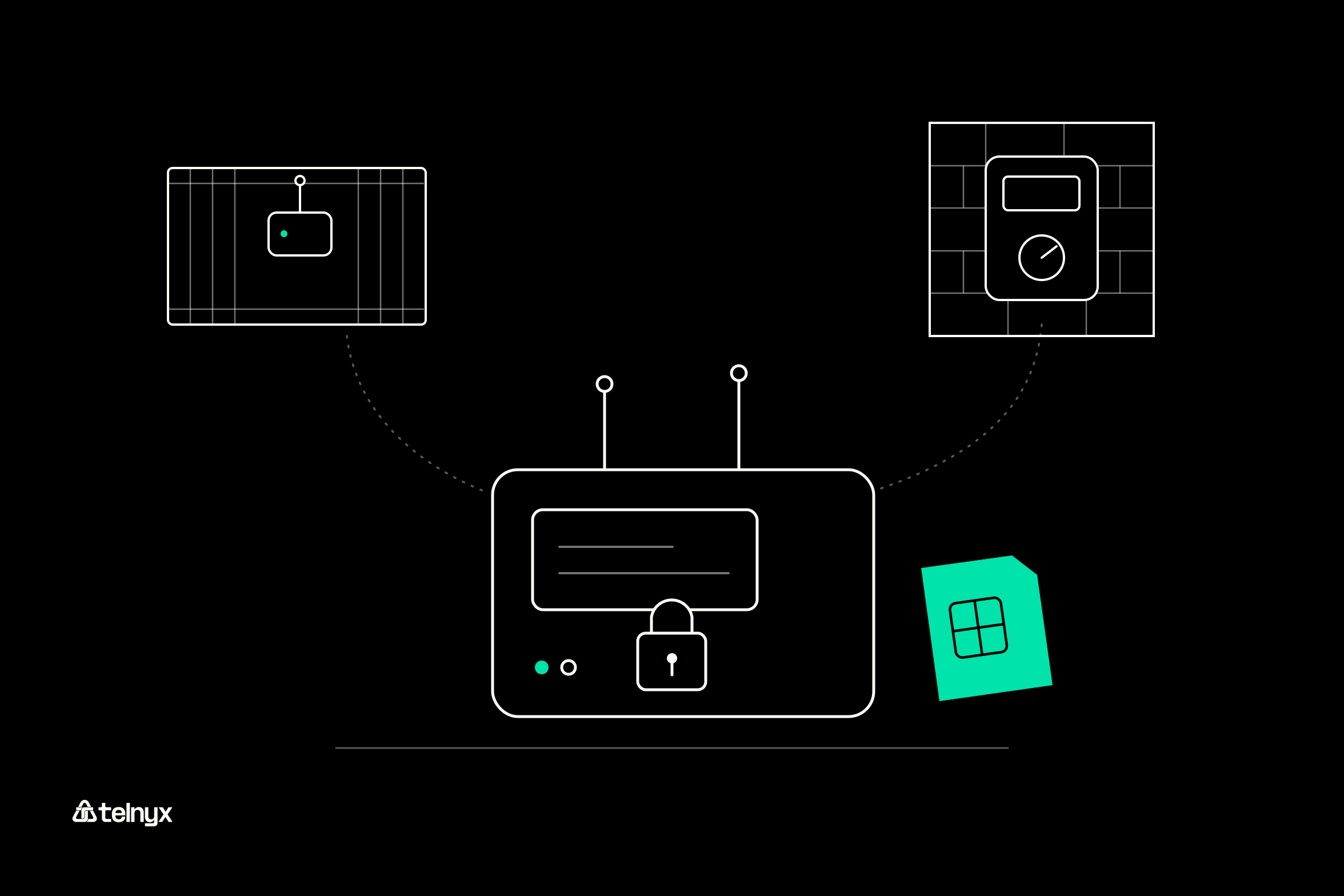
IoT network security is how you decide which devices get on your network, what each one can talk to, and who can read its traffic.
If you manage connected devices, you already know the problem. You can't install antivirus on a parking sensor, and you're not going to log in to a thousand trackers to patch them. So you secure them from the outside, by controlling how each device proves who it is and where its traffic is allowed to go.
Why IoT devices can't secure themselves
Whether you run trackers, meters, or payment terminals, you're up against the same three limits:
- Hardware: Your devices have just enough power to sense and transmit, often on a battery. There's no headroom for security software or heavy encryption.
- Operating systems: Many run real-time systems like FreeRTOS, Zephyr, or VxWorks, and your enterprise patching tools won't work there.
- Lifespan: You'll likely keep them in the field for years after the vendor stops shipping firmware.
Network security for IoT devices starts with identity
Your network can't contain a device until it knows which device it's talking to. Here are the four ways it can find out, from weakest to strongest:
- MAC address: It's sent in the clear, and anyone can spoof it in seconds, so don't treat it as a credential.
- Shared passphrase (WPA2-PSK): Every device holds the same secret. If someone captures a handshake, they can crack it offline with a tool like Aircrack-ng.
- Device certificate (EAP-TLS over 802.1X): Much stronger, but now you're running a certificate authority and keeping up with renewals and revocations.
- SIM: The mobile core checks a secret on the SIM before your device ever gets an IP address, and there's no shared password for you to leak.
How the connection path shapes IoT device network security
Here's the simplest way to think about it. If your device sits on a public IP, anyone scanning the internet can find it. If its traffic runs through a private gateway that only exits into your VPC, there's nothing for them to find.
That's how Telnyx IoT SIM cards work. Each SIM carries a multi-IMSI identity on a mobile core Telnyx runs, connects across 650+ networks in 180+ countries, and can take a private IP through the Private Wireless Gateway or IoT VPN. You don't need to buy custom hardware or set up firewalls.
Give every device a private path
Telnyx IoT SIMs connect across 650+ networks in 180+ countries and take private IPs through the portal or API.
What are the most common IoT network security issues?
You'll run into the same four problems again and again. The good news? Each one leaves a trace you can catch on the network.
- Default credentials: You see login attempts on Telnet or HTTP from the internet. A private path and changed defaults shut this down.
- Unencrypted traffic: Anyone on the segment can read your MQTT payloads or video. TLS or DTLS to your backend fixes it.
- End-of-life devices: You have known CVEs and no patch coming. End-of-life tracking, virtual patching, and segmentation keep you covered.
- Physical tampering: One of your SIMs shows up on an unexpected network, or its usage spikes. Attachment checks and usage alerts flag it.
Default credentials and the Mirai botnet
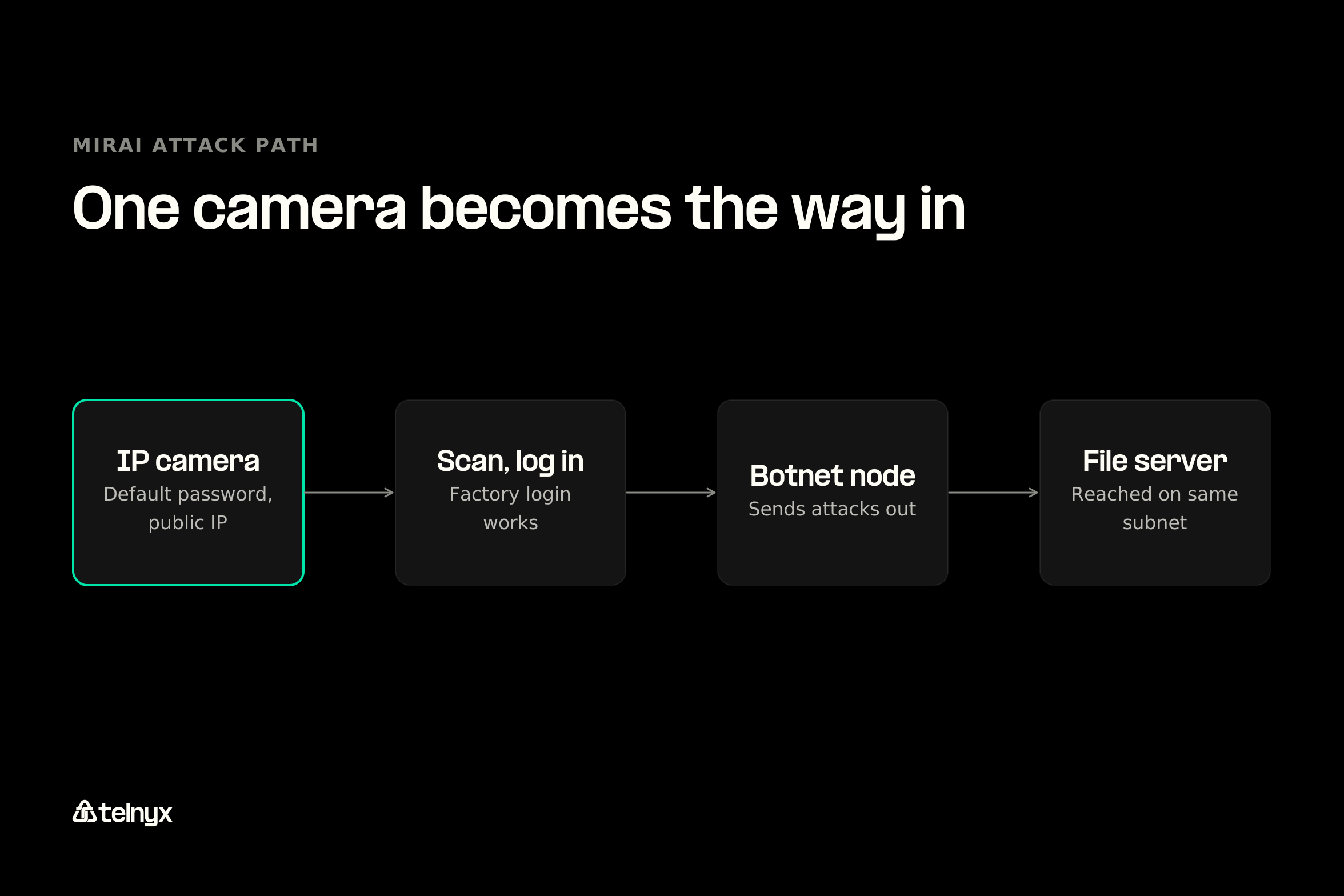
Want to see what one default password can cost? In 2016, the Mirai botnet scanned the internet for devices answering Telnet, logged in with factory passwords, and recruited hundreds of thousands of IP cameras, DVRs, and routers. That October, its operators aimed it at DNS provider Dyn and knocked Twitter, Netflix, and Reddit offline for millions of people.
So if one of your devices answers on a public IP with its default password, assume someone else already controls it.
Unencrypted traffic and man-in-the-middle attacks
Picture someone setting up an access point that broadcasts your network name and passphrase. That's an Evil Twin attack. Your devices connect to it, and the attacker reads or changes whatever they send.
Your MQTT and CoAP traffic may be traveling in the clear too, so require TLS for MQTT and DTLS for CoAP all the way to your backend. Just keep in mind that encryption hides what your device says. It doesn't control who your device talks to.
Devices that outlive their patches
Replacing a whole fleet is expensive, so you'll probably keep older devices longer than you'd like. Match vendor end-of-life notices to the part numbers you've deployed, and plan replacements before the cutoff. If you can't patch or pull a device, IPS virtual patching can block known exploit traffic before it gets there.
A device that moves or gets swapped
If your devices live outside, someone can get to them. Think meters on poles, trackers on trailers in logistics and transportation fleets, and waste management sensors on city streets. A thief can pull your SIM, pop it into another device, and run up data on your account.
You can catch it, though. Your SIM's network attachment data shows which carrier and country it's on, so if a unit that belongs in Ohio suddenly shows up somewhere else, you'll notice. That holds even for fleet telematics devices that cross borders every day.
If you have a developer on your team, they can start from this excerpt of the Flask location example, which pulls a SIM's carrier and country:
def get_sim_network_usage(sim_card_id: str) -> dict:
    """Fetch network usage data which includes carrier and network info."""
    api_key = os.getenv("TELNYX_API_KEY")
    headers = {
        "Authorization": f"Bearer {api_key}",
        "Content-Type": "application/json",
    }

    url = f"https://api.telnyx.com/v2/sim_cards/{sim_card_id}/network_usage"
    response = requests.get(url, headers=headers, timeout=10)
    # Status-code error handling trimmed here, see the full example
    data = response.json()

    # Extract location-relevant fields from network usage
    if "data" in data and len(data["data"]) > 0:
        latest = data["data"][0]
        return {
            "carrier": latest.get("carrier"),
            "country": latest.get("country"),
            "network_type": latest.get("network_type"),
            "last_updated": latest.get("last_updated"),
        }
return {}How does home network security for IoT devices work?
Shipping devices into your customers' homes? Give each one its own cellular connection, and it won't inherit whatever their router gets wrong. Telnyx SIMs come as triple-size cards, embedded MFF2 chips, or downloadable eSIM profiles, so you can build connectivity right into your unit.
Think about it from your side. You can't audit ten thousand customer routers, and one renamed network or new router would knock your device offline. With a SIM, your device sits on a network you manage.
Guest networks, WPA3, and changed defaults
If you're setting up a home network, or your customers are, here's what to do, in order:
- Change the router's admin password.
- Use WPA3, or WPA2 with a long passphrase.
- Put IoT devices on a guest or separate network.
- Turn off UPnP and remote administration.
- Keep the router's firmware updated.
- Buy devices whose makers publish an update policy, such as those carrying the FCC's Cyber Trust Mark.
Note: A guest network is segmentation for your home. It limits what a compromised device can reach, but it won't stop the compromise. VLANs in a factory work the same way.
Which IoT network security solutions keep devices off the public internet?
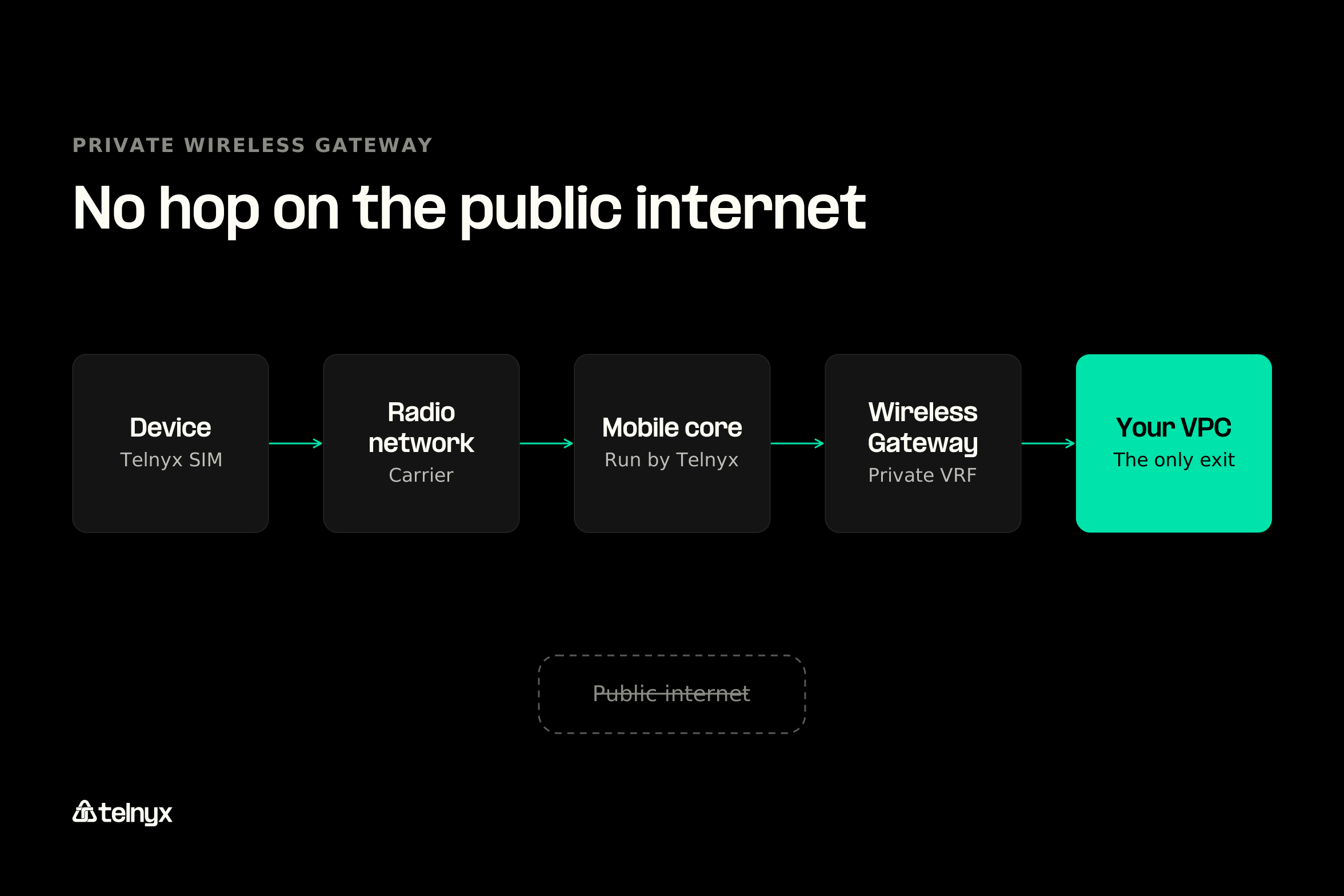
If you run a cellular fleet, your best option is a private path from each SIM to your cloud. Your device authenticates with its SIM, the carrier's radio network hands the session to the mobile core Telnyx runs, and the Private Wireless Gateway drops the traffic into a private VRF. From there, it can only exit into your VPC, so your device never has a public address to attack.
You manage everything else from the same portal and API. You can group SIMs, set data limits, and assign IPs. With eUICC support, you can also switch SIM profiles over the air (GSMA SGP.02 and SGP.22). When you're ready to set it up, the Private Wireless Gateway docs walk you through it.
Private Wireless Gateway and IoT VPN: a path that never touches the public internet
Prefer a VPN? The IoT VPN gets you to the same place. Either way, your devices never need a public IP or an open port, which shuts the door Mirai walked through.
What a private path costs per month
You pay per gateway plus per attached SIM, and your per-SIM rate drops as your fleet grows. Here are the published IoT SIM pricing rates:
Private Wireless Gateway monthly rates by fleet size
| SIMs on the gateway | Gateway charge per month | Charge per attached SIM per month |
|---|---|---|
| 0 to 100 | $100 | $0 |
| 101 to 1,000 | $100 | $0.60 |
| 1,001 to 3,000 | $100 | $0.54 |
| 3,001 to 5,000 | $100 | $0.48 |
| 5,001 to 10,000 | $50 | $0.36 |
| More than 10,001 | $50 | $0.30 |
On top of that, each SIM has its own costs. Data starts at $0.01 per MB, SIM cards cost $1 and eSIMs $0.70, and each active SIM is $2 a month. If you're running 500 SIMs, you land in the 101 to 1,000 tier, so you'd pay $100 for the gateway plus $0.60 for each attached SIM.
Usage alerts: spotting a hijacked device from its data
Say your tracker normally sends a few kilobytes an hour, then suddenly starts moving megabytes. Whether it's broken or hijacked, you want to know. Set each SIM's data limit to a multiple of its normal daily usage, then add a data usage notification so you hear about it before it hits the cap.
Want to build your own monitor? The monitor-iot-data-usage-nodejs example in the same repository checks every SIM (every five minutes by default) and flags any that pass 80% of their limit:
// Poll data usage for all SIM cards and update the cache
async function pollDataUsage() {
  const sims = await listAllSimCards();
  for (const sim of sims) {
    const usage = await getSimDataUsage(sim.id);
    if (usage) simDataCache.set(sim.id, usage);
  }
}
setInterval(pollDataUsage, config.pollingInterval);

// Per-SIM usage summary with a threshold alert
router.get('/sims/:simCardId/usage-summary', async (req, res) => {
  const { simCardId } = req.params;
  const cached = simDataCache.get(simCardId);
  if (!cached) {
    return res.status(404).json({ error: 'SIM card data not yet cached. Try again in a moment.' });
  }
  const { dataUsage } = cached;
  const totalBytes = dataUsage.limit_bytes || 0;
  const usedBytes = dataUsage.usage_bytes || 0;
  const percentageUsed = totalBytes > 0 ? (usedBytes / totalBytes) * 100 : 0;
  res.json({
    simCardId,
    percentageUsed: percentageUsed.toFixed(2),
    alert: percentageUsed > 80 ? 'WARNING: Data usage exceeds 80%' : 'OK',
  });
});
Device-side controls that still apply
A private path takes care of your biggest risk, but you'll still want to cover the basics on each device:
- Change default credentials before the device connects.
- Turn off Telnet, HTTP, and SNMP v1 and v2.
- Use certificate identity (EAP-TLS over 802.1X) for Wi-Fi and Ethernet devices, never MAC filtering.
- Segment devices by class.
- Record part numbers and vendor end-of-life dates.
- Accept only signed firmware.
- Encrypt MQTT with TLS and CoAP with DTLS.
If you make or sell devices, regulators expect this from you too. NIST IR 8259A sets a baseline for device identity, secure updates, and logging. ETSI EN 303 645 bans universal default passwords on consumer IoT. And if you sell in the EU, the Cyber Resilience Act requires you to provide security updates, with full obligations starting December 2027.
IoT network security FAQ
What is IoT network security?
It's how you control which connected devices can join your network, what each one can reach, and who can read its traffic. It lives in the network because most devices can't protect themselves.
What are the three types of IoT security?
You'll usually see it split into device security (signed firmware, changed passwords), network security (identity, segmentation, private paths, encryption in transit), and operational security (monitoring, patching, and retiring devices on schedule). You need all three, but network controls cover the most devices at once.
What are the latest IoT network security issues and threats?
You'll keep running into the same four issues, which are default passwords, unencrypted protocols, devices past end of life, and physical tampering. What's new is regulation. If you make devices, the EU Cyber Resilience Act, ETSI EN 303 645, and the FCC Cyber Trust Mark now put obligations on you.
What happens when an IoT device on your network is compromised?
It usually becomes a botnet node that attacks other targets, or a foothold for reaching servers on your network. On a cellular fleet, you also pay for its traffic, so the first sign you'll see is often a jump in that SIM's data usage.
Which IoT device types are most susceptible to security risks?
IP cameras, DVRs, and home routers were Mirai's main targets because they sat on public IPs with factory passwords. If your meters, trackers, or kiosks sit in public places, watch for physical tampering. And if you work in healthcare, a compromised medical device can reach patient data, which is why healthcare connectivity often runs on isolated networks.
Keep your device fleet off the public internet
Give every device a SIM identity, keep its traffic private with the Private Wireless Gateway or IoT VPN, and alert on its usage. Data starts at $0.01 per MB with no minimum order.