

What SBI’s live WhatsApp banking service offers, what each message costs a bank, and how to run alerts, OTPs, and AI on one Telnyx number.
Takeaways
- WhatsApp banking lets your customers handle everyday banking in a chat they already use, and you can run it on the same Telnyx number as your SMS and voice.
- SBI's live service shows that most of the work is answering customer questions, not sending alerts.
- Costs are per message, so you can forecast your bill once you know your mix of alerts, codes, questions, and offers.
- Security comes down to two habits you can teach customers: look for your verified name, and never share a code in chat.
What is WhatsApp banking and how does it work?
Meet Maria. She's a nurse who works 12-hour shifts, and her phone is the one thing she checks on every break. Until recently, a question about her account meant a call she couldn't make from the ward or an app that had logged her out again. When a card alert came by text, she had to phone the fraud line to say the charge was really hers.
Now her bank sits in the same list of chats as her sister and her friends. WhatsApp banking lets Maria check a balance, answer a card alert, get a one-time password (OTP), or ask a question in a thread she already has open. That's one customer's story, but picture it across everyone at your bank who would rather message than call. WhatsApp banking has two sides: what Maria sees in the chat, and what your bank runs behind the scenes on Meta's WhatsApp Business Platform.
What a customer can do in the chat
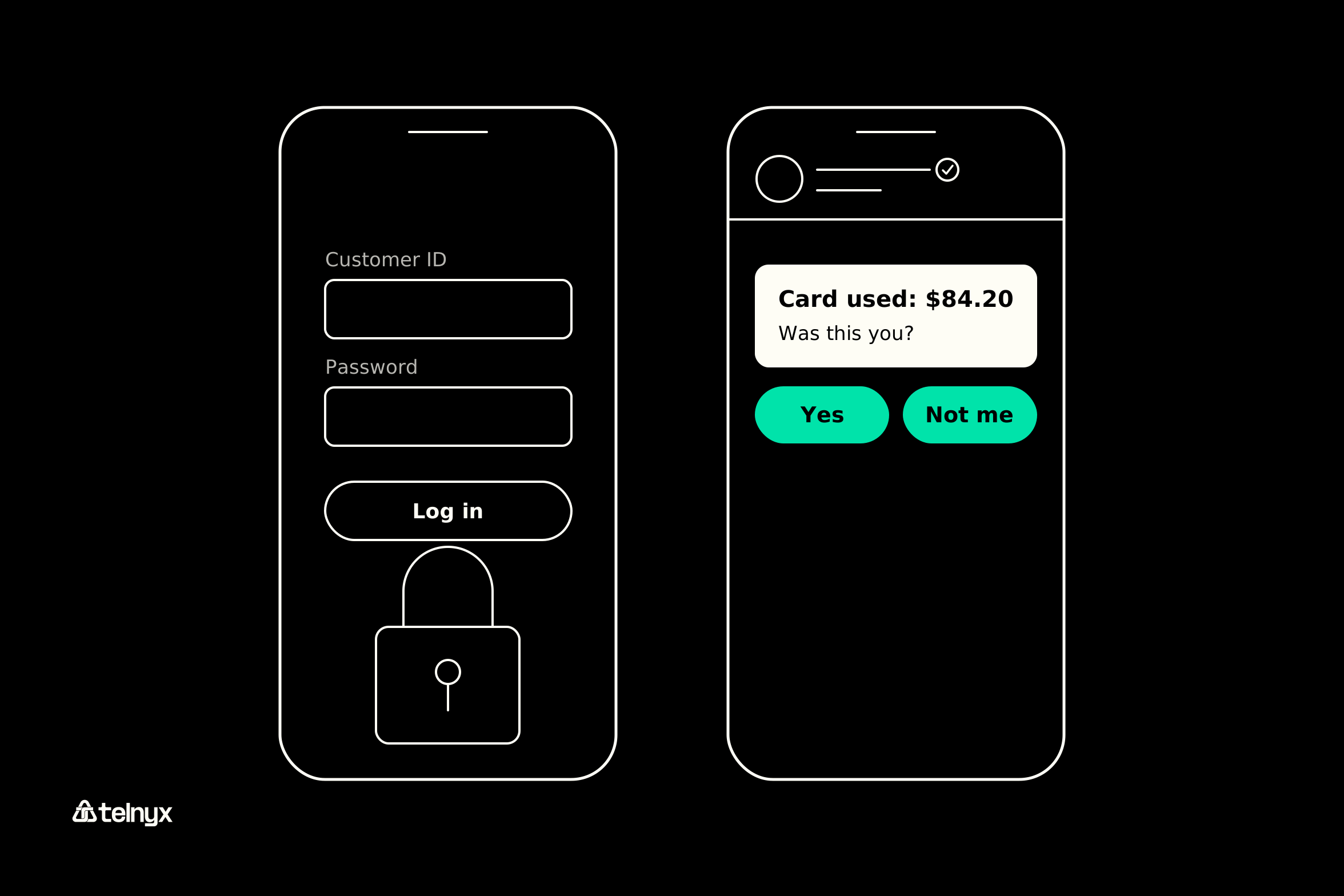
So what does Maria's day look like now? At 9 a.m., she stops for fuel on Harbour Road, and seconds later an alert from your bank pops up for $84.20 with two buttons: Yes and Not me. She taps Yes and heads into work. On her lunch break, she types "balance" and gets the number right back. In the afternoon, she pays her rent in your app, and the OTP lands in WhatsApp. That evening, she asks about a car loan rate, and the chat passes her to a person who picks up where the thread left off.
What the bank runs behind the chat
Notice that Maria's day had two kinds of messages. Your bank started some, like the fuel alert and the OTP. Maria started others, like the balance check and the loan question. That difference is the one rule that shapes everything else. If your bank starts the conversation, the message has to be a template Meta approved ahead of time. If Maria starts it, a 24-hour window opens, and you can reply however you like inside it. Meta sorts templates into four categories, and each one lines up with something your bank already sends.
Meta's four template categories for a bank
| Meta template category | What your bank sends with it | When you can send it |
|---|---|---|
| Authentication | An OTP for a login or transfer | Any time, with an approved template |
| Utility | A card alert or statement notice | Any time, with an approved template |
| Marketing | A card or loan offer | Any time, with an approved template and opt-in |
| Service | A free-form reply to a question | Only inside the 24-hour customer window |
Who answers Maria's balance question at lunch? A Telnyx AI Assistant can, using the same prompt, tools, and knowledge it uses on your phone calls. It looks up balances, picks up WhatsApp calls, and hands off to a person when needed. On Telnyx, the WhatsApp Business API sends templates and replies through one endpoint, and your agents pick up handoffs through Telnyx contact center solutions.
Add WhatsApp to the number you run
Run WhatsApp messaging, calls, and an AI Assistant on the Telnyx number you already use for SMS and voice.
Case study: SBI WhatsApp banking services and features
For a look at a large, live service, State Bank of India (SBI) publishes its whole WhatsApp banking setup on SBI's official page: the number, how to register, and every service it offers. Heads-up: SBI moved to sbi.bank.in, and the old sbi.co.in page still shows the 2023 version.
How a customer registers for SBI WhatsApp banking
Your customer sends "Hi" to +91 90226 90226 from WhatsApp, then confirms who they are with an OTP. After that, there are no commands to memorize. They can type, tap a menu, or send a voice note.
Warning: Confirm SBI's WhatsApp number on sbi.bank.in and nowhere else. A number that shows up in a forward, an ad, or an unsolicited message isn't the bank's.
SBI WhatsApp banking services and features, as published
Once they're in, SBI customers can do quite a lot:
- Banking: balances, mini statements, account and loan statements, certificates, know-your-customer (KYC) updates, nominees, and pension slips.
- Cheques: request, track, or stop a cheque book.
- Debit cards: apply, track, reissue, or block.
- Loans: information, applications, pre-approved eligibility, tracking, repayment, and an equated monthly installment (EMI) calculator.
- Credit cards: apply, pay a bill, or use FlexiPay.
- Product information: banking forms and deposit products.
- Complaints: raise or track a complaint, or deregister.
- Locate: find a branch or ATM.
It runs around the clock (24x7x365) in eight languages, with no SBI charge. Here's the useful part for your team: match each service to what runs it behind the scenes, and the list turns into a build plan.
SBI's services as a build list
| SBI service | What the customer sends | What runs it on your stack |
|---|---|---|
| Balance enquiry | A question or a menu tap | Free-form reply in the 24-hour window |
| Statement download | A menu tap | Free-form reply with a PDF |
| Block debit card | "Block my card" | Free-form reply, then a utility template |
| Loan status | A question | Free-form reply after a backend lookup |
| Registration | The OTP it received | Authentication template |
What SBI's service shows a bank building its own
Almost every row starts with the customer asking for something. That means most of SBI's traffic is free-form replies, not templates. That mix decides your bill. Telnyx for finance covers the rest of the voice and messaging stack a bank runs around it.
SBI WhatsApp banking services in India: what's current in 2026
As of November 4, 2026, SBI's page lists voice-enabled banking, debit card issuance, nominee services, statement downloads, and two-step registration under "What's New."
Note: Checked against SBI's WhatsApp banking page on sbi.bank.in and Meta's rate card on November 4, 2026.
If you're an Indian bank planning your own service, note that Meta prices India separately, so the North America figures later in this article won't match your traffic.
What WhatsApp banking costs a bank per message
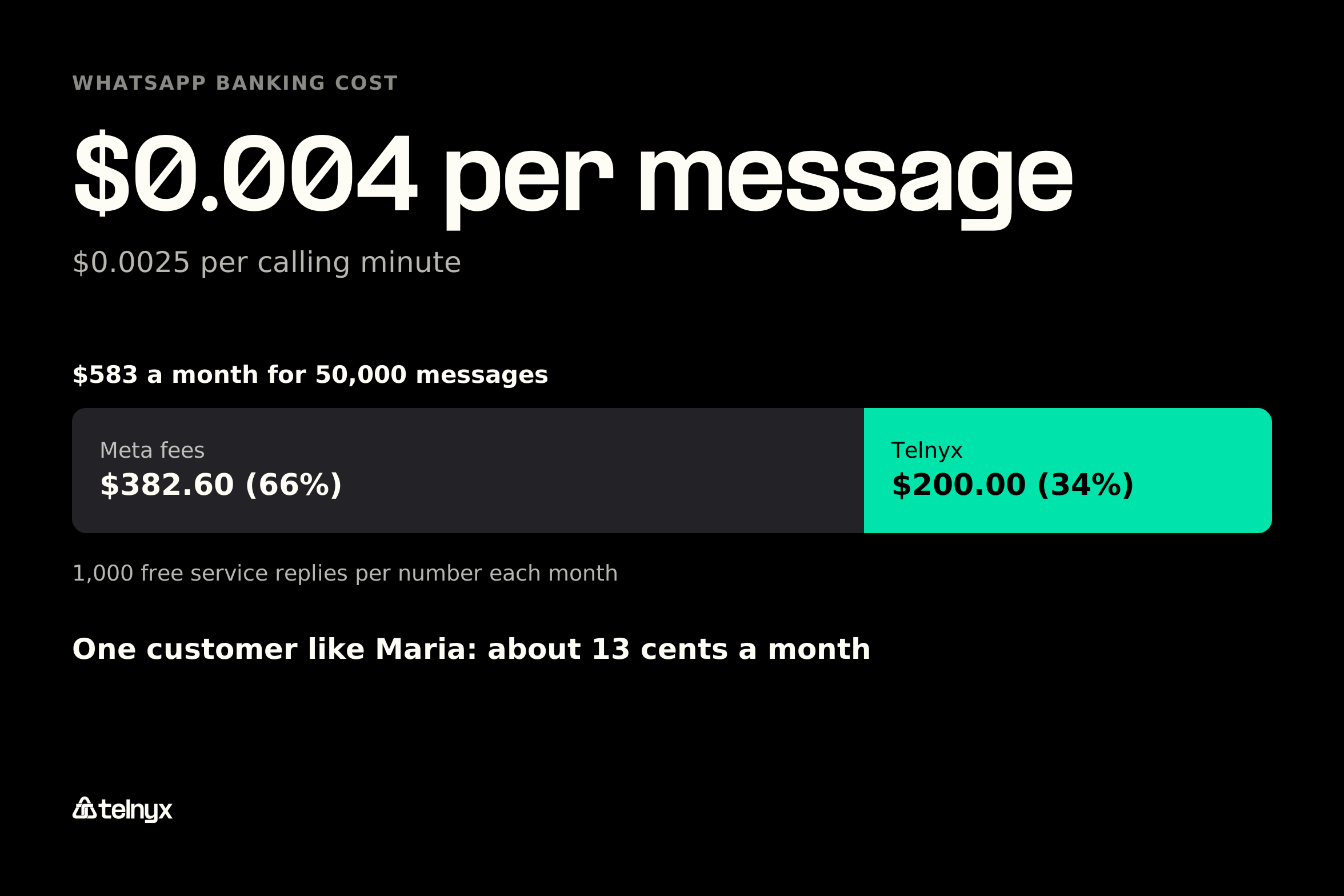
So what does it cost your bank to serve customers like Maria? Your bill has two layers. The first is Meta's fee, which depends on the message category, plus a per-minute fee for calls your bank starts. Telnyx passes that fee through unchanged. The second is Telnyx's fee: $0.004 per message and $0.0025 per calling minute. There's no platform fee, no subscription, and no minimum, and both layers show up on one invoice. Meta also gives every number 1,000 free service replies each month.
Telnyx's published example prices 50,000 messages at $583. Meta's fees make up $382.60 of that (66%), and Telnyx's fee is $200.00 (34%). That works out to $0.0117 per message, all in. Because Meta charges every provider the same rate, the real difference between providers is everything around it: how many channels you can run on one number, and whether AI handles both chat and calls. See Telnyx's WhatsApp pricing for the full breakdown.
Meta's rate by template category
Here's what Meta charges per category in North America, taken from the Telnyx pricing page. If you bank in India or another market, your rates live on Meta's rate card.
Meta North America rates, November 4, 2026
| Meta category | Banking example | Meta rate |
|---|---|---|
| Marketing | A pre-approved card offer | $0.0250 per message |
| Utility | A transaction alert | $0.0034 per message |
| Authentication | An OTP for a transfer | $0.0034 per message |
| Service | A reply to a balance question | $0.0034 per message |
| Calling | An outbound call to confirm fraud | $0.0121 per minute |
A worked month for a mid-sized bank
Where does $583 come from? Here's the math: 10,000 marketing messages ($250.00), 20,000 utility messages ($68.00), 15,000 authentication messages ($51.00), and 5,000 service replies. The first 1,000 replies are free, so you pay for 4,000 ($13.60). Add Telnyx's $200.00 for all 50,000 messages, and you're at $583. To estimate your own bill, count your alerts and OTPs (utility and authentication), customer questions (service), and offers (marketing).
As for Maria, say her month includes six card alerts, two OTPs, one loan offer, and five questions. Even if none of her questions fall in the free tier, that's about 13 cents for the whole month at North America rates, Meta and Telnyx fees included.
How to build WhatsApp banking on one Telnyx number
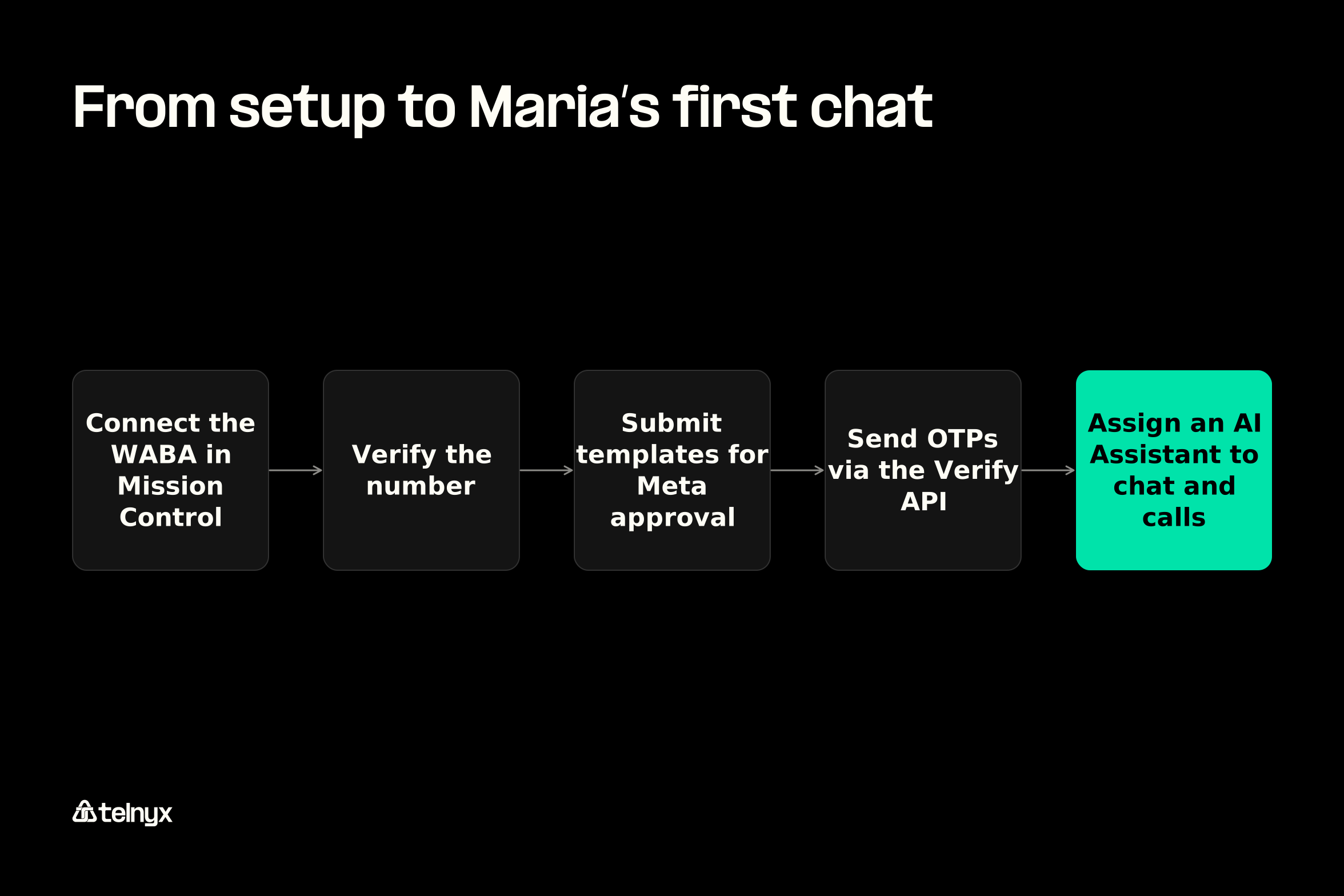
Setup takes three steps in Mission Control: connect your WhatsApp Business Account (WABA), verify your number, then start messaging and assign an AI Assistant. Add approved templates and WhatsApp OTPs, and you have everything behind Maria's first chat, all on the number you already use for SMS and voice.
Connect the WhatsApp Business Account in Mission Control
Head to Messaging, then WhatsApp. You'll sign in with Meta in your browser, which creates your WABA and sets up your webhooks. Meta then sends a code to confirm you own the number. The WhatsApp quickstart walks you through every screen. If you're moving from another provider, Bring Your Own Number (BYON) keeps your display name, quality rating, and approved templates.
Before you start: You need admin access to Meta Business Manager. The number can't be active on the WhatsApp Business App or personal WhatsApp (use Coexistence for an app number). Outbound WhatsApp calls need the customer's calling permission first and aren't available from United States, Canada, Egypt, Vietnam, or Nigeria numbers.
Send alerts and statements with approved templates
Back to the rule about who starts the conversation: every message your bank starts needs an approved template. You submit each one to Meta for approval from the portal, and manage message templates covers the API side. Here's Maria's 9 a.m. fuel alert as an API call: a utility template sent through POST /v2/messages/whatsapp, with her name, the amount, and the merchant filled in (the send messages docs cover every option):
curl -X POST https://api.telnyx.com/v2/messages/whatsapp \
  -H "Authorization: Bearer YOUR_API_KEY" \
  -H "Content-Type: application/json" \
  -d '{
    "from": "+15551234567",
    "to": "+15557654321",
    "whatsapp_message": {
      "type": "template",
      "template": {
        "name": "card_transaction_alert",
        "language": { "policy": "deterministic", "code": "en_US" },
        "components": [
          {
            "type": "body",
            "parameters": [
              {"type": "text", "text": "Maria"},
              {"type": "text", "text": "$84.20"},
              {"type": "text", "text": "Harbour Road Fuel"}
            ]
          }
        ]
      }
    }
  }'
Send OTPs over WhatsApp with the Verify API
Here's what happened behind Maria's rent payment. The Telnyx Verify API sent a code to her WhatsApp, she typed it into your app, and your backend checked it before the payment went through. It sits on the same platform as SMS, RCS, and voice verification. If you have a developer, these are the two calls from the whatsapp-verify-otp-python example, one to send the code and one to check it:
# Send the code to the customer's WhatsApp
resp = requests.post(
    f"{API_BASE}/verifications/whatsapp",
    headers={"Authorization": f"Bearer {TELNYX_API_KEY}",
             "Content-Type": "application/json"},
    json={"phone_number": phone, "verify_profile_id": VERIFY_PROFILE_ID},
    timeout=10,
)

# Check the code the customer typed back
resp = requests.post(
    f"{API_BASE}/verifications/by_phone_number/{phone}/actions/verify",
    headers={"Authorization": f"Bearer {TELNYX_API_KEY}",
             "Content-Type": "application/json"},
    json={"code": code, "verify_profile_id": VERIFY_PROFILE_ID},
    timeout=10,
)
verified = resp.json().get("data", {}).get("response_code") == "accepted"
Let one AI Assistant answer the chat and the call
Turn calling on for your number, and Telnyx sets up the calling connection for you. Then assign the number to an AI Assistant. If you already run Voice AI Agents on your phone lines, that same assistant can take WhatsApp with the same model, prompt, tools, and knowledge, and the voice engine costs $0.05 a minute plus model usage.
When Maria gets home from a night shift and asks for her balance at 2 a.m., the assistant looks it up and replies in the chat. There's no hold music and no office hours. The WhatsApp business calling docs cover call setup and permissions.
WhatsApp banking security: scams, OTPs and what a bank never asks
Is WhatsApp banking safe? Yes, as long as your customers know what a real bank message looks like. Here's how that plays out for Maria.
How a customer tells a real bank message from a scam
A few weeks later, Maria gets a WhatsApp message from a number she doesn't recognize. It says her account is locked and asks her to reply with the code it just sent. She won't fall for it if she knows two things: your messages come from your verified business name, and your bank never asks for a code in chat. SBI tells its customers the same, adding that it never asks for a full customer ID, full account number, or CVV. Here's how the two messages compare.
A genuine bank message next to a scam
| A genuine bank message | A scam message |
|---|---|
| Arrives under the bank's verified business name | Arrives from an unknown number |
| Uses an approved template with reply buttons | Pushes urgency in free-form text |
| Points to the bank's own app or site | Carries a payment link |
| Never asks for a code | Asks for an OTP or PIN |
Give customers a short list to remember. A bank never asks for these in chat:
- A full PIN
- A password
- A card CVV
- The OTP it just sent
- A transfer to "secure" an account
What the bank controls: verification, templates and step-up
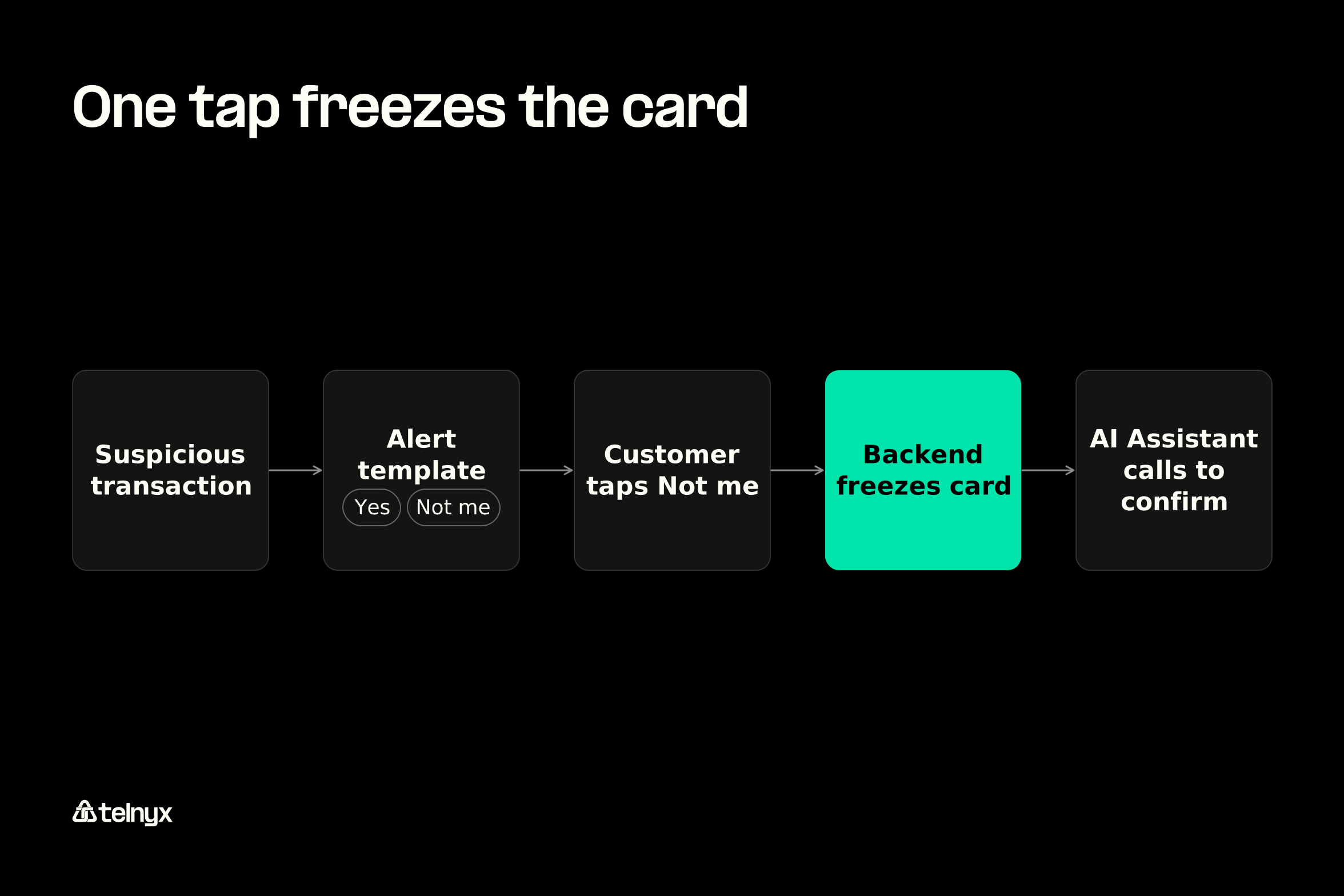
Now picture the real thing. A charge Maria doesn't recognize hits her card, and your bank sends a utility template alert with Yes and Not me buttons. She taps Not me, your backend freezes the card, and the AI Assistant calls her on WhatsApp to confirm, with the chat thread in context, as long as she has granted calling permission. If she later changes her contact number, an authentication template carries the OTP for a step-up check.
Number Lookup checks that a phone number is valid before your bank messages it.
WhatsApp banking FAQ
WhatsApp scams: who is really asking you for money?
Almost never your bank. Banks message you under a verified business name, and they don't ask for transfers, PINs, or codes in chat. If an unknown number asks you for money, treat it as a scam and contact your bank through its app or official number.
What is WhatsApp and how does a bank use it?
WhatsApp is Meta's messaging app. A bank uses it to send you approved messages, like alerts, codes, and offers, and to answer your questions in a normal chat for 24 hours after you write in.
How do I register for SBI WhatsApp banking?
Send "Hi" to +91 90226 90226 from WhatsApp and confirm who you are with the OTP, according to SBI's page on November 4, 2026. Check the number on sbi.bank.in first.
Is WhatsApp banking safe?
Yes, as long as you check for the bank's verified business name. The bigger risk is someone pretending to be your bank, which is why banks publish their official number and never ask for codes in chat.
How much does WhatsApp banking cost a bank per message?
Meta's rate for the message type plus $0.004 from Telnyx. In North America on November 4, 2026, utility, authentication, and service messages cost $0.0074 in total, and marketing messages cost $0.0290. Each number also gets 1,000 free service replies a month.
Can a bank send OTPs over WhatsApp instead of SMS?
Yes. The Telnyx Verify API sends OTPs over WhatsApp on the same platform as SMS, RCS, and voice verification, so you can offer both.
Put a per-message price on your WhatsApp banking
Price your WhatsApp banking service per message from the published card, then run alerts, OTPs, chat, and calls with one AI Assistant on the Telnyx number you already use.