

Published 25 Nov 2026
Learn how DMARC protects your domain from spoofing, what none, quarantine, and reject really do, and how to check your record.
 By Eli MogulContent Writer & Editor
Takeaways
- DMARC lets you tell receiving mail servers what to do when someone uses your domain but can't prove the mail came from you.
- To pass, SPF or DKIM has to succeed for a domain that matches the From address your recipient sees.
- Your policy is a request: the receiving server always makes the final call, even at p=reject.
- Gmail, Yahoo, and Outlook.com now require DMARC from high-volume senders, and the standard itself was rewritten in May 2026.
What is DMARC?
DMARC, short for Domain-based Message Authentication, Reporting, and Conformance, is an email standard that lets you tell receiving servers what to do with mail that uses your domain but fails authentication, and asks them to report back on what they see.
The DMARC meaning comes down to three jobs: confirm that mail claiming to be from you really is, tell receivers how to treat it when it isn't, and send you reports either way.
What DMARC protects: the From domain your recipient sees
DMARC protects the domain in the From line, the address a person actually reads. SPF and DKIM, the two older checks, look at other domains hidden in the message, so a scammer can pass both for their own domain while putting yours in the From line.
Picture a fake invoice from [email protected] landing in a customer's inbox. DMARC is the email security check built to catch that.
It has limits. DMARC won't stop look-alike domains like examp1e.com or a fake display name in front of a real address. And a DMARC pass says nothing about whether the mail is wanted, since spammers can authenticate their own domains too.
Which RFC defines DMARC?
DMARC is defined in RFC 9989, published in May 2026, which replaced RFC 7489. The 2015 original was an Informational document. RFC 9989 is a Proposed Standard, and reporting now lives in two companion specs: RFC 9990 for aggregate reports and RFC 9991 for failure reports.
If you already have a record, it keeps working. The practical changes: the pct tag is gone (t=y replaces it), a new np tag covers subdomains that don't exist, and receivers find your organizational domain differently.
How does DMARC work?
A receiving server looks up the DMARC record for the From domain, runs SPF and DKIM, and passes the message only if at least one of them passed for a domain that matches the From domain.
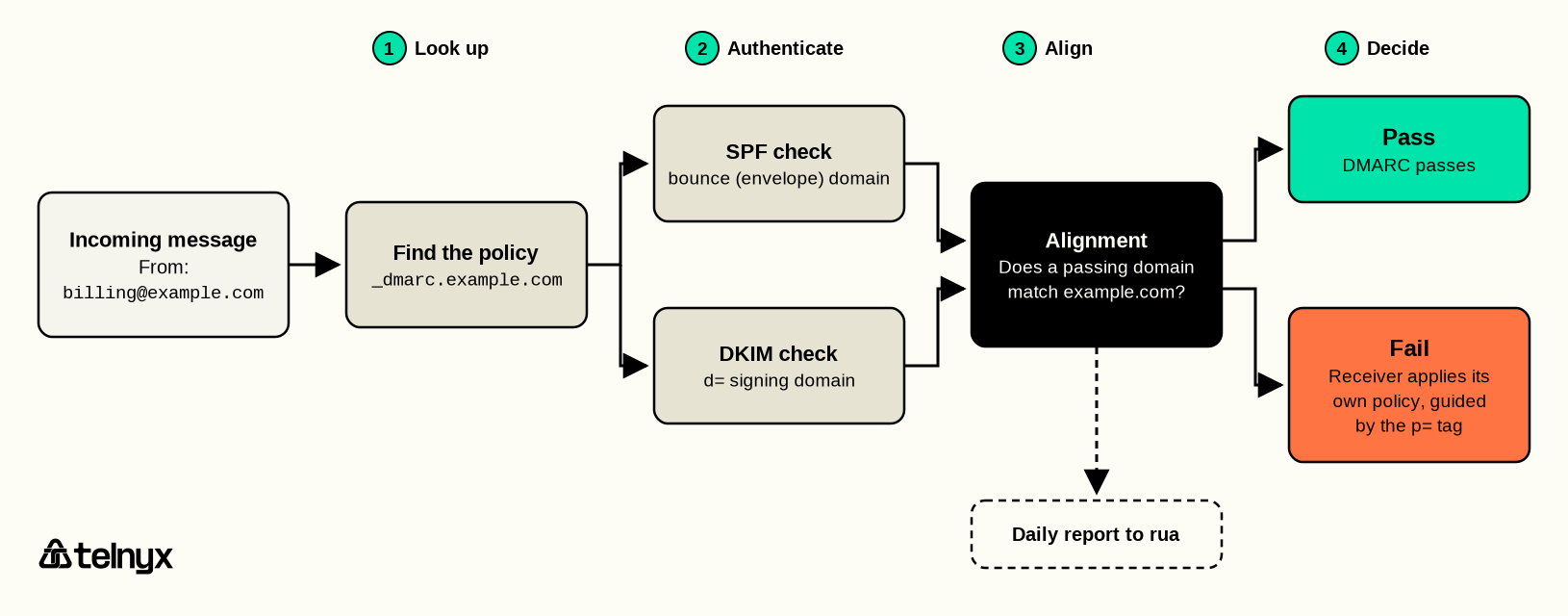
The SPF and DKIM checks DMARC builds on
SPF checks that the sending server is allowed to send for the envelope domain, the bounce address your recipient never sees. DKIM checks a cryptographic signature tied to whatever domain sits in the signature's d= tag.
Neither looks at the From line. DMARC connects them to it.
DMARC alignment: relaxed vs strict
Alignment is the match between the From domain and the domain that SPF or DKIM authenticated. Under relaxed alignment, the default, the two only need to share an organizational domain: a DKIM signature from mail.example.com aligns with a From address at example.com. Under strict alignment, they must be identical.
RFC 9989 also changed how receivers work out that organizational domain. Instead of checking the Public Suffix List, they walk up the DNS tree from the From domain, with a cap of eight lookups.
What a receiver does with a DMARC result
The receiver decides. RFC 9989 says the final handling of any message is always a matter of the receiver's local policy, so your record is a request, not a switch.
That's why spoofed mail can still land after you publish p=reject: without other evidence, receivers must treat a failing message under reject as if the policy were quarantine. A p=none policy must not change handling at all.
When legitimate mail fails, the cause is usually ordinary: a forwarder broke SPF, a third-party tool sends as you without aligned signing, or the DKIM record in DNS is out of date.
DMARC policies: none, quarantine, and reject
A DMARC policy is a single tag, p=, in a TXT record at _dmarc.yourdomain.com, and it takes one of three values: none, quarantine, or reject.
Where the policy lives: the _dmarc TXT record
Here's the shortest useful DMARC record:
_dmarc.example.com. TXT "v=DMARC1; p=none; rua=mailto:[email protected]"Three other tags are worth knowing by name. The rua tag sets where aggregate reports go, sp sets the policy for existing subdomains, and np, new in RFC 9989, sets it for subdomains that don't exist.
What each DMARC policy asks receivers to do
What each DMARC policy asks a receiving server to do.
| Policy | What it asks receivers | When to use it |
|---|---|---|
| p=none | No preference; handling must not change | While you find every service sending as your domain |
| p=quarantine | Treat failing mail as suspicious | Once reports show your senders align |
| p=reject | Treat the use of your domain as not valid | Sending-only domains and subdomains, after quarantine runs clean |
The standard suggests a gradual path: at least a month at none, then an equally long stretch at quarantine, before you move to reject.
Testing a policy with t=y
If you learned DMARC with pct=, that tag is gone. Its replacement is t=y, a test flag that asks receivers to apply one level down: quarantine behaves like none, and reject behaves like quarantine. Reports still arrive as normal.
Reject also isn't the right end state for every domain. RFC 9989 says domains whose users post to mailing lists should not publish p=reject, because lists alter messages in ways that break DMARC and can get your people unsubscribed.
A domain that only sends receipts, alerts, or one-time passcodes is a different case. Reject works well there.
DMARC reports: what aggregate and failure reports show
Aggregate reports are the part of DMARC you'll actually use: daily XML summaries, one from each receiving server, showing how much mail used your domain and whether it passed.
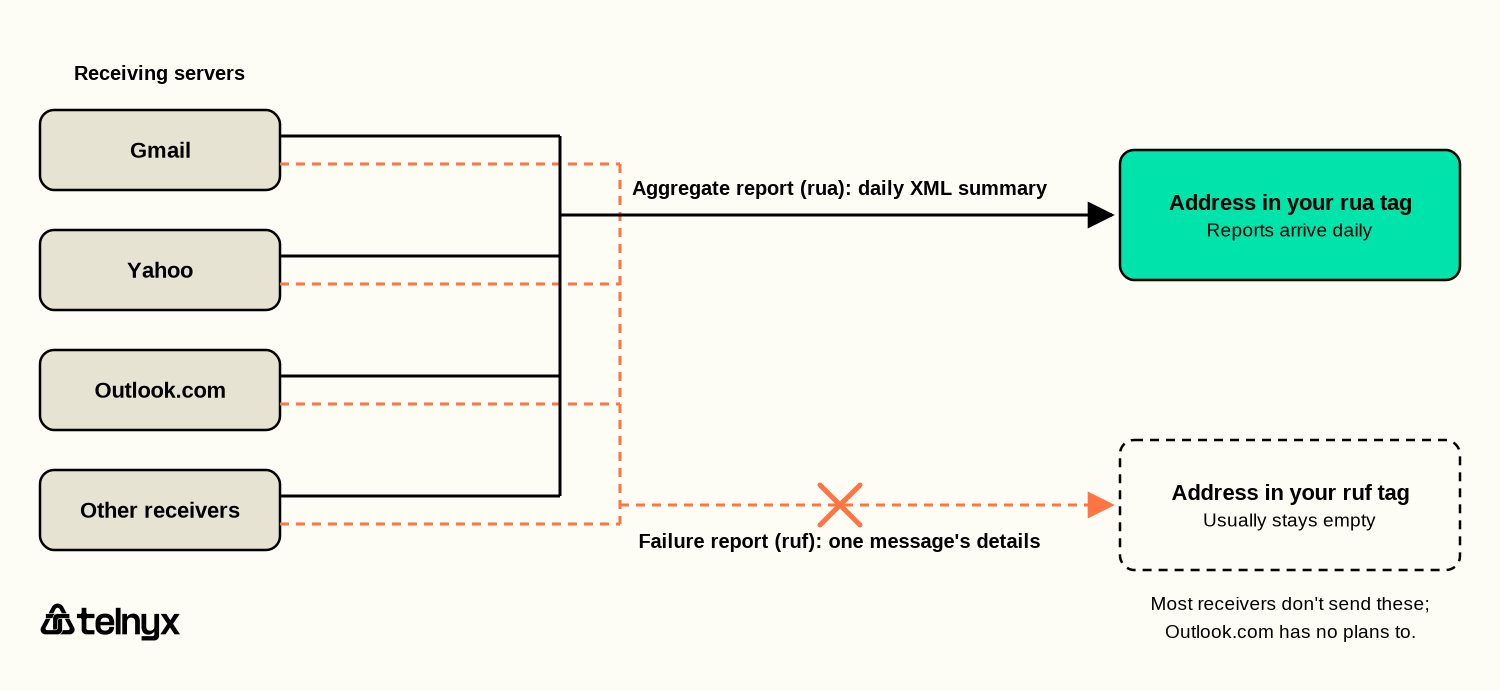
Aggregate reports (rua)
Each report lists sending IP addresses, message counts, and the SPF, DKIM, and DMARC results for each source. Together, they give you a list of every service sending mail as your domain, including the ones you forgot about. Aggregate reporting now has its own standard, RFC 9990.
Failure reports (ruf)
Failure reports copy details from a single failing message, which is exactly why most receivers won't send them. RFC 9989 notes that most receivers refuse out of privacy concerns, and Microsoft has said Outlook.com has no plans to send them.
Germany's federal cybersecurity agency, the BSI, goes further: it tells report software to ignore ruf requests because the format is impermissible under the GDPR. Add a ruf address if you like, but don't plan around it.
Who requires DMARC: Gmail, Yahoo, Microsoft, and governments
DMARC is mandatory if you send more than 5,000 messages a day to Gmail or Outlook.com, or bulk mail to Yahoo, and for US federal and UK government domains. Everyone else is expected to have it, even if no one forces them.
Plenty of domains still don't. Palisade, an email security vendor, scanned 99,300 top domains in August 2026 and found that 58.1% publish a DMARC record, with roughly a third of those still sitting at p=none.
Gmail and Yahoo bulk sender rules
Since February 2024, Google's email sender guidelines have required anyone sending more than 5,000 messages a day to personal Gmail accounts to publish a DMARC record and align the From domain with SPF or DKIM. A p=none record is enough.
Yahoo applies similar rules to its bulk senders. Gmail started ramping up enforcement in November 2025, including permanent rejections for mail that doesn't comply.
Outlook.com high-volume sender rules
Outlook.com followed in 2025. Domains sending more than 5,000 messages a day to Outlook.com, Hotmail, and Live addresses need SPF, DKIM, and DMARC at p=none or stronger, with at least one of SPF or DKIM aligned.
Enforcement began May 5, 2025. Non-compliant mail now bounces with error 550 5.7.515.
DMARC for government domains
Since 2017, CISA's Binding Operational Directive 18-01 has required US federal agencies to publish p=reject on their second-level domains. UK government guidance starts domains at none and moves them to quarantine or reject.
Note the tension: these mandates push reject, while RFC 9989 steers domains with everyday mailboxes away from it.
How to check a domain's DMARC record
Two checks tell you whether your domain has DMARC and whether it's passing: look up the record in DNS, then read the result a receiver stamped on a message you sent.
Look up the _dmarc TXT record
Run this from any terminal:
dig +short TXT _dmarc.example.comA result that starts with v=DMARC1 means a record exists. An empty answer means there's no DMARC record. Online DMARC checker tools run this same lookup.
Read the DMARC result in a message header
Receivers add an Authentication-Results header to the mail they deliver. Send yourself a message, open it in Gmail, and choose Show original to find a line like this example:
Authentication-Results: mx.example.net; spf=pass smtp.mailfrom=bounce.example.com; dkim=pass header.d=example.com; dmarc=pass header.from=example.comdmarc=pass next to your domain means you're covered. If your record looks fine but this line says dmarc=fail, you have an alignment problem: something sent as you without signing as you.
DMARC when an email API sends for your domain
Telnyx's Email API generates a DMARC record for each sending domain you register and signs every message with that domain's own 2048-bit DKIM key.
Why third-party senders need aligned DKIM or SPF
When a provider sends for you, SPF often passes for the provider's bounce domain, and DKIM may be signed with the provider's domain. Both checks pass, neither matches your From domain, and DMARC fails.
The fix is a DKIM signature with your domain in d=, or a bounce domain on your own domain. Before you pick an email API or move your sending, ask which of the two it supports. The email API hub covers the rest of the setup.
How Telnyx Email handles DMARC
The record Telnyx recommends starts at p=none, a monitoring-only policy, and sends aggregate reports to [email protected]. To read the reports yourself, point rua at your own mailbox, or list both addresses.
DMARC is recommended but not required to verify a Telnyx sending domain, and a missing or wrong DMARC record never blocks sending, though it can hurt deliverability. For a stronger policy, set the domain's dmarc_policy field or publish your own record: Telnyx verifies any valid v=DMARC1 record, including p=reject with your own rua.
Telnyx's guidance is to move to quarantine or reject only after reports show alignment is high. The deliverability guide walks through that.
Telnyx signs with the telnyx1 selector by default, and the public key is a TXT record you publish. A DKIM key rotation on Telnyx switches the signing key at once, with no overlap period, so publish the new TXT value promptly.
You can see every record in the domain setup docs, or start with the Email API quickstart. The Telnyx Email API page has the full feature list.
Frequently asked questions about DMARC
Is DMARC really necessary?
DMARC is necessary if you send more than 5,000 messages a day to Gmail or Outlook.com, or bulk mail to Yahoo, because those providers require it. For everyone else, it's still worth publishing: it's the only standard check on the From address your recipients actually read. A p=none record costs nothing, and the reports alone show you who's sending as your domain.
What happens if a domain has no DMARC record?
A domain with no DMARC record gets no DMARC protection. Receivers have no policy to apply when someone spoofs your From line, and you get no reports about it. If you send at volume, your mail to Gmail and Outlook.com also fails their sender requirements and risks rejection. This guide to reading delivery errors shows how those rejections surface.
What's the difference between DKIM and DMARC?
DKIM and DMARC do different jobs. DKIM signs a message for a domain, proving the signing domain sent it and nobody altered it in transit. DMARC checks whether that signing domain, or the SPF domain, matches the From address your recipient sees, then applies your policy when it doesn't. DKIM is one of the inputs, and DMARC is the rule that ties it to your visible brand.
Why am I getting DMARC aggregate report emails?
You're getting DMARC aggregate report emails because your DMARC record lists your address in its rua tag. Every server that receives mail using your domain sends a daily XML summary there, often from a noreply address, so expect plenty of them. If they're cluttering your inbox, point rua at a dedicated mailbox or a reporting tool rather than deleting the tag.
Can you set up DMARC without DKIM?
Yes, you can set up DMARC without DKIM, because a message passes DMARC on aligned SPF alone. RFC 9989 still recommends using both. Forwarding often breaks SPF, and a DKIM signature is what keeps forwarded mail passing. Mailbox providers lean the same way: Gmail and Outlook.com already require both SPF and DKIM from high-volume senders.
Is it demarc or DMARC?
It's both, and they mean different things. A demarc is a telecom term for the demarcation point, where a carrier's network ends and a building's own wiring begins; US federal rules define it in 47 CFR 68.3. DMARC is the email authentication standard this page covers. If you're troubleshooting spoofed or rejected email, DMARC is the one you want.
Send email that passes DMARC Create a Telnyx account, verify a sending domain, and publish the DKIM and DMARC records Telnyx generates.
By Eli MogulContent Writer & Editor