
Inference
vLLM inference: how it works and when to stop self-hosting
Run vLLM inference on one GPU, tune the config flags that matter, and see when moving the same client to a managed endpoint costs less.

By Eli Mogul
Takeaways
vLLM inference is the process of serving an open-weight LLM through vLLM, an open-source engine that exposes an OpenAI-compatible API. This guide gets one running on a single GPU and shows the one-line change that moves the same client to a managed endpoint.
- PagedAttention stores the KV cache in 16-token blocks, and continuous batching lets the scheduler mix prefill and decode work in one engine step.
- One Docker container is the fastest first deployment. Model size and the
gpu_memory_utilizationfraction decide whether it starts, and--enforce-eagerdecides how long startup takes. - A handful of config flags trade latency for throughput, and the KV cache block formula tells you how many sequences fit on your GPU.
- When running your own GPUs stops paying, the same OpenAI-compatible client can point at a managed endpoint instead: in-region GPUs, up to 75% less than proprietary alternatives, and no GPUs to manage, through Telnyx Inference.
What vLLM inference is and why it exists
vLLM inference means running an open-weight large language model through the vLLM engine, which schedules requests, manages GPU memory for the KV cache, and returns tokens through an OpenAI-compatible server. You bring the GPUs; vLLM turns them into an endpoint your application can call.
If you want the same open-weight models without owning that hardware, Telnyx Inference runs them on GPUs Telnyx owns, in-region across the Americas, Europe, MENA, and APAC, with no infrastructure to manage.
What is vLLM? vLLM is an open-source inference engine that batches requests, pages the KV cache, and exposes an OpenAI-compatible chat completions API for open-weight LLMs. It is software you run on your own GPUs, not a hosted API.
vLLM is an inference engine, not a model and not a platform
vLLM started as a research project at UC Berkeley's Sky Computing Lab and is now a hosted project of the PyTorch Foundation. Its job is narrow: take a model checkpoint, load it onto accelerators, and serve tokens as efficiently as the hardware allows. Red Hat expands the name as "virtual large language model," though the project itself rarely uses the long form.
Two boundaries trip people up:
- vLLM is not an orchestration layer. Projects like llm-d, which Red Hat launched in May 2025 with Google Cloud, IBM Research, NVIDIA, and CoreWeave, sit on top of vLLM to handle Kubernetes scheduling and routing across many instances. Those are separate projects, not vLLM features.
- vLLM is not a hosted service. You provision the GPUs, pick the model, size the memory, and keep it running. That operational work is the real cost, and the rest of this guide shows where it lands. For the broader picture of how serving engines fit into a stack, see our guide to the inference engine.
What vLLM inference runs on
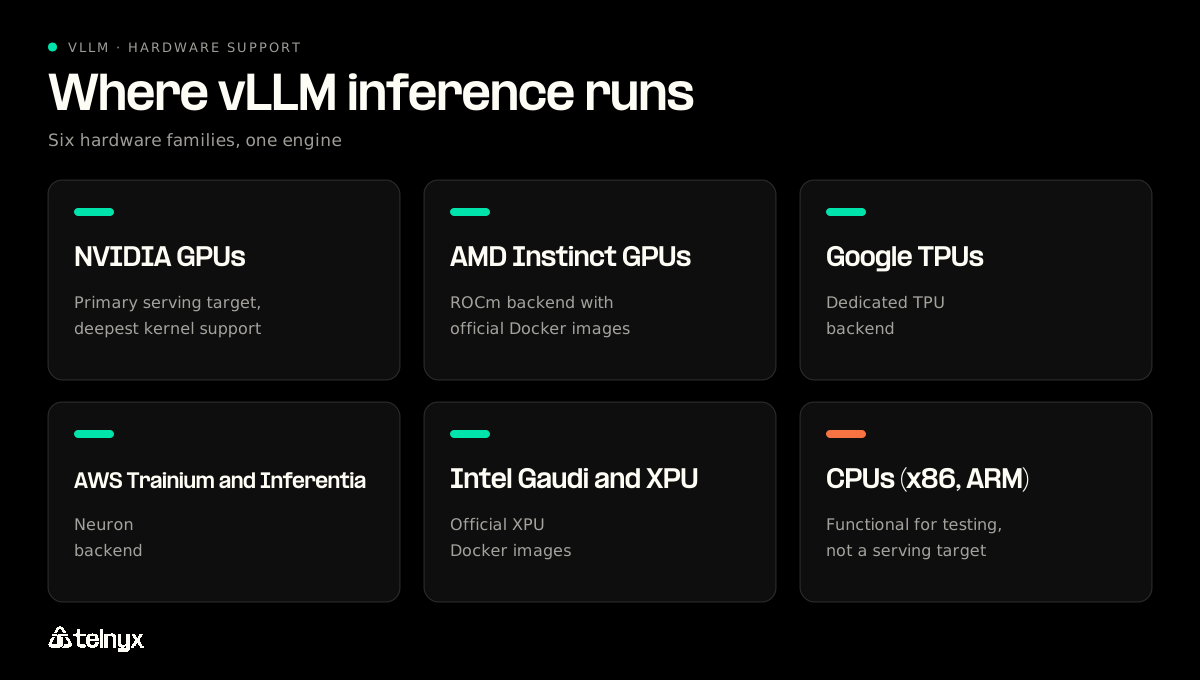
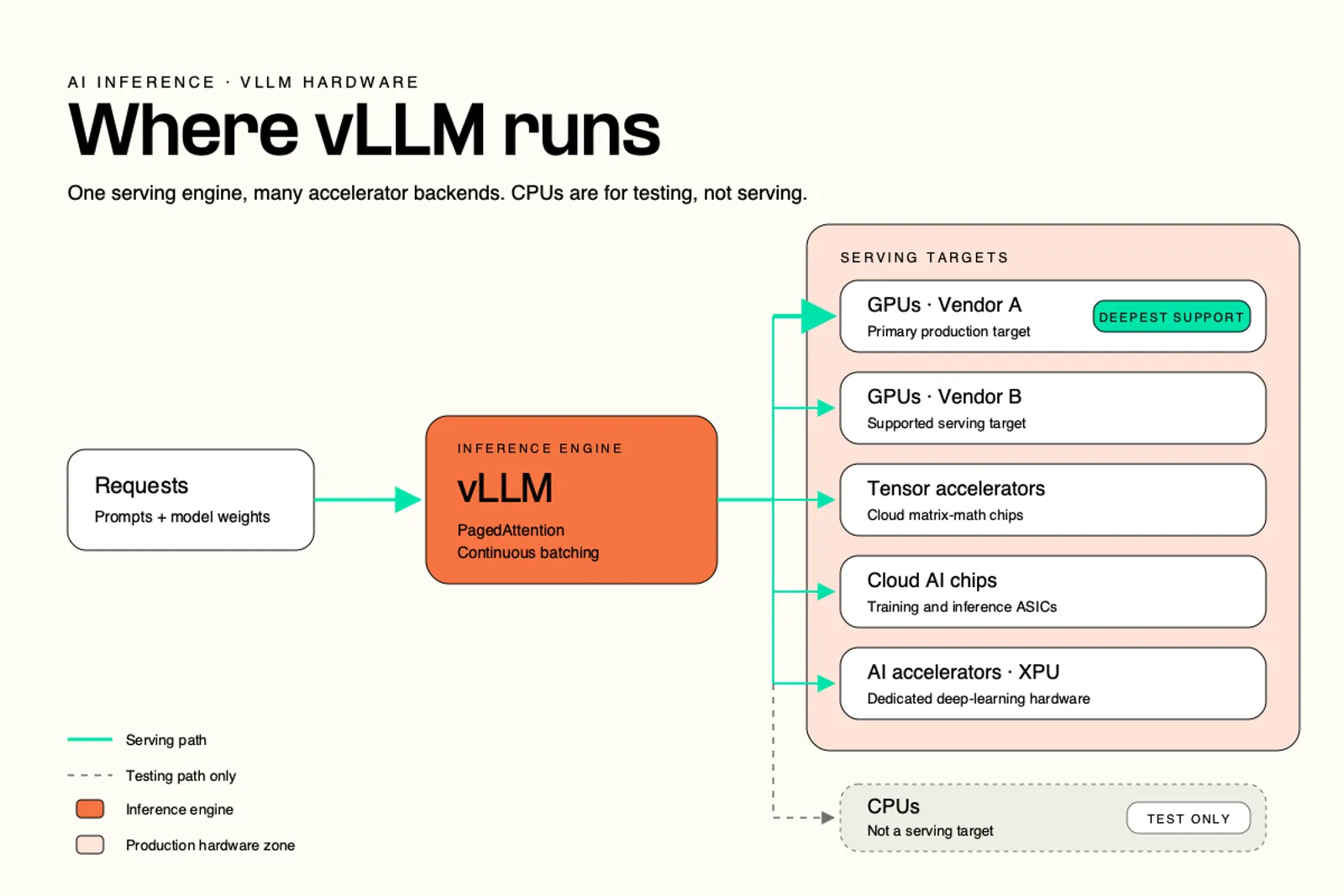
vLLM supports text, multimodal, embedding, and reward models across a wide hardware range:
- NVIDIA GPUs: the primary serving target, with the deepest kernel support.
- AMD Instinct GPUs: supported through ROCm, with official Docker images.
- Google TPUs: supported through a dedicated TPU backend.
- AWS Trainium and Inferentia: supported through the Neuron backend.
- Intel Gaudi and XPU: supported, with official XPU images.
- CPUs (x86, ARM): functional for testing, not a production serving target.
Try Telnyx Inference to point your existing OpenAI-compatible vLLM client at a managed endpoint with a one-line change.
How vLLM architecture serves a request
Every serving stack, including the GPUs behind a managed API, has to get these mechanisms right. Your users only see them as time to first token and tokens per second, which is why they matter for inference latency.
The engine step: schedule, forward pass, postprocess
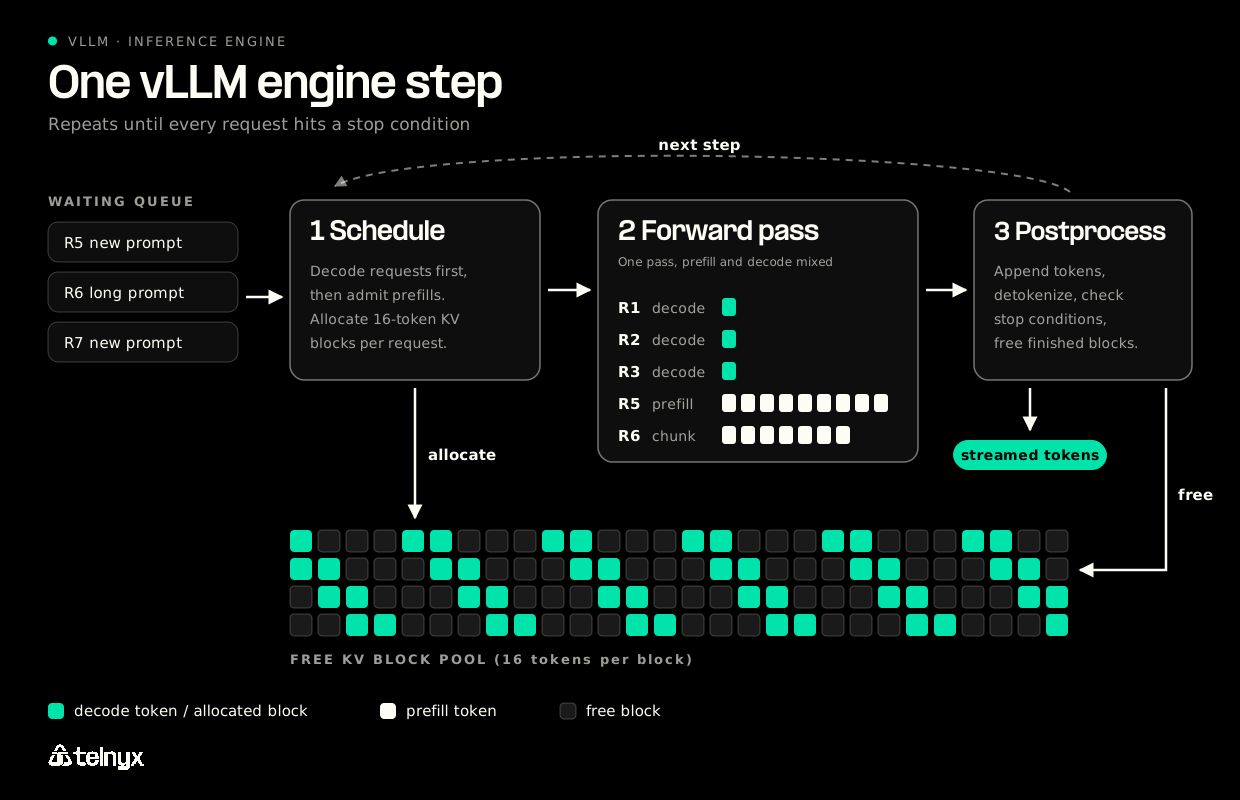
vLLM runs a loop. Each iteration, or engine step, does three things:
- Schedule: pick which requests run this step and allocate memory for them.
- Forward pass: run the model once over every scheduled token and sample the next token for each request.
- Postprocess: append the new tokens, detokenize, and check whether each request is finished.
The scheduler holds a waiting queue and a running queue, and serves them first come, first served or by priority. A request finishes when one of four stop conditions fires:
- It reaches
max_model_lenor its ownmax_tokenslimit. - It samples the end-of-sequence token (unless
ignore_eosis set, which is useful for benchmarking fixed output lengths). - It samples a token listed in
stop_token_ids. That token stays in the output. - Its output matches a stop string. The stop string is removed from the output.
These four rules explain most "why did generation stop early" tickets.
PagedAttention and the KV cache block pool
A transformer keeps a key and value vector for every token it has already processed. That KV cache grows with every output token, and storing it in one contiguous slab per request wastes memory on padding and fragmentation.
PagedAttention stores the KV cache in fixed-size blocks instead, 16 tokens per block by default. At startup, vLLM carves the reserved GPU memory into a pool of free blocks, often hundreds of thousands of them depending on VRAM. Requests borrow blocks as they grow and return them when they finish. When the pool runs dry, the scheduler preempts lower-priority requests and recomputes them later.
The block math: each block, per layer, takes 2 × block_size (default 16) × num_kv_heads × head_size × dtype_bytes, where dtype_bytes is 2 for bf16. A 17-token prompt needs ceil(17/16) = 2 blocks, so the second block sits 15/16 empty until decode fills it.
Paged KV cache is now standard across major serving engines. Where engines differ is scheduling: how they mix work, prioritize requests, and reuse cached blocks. The anatomy of vLLM post from the vLLM team walks through the V1 engine internals in detail.
Prefill, decode, and continuous batching
Inference has two phases with opposite bottlenecks:
- Prefill runs over every prompt token at once. It is compute-bound, and its cost scales with prompt length. It determines time to first token.
- Decode runs over one new token per request. It is memory-bandwidth-bound, because the GPU reloads all model weights to produce a single token. It determines tokens per second.
The V1 scheduler mixes both phases in the same step and serves decode requests first, so streaming users keep getting tokens while new prompts are admitted. The older V0 engine could only run one phase per step.
Continuous batching makes this work. vLLM flattens every scheduled sequence into one long sequence, and position indices and attention masks keep each request attending only to its own tokens. New requests join between steps, and nobody waits for the slowest request in a fixed batch.
Prefix caching, chunked prefill, and speculative decoding
Three extensions build on the block pool:
- Prefix caching hashes each complete 16-token block of a prompt. When a later request shares that prefix, such as a long system prompt, vLLM reuses the cached blocks instead of recomputing them. It is on by default and speeds up prefill only, not decode.
- Chunked prefill caps how many prompt tokens one request can push through a single step. Set
long_prefill_token_thresholdto a positive integer and a 50,000-token prompt can no longer block everyone else. - Speculative decoding proposes several draft tokens cheaply and verifies them in one forward pass. The V1 engine supports n-gram, EAGLE, and Medusa proposers.
vLLM inference examples: offline, server, and OpenAI-compatible client
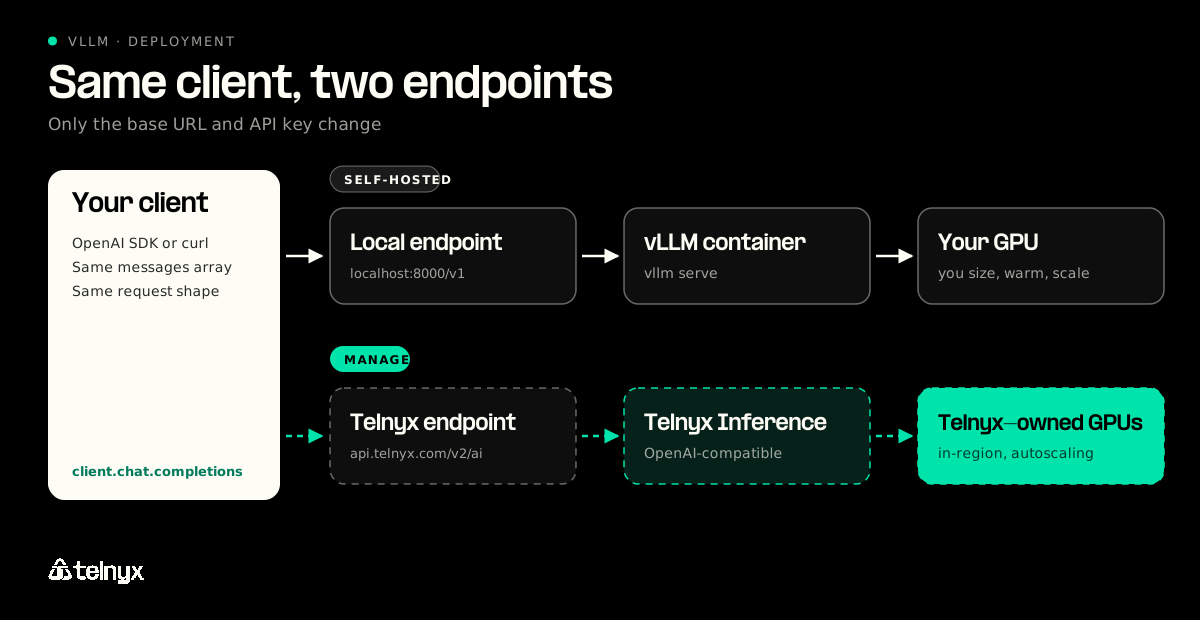
Because vLLM and Telnyx Inference both speak the OpenAI chat completions format, the client in the second example is the client in the third, with a different base URL and API key.
Offline vLLM inference example in Python
The smallest complete vLLM program loads a model and generates for a list of prompts. Use this pattern for batch jobs and benchmarks, not for serving users.
vllm serve and the OpenAI-compatible request
vllm serve starts the same engine behind an OpenAI-compatible HTTP server. Any OpenAI SDK works against it once you point the SDK's base URL at your host.
The same request against Telnyx Inference
Here is the same chat completions request sent to Telnyx, exactly as published on the product page:
Only three things changed: the base URL, the credential, and the model name. The messages array, the request shape, and your SDK stay the same.
Two engine toggles come up often when self-hosting. To turn off prefix caching, for example when you need fully cold measurements:
To try n-gram speculative decoding, which helps most when outputs repeat spans of the prompt, such as code edits or document extraction:
Structured output works per request on the vLLM server. On Telnyx Inference, JSON mode and regex constraints do the same job.
vLLM Docker quickstart: one GPU, one container, one endpoint
If the model you want is already in the Telnyx library, your quickstart is the curl above. This section is for when you need your own weights or your own hardware.
Why won't my vLLM container start?
Pick the error or symptom you see in the container logs.
Pick a model that fits the GPU
Before the container will start, the weights have to fit. In FP16 or BF16, weights take about 2 bytes per parameter. INT4 quantization cuts that to roughly half a byte per parameter, plus some overhead:
- A 70B model: about 140 GB in FP16, so it needs more than one 80 GB GPU unless quantized.
- A 72B model: about 144 GB in FP16, or under 48 GB in INT4, which fits one 80 GB card.
- A 176B model: about 352 GB in FP16, which needs tensor parallelism across several GPUs.
Those numbers cover weights only. The KV cache needs room on top, so leave headroom. Prefer a checkpoint the model vendor has already quantized over quantizing on load, which adds startup time and CPU and GPU work.
Run the vLLM Docker image
The official image, vllm/vllm-openai, runs the OpenAI-compatible server. This is the command from the vLLM Docker documentation, with --gpu-memory-utilization added after the image tag, where the docs say extra engine arguments go:
Mounting the Hugging Face cache keeps downloaded weights between container restarts, and --ipc=host gives PyTorch the shared memory it uses between processes. Once the logs show the server is up, the local curl from the previous section works against localhost:8000. For a model that needs several GPUs on one node, add --tensor-parallel-size with the GPU count.
Why the first request is slow and when it fails to start
At startup, vLLM checks that the GPU has enough free VRAM for the gpu_memory_utilization fraction (0.8 means 80% of total VRAM). It loads the weights, runs a dummy forward pass, and takes a memory snapshot to count how many KV blocks fit. Then it captures CUDA graphs for a range of batch sizes, which cuts kernel launch overhead during serving.
Startup troubleshooting
- Out of memory at start: the weights plus the reserved fraction exceed the card. Lower
--gpu-memory-utilizationor pick a smaller quantized checkpoint. - Slow first request: that is warmup. Exclude it from any benchmark, and measure TTFT versus end-to-end latency separately.
- Slow startup:
--enforce-eagerskips CUDA graph capture. Startup gets faster, and each token gets a little slower. trust_remote_code: this runs code from the model repository with full permissions. Enable it only for sources you trust.
vLLM config: the knobs that change latency and throughput
On Telnyx Inference, these knobs collapse into one request field, service_tier. When you self-host, they are yours to set.
Memory and batch knobs
Every knob here pulls from the same KV block pool that gpu_memory_utilization reserved. More concurrent sequences times longer context means more blocks, and the pool is fixed at startup.
gpu_memory_utilization: the fraction of VRAM vLLM reserves for weights and KV cache. Higher means more blocks and more concurrency, with less room for anything else on the card.max_model_len: the longest context a single request can use. Raising it lets fewer full-length requests fit at once.max_num_seqs: the cap on requests running concurrently. Raising it trades per-request latency for total throughput, until the block pool runs out and preemption starts.max_num_batched_tokens: the cap on tokens processed in one engine step. It bounds how much prefill work can crowd into a step alongside decode.--enforce-eager: skips CUDA graph capture. Faster startup, slower tokens.enable_prefix_caching: on by default. Leave it on when requests share long prompts.long_prefill_token_threshold: a positive integer enables chunked prefill, so long prompts stop monopolizing steps.
To estimate capacity, multiply the per-block size from the architecture section by your layer count, divide the reserved VRAM left after weights by that number, and you have the block pool. Divide the pool by max_model_len / 16 to see how many full-context sequences fit.
Attention backend and quantization
vLLM picks an attention kernel to match the model's positional encoding. FlashAttention is the usual fast path for RoPE models such as Qwen, while other backends cover ALiBi models. You can change the kernel at serve time, but not the model's attention mechanism, so check vLLM's attention backend support matrix before forcing one.
For quantization, the rule from the sizing section holds: a pre-quantized checkpoint starts faster and more predictably than quantizing on load.
Parallelism: tensor first, pipeline second, replicas for the rest
When the weights do not fit one GPU:
- Tensor parallelism splits each layer across GPUs on the same node. Use it first, because bandwidth inside a node is far higher than between nodes.
- Pipeline parallelism splits layers across nodes. Use it when one node still is not enough.
- Replicas scale throughput. vLLM's built-in data parallelism keeps replicas in lockstep, running dummy steps on idle replicas, which only mixture-of-experts models require. For dense models, run independent vLLM instances behind a load balancer.
What a managed endpoint replaces these knobs with
On Telnyx Inference, one field on each request selects serving capacity:
- Default: standard capacity at standard rates. Omit
service_tierand this is what you get. - Priority: faster serving capacity for interactive work, at a different rate. It does not change the model or the context window.
- Flex: the lowest rates, for background jobs where minutes of end-to-end latency is acceptable.
vLLM inference vs a managed API: when self-hosting stops paying
Telnyx Inference serves a curated library of open-weight models on GPUs Telnyx owns, behind OpenAI-compatible endpoints you reach by changing the base URL. Pricing is per token, at up to 75% less than proprietary alternatives, with Cached input at up to 88% off and no GPU rental fees, compute surcharges, or minimums.
What you take on when you self-host vLLM inference
Everything earlier in this guide becomes your job:
- Sizing models against VRAM and reserving the right
gpu_memory_utilizationfraction. - Waiting through the profiling pass and CUDA graph warmup on every new instance.
- Watching for recompute preemption when the block pool runs out under load.
- Sharding with tensor parallelism once weights outgrow one card.
- Provisioning GPUs ahead of every traffic peak, and paying for them while idle.
That last line is usually where the math turns. Our guide to inference cost optimization covers how idle GPU time drives the real cost per token.
What changes when the endpoint is Telnyx
The managed path removes the GPU operations, not the choices that matter. Inference runs in-region across the Americas, Europe, MENA, and APAC, with LATAM coming soon, on Telnyx's GPU network. Data stays in-region with zero data retention and no training on your data. Capacity autoscales from zero to thousands of requests per second with no cold starts.
What you give up is just as clear. You cannot load your own fine-tuned or LoRA weights, and you do not control the hardware.
The decision in one table
Self-hosted vLLM compared with Telnyx Inference
| Concern | Self-hosted vLLM | Telnyx Inference |
|---|---|---|
| Who runs the GPUs | You | Telnyx, on GPUs it owns |
| Models | Any weights you can load, including fine-tunes | Curated open-weight library from z.ai, DeepSeek, Minimax, and more |
| Scaling | Capacity you provision, warmup per instance | Autoscaling from zero to thousands of requests per second, no cold starts |
| Region and data | Wherever your hardware is | In-region across the Americas, Europe, MENA, and APAC, zero data retention |
| Pricing | GPU hours, busy or idle | Per token, up to 75% less than proprietary alternatives, no minimums |
| Latency tuning | The config knobs above | service_tier: Default, Priority, or Flex |
| Client change | None | Change the base URL and API key |
Pricing comparisons refer to the Default tier. Per-token rates vary by model and tier; see inference API pricing for the current lineup.
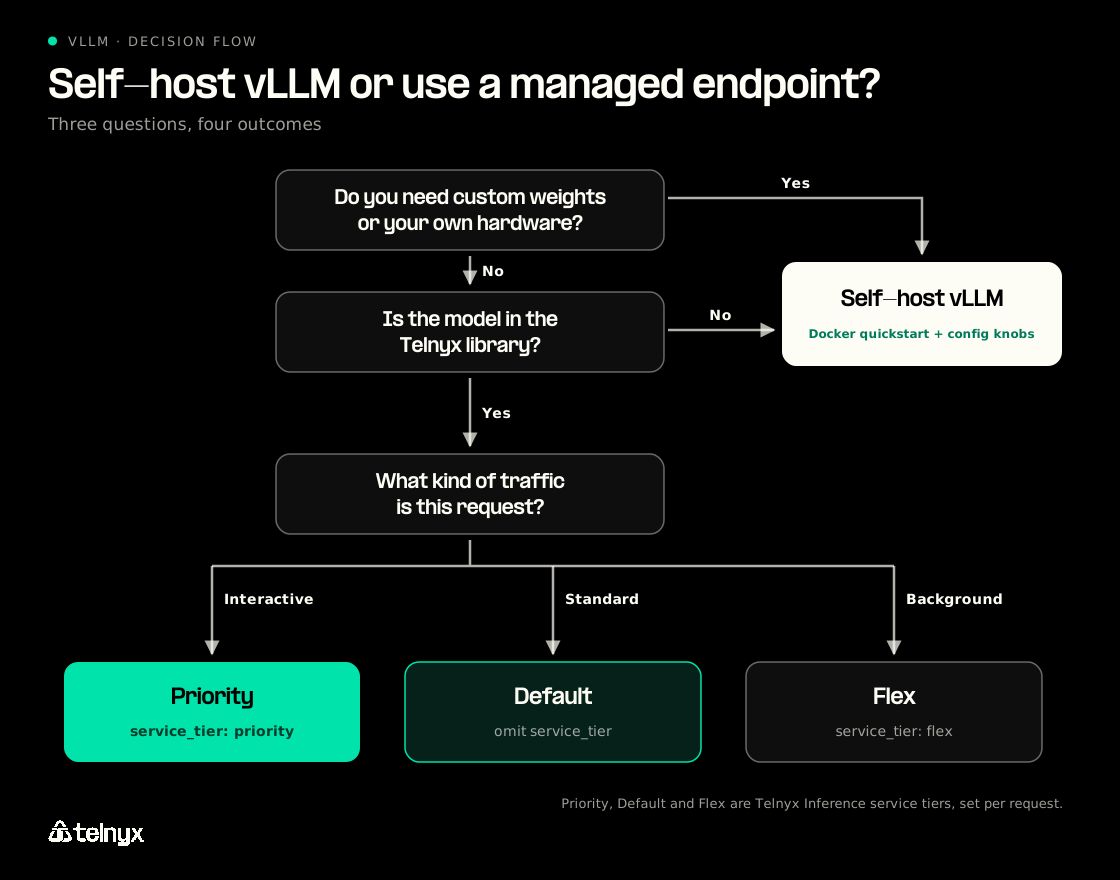
The migration is the request you already have. Point your OpenAI SDK's base URL at Telnyx, set your Telnyx API key, keep the messages array, and choose a model from the pricing page. Set
service_tier to Priority for interactive traffic or Flex for background jobs. vLLM inference FAQ
What is vLLM?
vLLM is an open-source inference engine for large language models. It schedules requests, manages GPU memory with PagedAttention, and exposes an OpenAI-compatible API server. It started at UC Berkeley and is now a hosted project of the PyTorch Foundation.
How does vLLM's PagedAttention allocate KV cache blocks?
At startup, vLLM reserves a fraction of VRAM and divides it into fixed blocks of 16 tokens each. Each request takes blocks from a shared pool as its context grows and returns them when it finishes. If the pool runs out, the scheduler preempts lower-priority requests and recomputes them later.
How does prefix caching work in vLLM and how do you disable it?
vLLM hashes each complete 16-token block of a prompt. When a new request starts with the same blocks, vLLM reuses the stored KV cache instead of recomputing it, which speeds up prefill. It is on by default; set enable_prefix_caching=False to turn it off.
What parallelism strategies does vLLM support and when should each be used?
vLLM supports tensor, pipeline, data, and expert parallelism. Use tensor parallelism across GPUs on one node first, pipeline parallelism across nodes when one node is not enough, and independent replicas behind a load balancer for extra throughput on dense models. Built-in data parallelism matters mainly for mixture-of-experts models.
What hardware does vLLM run on?
vLLM runs on NVIDIA and AMD GPUs, Google TPUs, AWS Trainium and Inferentia, Intel Gaudi and XPU accelerators, and CPUs. NVIDIA GPUs have the deepest support; CPUs work for testing but are not a serving target.
\Run open-weight models without running GPUs
You now have a vLLM server on one GPU and the one-line change that moves the same client to Telnyx-hosted GPUs. Sign up to test open-weight models on in-region GPUs, at up to 75% less than proprietary alternatives, with no infrastructure to manage. Start building with Telnyx Inference
Move your vLLM client to a managed endpoint
When running your own GPUs stops paying, point the same OpenAI-compatible client at Telnyx and get in-region GPUs at up to 75% less than proprietary alternatives.
Try Telnyx InferenceShare on Social


