
Insights and Resources
Model serving: how to run open-weight LLMs close to your users
Model serving keeps a trained model on GPUs and answers requests through an API. Learn the three layers of LLM serving and how to run open-weight models in-reg...

By Eli Mogul
Takeaways
Model serving keeps a trained model on GPUs and answers requests through an API. On Telnyx, that is one OpenAI-compatible request to open-weight models on owned GPUs near your users.
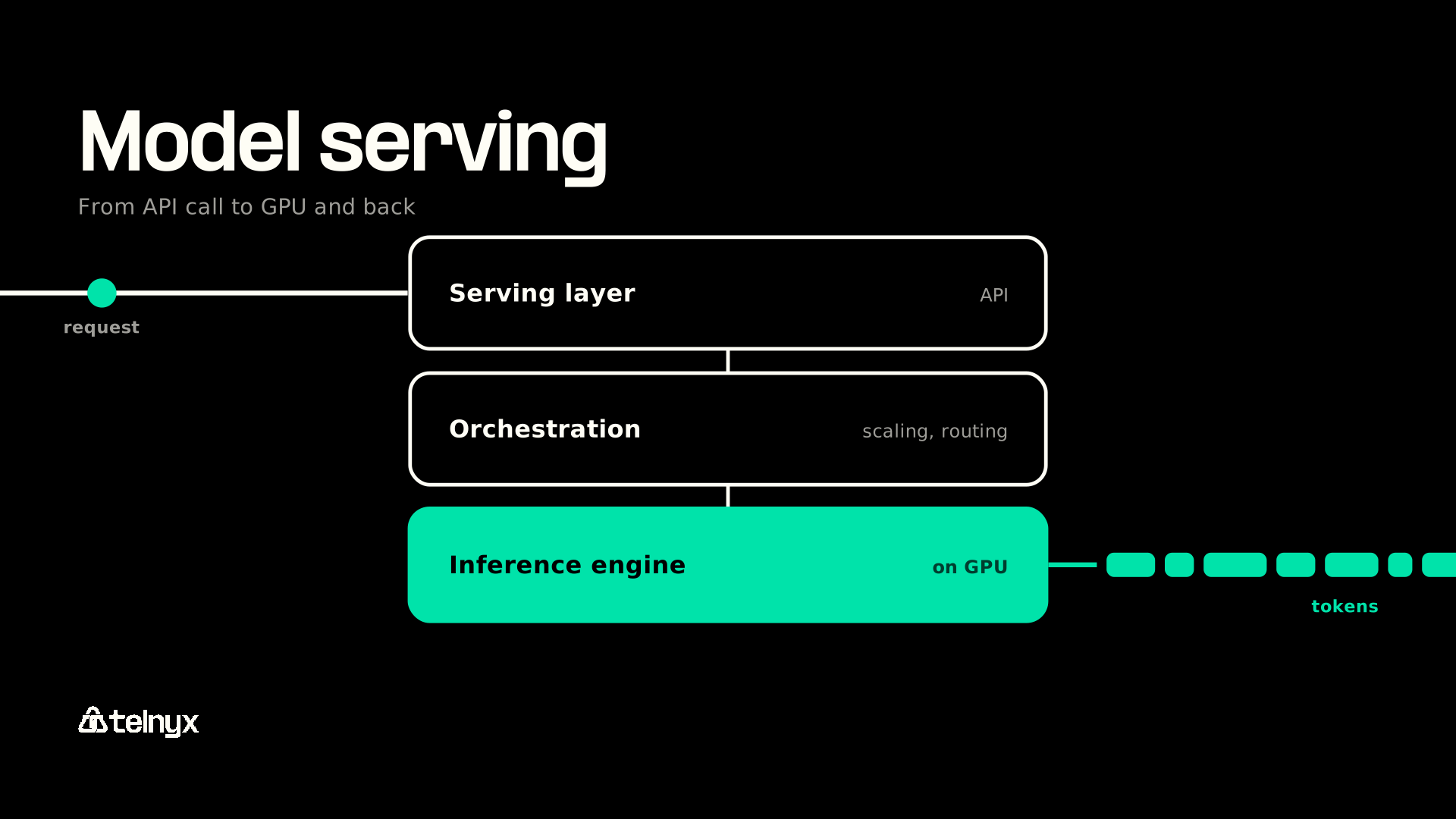
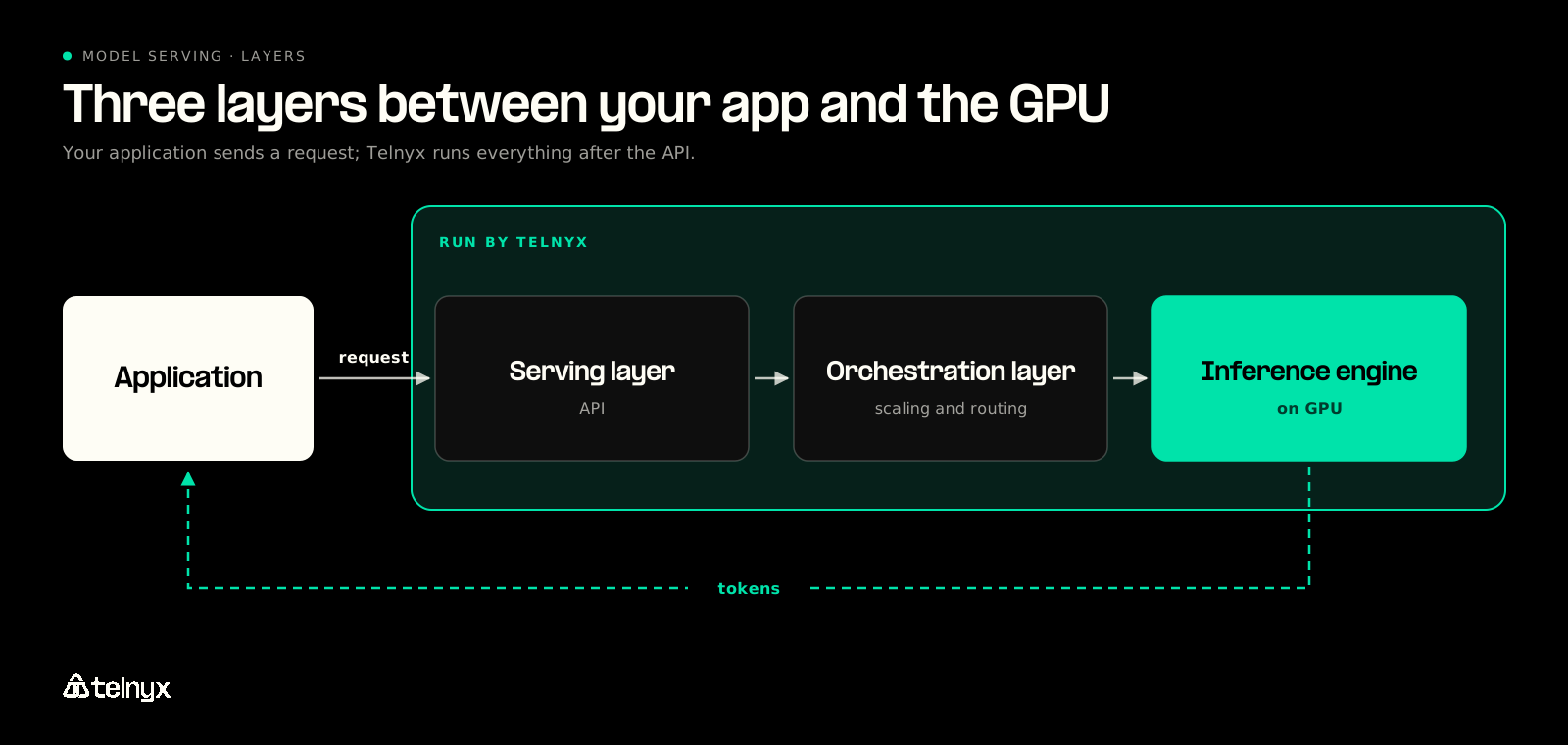
- Every LLM serving stack has three layers: an inference engine that generates tokens, a serving layer that exposes the API, and an orchestration layer that scales and routes.
- Where the model runs and which serving tier a request uses shape latency as much as the model itself.
- Telnyx Inference is priced per token with no GPU rental fees, at up to 75% less than proprietary alternatives.
What model serving is and why it is hard to run
Model serving is the work of keeping a trained model loaded on GPUs and answering requests from applications through an API. Telnyx Inference does that work for a curated library of open-weight models hosted on GPUs Telnyx owns, behind an OpenAI-compatible chat completions interface, with no infrastructure to manage.
Getting a model to answer once on a single GPU is the small part of the job. Keeping it answering for thousands of users, at a predictable cost, is the part that turns into batching, autoscaling, routing, regional placement, and an on-call rotation.
Training, inference, and serving are three different jobs
The three terms get used interchangeably, but each describes different work that happens at a different time and needs different hardware.
- Training produces the model weights. It happens once per model version and needs a training cluster.
- Inference is one run of the model on one input. It happens on every request and needs a loaded model.
- Serving answers many requests at once through an API. It runs all the time and needs GPUs, an API in front of the model, and something that scales it.
Serving is the step that turns model deployment into a working product. It is also the step with no finish line: the model has to stay loaded, fast, and affordable for as long as anyone calls it.
Why serving an LLM is harder than serving an ordinary API
A typical web API starts in milliseconds and treats each request on its own. A large language model breaks both assumptions, for three reasons.
- Size: the weights run from several GB to tens of GB and must sit in GPU memory before the first request arrives.
- Shared load: one served model handles many applications and users at once, so requests have to be batched and cached to keep the GPUs busy.
- Load-time settings: some parameters are fixed when the model loads, so a generic loader built for small models does not fit.
Each of those problems is handled by a different piece of software. That is why LLM serving is a stack of layers rather than a single program.
Try Telnyx Inference to run open-weight models on owned GPUs near your users through one OpenAI-compatible request.
How LLM serving infrastructure works, layer by layer
On Telnyx, you see one layer of the stack: an OpenAI-compatible endpoint. Telnyx runs the other two on GPU infrastructure it owns, which handles concurrent requests and scales automatically.
Walking a single request from the GPU upward shows what each layer does, and what a self-hosted team has to build for each one.
The inference engine
The inference engine loads the weights into GPU memory and generates tokens. vLLM is the most common open-source engine, and three techniques make engines like it efficient:
- Continuous batching lets a new request join a batch that is already running, so the GPU does not sit idle waiting for the slowest request in a batch to finish.
- Prefix caching reuses work already done for prompts that start the same way, such as a shared system prompt or a long document reused across turns.
- Quantization stores weights at lower precision so the model needs less GPU memory, at some cost in accuracy.
An engine tuned with these techniques makes a single replica fast. It does nothing on its own for authentication, streaming to clients, or traffic spread across many replicas.
The serving layer and its API
The serving layer exposes the model as an endpoint, authenticates callers, and streams tokens back as the engine produces them. The OpenAI chat completions format has become the standard here, so existing SDKs work unchanged against any compatible endpoint. KServe is an open-source example of this layer for teams running their own stack on Kubernetes.
This is also the layer most teams judge a provider by. The questions that matter when choosing an LLM API for production, such as streaming behavior, rate limits, and data handling, are all decided here.
The orchestration layer
The orchestration layer places model replicas on GPUs, scales them up and down, and routes each request to a replica. Kubernetes is the usual base for self-hosted stacks.
Routing matters because an LLM request has two phases with different needs. Prefill processes the whole prompt and is compute-heavy. Decode generates tokens one at a time and is latency-sensitive. A router that knows which replica already holds a prompt's cached prefix can skip repeated prefill work entirely.
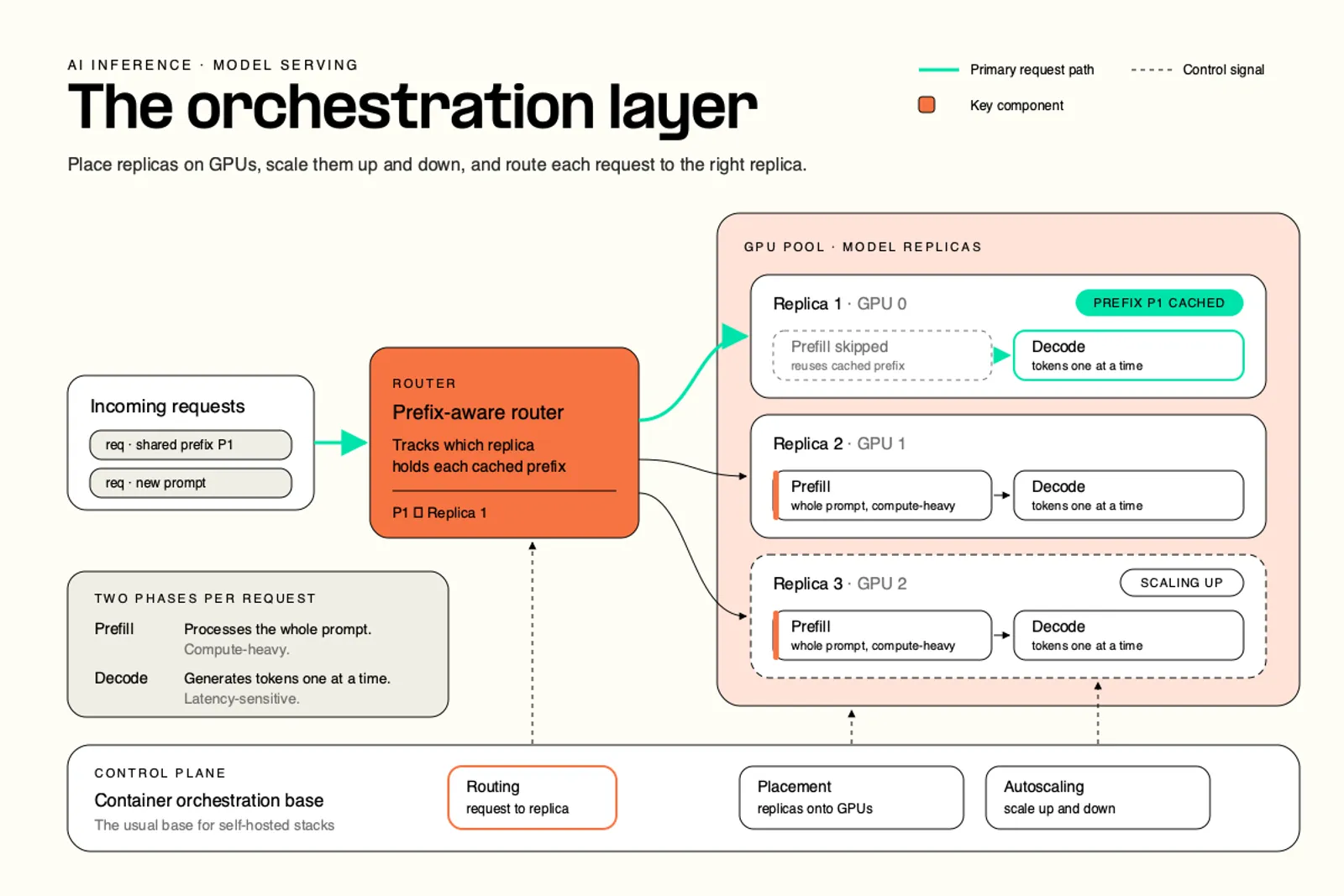
Routing result: Routing requests by cache instead of round-robin gave up to ~57× faster P90 TTFT and took throughput from ~4,400 to ~8,730 tokens/sec, according to llm-d project publications cited by KServe and llm-d.
The engine sets the ceiling for a single replica. Routing decides how close each request gets to that ceiling, which is why orchestration, more than the choice of model, is where serving performance is won or lost.
Where LLM serving runs decides how fast it feels
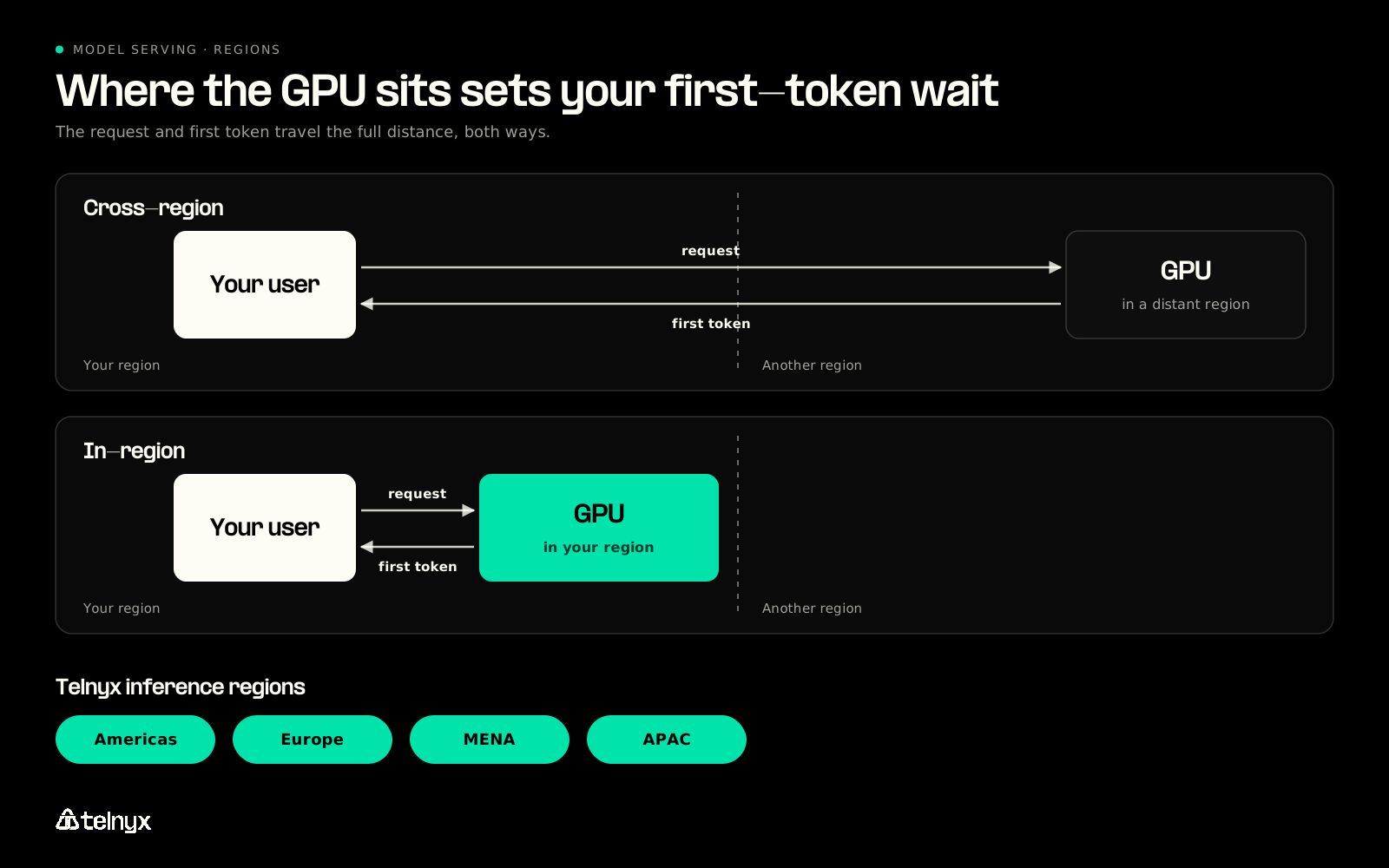
Telnyx runs inference in-region across the Americas, Europe, MENA, and APAC, on GPUs colocated with the network that serves your users, with zero data retention. That placement matters because users feel serving speed through four numbers, and distance shows up in the first one.
The four numbers that describe serving speed
Four metrics describe serving speed, and each maps to something a user notices.
- Time to first token (TTFT) measures how long before the answer starts, and when it is slow the user waits in silence.
- Inter-token latency (ITL) measures the gap between streamed tokens, and when it is high the answer stutters on screen or in a voice.
- Throughput measures tokens per second across all users, and when it is low every request costs more to serve.
- Tail latency (P90 or P99) measures what the slowest requests feel like, and when it is high a small share of users gets a much worse experience than the average suggests.
Engines and routers mostly work on ITL, throughput, and the tail. TTFT also depends on something no engine can fix: the distance between the user and the GPU.
Serving in the same region as your users
Every network round trip between the user and the GPU is added to TTFT. A model served in another region starts every answer late, however fast the engine is. Telnyx's product page states the approach directly: "No inter-provider hops, no cross-border routing, no training on your data."
The same reasoning led Telnyx to build co-located infrastructure for voice AI, with GPUs placed next to the telephony core so audio never crosses the public internet to reach a model.
"But in production, latency is often less about one slow model and more about the shape of the architecture: where the call enters, where media is anchored, where STT runs, where the LLM runs, where TTS runs, and how many vendor or cloud boundaries the audio crosses along the way." James Whedbee, VP of Engineering at Telnyx |
Text-to-speech, voice AI, and telephony run on the same Telnyx infrastructure as inference. A voice agent's model call stays on the network the call arrived on, rather than leaving it for a separate inference vendor.
Choosing serving capacity per request
Telnyx selects serving capacity per request with one field in the request body, service_tier. Omit it and the request runs on Default. Set it to priority or flex to trade price against latency for that request alone.
- Default: standard serving capacity at standard rates, and what every request gets when
service_tieris omitted. - Priority: capacity optimized for low-latency interactive workloads, including voice orchestration. It keeps the same model and context window at a different rate, and it is live on select models.
- Flex: the lowest rates, built for background work such as offline evaluation, document processing, and background summarization, where minutes of end-to-end latency is acceptable. All requests remain synchronous, and Flex is available in the US on select models.
A self-hosted stack gets the same split by running a second GPU pool for interactive traffic or a queue for background jobs. On Telnyx, an interactive voice turn and an overnight summarization job can use the same model ID and the same endpoint, with one field telling them apart.
AI model hosting: run the stack or call an API
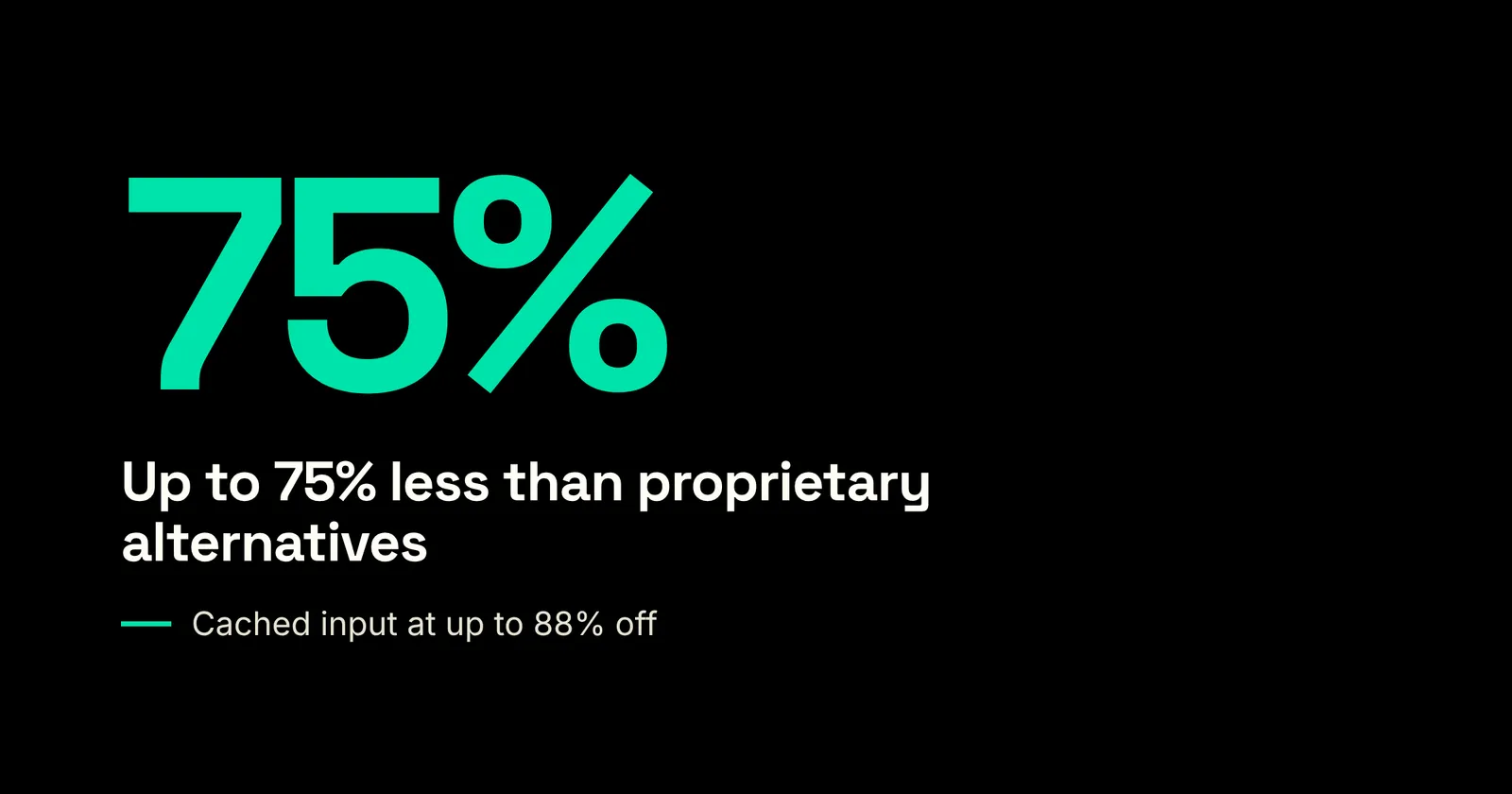
Telnyx Inference is serverless inference priced per token. Rates run up to 75% less than proprietary alternatives, and cached input is up to 88% off. The alternative is self-hosting, which means renting or buying GPUs and running all three layers from the previous section yourself.
Should you run the serving stack or call an API?
Pick the case that matches your traffic and your model to see which way to go.
The choice is rarely about the model. Both paths can serve the same open-weight weights, so the decision comes down to who carries the operating work.
What hosted inference on Telnyx includes
The comparison below covers the costs a team carries once the first model is answering, row by row.
Self-hosted LLM serving compared with Telnyx Inference
| What changes | Self-hosted stack | Telnyx Inference |
|---|---|---|
| What you pay for | GPUs by the hour, busy or idle | Tokens used |
| Who runs the three layers | Your team | Telnyx, on GPUs it owns |
| Scaling | You plan capacity and handle cold starts | Autoscaling by default, no capacity planning, no cold starts |
| Where requests are processed | Wherever you deploy | In-region across the Americas, Europe, MENA, and APAC |
| Data retention | Your policy to build and enforce | Zero data retention, no training on your data |
| Changing models | Redeploy and retune | Change the model name in the request |
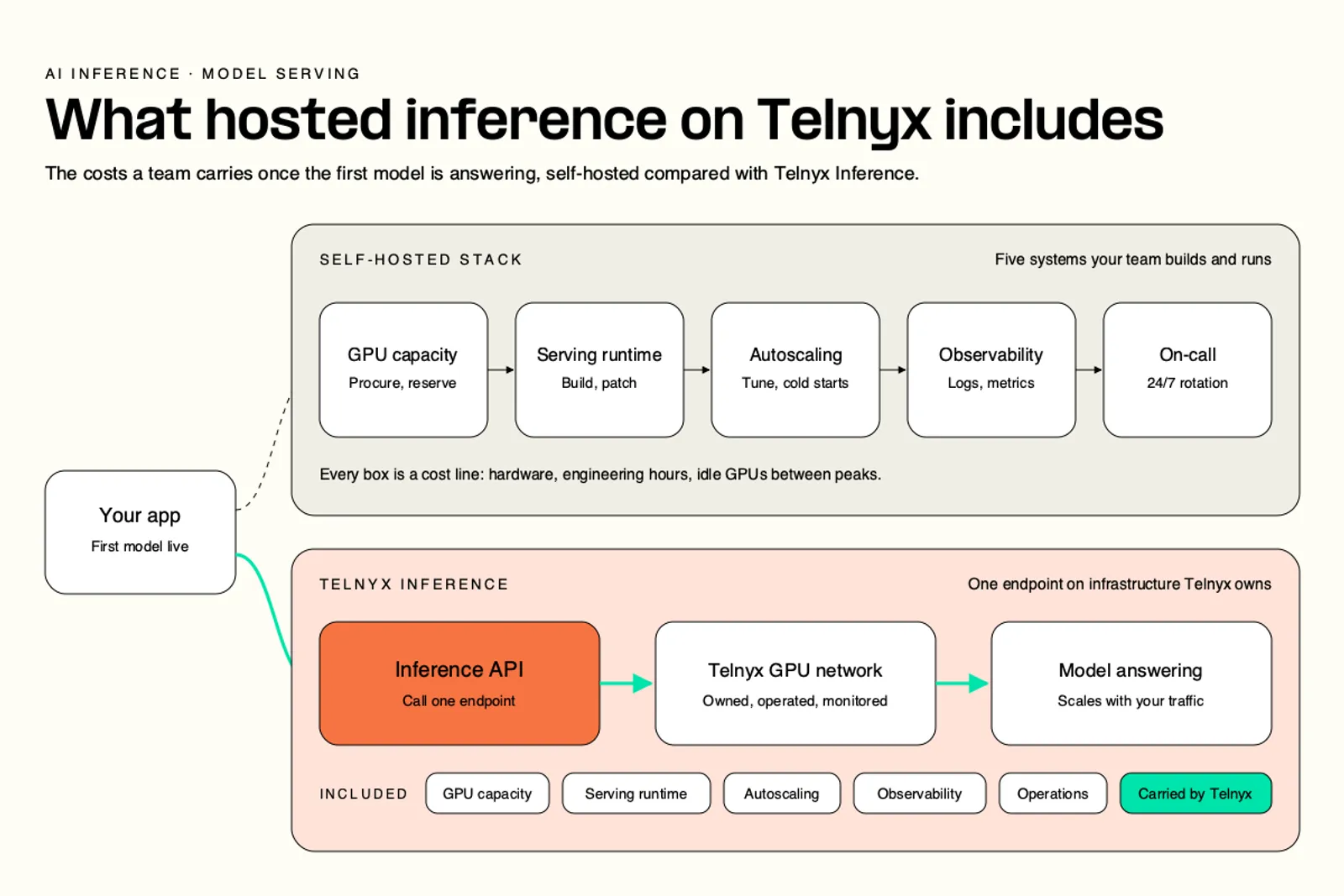
The pricing model is the row that changes budgeting most. Hourly GPUs cost the same whether they serve one request or ten thousand, while per-token pricing moves with actual use.
Pricing: No GPU rental fees, no compute surcharges, no minimums. Per-token rates vary by model and service tier. Current rates for each model are on the inference pricing page.
How to decide
Four questions settle most hosting decisions. Answer them before comparing per-token rates with GPU-hour prices.
- Do you have people to run an engine, an API layer, and an orchestrator around the clock? If not, a hosted endpoint removes the on-call rotation that self-hosting requires.
- Is your traffic steady enough to keep rented GPUs busy? Hourly GPUs pay off only when they stay loaded, and spiky traffic leaves you paying for idle capacity between peaks.
- Where do your users' requests have to be processed? If data must stay in a region, confirm the provider runs inference there, not only storage.
- How often will you change models? If the best model for your workload changes often, a request field is far cheaper to change than a redeployed and retuned cluster.
Teams with a dedicated infrastructure group, steady load, and a reason to modify weights have a real case for self-hosting. Teams missing any of those conditions should price the on-call and capacity work before assuming GPU hours are the cheaper path.
Serving open weight LLM models with one request
On Telnyx, serving one of the hosted open-weight models is a POST to https://api.telnyx.com/v2/ai/chat/completions with the model's name in the body. The engine, the API layer, and the orchestration behind that URL are already running.
The request that replaces the stack
Run this from a terminal with your Telnyx API key set as the TELNYX_API_KEY environment variable:
The request has three parts. The bearer key in the Authorization header identifies your account. The model field selects the model, here moonshotai/Kimi-K3, Moonshot AI's Kimi K3. The messages array uses the OpenAI chat format, so existing OpenAI SDKs work once the base URL points at Telnyx. There is no model to download, no GPU to reserve, and no replica count to set.
Switching models without rewriting code
Changing models means changing the model string. Telnyx adds open-weight models from z.ai, DeepSeek, Minimax, and more as they launch, and the current lineup is listed on the inference pricing page.
"The competition in comms is stiff, but I'm grateful I'm not competing in the foundation-model cage match. Every week, a new contender takes the leaderboard. No loyalty in AI land." David Casem, CEO at Telnyx |
When the best model changes that often, a stack tuned around one model becomes a liability. Keeping the model as a single string in the request lets a team test a new release the day it lands. For structured output, JSON mode and regex constraints make the response conform to a schema, which matters when another program parses the result.
The path from first request to production settings runs in four steps:
- Send the request above with your Telnyx API key.
- Change the model string to switch models, using the lineup on the pricing page.
- Leave
service_tierout for Default capacity, or set it topriorityorflex. - Turn on JSON mode or a regex constraint when the output has to match a schema.
FAQ
What is model serving architecture?
.svg)
Model serving architecture is the arrangement of three layers that takes a request to a loaded model and returns tokens. The inference engine generates tokens on the GPU, the serving layer exposes the API and streams responses, and the orchestration layer places replicas, scales them, and routes requests. On Telnyx, all three sit behind one OpenAI-compatible endpoint.
What's the difference between synchronous and asynchronous model serving?
Synchronous serving means the client holds the connection open and receives the answer, usually streamed token by token. Asynchronous serving queues the job and returns the result later, which suits batch work. On Telnyx, the Flex tier covers background work at the lowest rates, yet all requests remain synchronous, so there is no separate queue to integrate.
How should I choose between vLLM, SGLang, and TensorRT-LLM?
Compare them on your hardware and workload rather than headline benchmarks. vLLM runs on hardware from several vendors. SGLang reuses shared prompt prefixes automatically, which helps chat and agent workloads with repeated context. TensorRT-LLM is NVIDIA's library and runs on NVIDIA GPUs only. On a hosted endpoint such as Telnyx Inference, the engine is chosen and tuned for you.
What infrastructure is needed for high-availability model serving?
A self-hosted deployment needs more than one replica per model, health checks that pull failing replicas out of rotation, and autoscaling tied to request load. It also needs spare capacity for traffic spikes, since a large model can take minutes to load onto a new GPU. On Telnyx, owned GPU infrastructure handles concurrent requests and scales automatically, with no capacity planning and no cold starts.
How do I optimize costs for LLM serving while maintaining performance?
When self-hosting, the two biggest levers are keeping GPUs busy with batching and caching, and scaling idle capacity down when traffic drops. Routing requests with shared prefixes to the same replica also cuts repeated prefill work. On Telnyx, the Flex tier offers the lowest rates for background work, cached input is up to 88% off, and rates run up to 75% below proprietary alternatives.
Serve open-weight models without running the stack
Send one OpenAI-compatible request and run open-weight models in your users' region, on GPUs Telnyx owns, with nothing to operate. Up to 75% less than proprietary alternatives, with zero data retention.
Start building
Serve open-weight LLMs close to your users
Telnyx Inference runs a curated library of open-weight models on GPUs Telnyx owns, priced per token with no GPU rental fees and no infrastructure to manage.
Start buildingShare on Social


