
General
Sender Reputation and How to Check It
Sender reputation determines email deliverability. Learn how mailbox providers score you, how to check it for free, and why shared IP pools limit your control.

By Eli Mogul

Takeaways
- Sender reputation is the score mailbox providers assign to your sending IP and domain. It determines whether your email reaches the inbox, the spam folder, or gets rejected outright.
- You can check it with free tools: Google Postmaster Tools, Sender Score, Microsoft SNDS, MxToolbox, and Spamhaus each show a different piece of the picture.
- A good Sender Score is 80 or above. Below 70 means active deliverability damage. No single tool is authoritative.
- Authentication is the foundation. SPF, DKIM, and DMARC with alignment are required by Gmail, Yahoo, and Microsoft for bulk senders.
- On shared IP pools, your reputation is partly determined by other senders. On owned infrastructure, every signal traces back to your own sending.
What sender reputation actually measures
Sender reputation is not one number published by one authority. It is a set of independent judgments made by Gmail, Outlook, Yahoo, corporate filters, and blocklist operators, each using its own data.
Those judgments draw on a common set of inputs:
- Complaint rate. The share of delivered messages that recipients mark as spam. This is the single heaviest signal at most providers.
- Authentication results. Whether SPF, DKIM, and DMARC pass, and whether they align with the domain in your visible From address.
- Bounce rate. Hard bounces indicate a list you are not cleaning.
- Spam trap hits. Addresses that exist only to catch senders who scrape, buy, or never prune lists.
- Engagement. Opens, replies, and deletions without reading. Providers infer whether recipients want your mail.
- Volume consistency. Sudden spikes from an IP with no history read as compromise or abuse.
- Blocklist status. Presence on a widely queried DNSBL suppresses delivery well beyond the provider that listed you.
Two things carry these signals: your sending domain and your sending IP address.
Domain reputation and IP reputation are not the same thing
Domain reputation follows the domain in your From address and your DKIM signature. It travels with you. Change providers, change IPs, rebuild your stack entirely, and your domain history comes along.
IP reputation attaches to the specific address that opened the SMTP connection. It is shared by everything sending from that address.
Providers weigh these differently. Gmail leans heavily on domain reputation, which is why Google Postmaster Tools is organized around a verified domain. Microsoft's Smart Network Data Services is IP-based, which is why access requires proving you control the IP range. Yahoo's Complaint Feedback Loop is domain-based and only supports DKIM-signed mail, so enrollment is impossible without correct authentication in place first.
The practical consequence: you need both. A clean domain on a poisoned IP still lands in spam.
The shared IP problem
Here is where the sending model you chose starts to matter.
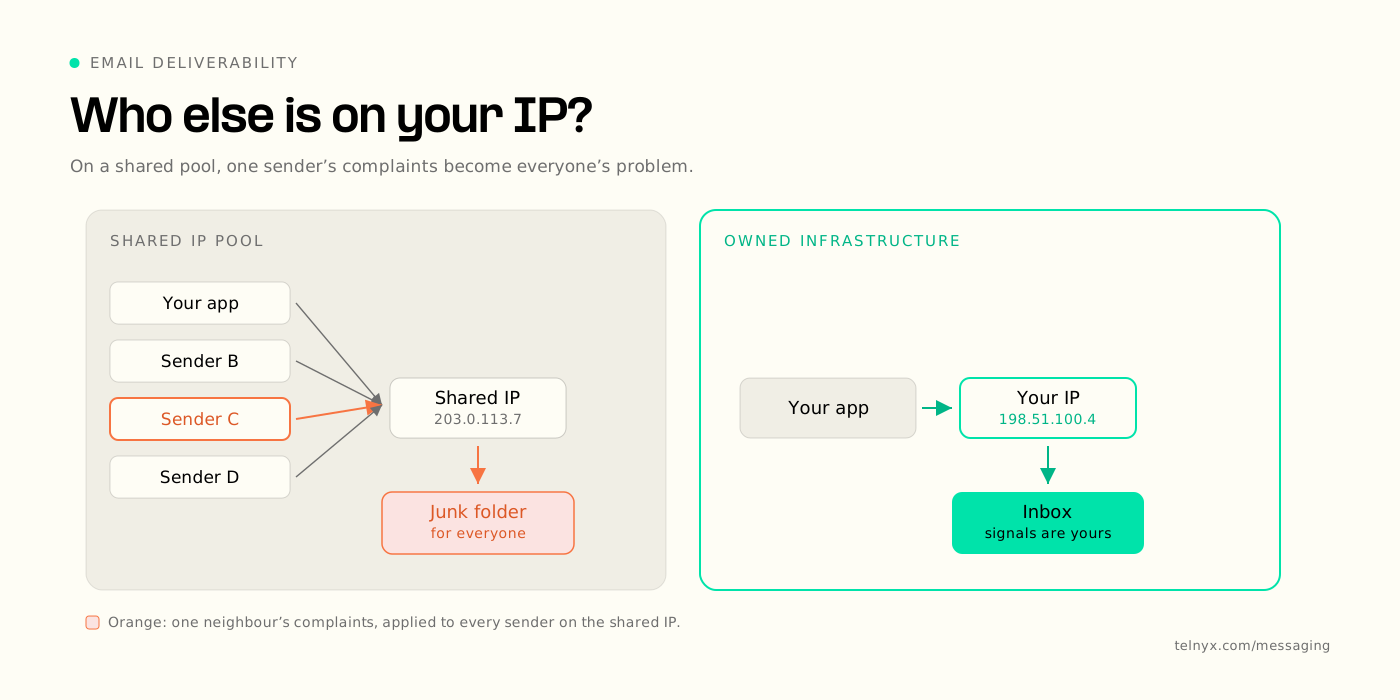
On most email platforms, new accounts land in a shared IP pool by default. Your mail leaves from an address that dozens or hundreds of other senders also use. A dedicated IP is a paid upgrade, gated behind higher plan tiers and per-IP monthly fees.
Shared pools are not automatically bad. For low-volume senders they are usually better than a cold dedicated IP, because reputation is built from consistent volume and a lightly used dedicated address never accumulates enough positive signal to establish one. Industry practice generally puts the line somewhere around 50,000 messages a month sent on a steady schedule. Below that, a well-managed shared pool typically outperforms a dedicated IP. Providers publish different thresholds, so treat the number as a planning heuristic rather than a rule.
The problem is what you give up. In a shared pool:
- A neighbor's complaint spike degrades your delivery, and you find out through a metric you cannot attribute.
- A neighbor's spam trap hit can land the pool on a blocklist you never triggered.
- Remediation is your provider's job, on your provider's timeline.
- Your IP reputation is not a variable you control. It is an input you inherit.
In a shared pool, your reputation is partly a function of decisions you did not make. On infrastructure you control, every signal traces back to something you sent.
On infrastructure you control, the causal chain is legible. When complaint rate moves, it moves because of something you sent. When an IP gets listed, you know which of your sends caused it, and you can fix the underlying practice instead of filing a ticket and waiting.
The same principle drives how Telnyx built its voice and messaging infrastructure. Telnyx owns and operates private global network instead of renting capacity from aggregators, which removes a layer of other people's decisions between a customer and the delivery outcome they are measured on. Email is a different channel with different mechanics, but the underlying question is identical: how much of your reputation is yours to control, and how much are you inheriting?
How to check your sender reputation
There is no universal dashboard. Checking properly means querying each provider that matters to your recipient base, plus the major blocklists. Here is where to look.
| Tool | What it reports | Scope |
|---|---|---|
| Google Postmaster Tools | Spam rate, domain and IP reputation, authentication pass rates, delivery errors | Domain and IP, Gmail recipients only |
| Microsoft SNDS and JMRP | Volume, complaint rate, trap hits, filter status, junk report copies | IP, Outlook, Hotmail, and Live recipients |
| Yahoo Complaint Feedback Loop | Individual spam complaints in ARF format | Domain, Yahoo properties |
| Sender Score | 0 to 100 percentile rating from complaints, traps, volume, blocklist data | IP, cross-provider |
| Spamhaus, Talos, Barracuda | Blocklist status and reputation grade | IP and domain, cross-provider |
Access and refresh cadence
| Tool | Access requirement | Refresh |
|---|---|---|
| Google Postmaster Tools | Verify sending domain with DNS TXT record | Daily, 2-3 day lag |
| Microsoft SNDS and JMRP | Request IP range access, verify control | Daily |
| Yahoo Complaint Feedback Loop | DKIM-signed mail plus CFL enrollment | Near real time |
| Sender Score | Free lookup, no verification | Rolling 30-day average |
| Spamhaus, Talos, Barracuda | Free lookup | Minutes to hours |
A note on Sender Score: because it runs on a rolling 30-day average, it is a trend indicator, not an alarm. Improvements take weeks to appear. Use it to confirm direction, and use provider dashboards and blocklist lookups to catch problems the same day they happen. MXToolbox runs a single IP or domain against a wide set of DNSBLs at once, which is a faster first check than querying each list individually.
What the numbers need to look like
The thresholds are published, and they are stricter than they were two years ago.
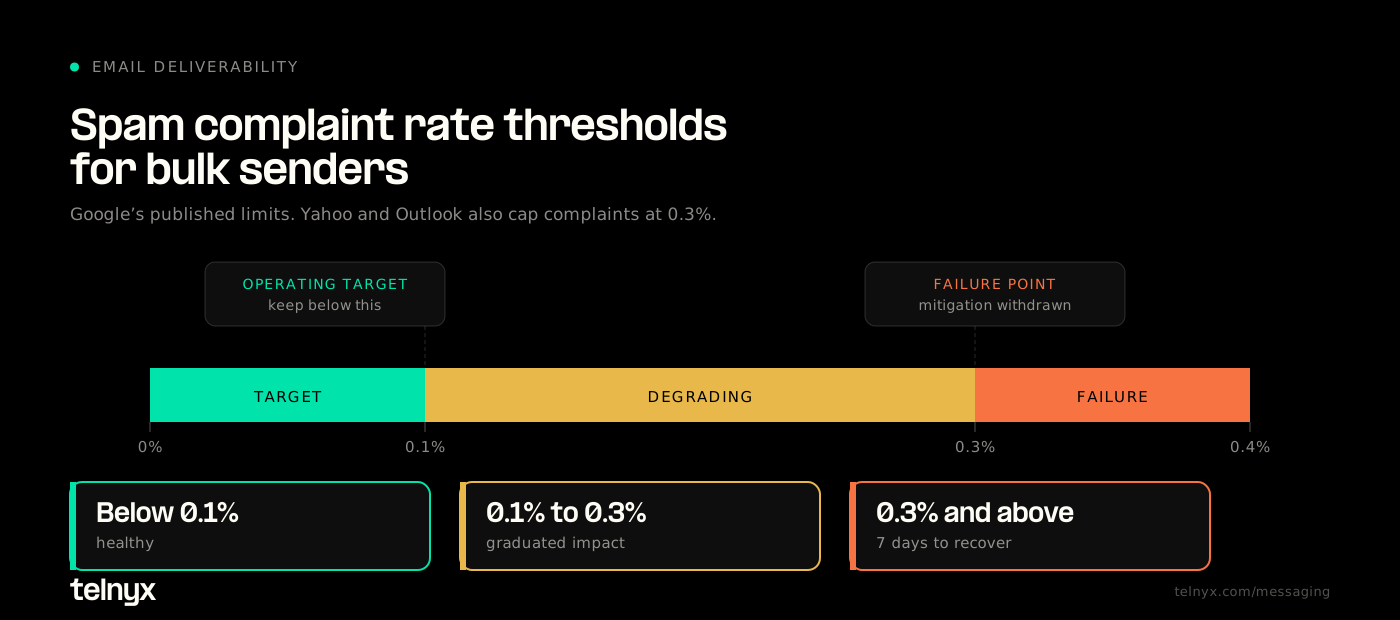
Complaint rate. Google asks bulk senders to stay below 0.10% and never reach 0.30%. The impact is graduated, so 0.3% and above hits delivery hardest, and Gmail withdraws mitigation support until you hold below that line for seven consecutive days. Yahoo sets the same 0.3% ceiling. Microsoft asks senders to stay under 0.3%. Treat 0.1% as the operating target and 0.3% as the failure point.
Authentication. Since 2024, Google and Yahoo have required SPF, DKIM, and a published DMARC record with SPF or DKIM alignment for senders exceeding 5,000 messages a day. Microsoft applied the same requirements to Outlook, Hotmail, and Live starting May 5, 2025. Enforcement is phased: since that date, mail from non-compliant high-volume domains routes to the junk folder, and Microsoft has stated that non-compliant messages will be rejected outright in a later phase on a date it has not yet announced. If you are not sure what alignment means in practice, DMARC.org's overview is the clearest primary explanation.
Unsubscribe handling. Marketing and promotional mail needs one-click unsubscribe implemented through the List-Unsubscribe and List-Unsubscribe-Post headers defined in RFC 8058. The link has to work without a login, and you have to honor the request within two days. Transactional mail such as password resets and order confirmations is exempt.
Note that these are mailbox provider requirements, not law, and in this case they are stricter than the statute. The CAN-SPAM Act gives US senders 10 business days to honor an opt-out, and separately requires a valid physical postal address in commercial mail. Gmail and Yahoo will filter you long before the FTC notices. Senders reaching EU or UK recipients also have to meet GDPR consent standards, which govern whether you were permitted to add the address in the first place rather than how quickly you remove it.
Bounce rate. No provider publishes a hard threshold, but sustained hard bounces above 2% signal a list you are not maintaining.
Building reputation you can actually protect
Once you can see the numbers, the work is mostly operational.
Warm new IPs deliberately. A new sending IP has no history, and providers treat unexplained volume as suspicious. Start in the low hundreds per day, send to your most engaged recipients first, and scale over four to eight weeks. Watch complaint rate at each step rather than working to a fixed schedule.
Segment by engagement, not by list. Recipients who have not opened anything in six months depress your engagement signal and raise complaint risk. Suppress them or run a re-permission campaign before they cost you inbox placement with everyone else.
Honor opt-outs immediately and completely. This is where reputation damage compounds fastest, and the pattern is identical across channels. In messaging, ignoring a STOP keyword creates legal exposure, carrier filtering, and lasting reputation damage on the numbers you send from.
Separate your streams. Transactional and marketing mail deserve different subdomains and, at volume, different IPs. A promotional campaign that draws complaints should not drag your password reset emails down with it.
Publish valid reverse DNS. Every sending IP needs a meaningful, non-generic PTR record that reflects your domain. Generic hostnames from a hosting provider read as suspicious.
Monitor continuously, not after incidents. Reputation moves gradually and recovers slowly, so a weekly check will usually catch a problem after it has already cost you a send cycle. The same logic drives the message deliverability dashboard in the Telnyx portal: visibility into delivery outcomes has to be continuous to be useful.
The parallel with messaging
If you run SMS alongside email, none of this will feel unfamiliar. Carriers score message senders on registration status, opt-in provenance, complaint volume, and content patterns, and they filter accordingly. Campaigns that ignore 10DLC compliance requirements see delivery rates fall before anyone sends a warning, and US carriers can suspend non-compliant campaigns without notice.
The failure modes rhyme. An unregistered or poorly registered 10DLC campaign draws a low trust score, which throttles throughput and increases filtering across every carrier at once, and you find out through a delivery metric rather than an error message. That is structurally the same experience as a shared IP pool landing on a blocklist: a scoring decision made upstream, applied to all your traffic, surfaced only as degraded delivery. In both cases the fix is the same. Establish provenance for every recipient, register and separate your traffic streams, and keep the signals you control clean enough that the scoring works in your favor.
The mechanics differ. The principle does not. Reputation is an asset you accumulate through consistent, permission-based sending, and it degrades faster than it rebuilds. The senders who do well across both channels treat deliverability as an infrastructure discipline rather than a marketing metric.
Frequently asked questions
How do I check my sender reputation for free?
Use Google Postmaster Tools for Gmail delivery data, Sender Score for a cross-provider IP rating, MxToolbox for blocklist checks, and Spamhaus for domain and IP reputation status. All four are free. None is complete on its own.
What is a good sender score?
A Sender Score of 80 or above is good. Above 90 is strong. Below 70 indicates active deliverability damage. Sender Score is a rolling 30-day average, so it shows trends rather than same-day problems.
What is the difference between IP reputation and domain reputation?
IP reputation attaches to the sending address. Domain reputation follows your From address and DKIM signature. Gmail weights domain reputation heavily. Microsoft's SNDS is IP-based. You need both clean for reliable delivery.
How long does it take to rebuild sender reputation?
Typically four to eight weeks of clean, consistent sending after fixing the root causes. Authentication errors, list contamination, and volume spikes must be resolved first. Reputation degrades faster than it rebuilds.
Take control of the infrastructure your reputation runs on
Sender reputation is only as defensible as the network underneath it. When your addresses are shared, your remediation path runs through someone else's support queue. When you own the path, you own the outcome.
Telnyx built its own private global network for exactly that reason: fewer intermediaries, direct visibility into delivery, and control over the infrastructure that carries your traffic. That principle already governs how Telnyx customers run voice and messaging, and it is the same standard worth holding email infrastructure to.
Create a free account to start building on communications infrastructure you can actually see into.
Share on Social


%20(1).png?width=96&format=webp)


