
Email API
Email automation best practices that hold up at scale
Email automation best practices for teams running production sends: domain authentication, per-message state, and retries with exponential backoff from one API key.

Takeaways
The email automation best practices that survive production are domain authentication, per-message state, retries with exponential backoff, and marking a message sent only when a delivery event arrives. Telnyx runs all four from one application programming interface (API) credential, so a failed batch re-sends itself instead of paging you at 3am.
- Google requires anyone sending 5,000 or more messages a day to Gmail to pass SPF (Sender Policy Framework) and DKIM (DomainKeys Identified Mail), publish DMARC (Domain-based Message Authentication, Reporting and Conformance), offer one-click unsubscribe and keep spam complaints under 0.3%.
- A failed batch should re-send itself. The email-batch-retry-agent pattern records state for every message, backs off exponentially and retries only the failures.
- Inbound and outbound email belong on one platform, so replies and sends share one API credential and one state store rather than a second vendor you have to reconcile against.
What is email automation and why infrastructure matters
Email automation is any system that sends or replies to email without a person pressing send. A rule fires, a message leaves, and a webhook reports what happened. Most lists of email automation best practices cover only the first part, the rules. The rules layer decides when to send and to whom. The infrastructure layer decides whether the message actually leaves, whether it is authenticated, whether a reply comes back to something that can read it, and whether a failure can be retried.
Automation rules only work when the sending layer confirms delivery and reports inbound through email.received webhooks.
Definition: Email automation is any system that sends or replies to email without a person pressing send. It has two parts: the rules that decide, and the infrastructure that delivers. Most failures live in the second part.
Triggered, scheduled and agent-driven email automation
Automation comes in three shapes, and the third is the one almost every definition skips. Event-triggered automation reacts to something that just happened, such as an order placed or a password reset requested, and the message has to leave within seconds. Scheduled automation runs on a clock, such as a Monday digest or a renewal notice 14 days before a contract ends. Agent-driven automation starts with an inbound email: a message arrives, software reads it, drafts a response, and sends it. That last shape only works if the platform can receive mail as well as send it.
The three shapes of email automation
| Shape | What starts it | Example |
|---|---|---|
| Event-triggered | An application event | Password reset, order confirmation |
| Scheduled | A clock | Weekly digest, renewal reminder |
| Agent-driven | An inbound email | Customer question answered by an AI agent |
The Telnyx email-inbox-demo shows the agent-driven loop end to end in Node.js. You create an inbox on a verified domain, receive messages through email.received webhooks, list and read them, then act on what they say. The Telnyx Email API handles the inbox, the verified domain, the inbound webhook and the outbound send on the same platform. Competitor definitions from marketing tools describe automation purely as an outbound feature and never mention receiving email. Inbound is half of automation. A reply that lands in a mailbox no software reads is a broken workflow, whatever the send report says.
Why the sending layer decides whether automation works
An automation rule is only as good as the webhook that tells it a message was received and the API that confirms a message was sent. A renewal reminder scheduled for 20,000 accounts is worthless if the sending domain fails authentication and the batch lands in spam, and the rule that scheduled it will report success anyway. A support bot that drafts perfect replies is worthless if the inbound side runs on a different vendor and the email.received event never reaches it. The rules can be perfect and the outcome still wrong, because the outcome is decided one layer down.
One API for both layers. If you want the sending layer and the receiving layer on one API, with verified domains, email.received webhooks and delivery events on the same platform, the Telnyx Email API handles both.
Email automation best practices for reliable workflows
Segmentation, send timing, subject lines and personalization are table stakes. Every marketing platform teaches them, and none of them stop a 3am incident. The email automation best practices that decide whether a workflow survives production are operational. They are listed below from cheapest to hardest to retrofit, each with the symptom you have probably already seen and the fix.
Which email automation case are you in?
Pick the situation that matches your setup to see what to fix.
Email marketing automation best practices that also apply to transactional sends
Marketing platforms treat transactional email as a separate product, and in most stacks it is a separate vendor. That split is where state gets lost. The practices above apply to both. A shipping update and a product launch both need an authenticated domain, both need a suppression check, and both need a per-message record of what happened.
The difference is deadline. A launch email that arrives an hour late is fine. A one-time passcode that arrives an hour late is a support ticket.
Where the two do differ is in what a failure costs. Marketing sends can retry across a wide window, and a message that gives up can simply be dropped from the campaign. Transactional sends carry a deadline after which retrying is worse than alerting a person. If you are comparing platforms for the marketing side, the round-up of email marketing service providers covers the tooling.
Keep inbound and outbound on one API key
The ai-email-agent-python example runs the full agent-driven loop on the Telnyx Email API. A customer emails the agent's inbox address. Telnyx fires an inbound webhook. The app verifies the Ed25519 signature, fetches the full message body, asks Telnyx AI Inference to draft a reply, and sends the reply back through the Email API with In-Reply-To and References headers so the thread stays intact in the customer's mail client. Receiving, drafting and sending all authenticate with one API credential. The trimmed excerpt below shows the receive handler and the send call.
Common email automation mistakes to avoid
These mistakes rarely show up in testing. They surface in production as a batch that lands in spam, a customer who gets the same email three times, or a domain whose reputation drops below the point where mailbox providers accept its mail. Each one below is cheap to prevent and expensive to repair after the fact.
Email automation mistakes and their fixes
| Mistake | What breaks | The fix |
|---|---|---|
| Sending from an unauthenticated or unaligned domain | SPF or DKIM fails, or passes for a domain that does not match the From address, and DMARC sends the batch to spam | Publish SPF, DKIM and DMARC and align them with the From domain before the first send |
| Retrying without per-message state | A rerun re-sends to every contact, so people who already got the message get it twice | Record the outcome of each message and retry only the failures |
| Retrying hard bounces | Invalid addresses bounce on every attempt and drag down sender reputation | Suppress a hard bounce on the first event and never retry it |
| Ignoring delivery and complaint events | Bounces and complaints pile up unseen until the complaint rate crosses 0.3% | Read the events daily and update message state from them |
| Blasting a new domain or IP with no warm-up | Mailbox providers throttle or junk high volume from a sender with no history | Start with a few hundred messages to engaged recipients and ramp over two weeks |
| Missing one-click unsubscribe | Recipients report spam instead of leaving, and the Gmail bulk sender rules are not met | Add List-Unsubscribe headers with one-click support to every message |
Fix these six before tuning subject lines or send times, because no rule can rescue a message the sending layer never delivers.
How to choose email automation infrastructure
The three questions below are the ones worth asking in a vendor call. Each maps to one of the practices above, and a "no" to any of them means you will be building that practice yourself on top of the vendor.
Delivery events and webhooks
Does the provider tell you what happened to each individual message, or only report batch totals? Per-message delivery, bounce and complaint events are what let automation confirm a send instead of assuming it.
Verified domains and inbound
Can you receive on the same platform you send from, on the same verified domain? If inbound needs a second vendor, replies and sends will never share a state store.
Programmatic retry control
Can an agent send, read the outcome and retry through the same API credential, as with the Telnyx Email API? If retry means a human clicking "resend" in a dashboard, it is not automation.
How to improve email deliverability for programmatic sending
Programmatic sending is judged more harshly than a person sending one email, because volume and repetition are exactly what spam filters weight. A human sends 30 messages a day with different content to different people. An automation sends 30,000 messages with near-identical content from one domain in one hour. Mailbox providers treat that pattern as suspect by default, and the only way past the suspicion is to prove who you are and to keep the recipients from complaining.
Top email authentication for marketing automation platforms
Mailbox providers check three Domain Name System (DNS) records, in this order. SPF lists which servers are allowed to send for your domain, and without it any server can impersonate you and receivers have no reason to trust yours. DKIM adds a cryptographic signature to each message so the receiver can confirm it was not altered in transit, and without it a message that passes SPF can still be flagged as tampered. DMARC publishes a policy telling the receiver what to do when SPF or DKIM fail and where to send aggregate reports, and without it receivers guess, which usually means the spam folder. The step-by-step DNS work is covered in the Telnyx email authentication guide.
Authentication records mailbox providers check
| Record | What it proves | Where it lives |
|---|---|---|
| SPF | This server is allowed to send for the domain | TXT record on the sending domain |
| DKIM | The message was not altered after signing | TXT record holding the public key, private key on the sender |
| DMARC | What to do on failure, and where to report | TXT record at _dmarc.yourdomain, per the DMARC specification |
| One-click unsubscribe | Recipients can leave with one action | List-Unsubscribe headers on every message |
What fails without each record
| Record | What fails without it |
|---|---|
| SPF | Receivers cannot tell your server from a spoofer |
| DKIM | Content integrity cannot be verified |
| DMARC | No policy, no reports, receivers decide for you |
| One-click unsubscribe | Required by Google for senders over 5,000 a day |
Google threshold: The bulk sender rules have applied since February 2024. The full requirements are in the Google sender guidelines.
Warm-up, suppression and unsubscribe handling for automated sends
A new domain has no reputation, and sending the full list on day one is the fastest way to give it a bad one. Ramp volume over days. Start with a few hundred messages to engaged recipients, watch the bounce and complaint events, and increase only while both stay low. Suppression and unsubscribe checks belong before the API call, inside the automation. A platform that suppresses after the send has already spent the reputation.
- Verify the domain on the sending platform.
- Publish SPF and DKIM and confirm both pass on a test send.
- Set DMARC to a monitor policy, read the reports, then move to enforce.
- Ramp volume over the first two weeks rather than sending the full list on day one.
- Run suppression and unsubscribe checks before every send, following the same rules Gmail and the Yahoo sender requirements publish.
- Read bounce and complaint events daily and remove hard bounces the same day.
Reading delivery events instead of guessing
Authentication gets a message to the door. Delivery events tell you whether it went through. Every automated send should produce a stream of events per message: accepted, delivered, bounced, complained, opened. The automation reads those events and updates the state of the individual message, which is what makes per-message retries possible. A workflow that reads delivery events knows within minutes that a launch batch bounced. A workflow that reads only the API response finds out from a customer.
Spam threshold: Bounces and complaints are also the inputs to the 0.3% spam threshold. A hard bounce that is not removed will bounce again on the next scheduled send, and a complaint that is not honoured turns into a second complaint. Reading the events daily is the difference between a domain that stays under the threshold and one that quietly crosses it during a campaign.
How do I automate email notifications at high volume
High-volume notification systems fail in one of two ways. Either a partial failure forces the whole batch to run again, or a partial failure is silently ignored and nobody knows which 300 recipients never got the message. The email-batch-retry-agent pattern avoids both by treating each message as its own unit of work, with its own state and its own retry clock, on the Telnyx Email API.
A retry agent with per-message state
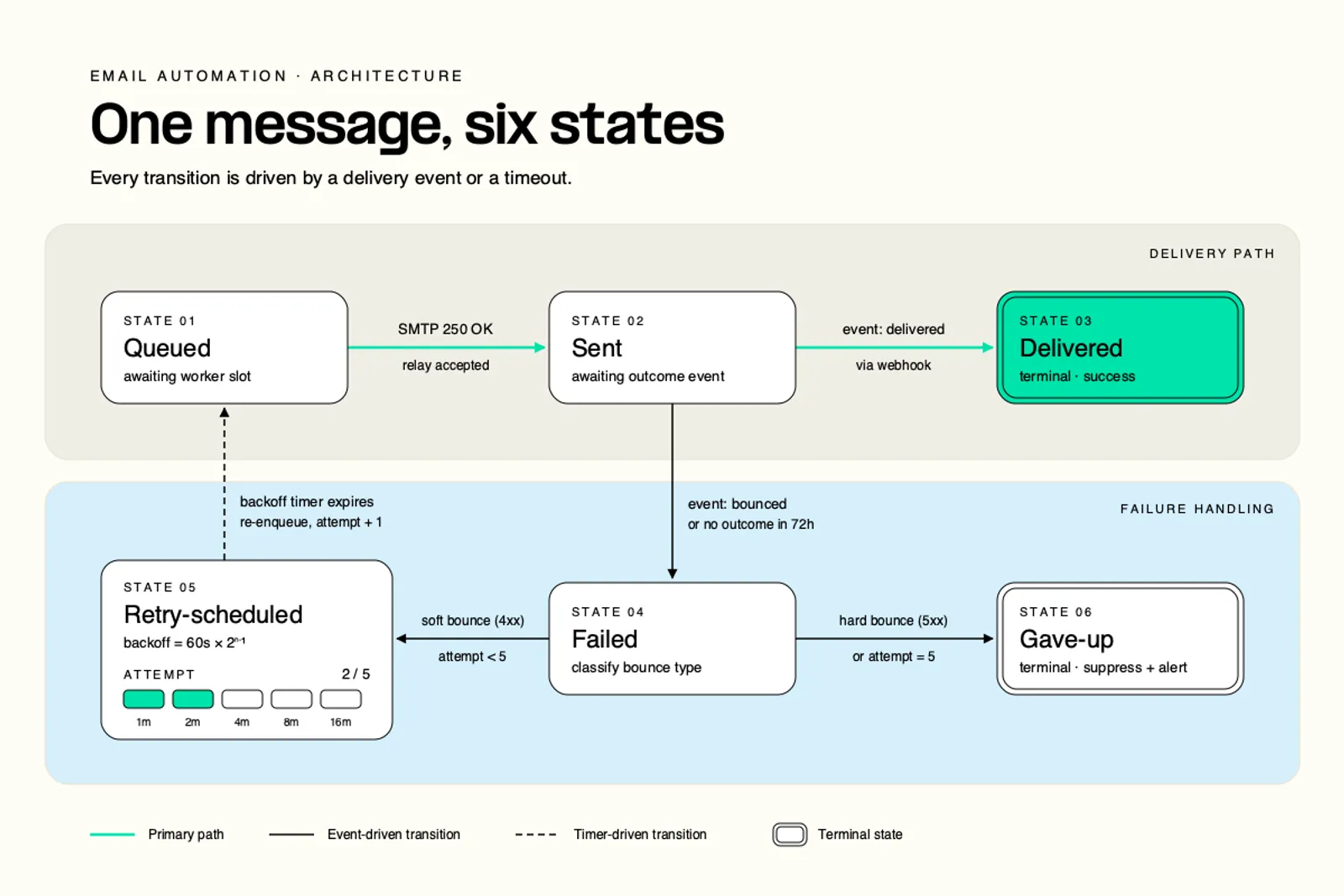
The agent runs one state machine per message. It accepts a batch, writes a per-message state record for every recipient, sends each message through the Telnyx Email API, and records the outcome individually. When a send fails, the agent does not touch the messages that succeeded. It marks the failed message retry-scheduled, computes the next attempt time with exponential backoff, and schedules itself to wake up at that time. On waking it retries only the messages whose state says retry-scheduled, then repeats until every message is delivered or has hit the attempt cap. The TypeScript excerpt below is trimmed to the retry loop.
The backoff schedule in the excerpt doubles on each failure. With a one-minute base delay that produces retries at 1, 2, 4, 8 and 16 minutes, and the sixth attempt is the cap, for a total window of about 31 minutes. That is an example schedule, not a Telnyx default. The right base and cap depend on the notification type.
Example backoff schedule, one-minute base, doubling, six attempts
| Attempt | Delay before it | Elapsed since first failure |
|---|---|---|
| 2 | 1 min | 1 min |
| 3 | 2 min | 3 min |
| 4 | 4 min | 7 min |
| 5 | 8 min | 15 min |
| 6 | 16 min | 31 min |
For time-critical notifications the agent needs a give-up rule, and the rule has two triggers: no delivery event within the deadline, or the attempt cap reached. Either one moves the message to gave-up, records the final state, and raises an alert to a person. Never give up on the absence of an open. Opens are blocked by mail clients, prefetched by security scanners and stripped by privacy proxies, so an open that never arrives says nothing about delivery. A delivery event that never arrives says a great deal.
Retry policy for time-critical notifications, sent through the Telnyx Email API
| Notification type | Retry window and cap | Give-up action |
|---|---|---|
| One-time passcodes (OTP) and login codes | 2 minutes, 3 attempts | Alert, invalidate the code, offer another channel |
| Outage and incident alerts | 15 minutes, 5 attempts | Page on-call, fall back to SMS or voice |
Retry policy for routine notifications, sent through the Telnyx Email API
| Notification type | Retry window and cap | Give-up action |
|---|---|---|
| Order and shipping updates | 6 hours, 6 attempts | Log final state, surface in the order record |
| Weekly digest | 24 hours, 4 attempts | Drop from this cycle, retry next week |
| Billing and renewal | 48 hours, 8 attempts | Alert billing team, flag the account |
One platform for sending, receiving and retrying
The retry agent only works because the send, the delivery event and the state record all refer to the same message ID on the same platform. Split sending and receiving across two vendors and the agent has to match a delivery event from one system to a send from another, usually by guessing on address and timestamp. Put both on one API credential and the match is a lookup. The same applies to replies. When a customer answers a notification, the email.received webhook lands in the same state store as the original send, and the agent can read the reply in the context of what it sent.
Bottom line: Rules are cheap to write and cheap to change. Infrastructure decides whether they work. One API credential, one set of webhooks, one state store, and no second vendor to reconcile against is what turns a batch that failed at 3am into a batch that re-sent itself by 3:31.
FAQ
Run email automation that re-sends its own failuresSend, receive and retry from one API key with per-message state and exponential backoff on the Telnyx Email API, so a failed batch re-sends itself instead of paging you.
Start with the Email APIShare on Social
Deniz is a Senior Product Marketing Manager at Telnyx with 10 years of experience in technology and healthtech marketing. She previously led go-to-market initiatives at Philips Healthcare, Vodafone, and The Coca-Cola Company. Originally from Türkiye and based in Amsterdam, she ho


