
Email API
Event-driven architecture for multi-channel communications
How to normalize webhooks across email, SMS, WhatsApp, and voice into a single event layer your application can reason about. Includes real Telnyx webhook payloads and code examples.
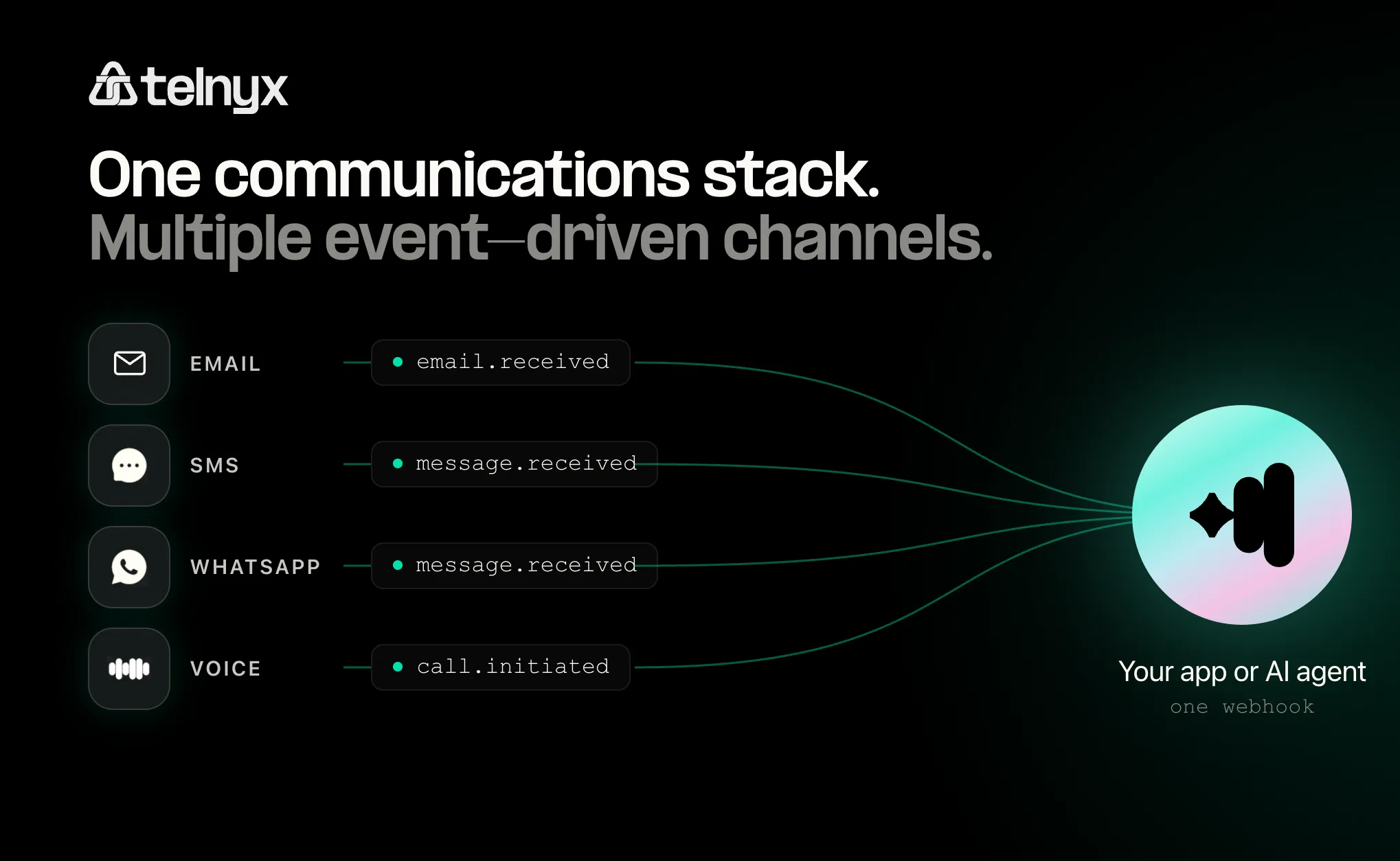
Sending a message is usually the easy part.
The harder part starts after you add several communication channels to the same application.
An email is delivered. A customer replies by SMS. A WhatsApp message is read. A phone call is answered.
Each of those actions creates an event your application may need to process. As you add channels, it is easy to end up with separate webhook handlers, different data models, duplicated customer lookups, and business logic spread across several integrations.
An event-driven communications architecture gives you another option. Instead of building separate workflows around email, SMS, WhatsApp, and voice, you route communication events into a common application layer and decide what happens next from there.
This guide covers how to build one: what to normalize, what to keep channel-specific, how to handle webhooks reliably, and where AI agents fit in.
What is an event-driven communications architecture?
An event is a record that something happened. For communications, that might be:
Webhooks allow your communications provider to send those events to your application as they happen.
Telnyx Email API sends webhook events for queued, sent, delivered, opened, clicked, bounced, deferred, failed, unsubscribed, complained, and inbound email. Telnyx Messaging uses webhook events such as message.received for inbound SMS. Programmable Voice generates events around the lifecycle of calls. WhatsApp webhooks notify applications about inbound messages and events such as message.delivered, message.read, and message.failed.
An event-driven architecture takes these individual channel events and turns them into inputs for the rest of your application.
A simplified architecture looks like this:
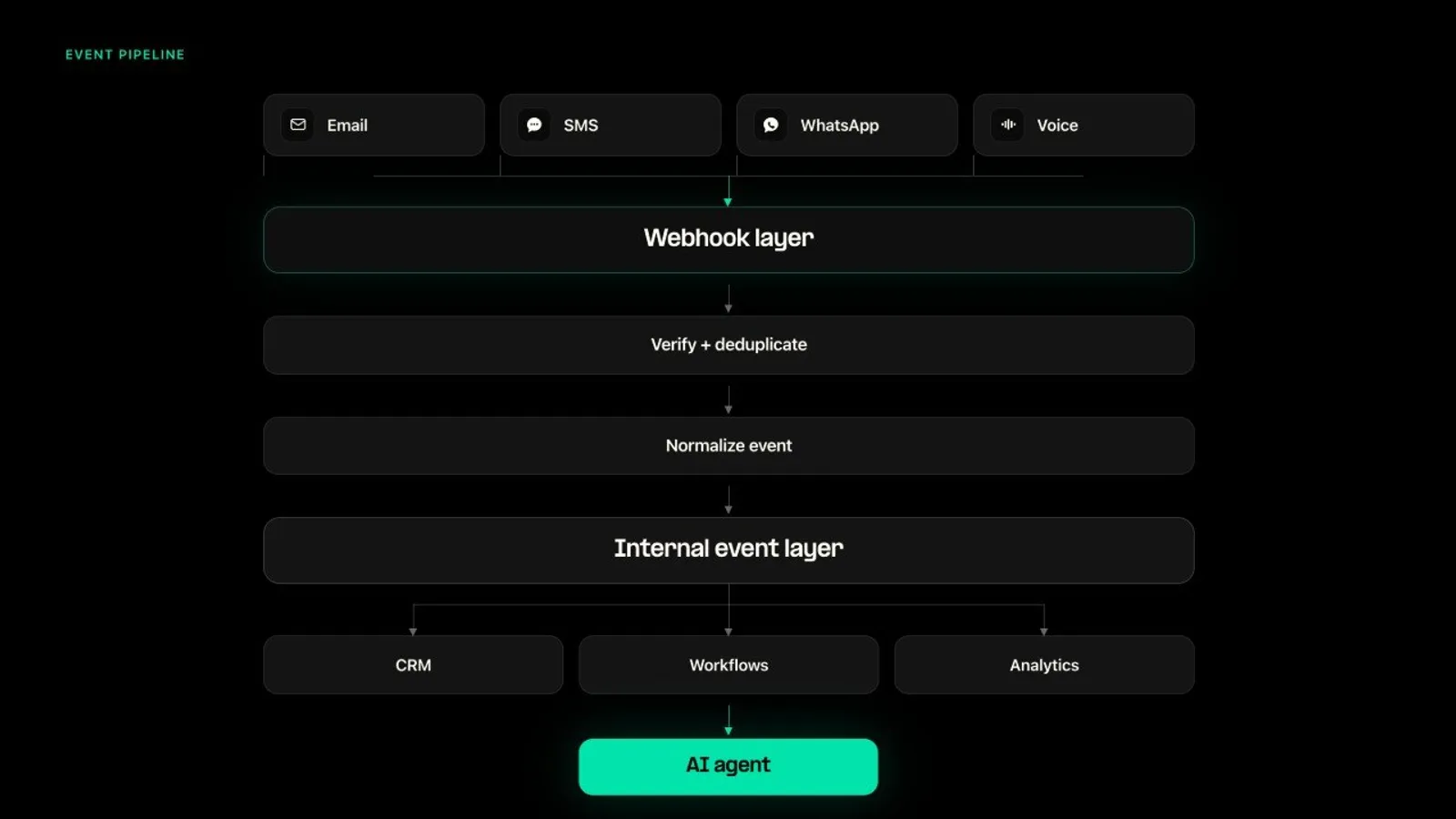
The key design decision is the middle layer: how you transform raw channel events into something your application can reason about.
Why not just process each webhook separately?
You can. For simple applications, that may even be the right choice. If your system sends transactional email and nothing else, there is little reason to build an elaborate event abstraction.
The problem appears when several channels start participating in the same customer journey. Imagine this workflow:
- A customer receives an email.
- The email bounces.
- Your application sends an SMS instead.
- The customer replies.
- The issue requires immediate help, so your application initiates a call.
Without a shared event layer, you end up implementing the same logic several times. Your email handler identifies the customer. Your SMS handler identifies the customer again. Your voice handler does its own lookup and workflow rules.
Now add analytics, consent checks, CRM updates, AI agents, retries, and customer history. The complexity grows quickly.
The goal of an event layer is to prevent your channel integrations from becoming your business logic.
Where AI agents fit
This architecture becomes particularly useful when an AI agent needs to communicate across channels.
Instead of telling an agent to use Email API A, then call SMS API B, then use Voice API C, your application can expose communications as tools:
The agent receives the customer context and chooses an action. For example, if a customer emailed about a delayed delivery, the order is three days late, and the customer previously requested urgent updates by SMS, the agent could decide to reply to the email, send an SMS update, and escalate to a voice call if the customer requests immediate assistance.
The important part is that the application carries the context. The communications APIs provide the channels and events. This distinction matters because simply using the same communications provider does not automatically create shared customer context. Your application, CRM, conversation store, or agent framework still needs to maintain it.
Normalize what happened, not how it happened
One mistake teams make is forcing every channel into the same schema. Email and voice are fundamentally different.
An email event contains sender and recipient addresses, message ID, subject, delivery status, bounce metadata, and thread information.
A voice event contains calling and called numbers, call-control IDs, call-session IDs, call state, duration, and recording references.
Those differences are useful. Keep them.
Instead of making every event identical, define a small set of fields your application can consistently understand.
For example, here is a raw email.received webhook from Telnyx:
And here is a raw message.received webhook for an inbound SMS:
Both events share the same envelope (data.event_type, data.id, data.occurred_at, data.payload), but the payload contents are channel-specific. Your normalization layer takes both and produces a common internal event:
inbox_id and messaging_profile_id group everything arriving at one inbox or profile, not one customer's thread. Treat them as a starting point and derive a real conversation ID in your application from the customer plus the email thread or an open ticket.
The email webhook becomes:
The SMS webhook becomes:
Your application now has two useful layers of information.
Normalized fields
These answer questions such as: Which customer is this? Which channel generated the event? What happened? When did it happen? Which conversation does it belong to?
Channel-specific payload
This preserves everything else your application might need later. For email, that might mean bounce metadata. For voice, it could mean a call session ID. For WhatsApp, it might include message type or delivery information.
This avoids two extremes.
Too little normalization: every downstream service has to understand every communications API.
Too much normalization: useful channel-specific information gets thrown away.
A good architecture gives you a predictable application-level event while preserving the original payload underneath.
Separate communication events from business events
There is another useful distinction.
A provider tells you email.bounced. That is a communication event. Your application translates it into customer.unreachable_by_email. That is a business event.
Those are not the same thing.
This extra layer prevents your business workflows from being tightly coupled to individual provider event names. It also makes provider changes easier in the future.
The Telnyx email webhook payload includes error_evidence.code to distinguish bounce subtypes: 30001 for a hard bounce, 30005 for queue expiry, 30003 or 30099 for an administrative bounce. error_evidence.retryable tells you whether resubmitting can succeed; only 30002 (deferred) is retryable. Your business event layer can use these codes to decide whether to retry, switch channels, or suppress the recipient.
Design your webhook endpoint to do less
A webhook endpoint is not your workflow engine.
Its responsibilities should be:
Then your application processes the event asynchronously. There are several reasons for this.
1. Verify that the webhook is authentic
Webhook endpoints are public HTTP endpoints. You should verify the sender before trusting the payload.
Telnyx signs every webhook delivery with an Ed25519 signature carried in the telnyx-signature-ed25519 and telnyx-timestamp request headers. The Node.js, Python, Go, Java, Ruby, and PHP SDKs all provide verification helpers that accept the raw payload and headers and return a parsed event.
Do not parse and reserialize JSON before verification. The signature is computed over the exact body bytes received.
2. Expect retries
Webhook delivery is not the same as exactly-once processing. If your endpoint fails to acknowledge an event, providers may retry it. Your application therefore needs to be idempotent.
In production, back seen_event_ids with a shared store such as Redis or a unique database constraint, so deduplication survives restarts and works across multiple workers.
3. Respond quickly
Avoid putting slow CRM queries, model inference, database transformations, or external API calls directly into the webhook request. Instead, enqueue the event and process it in a worker.
4. Store the original event
Normalized events are useful for your application. Raw events are useful for debugging. Keeping both lets you answer questions such as: What did the provider actually send? Did our normalization logic fail? Was the event duplicated?
What should your internal event model contain?
There is no universal schema, but a useful starting point is:
| Field | Purpose |
|---|---|
event_id | Unique identifier for deduplication |
event_type | What happened |
channel | Provider channel family: email, message (SMS, MMS, WhatsApp), call |
customer_address | The email address or phone number on the event |
customer_id | Your internal customer identity, looked up from customer_address |
conversation_id | Groups related interactions |
direction | Inbound or outbound |
occurred_at | When the event happened |
provider_message_id | Links back to the original communication |
provider_payload | Preserves channel-specific data |
You may not need every field. The important part is defining the fields according to the decisions your application actually needs to make.
When you probably don't need this architecture
Not every application needs an event normalization layer. If you only use one communication channel, direct webhook handling may be simpler. If you send notifications but rarely react to customer responses, adding a full event layer may create unnecessary complexity.
It becomes more valuable when you have:
- multiple communication channels
- two-way customer conversations
- cross-channel workflows
- AI agents choosing communication channels
- communication events feeding a CRM or customer timeline
- multiple teams consuming communication data
- analytics spanning several channels
The architecture should solve complexity, not create it.
How this maps to Telnyx
Telnyx brings email, SMS, WhatsApp, and programmable voice onto the same communications platform. This is the Composition pillar of how Telnyx is built: many primitives, one control plane. One API, one bill, one support team, one compliance boundary. Add a channel without adding a vendor.
Each channel still has its own capabilities and event payloads. That is expected. But developers can build around a common event-oriented pattern.
All Telnyx webhooks share the same envelope (data.event_type, data.id, data.occurred_at, data.payload) and the same Ed25519 signature verification. That means your normalization layer has less work to do: the envelope is already consistent across channels. Retry schedules and timeouts vary by product, so deduplicate on data.id rather than assuming one schedule.
A practical checklist
Before adding another communication channel, ask:
Event ingestion
- Where will its webhooks arrive?
- How will signatures be verified?
- How will duplicate events be handled?
- What happens if downstream processing fails?
Data model
- Which fields should be normalized?
- Which channel-specific fields need to remain available?
- How do events map to customers?
- How do events map to conversations?
Workflow
- Does the channel decide the next action, or does the application?
- Can a workflow move from one channel to another?
- Where is customer preference and consent stored?
Observability
- Can you trace an event from provider to application?
- Can you see the raw webhook?
- Can you replay failed processing?
- Can you understand why a workflow chose a particular channel?
AI
- What context does the agent receive?
- Which communication tools can it invoke?
- Which actions need deterministic rules or human approval?
If you can answer those questions, adding the next channel becomes much less about creating another isolated integration and more about connecting another source of events to an architecture you already understand.
Build around events, not channels
Multi-channel communications does not get hard because sending an email, an SMS, or a WhatsApp message, or placing a call, is complicated. It gets hard when each channel becomes its own isolated workflow.
An event-driven architecture changes that. Channels report what happened. Your application maintains context. Your workflows decide what happens next. Email, SMS, WhatsApp, and voice become tools your application uses when they fit.
Build your event layer on one platform
One API, one bill, one vendor for email, SMS, WhatsApp, and voice. Start building event-driven workflows on Telnyx.
Share on Social
Deniz Yakisikli
Originally from Turkiye and living in Amsterdam, Deniz is a senior product marketing manager at Telnyx. She has her MBA in marketing management from the University of Amsterdam. Previously, she worked at the Coca-Cola Company, Vodafone, and Philips Health Systems. In her free tim


