
Telnyx
LLM inference explained: phases, bottlenecks and the fastest setup
How LLM inference works, which optimizations fix slow replies, and why the distance between your users and the GPU decides latency.

By Eli Mogul
Takeaways
LLM inference is running a trained model forward on a new prompt to generate tokens, with no weight updates, in two phases: prefill reads the whole prompt and decode writes the reply one token at a time.
- When your replies slow down, one of four things is the cause: prefill on a growing context, decode speed, a GPU waiting on the CPU, or the network hop to wherever the GPU is.
- Each symptom has its own fix: prefix caching for long repeated context, quantization or speculative decoding for slow decode, and continuous batching for an idle GPU.
- The network hop disappears when inference runs on owned GPUs in your users' region, across the Americas, Europe, MENA, and APAC, with a Priority tier for interactive work.
What is LLM inference?
LLM inference is running a trained large language model forward on a new prompt to produce output tokens. It is read-only, with no backpropagation and no weight updates. Training happens once, and inference happens on every request your agent sends.
Inference vs training: a forward pass with no weight updates
Training adjusts billions of weights against a dataset over days or weeks. Inference loads those finished weights and passes your prompt through them, layer by layer, until the model scores every possible next token. The weights never change, which is why the same model behaves consistently across millions of requests and why your inference bill grows with every request you send.
Prefill and decode: how one response is generated
Your request moves through four stages in order. Tokenization splits the prompt into subword tokens. Prefill then runs every prompt token through the model in one parallel pass and fills the KV cache with each token's attention keys and values. Prefill is compute-bound, and it sets your time to first token, so a longer context means a longer wait before the first word.
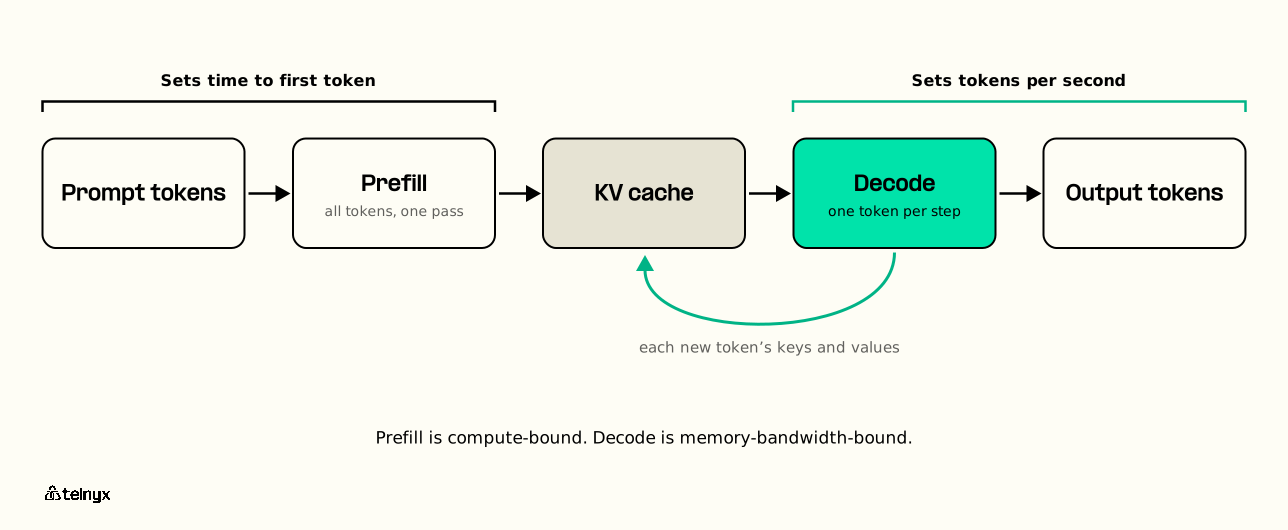
Decode produces one token per step. Each step reads the full model weights plus the whole KV cache, which makes decode memory-bandwidth-bound, as the NVIDIA inference optimization guide explains. Decode sets your tokens per second, and each new token is detokenized and streamed to you as it appears.
This is why a voice agent feels slower at the end of a long call. Every turn sends the whole conversation history back, and prefill processes all of it again unless the shared prefix is cached. By turn 30, your agent prefills thirty turns of context before the caller hears a word.
Inference vs serving: the computation and the system around it
Inference is the forward pass itself, and you can run it in a notebook on one GPU. Serving is everything that turns that pass into an API your orchestrator can call: the HTTP endpoint, the request queue, the scheduler, batching, autoscaling, model loading, and observability. When you call a hosted LLM API, most of the latency you cannot see lives in the serving layer and the network in front of it. On Telnyx, that serving layer is the Telnyx Inference API, an OpenAI-compatible endpoint on GPUs Telnyx owns that autoscales by default.
How LLM inference is measured: TTFT, tokens per second and tail latency
Four numbers describe how inference feels to your users:
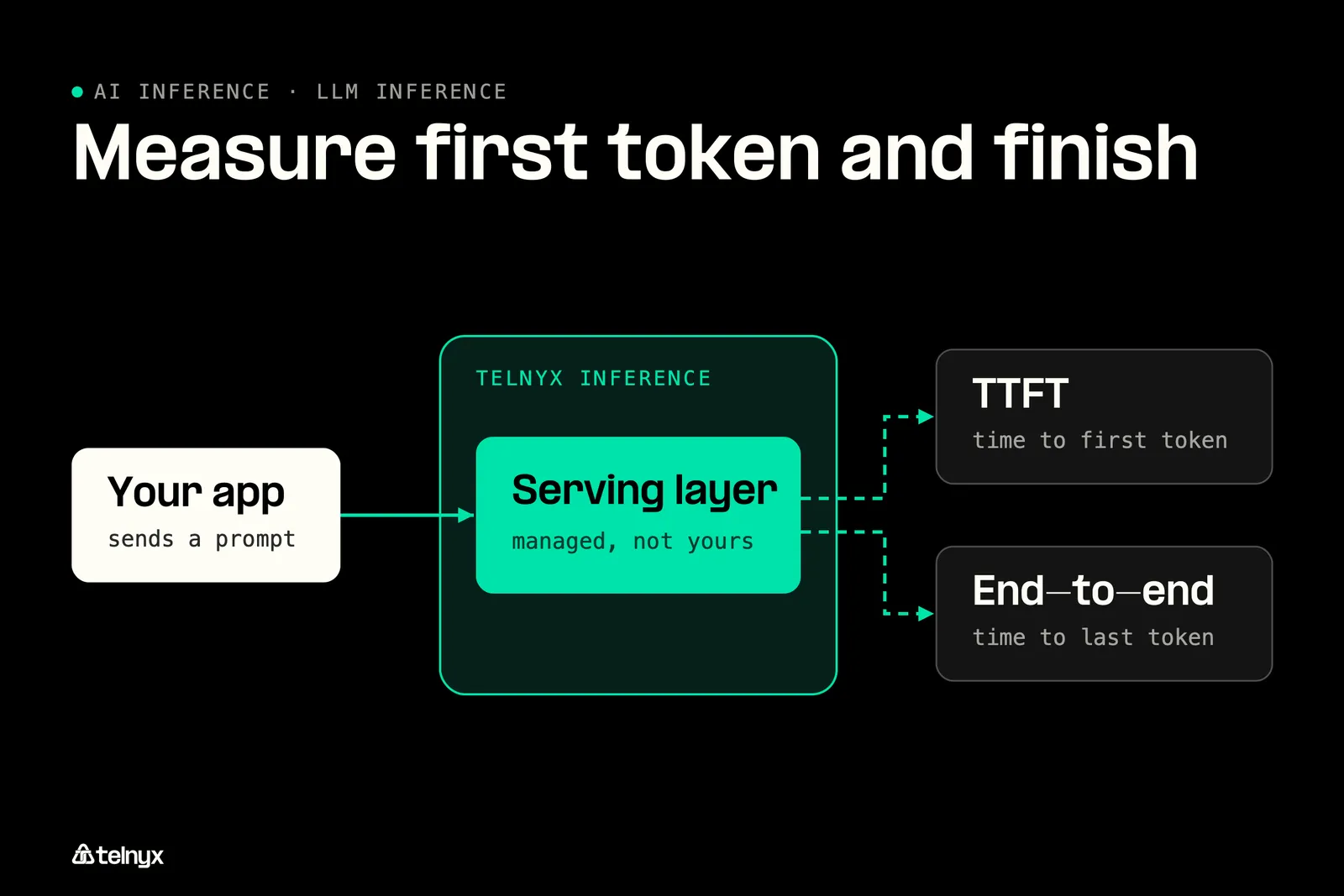
- Time to first token (TTFT): the wait from sending a request to receiving the first output token, set by the network, the queue, and prefill.
- Inter-token latency: the time between output tokens during decode, also called time per output token.
- Tokens per second across users: total output across every request, a better capacity measure than requests per second because requests vary widely in length.
- Tail latency (p95, p99): the slowest 5% or 1% of requests, which is what a caller remembers.
Measure TTFT and total response time separately, as the TTFT vs end-to-end benchmark shows, because a fast first token can hide a slow finish. For where each part of the delay comes from, read inference latency explained.
Skip running the serving layer yourself
Telnyx runs the whole serving layer for you: an OpenAI-compatible inference API on GPUs Telnyx owns, in your users' region.
Try Telnyx Inference
Run inference on GPUs near your users
Cut the network hop with owned GPUs across the Americas, Europe, MENA, and APAC, plus a Priority tier for interactive work.
Which LLM inference optimization techniques matter most?
Every technique trades accuracy, speed, memory, or cost against the others, so pick by symptom rather than working down a list. The inference optimization guide covers each one in more depth. Here is what each technique fixes in your request, and what it costs you.
Why are my LLM replies slow, and what fixes it?
- Voice call drags more by turn 30: cache the shared conversation prefix. Prefill then skips the repeated history instead of rerunning it every turn, so TTFT stops climbing.
- First token is quick, the finish crawls: try quantization or speculative decoding. Decode is memory-bandwidth-bound, rereading full weights plus the KV cache for every single token.
- GPU sits idle while requests queue: enable continuous batching. The GPU is waiting on the CPU, and batching keeps more requests flowing through each step.
- Users are far from the GPU region: call Telnyx Inference in your users' region. Owned GPUs across the Americas, Europe, MENA, and APAC remove the network hop from TTFT.
- Interactive agent with a bad p99 tail: use the Telnyx Inference Priority tier. It is built for interactive work, and the slowest 1% of requests is what callers remember.
LLM inference optimization techniques compared
| Technique | What it fixes | What it costs |
|---|---|---|
| KV cache | Recomputing attention every step | GPU memory per token and user |
| Prefix caching | Re-prefilling a shared prompt | Cache memory and lookup overhead |
| Continuous batching | Idle GPU between requests | Scheduler complexity |
| Quantization | Memory and bandwidth per step | Small accuracy loss, tested per model |
| Speculative decoding | Slow per-token speed | Extra compute for a draft model |
| Tensor parallelism | Model too large for one GPU | Interconnect overhead every step |
KV cache, prefix caching and PagedAttention: stop recomputing the prompt
Without a KV cache, every decode step would recompute attention over the whole sequence. The cache keeps each token's attention keys and values from prefill, so decode only computes the newest token. The price is GPU memory that grows with context length and with every concurrent user.
Prefix caching goes one step further. When many requests share a long system prompt, the cache entries for that prefix are computed once and reused, which cuts prefill time on every call. PagedAttention, described in the PagedAttention paper, allocates the cache in fixed-size blocks as a sequence grows, so memory is not wasted on padding reserved up front.
Continuous batching: keep the GPU full without making users wait
A static batch waits until it fills before it runs, which adds delay for the first request in line. Continuous batching, also called in-flight batching, evicts finished sequences after every decode step and slots new requests into the freed space. GPU utilization rises without the wait, and a short request never sits behind a long one.
Quantization and speculative decoding: trade precision or draft work for speed
Quantization stores weights and activations at lower precision, such as INT8 or FP8 instead of FP16. Every decode step then reads fewer bytes from memory, which speeds up tokens and leaves room for more concurrent users. The accuracy cost is usually small but varies by model, so test it on your own prompts before you ship.
Speculative decoding runs a small draft model that proposes several tokens ahead. The full model checks all of them in one pass, keeps the ones it agrees with, and discards the rest. Output quality matches the full model, and speed improves whenever the draft is usually right.
Tensor parallelism and multi-GPU serving: when one GPU is not enough
When a model's weights do not fit in one GPU's memory, tensor parallelism splits each layer across several GPUs that work on the same token together. You pay for it in interconnect traffic on every step, so reach for it when the model is too large for a single card. On Telnyx, hosted models run on GPUs Telnyx owns with these optimizations applied for you, and prefix caching shows up on the invoice as cached input at up to 88% off.
Pricing: Cached input on Telnyx is priced at up to 88% off, and per-token rates run up to 75% below proprietary alternatives, with no GPU rental fees, compute surcharges, or minimums. Rates vary by model and service tier on the inference API pricing page, and the guide to cut inference cost shows how caching, model size, and tier choice add up.
Low GPU utilization in LLM inference: finding the CPU bottleneck
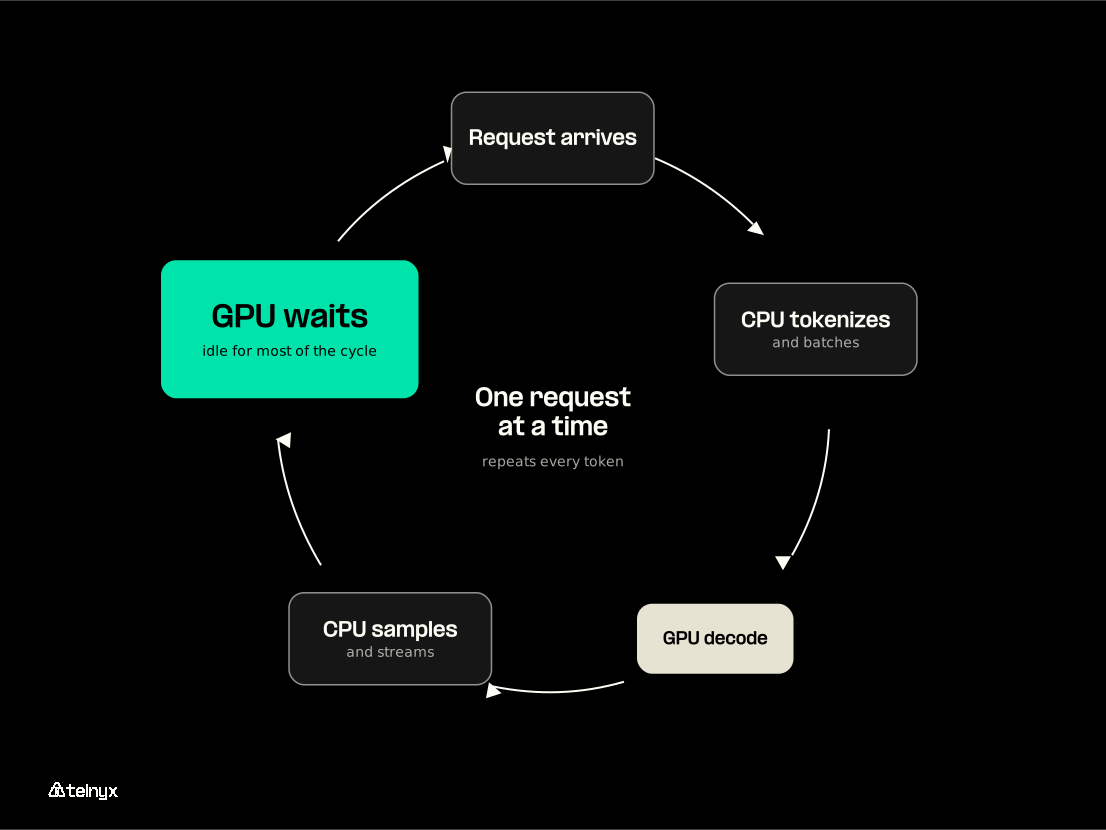
Your GPU dashboard shows low utilization, yet time to first token and tokens per second are still poor. Adding GPUs will not help, because the delay comes from work the CPU does between GPU steps.
Where the CPU gets in the way of the GPU
A decode step on the GPU is short. Before the next step can start, the CPU has to receive and parse the request, tokenize it, assemble the batch, run the sampler over the model's output scores, detokenize the new token, and push it to the stream. When requests run one at a time, the GPU waits for all of that on every token, so it sits idle for most of the wall clock.
How to tell a CPU bottleneck from a slow model
Watch GPU utilization next to CPU utilization and queue depth while the system is under load. Low GPU utilization with a saturated CPU core, or a single-threaded request loop, means the bottleneck sits in front of the GPU. Low GPU utilization with low CPU use and a long queue means the scheduler is not batching requests together.
What to change, and when to stop running your own GPUs
Work through the fixes in this order, and check tail latency after each one:
- Turn on continuous batching so the GPU always has work queued.
- Move tokenization and sampling off the request path, or onto the GPU.
- Raise the batch size until tail latency starts to move.
- Remove per-token Python overhead from the serving loop.
- Add hardware last, once the CPU path is clear, using the AI inference hardware guide to choose it.
Note: On Telnyx, the serving stack runs on owned GPUs that autoscale from 0 to 1000s of requests per second, with no capacity planning and no cold starts, so GPU utilization becomes Telnyx's problem instead of yours. The guide to inference infrastructure explains how that layer is built.
How do you get the fastest LLM inference?
The fastest LLM inference is the one with the shortest path from your user to the GPU and back. Engine tuning recovers milliseconds on the GPU, while the trip to reach it can cost far more.
"We often obsess over LLM inference speeds, but in Voice AI, the network is often the silent killer." Ian Reither, COO at Telnyx |
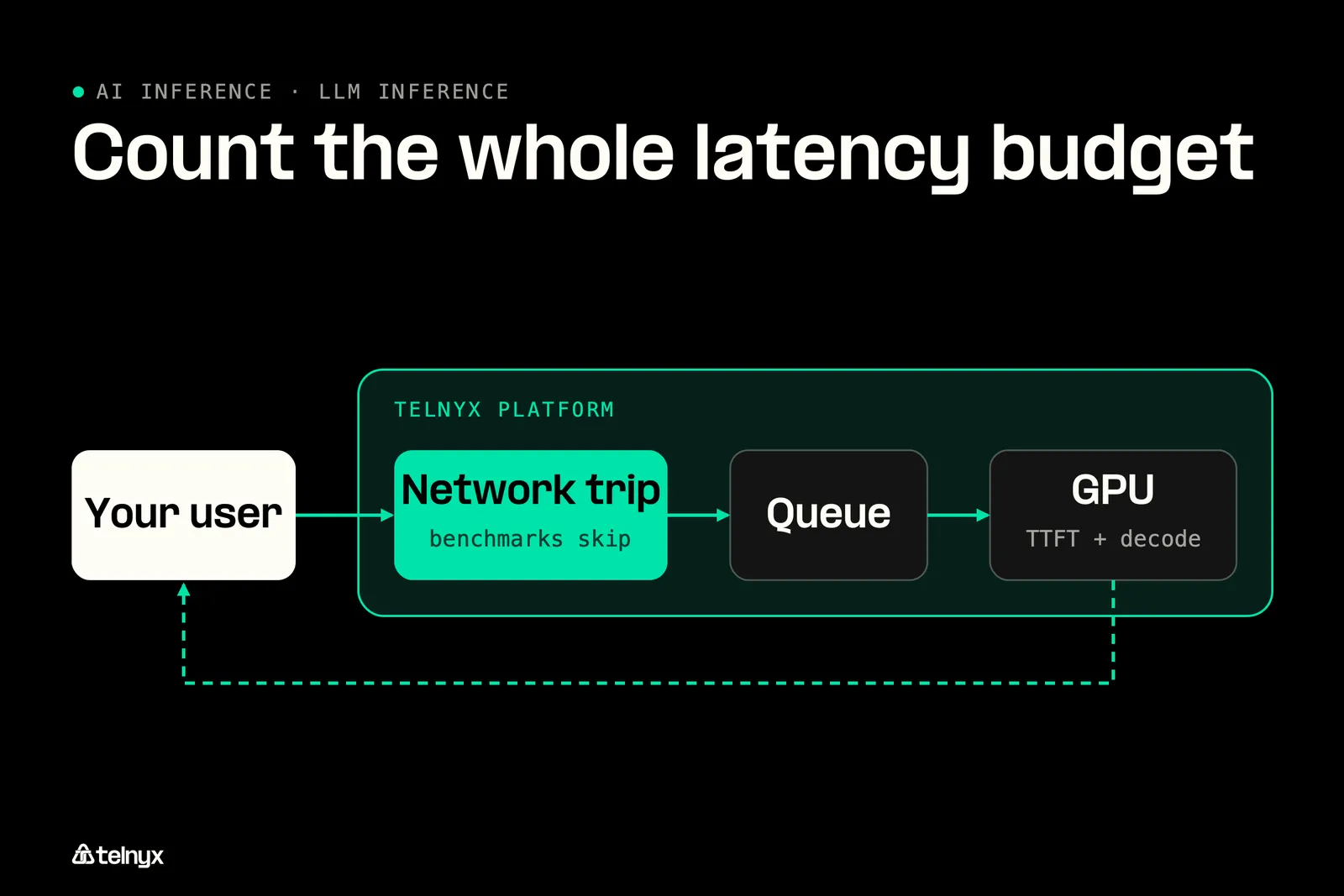
Count the whole latency budget, not just the GPU
What your user waits for is the sum of five parts: the network trip to the inference endpoint, time in the queue, time to first token, decode, and the network trip back. A voice agent adds speech-to-text before the model and text-to-speech after it. Most inference benchmarks measure from the GPU inward and leave out the first and last terms, which is exactly where a multi-vendor stack spends its budget.
If you build contact center AI from three providers on three networks, each boundary adds a public-internet hop and often a re-encode.
"The failure mode is the network hop you forgot to account for. Your TTS engine might synthesize in 150ms, but if that audio then has to traverse the public internet back to a separate telephony provider, get re-encoded, and delivered to the caller, you've blown your budget. The design principle is co-location: synthesis has to happen in the same facility where calls terminate, so the only latency is processing time. When TTS, telephony, STT, and inference are all on one network, there's a single path from synthesis to delivery with zero hops between them." Dr. Sonam Gupta, Developer Advocate at Telnyx |
Inference works on its own through the OpenAI-compatible endpoint, so you can keep your current speech vendors. If you want to close the rest of the budget too, Telnyx runs Voice AI Agents, speech, and telephony on the same network as inference.
Put the GPU where your users are
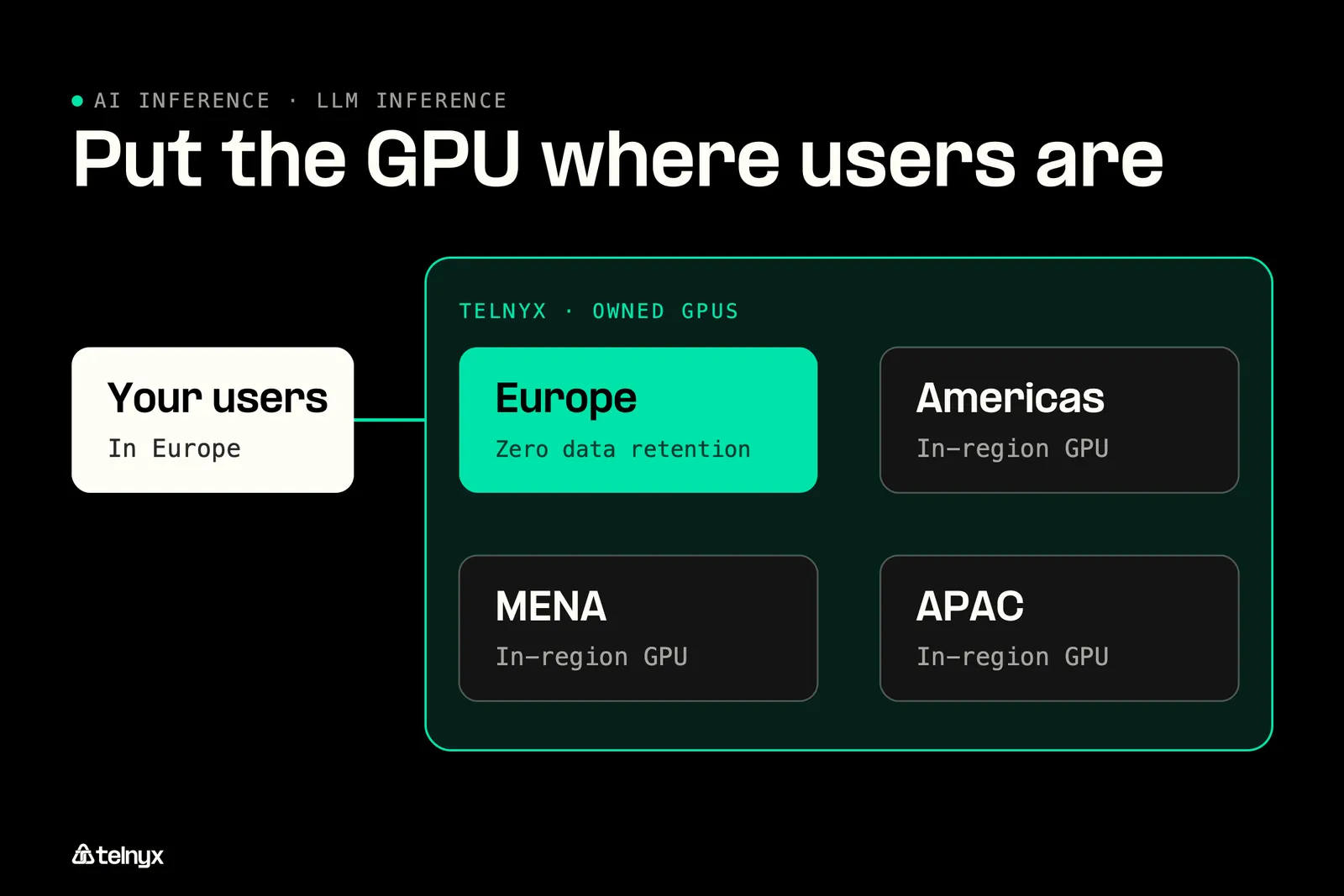
Telnyx runs serverless inference in-region across the Americas, Europe, MENA, and APAC on GPUs it owns. Your request reaches a GPU near your users with no inter-provider hops, no cross-border routing, and zero data retention. The case for GPUs on the network and for edge inference comes down to the same physics: shorter distance, shorter wait.
"Data stays where your users are because our GPUs are physically there, not because you toggled a setting." Regis David Souza, Senior Staff Engineer at Telnyx |
For the MENA region specifically, read about the Dubai GPU launch.
Pick the service tier for the job: Default, Priority or Flex
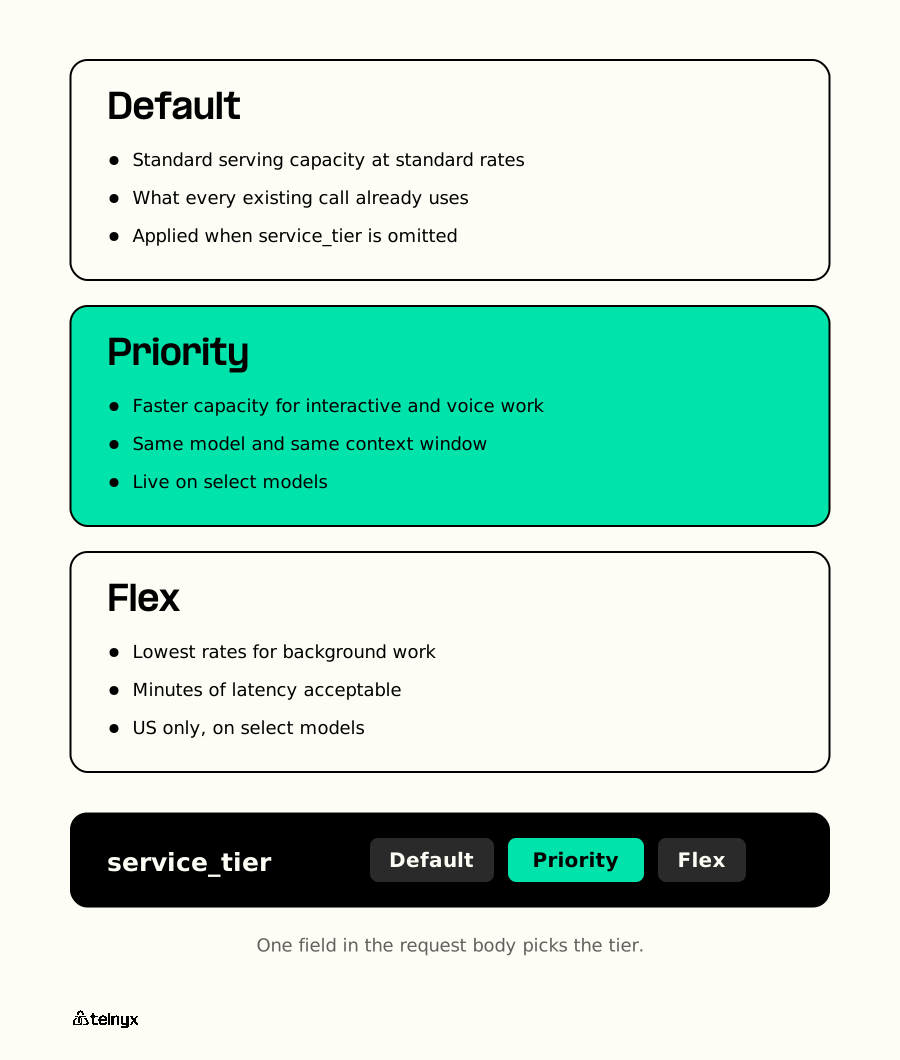
Every Telnyx inference request runs on one of three service tiers, chosen with a single field, service_tier, in the request body. Default is standard serving capacity at standard rates, and it is what every existing call already uses. Omit service_tier and you get Default.
Priority selects faster serving capacity for low-latency interactive workloads, including voice orchestration. It does not change the model or the context window, and it runs at a different rate. Priority is live on select models today, and it is the tier for a voice agent waiting on its next sentence.
Flex offers the lowest rates for background work where minutes of end-to-end latency are acceptable, such as offline evaluation, document processing, and background summarization. All requests remain synchronous. Flex is available in the US on select models.
Send your first in-region request
The request below is the documented chat completions call. It sends one user message to moonshotai/Kimi-K3, so you can time the first token from your own region. Because the endpoint is OpenAI-compatible, your existing SDK works once you change the base URL.
Swap in any model from the hosted model list. When your orchestrator needs structured output, the JSON mode docs show how to constrain the response to your schema.
LLM inference FAQ
Why does my voice agent get slower toward the end of a long conversation?
Because every turn resends the full conversation history, and prefill processes all of it again before the first token comes back. Time to first token grows with each turn unless the shared prefix is cached. Long booking calls in travel and hospitality show this pattern clearly. Prefix caching and trimming old turns both shorten the wait.
Can I use LLM inference as one component inside my own voice orchestration?
Yes. The Telnyx inference endpoint is OpenAI-compatible, so your orchestrator calls it like any other model API by changing the base URL, and you can keep your current speech-to-text and text-to-speech vendors. To connect a model to a Telnyx AI Assistant instead, follow the custom LLM setup guide.
What is LLM inference?
LLM inference is running a trained language model forward on a new prompt to generate output tokens, with no changes to the model's weights. It happens in two phases. Prefill processes the whole prompt in one pass and sets time to first token. Decode then generates the reply one token at a time and sets tokens per second.
Is "inference" the right term for LLM text generation?
Yes. In machine learning, inference means applying a trained model to new input to get an output, as opposed to training it. For a language model, that output is a sequence of predicted tokens, so text generation is inference repeated one token at a time. The term covers classifiers, image models, and LLMs alike.
Do I really need to understand inference if I just use an API?
Yes, because the parts you still control decide your latency and your bill. Prompt length sets prefill time, a reused system prompt can be billed as cached input, and the region your endpoint runs in sets the network hop. Knowing prefill from decode tells you which of those to change when replies slow down.
Remove the hop between your users and the GPU
You now know where your LLM inference latency hides. Run inference on GPUs in your users' region across the Americas, Europe, MENA, and APAC, through an OpenAI-compatible API where switching is a base URL change.
Start buildingShare on Social


