
Telnyx
HGX B300 cluster sizing: the node, network and control plane numbers
Every number you need to size an HGX B300 cluster, from 288 GB GPUs to control plane nodes, plus why vendor spec sheets disagree on the same board.

By Eli Mogul
Takeaways
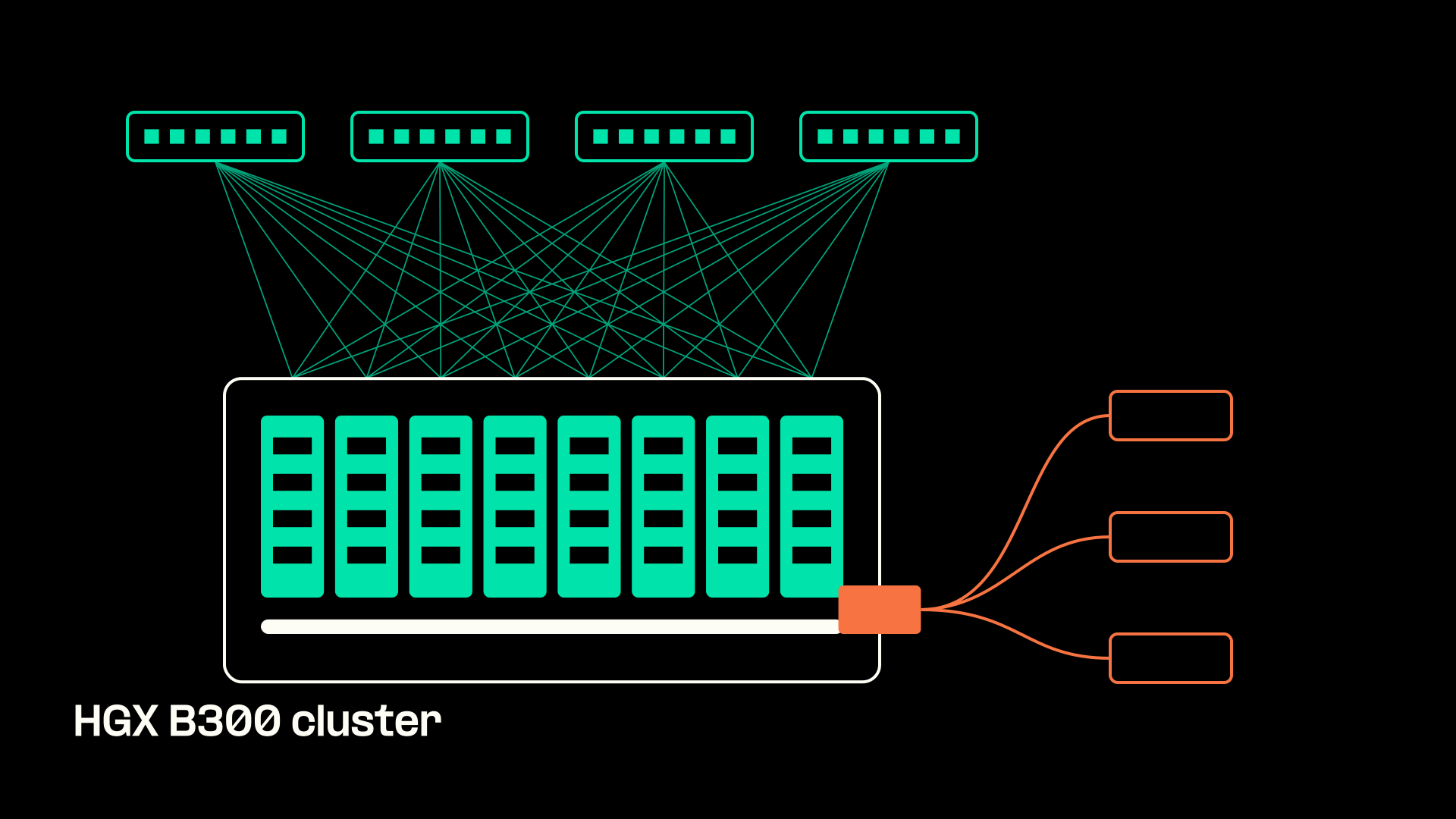
An HGX B300 cluster is one or more nodes, each with eight Blackwell Ultra GPUs carrying 288 GB of HBM3e (2.30 TB per node) on a 14.4 TB/s NVLink fabric, plus two separate network fabrics and a control plane. This page puts every number you need to size one, from GPU memory to control plane node count, in a single sheet.
- Each node needs at least 48 physical CPU cores per socket, 2TB of system memory, and a 1 TB NVMe boot drive, according to NVIDIA's reference architecture.
- You plan two fabrics: East/West compute at 8x 400 Gb/s per node minimum, and North/South storage and management through one BlueField-3 DPU per server.
- Spec sheets that say 2.1 TB or NVL16 describe the same eight-GPU board. NVL16 counts GPU dies instead of GPU packages, and 2.1 TB is the conservative usable figure.
What is an NVIDIA HGX B300 GPU cluster?
An NVIDIA HGX B300 GPU cluster is a set of NVIDIA-Certified servers, each built on one HGX B300 baseboard, linked by an Ethernet or InfiniBand fabric so a single job can run across many nodes.
Which GPU node should run your inference workload?
- Model plus KV cache exceeds 180 GB per GPU: pick HGX B300 nodes. 288 GB per GPU and 2.30 TB per node keep weights and cache resident with no offload.
- Model fits, token speed is the bottleneck: stay on B200. It reaches the same 8 TB/s peak bandwidth as B300, so extra memory adds little speed.
- On H200, long contexts spill to host memory: move to B300. Memory per GPU rises from 141 GB to 288 GB and bandwidth from 4.80 TB/s to 8 TB/s.
- Want inference without running a cluster: use Telnyx Inference. It runs on GPUs Telnyx owns, colocated with its network, so data stays in-region.
If you have run H100 or H200 nodes, you already know where they break. Long contexts and high concurrency fill GPU memory with KV cache, and once the cache spills to host memory or network storage, your latency target goes with it. The B300 raises that ceiling. More of the model and more of the KV cache stay resident on the GPU, so long-context and high-concurrency inference can run without offload.
What is on an HGX B300 baseboard
The baseboard is the fixed part of every node. Whichever OEM builds your server, these five figures from the NVIDIA reference architecture stay the same:
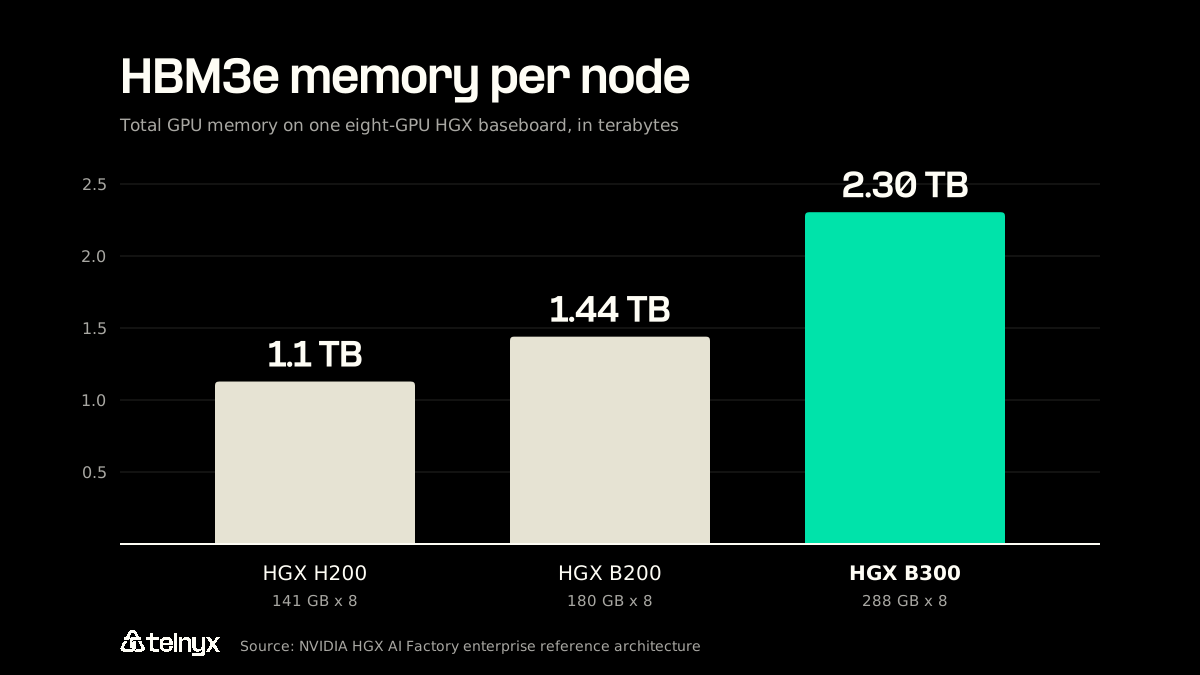
- GPUs: Eight Blackwell Ultra SXM GPUs with 288 GB of HBM3e each.
- Memory per node: 2.30 TB of HBM3e (2,304 GB), with up to 8 TB/s of memory bandwidth per GPU.
- NVLink: Fifth-generation NVLink and NVSwitch at 14.4 TB/s aggregate and 1,800 GB/s GPU-to-GPU.
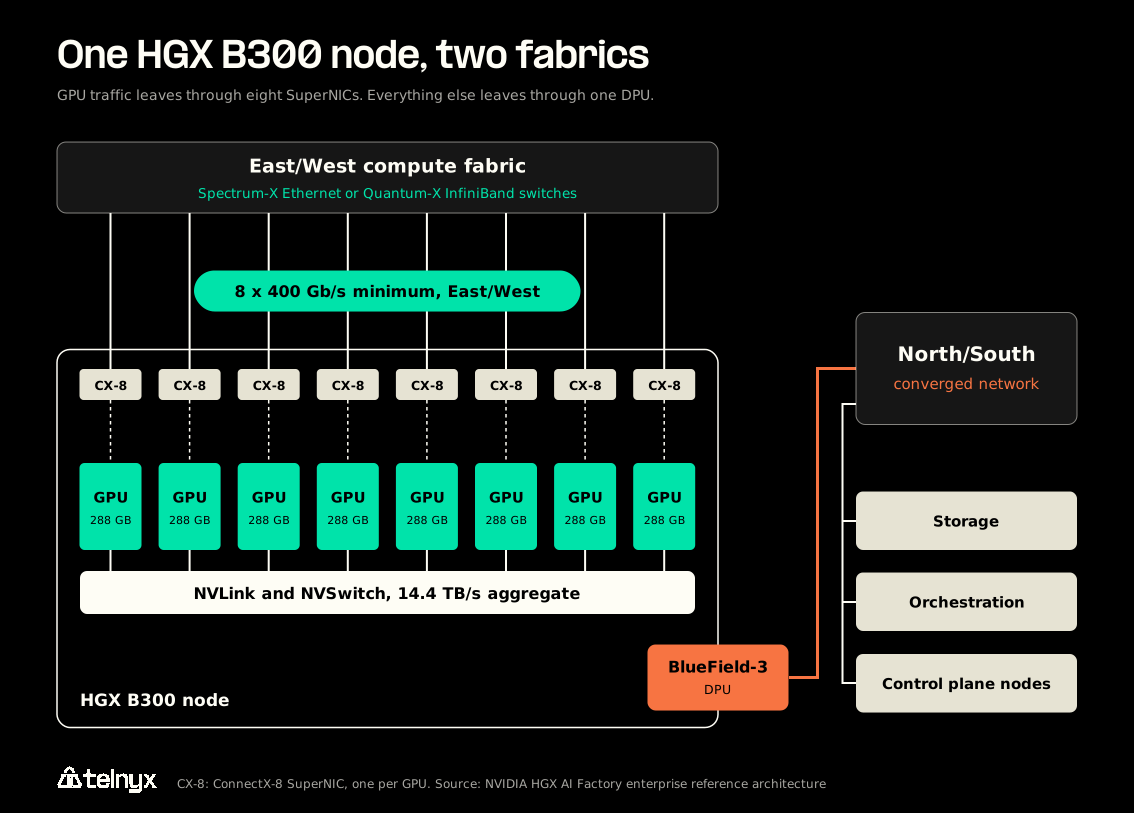
- Networking: Eight ConnectX-8 SuperNICs on the board, one per GPU, at 800 Gb/s (2 x 400 Gb/s) each.
- Compute: Up to 144 petaflops per baseboard.
The SuperNICs are the part that changes your build most. On earlier HGX generations you bought and slotted the compute NICs yourself. On the B300 they ship on the baseboard at a 1:1 GPU-to-NIC ratio, which fixes your East/West port count before you open a switch catalog.
How HGX B300 compares with H200 and B200
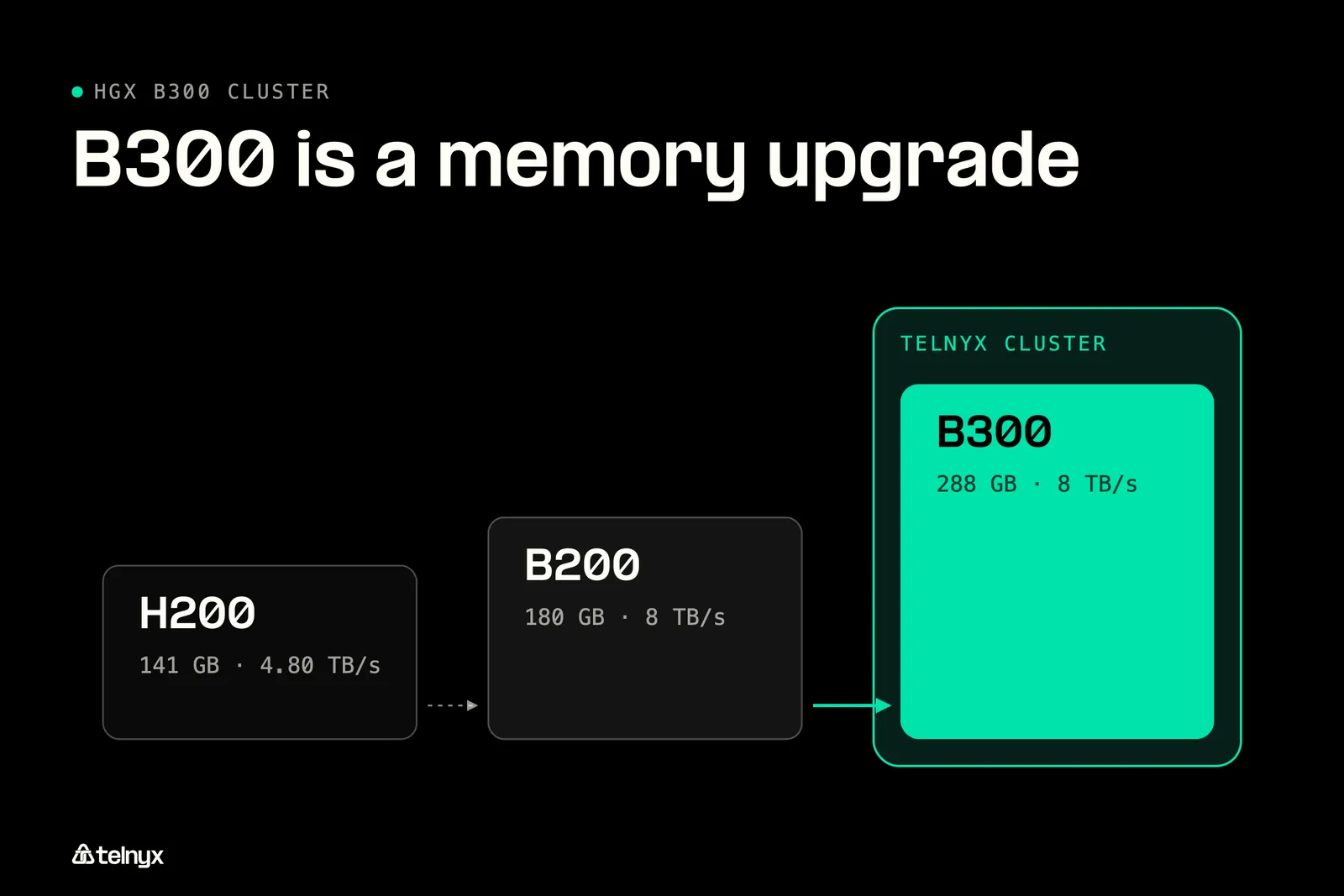
The B300 is a memory upgrade first. An H200 node holds 141 GB per GPU and 1.1 TB per node at 4.80 TB/s of HBM bandwidth per GPU. A B200 node holds 180 GB per GPU and 1.44 TB per node at up to 8 TB/s. A B300 node holds 288 GB per GPU and 2.30 TB per node, also at up to 8 TB/s.
Read those numbers together and the buying logic gets simple. Moving from B200 to B300 buys you 60% more memory per GPU at the same peak memory bandwidth. If your bottleneck is fitting the model and its KV cache, the B300 solves it. If your bottleneck is how fast tokens stream out of memory, a B200 performs in the same range. Our piece on the inference GPU network covers why memory bandwidth often sets the pace of token generation.
Read the Dubai GPU launch to see how Telnyx runs inference on GPUs it owns, colocated with its network, so data stays in-region.
Why vendors quote 2.1 TB, 2.30 TB, NVL16, and eight GPUs for the same board
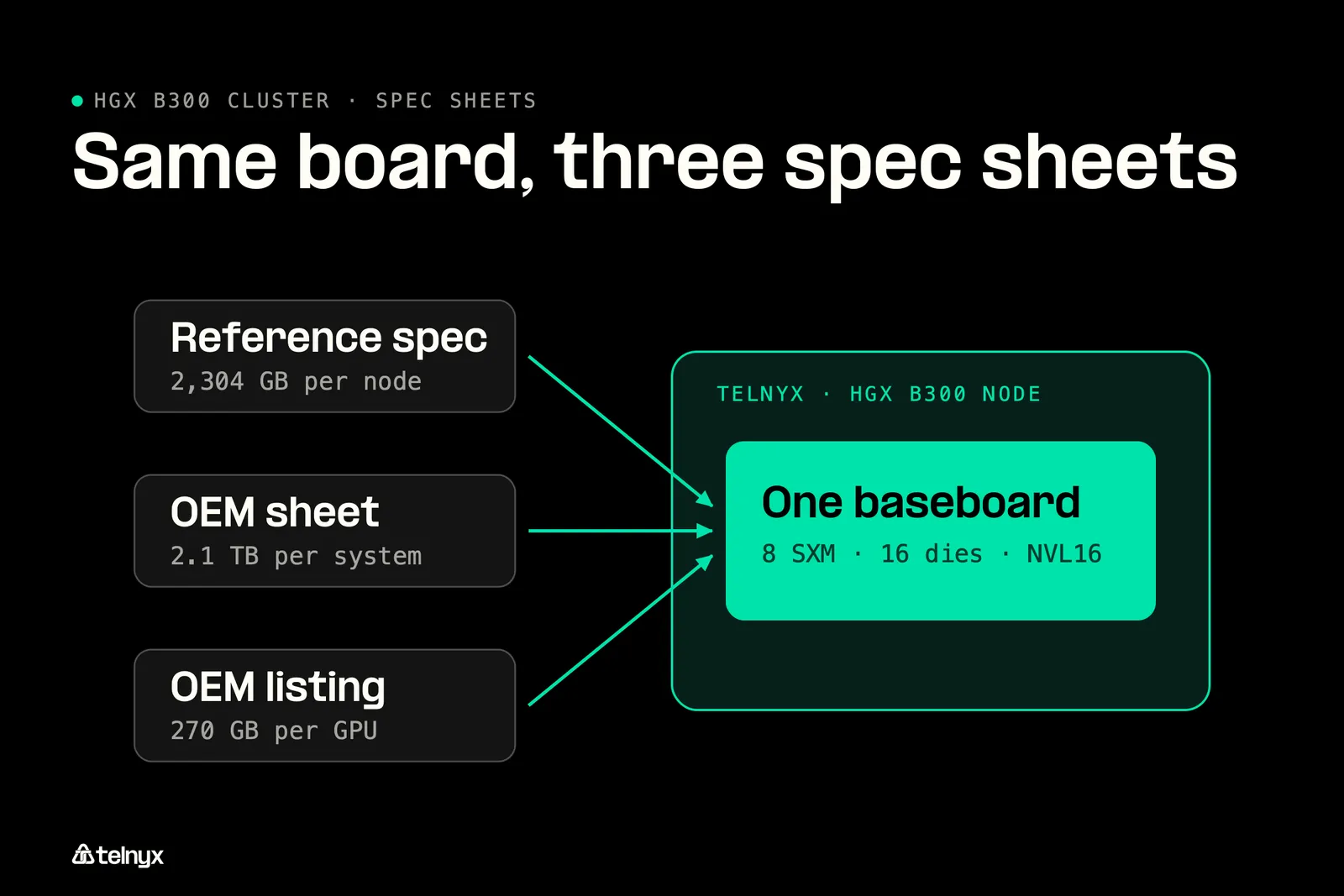
Three pages about the same baseboard can disagree on memory, GPU count, and PCIe generation. None of them is describing different hardware.
Reading conflicting B300 spec sheets: NVIDIA's reference architecture lists 2,304 GB (2.30 TB) per node. Some OEM materials list 2.1 TB per system, and at least one lists 270 GB per GPU. The gap comes from units and reserved memory: 2,304 GB is about 2.1 TB in binary terabytes. Size capacity on 2.1 TB and treat 2,304 GB as the ceiling. NVL16 counts the 16 GPU dies linked by NVLink, two per package across eight SXM modules, so NVL16 and "eight GPUs" are the same board. For PCIe slot planning, follow the reference architecture: eight Gen5 x16 links per baseboard and one Gen5 x16 link per DPU or adapter.
The same caution applies to performance claims. NVIDIA's speedup figures for B300 are "up to" numbers from tuned benchmarks. Treat them as a ceiling, and benchmark your own model at your own context length before you size around them.
Talk to our sales team to size your HGX B300 cluster, from GPU memory to control plane node count.
How do you build or source an HGX B300 cluster?
You size an HGX B300 cluster in five layers: the host around each baseboard, the East/West compute fabric, the North/South storage fabric, the control plane, and the facility. The table below is the sizing sheet, built from NVIDIA's reference architecture minimums and recommendations.
HGX B300 cluster sizing sheet
| Component | NVIDIA RA minimum | NVIDIA RA recommended |
|---|---|---|
| CPU cores per socket | 48 at 2.0 GHz base clock | 56 |
| System memory | 2TB at 500GB/s | 2TB+, evenly populated across all channels |
| Local NVMe per socket | 1 TB for inference and HPC, plus 1 TB boot drive | 2 TB for training, plus 1 TB boot drive |
| Compute network per node | 8x 400 Gb/s (3.2 Tb/s) | 16x 400 Gb/s with breakout (6.4 Tb/s) |
| North/South DPU | One BlueField-3 per server | BlueField-3 B3240, dual-port 400GbE |
| Control plane nodes | One high-availability set per cluster | Up to eight, seven in the BCM, Slurm, and Kubernetes example |
Host sizing for each HGX B300 node
The host's job is to keep eight GPUs fed. Each HGX B300 node needs at least 48 physical CPU cores per socket at a 2.0 GHz base clock, with 56 recommended, and at least 2TB of system memory with 500GB/s of memory bandwidth. NVIDIA calls for that memory to be spread evenly across sockets and fully populated on every memory channel, because an unbalanced layout starves the GPUs on one side of the board.
Local storage depends on the job. Plan a 1 TB NVMe boot drive, then 1 TB of NVMe per CPU socket for inference and HPC servers or 2 TB per socket for training servers. Add a TPM 2.0 module for secure boot and one BlueField-3 DPU per server.
Two fabrics: East/West compute and North/South storage
The two fabrics carry different traffic, so you size them separately. East/West carries collective operations between nodes during multi-node training and fine-tuning. North/South carries everything else: orchestration, remote storage, user access, and Internet traffic.
East/West runs through the eight on-board ConnectX-8 SuperNICs. The minimum is 8x 400 Gb/s per node, and the recommendation is 16x 400 Gb/s using breakout.
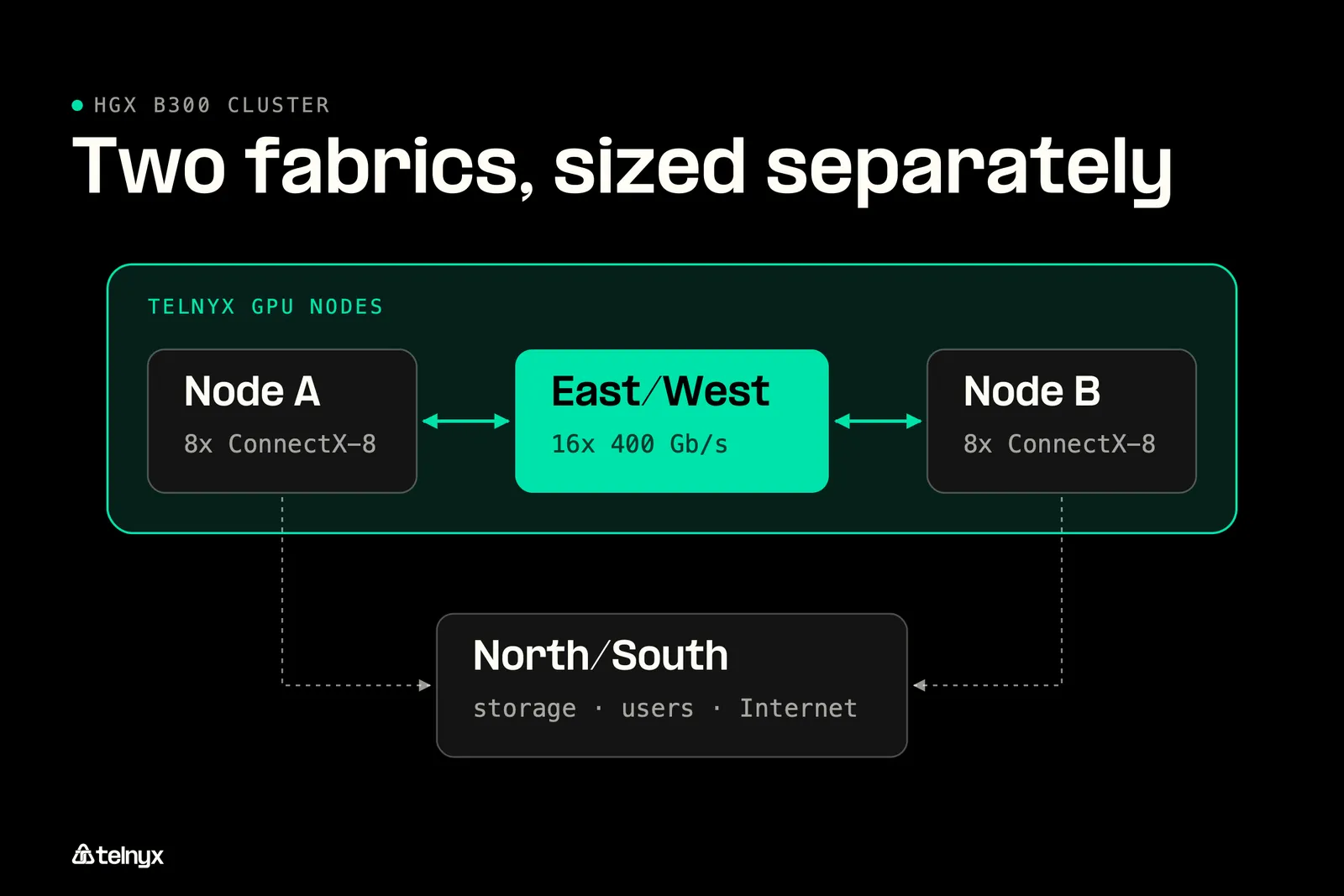
East/West bandwidth, in one unit: NVIDIA writes the minimum as "400 GB/s (8x 400 Gb/s Ethernet NICs)." Both describe the same link budget, once in bytes and once in bits. In switch-port terms, that is eight 400 Gb/s ports per node, or 3.2 Tb/s. The recommended configuration is sixteen 400 Gb/s ports, or 6.4 Tb/s. Count switch ports in Gb/s, multiply by your node count, and add your uplinks.
North/South runs through the BlueField-3 DPU. NVIDIA recommends the B3240 with dual-port 400GbE over the B3220 used in H100, H200, and B200 systems. The reason is inference. Distributed inference that offloads KV cache to network-attached storage needs higher burst I/O per GPU than typical training. Check the power budget too: some BlueField-3 configurations draw more than 75 W and need an extra PCIe power connector rated for at least 75 W.
On the InfiniBand versus Ethernet choice, NVIDIA's reference architecture documents a Spectrum-X Ethernet design. InfiniBand still makes sense where collective tail latency dominates very large training runs. Ethernet makes sense when you want one operations model across compute and storage and a broader choice of switch vendors.
Control plane nodes for the HGX B300 cluster
The control plane runs the software that schedules jobs and manages the cluster. The reference design supports up to eight control plane nodes. NVIDIA's example using Base Command Manager, Slurm, and Kubernetes together needs seven:
- Base Command Manager: Two nodes, configured for high availability.
- Slurm: Two head nodes.
- Kubernetes: Three control plane nodes.
Each control plane node in the example has two 32-core CPUs (Intel Xeon Gold 6448Y or AMD EPYC 9354), at least 256 GB of DDR5, a 1 TB NVMe boot drive, 4 TB of local NVMe, and a BlueField-3 B3220 DPU. If your environment has no existing control plane, NVIDIA recommends one high-availability set per cluster.
Power, cooling, and rack density
Cooling decides how many GPUs fit in a rack. Supermicro's air-cooled 8U HGX B300 system fits up to four systems per rack, or 32 GPUs and 9.2 TB of HBM3e. Its liquid-cooled 4U system fits up to 64 GPUs in a standard 19-inch rack, or 18.4 TB of HBM3e. Supermicro rates each B300 GPU at up to 1,100 W TDP, which is why liquid cooling doubles density instead of simply adding headroom.
Where the cluster sits matters as much as how it is cooled. For real-time workloads, the distance between the GPUs and the request adds latency that no spec sheet can remove. That is the reason Telnyx colocates GPUs with its points of presence, as in its Sydney GPU deployment.
Not in any public spec sheet: Total node power in kW at sustained load, cost per GPU-hour, and lead time. GPU TDP is published, but CPUs, DPUs, NVMe, fans, and pumps add to the node total. Ask your OEM and your provider for all three numbers in writing before you sign.
When an HGX B300 cluster is the wrong buy
A B300 cluster is the wrong buy when memory is not your limit. If your model plus KV cache fits in 180 GB per GPU at your target context length, a B200 node gives you the same peak memory bandwidth for less. The same holds for small models, modest batch sizes, and lightweight fine-tuning, where the extra 108 GB per GPU sits idle.
It is also the wrong buy when you do not need to own a cluster at all. If your goal is serving open-weight models rather than training them, Telnyx Inference runs models through an OpenAI-compatible API on GPUs Telnyx owns, with no hardware to procure. If you are still comparing accelerator families, our TPU vs GPU guide covers when each one fits.
FAQ
What is the difference between HGX B300 and DGX B300?
HGX B300 is the baseboard that OEMs such as Supermicro and ASUS build into their own servers, with their choice of CPUs, memory, storage, and chassis. DGX B300 is NVIDIA's own pre-built, validated system. Both use eight Blackwell Ultra GPUs. Choose HGX when you want to pick the host configuration and vendor, and DGX when you want one validated system from NVIDIA.
Should I choose B300 or B200 for my cluster?
Choose B300 if memory is your bottleneck. It holds 288 GB per GPU against 180 GB on B200, at the same peak bandwidth of up to 8 TB/s. If your model and KV cache fit within 180 GB per GPU at your target context length and concurrency, a B200 node delivers similar token throughput for less.
Why does HGX B300 appear as NVL16 on some spec sheets and as eight GPUs on others?
Both names describe the same board. NVL16 counts the compute dies connected by NVLink: eight SXM modules, each holding a dual-die Blackwell Ultra GPU, for sixteen dies in total. "Eight GPUs" counts the packages. For memory, networking, and slot planning, size on eight GPUs, since NIC ratios and memory figures are quoted per package.
Is liquid cooling required for an HGX B300 cluster?
No. Air-cooled 8U HGX B300 systems exist, and Supermicro fits up to four in a rack for 32 GPUs. Liquid cooling doubles that to 64 GPUs in a standard 19-inch rack. With each GPU rated at up to 1,100 W TDP, the choice comes down to how much rack space and facility cooling capacity you have.
What are the most common HGX B300 deployment mistakes?
The usual ones are sizing East/West switches from the 400 GB/s label without converting to 400 Gb/s ports, reusing the B3220 DPU from older nodes, populating system memory unevenly across sockets, and skipping the extra power connector some BlueField-3 cards need. Regulated teams building healthcare AI should also plan data isolation and residency before choosing a site.
Size your cluster, then talk to us about GPU capacity
You now have one sizing sheet for an HGX B300 cluster, from GPU memory to control plane nodes. Bring it to our team to talk through GPU capacity on infrastructure Telnyx owns.
Talk to our teamShare on Social


