
Voice
VoIP infrastructure explained: find the layer behind every bad call
Bad call quality starts in one of seven VoIP infrastructure layers. See what each one does and where calls break.

By Eli Mogul
Takeaways
VoIP infrastructure is every layer a call crosses between the handset and the public phone network (PSTN), so a choppy, one-way, or dropped call can be traced to the specific layer that caused it.
- Keep one-way mouth-to-ear delay at or under 150 ms, the ITU-T G.114 target, and budget 80 kbps per direction for each G.711 call before Layer 2 overhead.
- A common cause of one-way audio is NAT: it rewrites packet headers but leaves the private address inside the SIP message body, and a session border controller fixes that.
- A 99.999% uptime SLA allows 5.26 minutes of downtime a year, so ask how failover works, not only what the SLA promises.
What is VoIP infrastructure?
VoIP infrastructure is the full chain of systems that carries a voice call over IP and hands it to the phone network.
Definition: VoIP infrastructure covers every device, network, and service a call crosses from the caller's handset to the called party, including the session border controller, the SIP trunk, and the PSTN interconnect that sit outside the office.
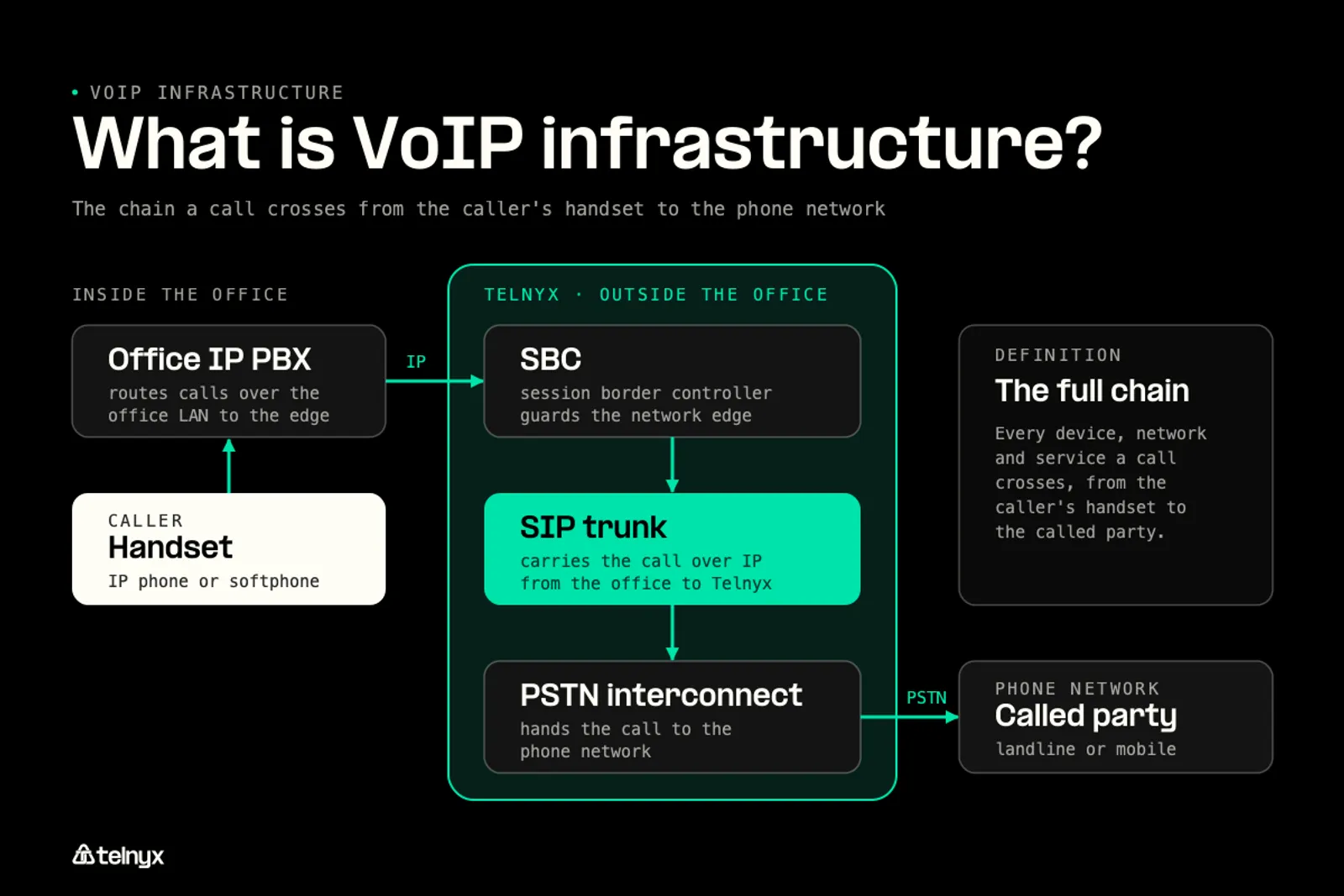
The common picture stops at the office: enough bandwidth, QoS on the router, and the right phones. That covers two layers out of seven. The session border controller (SBC), the SIP trunk, and the PSTN interconnect run outside the building, and they decide call quality just as often. Because the infrastructure is a chain, every quality problem has a location in it.
How a VoIP call works
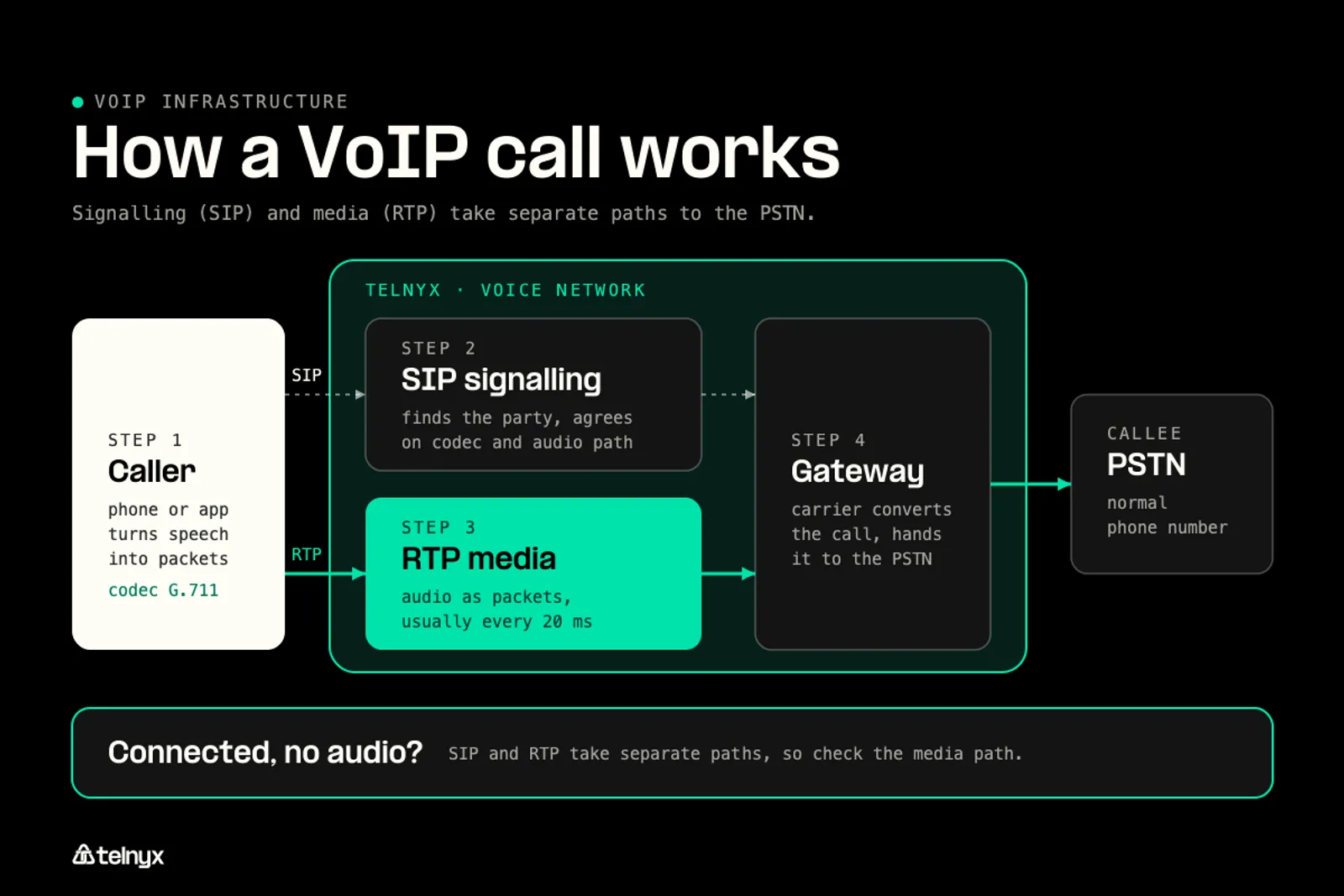
A VoIP call moves through four steps. First, the phone or app turns speech into packets using a codec such as G.711. Second, SIP signalling sets the call up: it finds the other party, agrees on a codec, and tells each side where to send audio. Third, the audio itself travels separately as RTP packets, usually every 20 ms. Fourth, when the other party is on a normal phone number, a carrier converts the call and hands it to the PSTN.
Signalling and media take separate paths, so a call can connect cleanly and still have no audio. That split explains most of the faults covered below.
Connect your phone system to a carrier network with Telnyx SIP trunking.
Explore Telnyx SIP trunks to connect your calls to the public phone network with failover built in.
The VoIP architecture, layer by layer
A call crosses seven layers in a fixed order, and knowing which layer a symptom belongs to is how you find the fault instead of guessing. The first two layers are yours. The last five usually belong to a provider or a carrier, which is why a clean office network does not guarantee a clean call.
What is wrong with your call?
Pick the symptom you hear to get the likely cause and the fix.
.svg)
The table maps each layer to its usual owner and the sound of its failure.
The seven layers of VoIP infrastructure
| Layer | Who usually runs it | What you hear when it fails |
|---|---|---|
| 1. Endpoints (IP phones, softphones, browsers) | You | Echo, muffled audio, or a phone that will not register |
| 2. Local network (LAN, Wi-Fi, router, firewall) | You | Choppy audio at busy hours, one-way audio |
| 3. Internet or private transport | Your ISP or your provider | Delay, robotic or clipped speech |
| 4. Session border controller | You, your provider, or both | One-way audio, calls that drop at a fixed time |
| 5. SIP trunk or carrier network | Your provider or a carrier | Failed call setup, poor quality on certain routes |
| 6. PSTN interconnect | A carrier | Calls that fail or degrade only to certain countries or networks |
| 7. Phone numbers | Your provider or a carrier | Outbound calls labeled as spam or left unanswered |
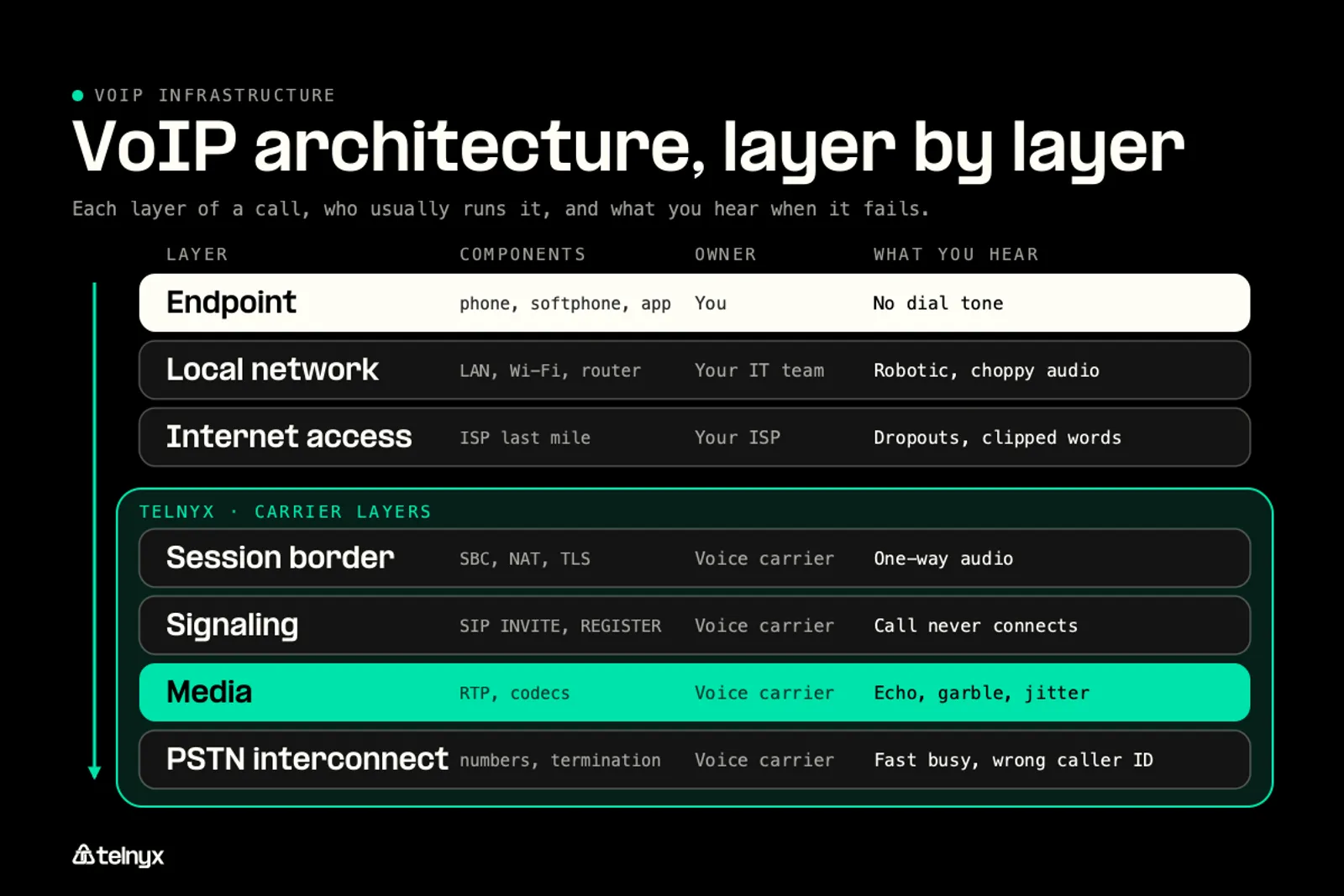
Layers 3 to 7 are where call quality is decided outside your control, and they are the layers a carrier tunes. James Whedbee, who works on the network Telnyx operates, names the controls that sit there:
"Telnyx made the infrastructure part of the product. That gives us a different set of levers: network routing, media anchoring, SIP behavior, number reputation, failover, and AI placement." James Whedbee, VP of Engineering at Telnyx |
Each lever acts on a layer from the table:
- Network routing sits on layer 3. It decides which path packets take between your edge and the carrier, and so how much delay they collect.
- Media anchoring sits on layers 4 and 5. It is the choice of where the audio is relayed, which sets how far the audio travels before it reaches the other party.
- SIP behavior sits on layers 4 and 5. It covers how signalling is handled: timers, headers, and how each side reads the address it is told to send audio to.
- Number reputation sits on layer 7. It affects whether outbound calls are answered or flagged before anyone picks up.
- Failover sits on layer 5. It determines what happens to calls when a route, site, or region fails.
- AI placement sits on layer 5. It decides where an AI agent's processing runs relative to the call path.
Endpoints and the local network
Endpoints turn speech into packets and play the far end back. When they fail, you hear echo from poor cancellation, a one-sided call from a bad headset, or a phone that cannot register. The local network carries those packets to the edge. Congestion, Wi-Fi interference, and a firewall that blocks RTP ports show up here, and this is the layer the standard setup checklist already covers.
Transport, SBC, and SIP trunk
Transport is the internet link or private circuit between your site and your provider. The SBC sits at the edge of a network, cleans up addressing, and relays media. The SIP trunk connects your phone system to a carrier network so calls can reach real phone numbers. If you are deciding between a trunk and a hosted service, the trade-offs are covered in SIP trunking vs VoIP. Faults here tend to look like network problems in the office, which is why they get misdiagnosed.
PSTN interconnect and phone numbers
The PSTN interconnect is where a carrier exchanges calls with other phone networks. A weak route here explains calls that fail or sound poor only to some countries or carriers. Phone numbers sit at the end of the chain. Teams that get a VoIP number also inherit how that number is treated by other networks, which affects answer rates on outbound calls. The provider that issues your phone numbers controls porting, registration, and how those numbers are presented.
VoIP network requirements: latency, jitter, packet loss, and bandwidth
A VoIP call needs low one-way delay, steady packet timing, very little loss, and a predictable amount of bandwidth per call. Two of those targets rest on a standard or on arithmetic. The other two depend on the codec and the jitter buffer, so no single published threshold applies:
- One-way latency: at or under 150 ms mouth to ear, per ITU-T G.114. Past that, people start talking over each other.
- Jitter: no single standard figure. A jitter buffer absorbs the variation, but every millisecond of buffer is added delay, so high jitter turns into either gaps or lag.
- Packet loss: no single standard figure. Codecs with packet loss concealment hide small amounts, while larger or bursty loss sounds like clipped syllables and robotic speech.
- Bandwidth: 80 kbps per direction for each G.711 call before Layer 2 overhead, worked out below.
How much bandwidth a VoIP call needs
Per-call bandwidth comes from three numbers: the codec rate, the packet interval, and the header size. Redo the math for your own codec and call volume:
- G.711 encodes speech at 64 kbps.
- A 20 ms packet interval means 50 packets per second.
- Each packet carries 40 bytes of IP, UDP, and RTP headers (20, 8, and 12 bytes).
- 40 bytes × 8 bits × 50 packets per second = 16 kbps of header overhead.
- 64 kbps + 16 kbps = 80 kbps per call, in each direction, before Layer 2 framing.
- Multiply by peak concurrent calls. Twenty simultaneous G.711 calls need 1.6 Mbps each way before framing.
The 100 kbps per call figure that circulates is this 80 kbps plus Ethernet framing and some headroom. Wideband codecs such as G.722 improve clarity, and Opus adjusts its bit rate to the network, so check the rate your phones actually negotiate before sizing the link.
Where the latency budget goes
Delay accumulates in a set order, and each stage spends part of the 150 ms budget:
- Codec processing on the sending device.
- Packetization, which holds 20 ms of audio before each packet leaves.
- The jitter buffer on the receiving side.
- Network transit across layers 2 to 5.
- The hop into and across the PSTN when the other party is on a phone number.
The first three stages are mostly fixed. Network transit is the stage that grows with distance, and it is the one the routing and media anchoring levers act on.
Why echo shows up on IP calls: people rarely notice echo while the round trip stays very short, commonly put at under about 50 ms. IP paths often run longer than that, so every endpoint needs working echo cancellation, and an echo complaint is often a delay problem rather than a faulty handset.
QoS and voice VLANs
QoS works at two layers of the local network. At Layer 2, 802.1p tags inside 802.1Q frames tell switches to forward voice first. At Layer 3, DSCP markings (Expedited Forwarding, value 46, is the usual choice for voice) tell routers the same thing. A dedicated voice VLAN keeps phones apart from bulk data traffic.
These markings only hold on networks you control. Once packets reach the public internet, most networks ignore them. That is the point where a call that tested fine in the office can still degrade, and where layers 3 to 5 take over.
Why NAT breaks calls and what a session border controller fixes
NAT breaks calls because it rewrites the address in a packet's header but not the address SIP carries inside the message body. Under RFC 3261, a SIP message includes a session description (SDP) that states where the other side should send audio. A phone behind a router writes its private address into that SDP. The router rewrites the outer header to its public address and leaves the SDP alone. The far end then sends audio to a private address it cannot reach, and you get one-way audio or none.
.svg)
One-way audio and SIP ALG
Many routers ship with SIP ALG, a feature that tries to fix this by rewriting the addresses inside SIP messages. In practice it often corrupts the messages instead, and switching SIP ALG off is a standard first step when troubleshooting.
Use the symptom to find the layer:
- One-way audio: a private address left in the SDP. Check NAT handling at the local network or SBC.
- No audio in either direction: RTP ports blocked by a firewall. Check the firewall rules for the RTP port range.
- Calls drop after a fixed interval, often around 30 seconds or a set number of minutes: a NAT binding or SIP session timer expiring. Check keepalive and session timer settings.
- Phones fail to register now and then: SIP ALG rewriting registration messages. Turn SIP ALG off on the router.
What a session border controller does
A session border controller sits at the edge between two networks and handles the jobs NAT cannot:
- Corrects the addresses inside SIP and SDP so audio reaches a public, reachable point.
- Relays media, which also decides where the audio is anchored.
- Hides the internal network layout from the outside.
- Enforces security policy, such as rate limits and allowed destinations.
VoIP security and compliance: encryption, fraud, and emergency calling
Securing VoIP infrastructure means encrypting both signalling and media, blocking fraud at the trunk, and meeting the rules that apply to emergency calls and caller ID.
Encrypting signalling and media
Signalling and media need separate protection. TLS encrypts SIP signalling. SRTP, defined in RFC 3711, encrypts and authenticates the RTP audio using AES. Older guidance that lists DES or RC4 for voice describes ciphers that are no longer considered secure. When a vendor page says "end-to-end encrypted," check whether it names both TLS and SRTP.
The four threats every VoIP deployment faces map to specific controls:
- Eavesdropping: an attacker captures audio or call details on the path. Use SRTP for media and TLS for signalling, from endpoint to SBC to trunk.
- Toll fraud: an attacker uses your trunk to place expensive international calls. Use strong authentication, call limits, and destination restrictions at the SBC or trunk.
- Denial of service: an attacker floods the SIP edge until calls fail. Use rate limiting at the SBC and keep voice traffic apart from data.
- Unauthorized access: an attacker takes over an account or device. Use strong credentials, role-based access, and IP allow lists.
E911 and call authentication
Emergency calling is part of the infrastructure. Each user's dispatchable location has to be registered and kept current so a 911 call reaches the right dispatcher. The details are covered in E911 requirements.
Caller ID authentication is the second regulatory layer. STIR/SHAKEN is the framework US carriers use to sign and verify caller ID, and it affects whether your outbound calls display as verified.
Ask any provider three questions:
- Is SIP carried over TLS?
- Is media encrypted with SRTP by default or only on request?
- Who is responsible for registering and updating E911 addresses?
VoIP redundancy: failover and what an uptime SLA really allows
An uptime SLA is a downtime allowance, and it says nothing about how a provider fails over.
What 99.999% uptime means in minutes
A year has 525,600 minutes. Each extra nine cuts the allowance by a factor of ten.
- 99.9% uptime: about 8.76 hours a year, or about 43.8 minutes a month.
- 99.99% uptime: about 52.6 minutes a year, or about 4.4 minutes a month.
- 99.999% uptime: about 5.26 minutes a year, or about 26 seconds a month.
The percentage leaves out what matters during an outage. Ask whether calls in progress survive a failure, whether the service runs in more than one region, and how the SLA is measured and credited.
Failover you control
Some redundancy is yours to build before go-live. Work through it in order of defense:
- A second internet link from a different provider.
- Redundant power and switching on site.
- A backup SIP trunk or a second route on the same trunk.
- Call forwarding to mobile numbers or a PSTN line as the last resort.
- Your provider's emergency contact stored somewhere outside the phone system.
How to build VoIP infrastructure: self-host, subscribe, or use a carrier
You can build VoIP infrastructure in three ways, and the real difference between them is which of the seven layers you run and which you hand over.
Three ways to run it
Self-hosted. Open-source software such as Asterisk or FreeSWITCH runs on your own servers, with a SIP trunk for PSTN access. You run layers 1 to 4 and pay in hardware and staff time. It suits teams that need deep customization and have voice engineers on hand.
Hosted phone system. A provider runs the call platform and you buy seats. You run layers 1 and 2, and pricing scales per user. It suits offices that want a working phone system with little engineering.
Carrier SIP trunking or voice API. You build on a carrier's network through SIP trunks or a VoIP API, and pricing scales with usage. You choose how much of layers 1 to 4 to run, and the carrier runs layers 5 to 7. Telnyx is an example of this model: it operates carrier infrastructure, call routing, media handling, phone numbers, and SIP itself.
Ownership affects price as well as quality. A provider that resells another carrier's network passes along that carrier's price changes and cannot fix that carrier's routes.
"Having a whole stack ownership lets us also control the pricing of it, so that we can charge a fair amount and not increase the charges overnight just because one of our vendors has decided to increase the price." Abhishek Sharma, Senior Technical Marketing Manager at Telnyx |
A rollout checklist
A rollout goes in four phases:
- Plan: audit the network, count peak concurrent calls, and size bandwidth with the arithmetic above.
- Build: configure QoS, the voice VLAN, and the SBC, and start number porting early because it takes the longest.
- Test: run a small pilot group and check latency, jitter, and loss at busy hours, not only after hours.
- Operate: monitor call quality per layer and review capacity on a schedule.
VoIP infrastructure for AI voice agents
An AI voice agent puts speech recognition, a language model, and speech synthesis into the call path, so every millisecond the network spends comes out of the time the agent has to respond. A route that adds delay a person would barely notice can make an agent sound slow or cause it to talk over the caller.
That makes AI call quality an infrastructure question as much as a model question:
"We are not only orchestrating an AI agent. We also operate carrier infrastructure, call routing, media handling, phone numbers, SIP, and the voice AI layer. That matters because production voice quality is not only a prompt or model problem. It is also routing, answer rates, codec handling, failover, observability, and operational accountability when something goes wrong." James Whedbee, VP of Engineering at Telnyx |
Routing and media anchoring set how far audio travels. Answer rates depend on number reputation. Codec handling decides what the speech recognizer actually hears. Failover and observability decide whether a problem is caught and fixed. The measured results of running the agent next to the call path are in the write-up on co-located infrastructure.
Before changing the model: if an AI agent sounds slow or drops calls, check the seven layers in the architecture table above before rewriting the prompt or swapping the model.
FAQ
What is VoIP and how does it work?
VoIP (voice over IP) carries phone calls as data packets instead of over copper lines. A codec turns speech into packets, SIP signalling sets up the call, and RTP carries the audio. When the other party is on a regular phone number, a carrier hands the call to the public phone network so it can ring any phone.
What are the minimum requirements for VoIP infrastructure?
Plan for about 80 kbps per direction for each G.711 call before Layer 2 overhead, one-way delay at or under 150 ms, and low, steady jitter and packet loss. Add QoS or a voice VLAN on your network, a firewall that allows SIP and RTP, and a SIP trunk or hosted service to reach the phone network.
What causes poor call quality after a VoIP installation?
The usual causes are congestion on the local network, NAT or SIP ALG problems at the router, too much delay or loss on the internet path, and weak carrier routes to certain destinations. Match the symptom to a layer: one-way audio points to NAT, choppy audio at busy hours points to the local network, and problems on certain routes point to the carrier.
What factors contribute to VoIP latency and delay?
Delay builds up from codec processing, packetization (usually 20 ms per packet), the jitter buffer, network transit, and the hop into the public phone network. The first three are mostly fixed. Network transit grows with distance, so routing and where the audio is relayed have the largest effect on how much delay a call collects.
Can I keep my existing phone numbers when switching to VoIP?
In most cases, yes. Number porting moves your existing numbers from the old carrier to the new provider. It can take days or weeks depending on the carrier and country, so start porting early in the rollout and keep the old service active until every number has moved and been tested.
Find the layer behind every bad call
Every bad call has a layer. Telnyx operates the carrier layers itself, including call routing, media handling, phone numbers, and SIP, so you can trace a problem past your office network.
Explore SIP trunkingShare on Social


