
WhatsApp Business API
WhatsApp Business Messaging for Retail: Setup and Pricing
WhatsApp Business messaging for retail: order updates, promotions and support from one Telnyx number, from $0.004 a message. Setup steps and a sample API call.
Takeaways
You send your order updates, promotions and support replies with WhatsApp Business messaging for retail on Telnyx from the same number, application programming interface (API) and invoice you already use for SMS text messaging and voice, from $0.004 a message, and your first order confirmation template goes out in one API call.
- The rules are the same for every message: the shopper opts in first, an approved template starts the conversation, and once the shopper replies you have a 24-hour window to answer in plain text with no template.
- The free WhatsApp Business App runs on one phone and suits one store replying by hand. The API is for several stores, several agents and automated order updates, and you reach it through a provider.
- The same WhatsApp number takes voice calls from inside the app, and those calls ring on the SIP (Session Initiation Protocol), Voice API or TeXML (Telnyx's markup language for call flows) connection you already have.
Why WhatsApp Business for Retail Matters Now
A shopper who ordered on Tuesday asks "where is my order" on Thursday, by phone or by email, and the ticket costs you money either way. WhatsApp Business messaging for retail puts that answer, along with your order updates and offers, in the chat app your shoppers already open every day, and every message arrives under your verified business name rather than from a number they do not recognise.
Your shoppers are already on WhatsApp
WhatsApp reaches 3.3 billion users, the figure Telnyx publishes for its WhatsApp Business API. For you that means the shipping update arrives in an app your shopper already uses, and the shopper who wants to change a delivery address replies in the same thread instead of calling your store.
3.3 billion WhatsApp users. Your shopper gets the order update in an app they already use, and can reply to it.
Why WhatsApp beats email and SMS for retail follow-ups
The difference from email is the reply. A shopper opts in, your order update lands as a chat, and when the shopper answers, that answer opens a two-way conversation your team can carry on in plain text. Email gives you the open rate and stops there.
Two things change for you versus email:
- The shopper replies in the same thread, so the order number and history are already there.
- The reply opens a 24-hour window in which your team can send free-form support messages with no template.
If you sell in Europe, Latin America, India or the Middle East, WhatsApp is your shoppers' default retail channel, and the European setup is in WhatsApp Business in Europe. If your shoppers are in the US, most still read SMS, and retail SMS short codes may reach more of them.
See WhatsApp Business API from Telnyx, which runs WhatsApp messages and calls on the same number you already use for SMS and voice.
How WhatsApp Business messaging for retail drives sales
One order generates five or six messages, each either a template you send or a free-form reply inside the 24-hour window your shopper's message opens. Meta prices them by category, utility for order updates, marketing for promotions, authentication for login codes, and service for the free-form replies. Our retail and ecommerce solutions page covers the voice and SMS side of the same stack.
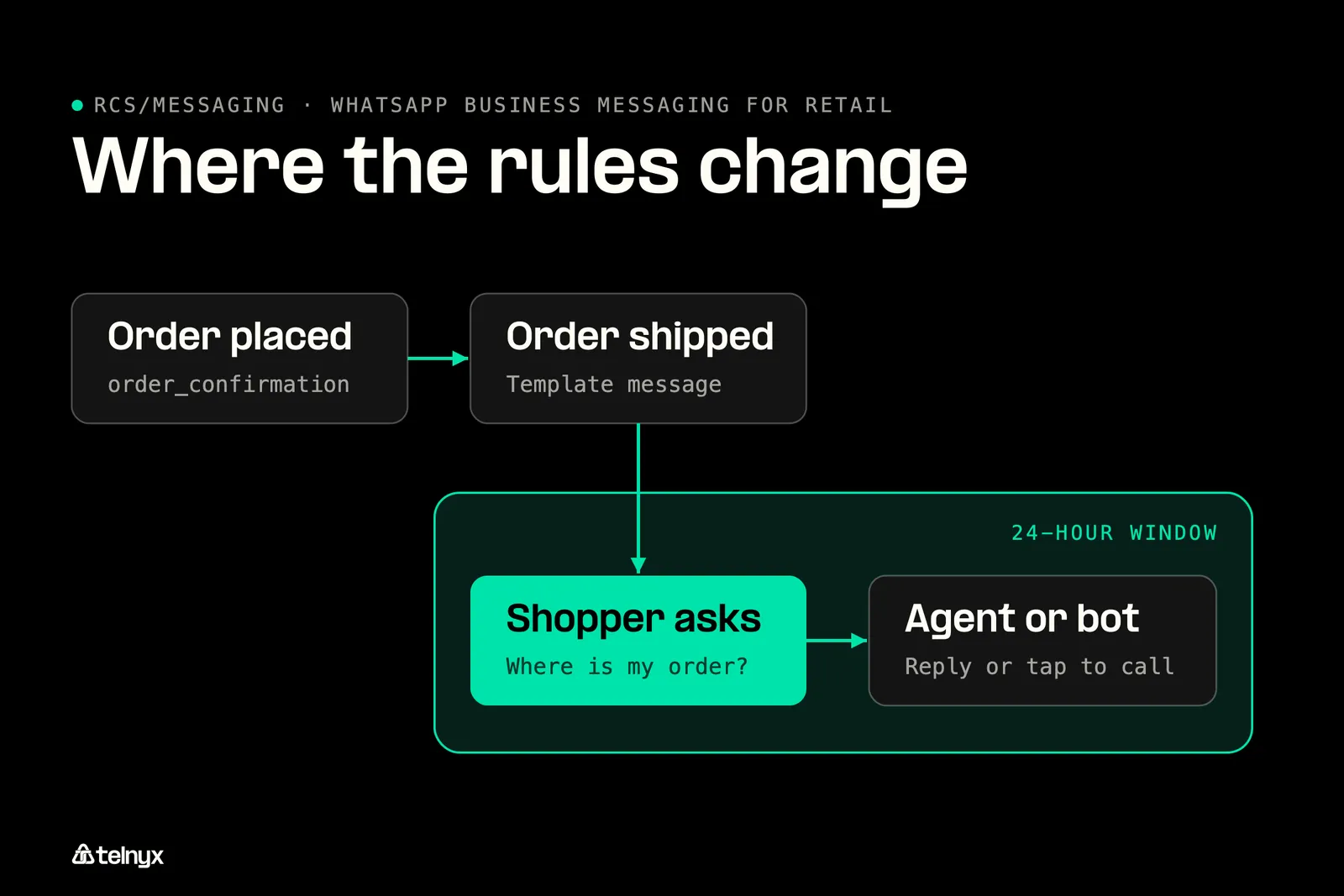
One order produces template messages and free-form replies, and each is priced and permitted differently by Meta.
Order confirmations and 'where is my order' updates
"Hi John, thanks for your order ORD-12345. We'll message you here when it ships." That is a utility template, sent by you at checkout. It is named order_confirmation and takes two parameters, the shopper's name and the order number.
Retail messages by sender and template category
| Retail message | Who starts it and when | Template category |
|---|---|---|
| Order confirmation | You, at checkout | Utility |
| Shipping and delivery update | You, on each status change | Utility |
| "Where is my order" reply | The shopper, any time | Free-form, inside the 24-hour window |
| Restock or new-arrival alert | You, to the marketing opt-in list | Marketing |
| Flash sale or VIP early access | You, before the sale opens | Marketing |
| Return request | The shopper, free-form, then you send the label | Free-form, then utility |
| Login or order-pickup code | You, at login or pickup | Authentication |
The shopper's "where is my order" message opens the 24-hour window. Your agent or bot answers in plain text with the tracking link and the carrier's delivery estimate. No template to approve, and the answer sits in the same thread as the order confirmation.
Restock alerts, new arrivals and VIP early access
"The Oslo chair in oak is back in stock. 12 left. Reserve yours here." That is a marketing template, and it needs explicit marketing opt-in, separate from the consent your shopper gives for order updates.
Timing that works in practice: send a post-purchase follow-up a few days after delivery, a VIP early-access message before your sale opens, and a restock alert the moment the item returns.
WhatsApp Business use cases for supermarkets and grocery
"We're out of the 2L semi-skimmed. Reply YES to swap for 2 x 1L, or NO to remove it." That substitution question is the grocery message no email can carry, because your shopper answers in seconds and your picker keeps moving. Your core grocery set on WhatsApp:
- Weekly offers to an opt-in list, as a marketing template with an image.
- Click-and-collect "your order is ready" notice, a utility template.
- Substitution approval, free-form inside the 24-hour window the shopper's reply opens.
- Delivery slot reminder, a utility template the morning of delivery.
- Receipt or invoice as a PDF in the chat.
Cafés and quick-service chains run the same order-ready flow, covered in WhatsApp for restaurants.
Returns and post-purchase support in the same thread
"I need to return the blue jacket from ORD-12345." That message opens the 24-hour window, and the return runs as three steps in the chat: your agent or bot checks eligibility against the order date, confirms the return, and sends the label as a utility template the shopper downloads.
If the return gets complicated, the shopper taps to call your number from inside WhatsApp, and the call lands on the voice connection your contact centre already uses. No hold music on a separate line, and the agent who picks up sees the same thread.
What to measure: delivery and read rates per template, time to resolution for order questions, the share resolved without an agent, and repeat purchase within a set window after a WhatsApp conversation. Your messaging analytics in Mission Control show delivery data in real time.
How to increase retail customer engagement with the WhatsApp Business API
Three rules decide what you can send and when: the shopper's opt-in, an approved template in one of four categories, and the 24-hour window that opens when the shopper replies. Used together they turn notifications into conversations that end in a sale or a closed ticket.
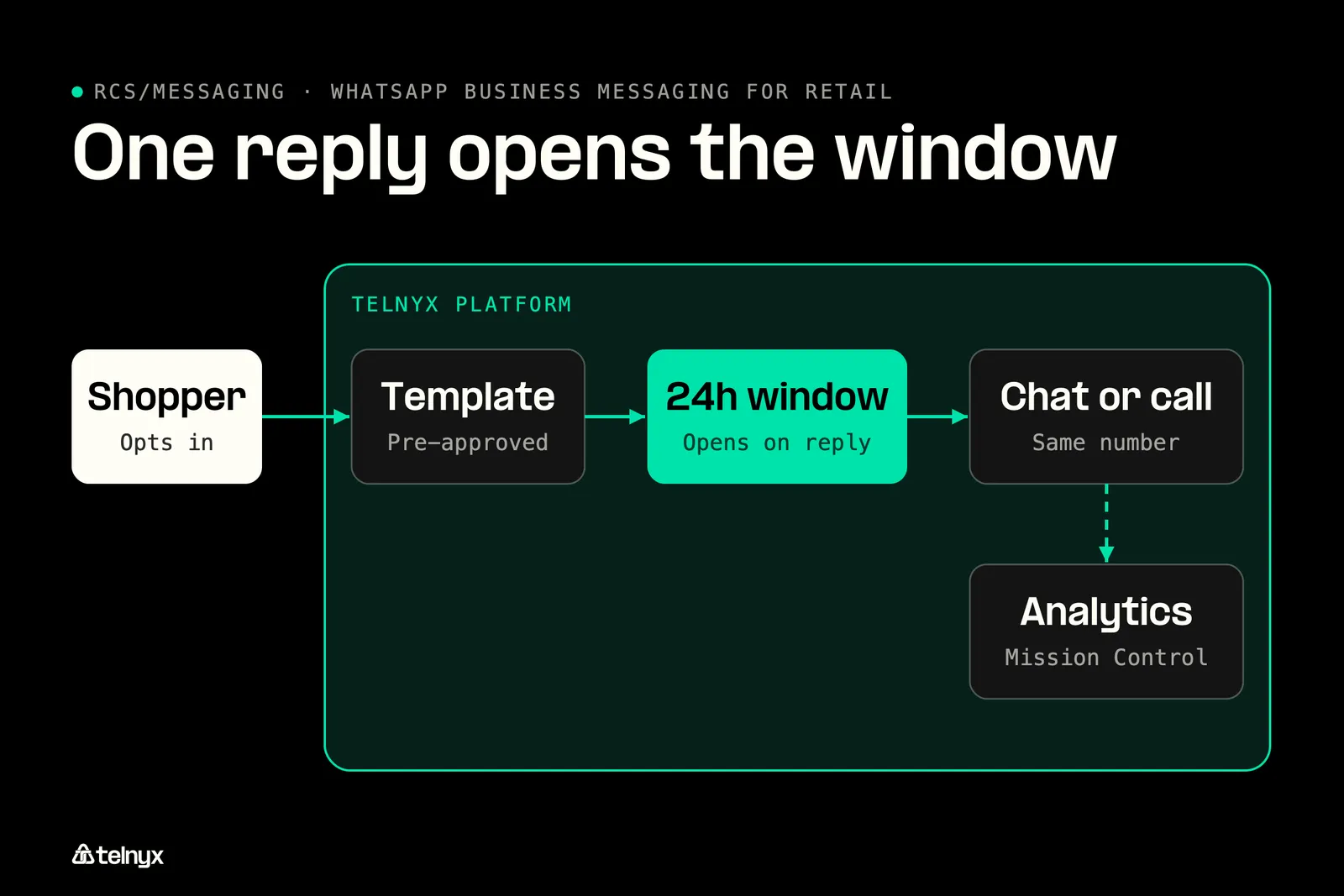
Templates start the chat, a shopper reply opens 24 hours of free-form messaging, and calls land on one number.
Collect opt-in at checkout, in store and on packaging
Collect consent at the moments you already own, and make the consent line say what the shopper gets. The WhatsApp Business messaging policy requires opt-in before a business-initiated message, and the consent record is yours to keep.
- Checkout tick box: "Get order updates and support on WhatsApp."
- Order confirmation email: "Prefer WhatsApp? Tap here for shipping updates in chat."
- Loyalty sign-up form: "Send me member offers and early access on WhatsApp."
- QR code at the till: "Scan to get your receipt and order updates on WhatsApp."
- Parcel insert: "Questions about this order? Message us on WhatsApp, same number as the box."
Opt-outs matter as much as opt-ins, and they work like SMS consent under 10DLC A2P messaging rules in the US, where 10DLC is a 10-digit long code and A2P means application-to-person: record consent per phone number, with the date and the source, and treat a STOP or "unsubscribe" reply as an opt-out from marketing templates. Keep utility order updates on their own consent so a shopper who leaves your promotions list still gets the shipping notice for the order they placed.
Handle STOP in WhatsApp: record consent per phone number, treat STOP or unsubscribe as a marketing opt-out, keep utility order updates separate from marketing consent, and re-confirm before adding a number to a promotions list.
Templates start the chat, the 24-hour window keeps it going
Any message you send first must be an approved template, and once the shopper replies you have a 24-hour window to send free-form messages. On Telnyx you create and manage templates for authentication, utility, marketing, and service use cases and submit them for Meta approval directly from the portal, so the order_confirmation template and the restock alert both go through the same screen. Meta template guidelines set the format and the reasons a template gets rejected, and the usual one is a marketing message submitted as utility.
Buttons, catalogs and rich media that move a shopper to checkout
Quick-reply buttons teach your shoppers that this chat is interactive. A shipping update with "Track my order" and "Change address" underneath gets tapped, and the tap is a reply, which opens the 24-hour window for your team. A product image with a link to your catalog or checkout page is how a browse in chat becomes a sale.
Three quick-reply buttons for a retail thread
| Button | What the tap does | Where it leads |
|---|---|---|
| Track an order | Opens the 24-hour window, bot replies with tracking | Carrier tracking page |
| Return an item | Starts the three-step return flow in chat | Return label as a document |
| Speak to an agent | Hands the thread to an agent, or a tap to call | Your existing voice connection |
Keep media light. One image per promotion, the receipt as a PDF, and a catalog link to a page that already has the price and the size chart. Shoppers reply to a chat that looks like a chat.
Keep SMS as the fallback with a WhatsApp to SMS bridge
Some of your shoppers are not on WhatsApp, and in the US most of them still read SMS first, with RCS (Rich Communication Services) worth a look for Android-heavy lists. See RCS messaging pricing. On Telnyx both channels send through the same messages endpoint from the same account, so a bridge between them is a few lines. If you have a developer, this is the forwarding logic from the whatsapp-sms-bridge-python example, with the setup it needs to run: two send functions, one per channel, and a webhook that forwards an inbound message to the other side. Set TELNYX_API_KEY, SMS_NUMBER, WHATSAPP_NUMBER and MESSAGING_PROFILE_ID as environment variables, then point your messaging profile's webhook URL at /webhooks/messages.
How to set up the WhatsApp Business API for retail on Telnyx
On Telnyx you connect your WhatsApp Business Account to a Telnyx number in three steps from Mission Control, keep a WhatsApp number you already own, and pay from $0.004 a message with Meta's fee on the same invoice.
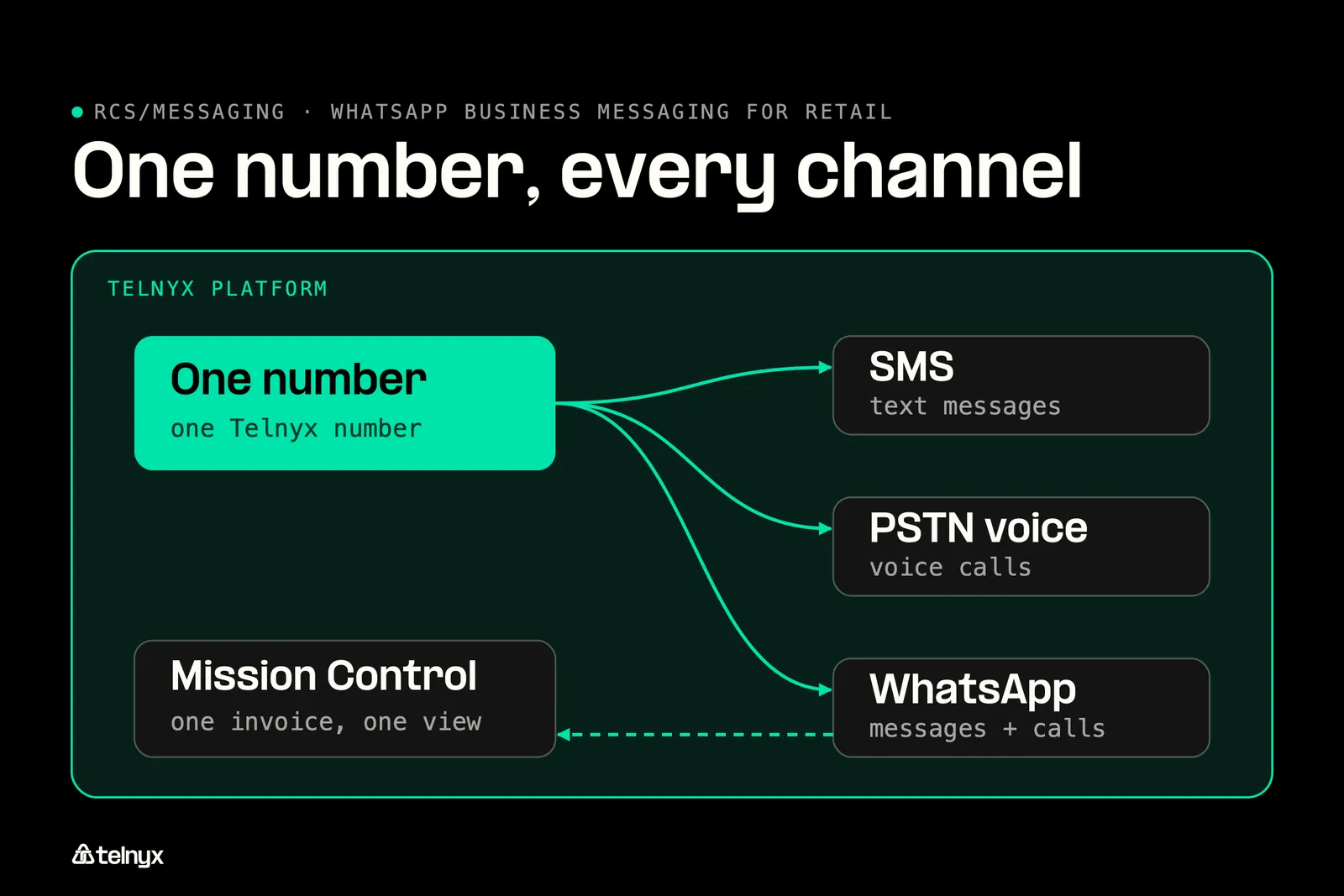
SMS, voice, WhatsApp messages and WhatsApp calls run on one Telnyx number with Meta fees on a single invoice.
Which WhatsApp setup does your retail business need?
- One store, one phone, replies by hand: use the free WhatsApp Business App. A single phone covers one store where staff answer each shopper themselves.
- Several stores sharing one number and inbox: move to the WhatsApp Business API on Telnyx. Every store and agent works the same number, from $0.004 a message.
- Automated order and shipping updates: connect your order system to the Telnyx WhatsApp Business API. Each approved confirmation template goes out in one API call, from $0.004 a message.
- Shoppers who want to call the same number: use the Telnyx WhatsApp Business API with calling turned on. In-app calls ring on your existing SIP, Voice API or TeXML connection.
Do you need the free WhatsApp Business App or the API?
Past one store, the deciding question is whether messages need to go out without someone typing them. Automated order updates, several agents on one number and shopper data pulled from your customer relationship management (CRM) system all need the Telnyx WhatsApp Business API.
WhatsApp Business App versus the API on Telnyx
| What you need | WhatsApp Business App | WhatsApp Business API on Telnyx |
|---|---|---|
| Agents or devices | One phone | Many agents through the API |
| Automated order updates | Manual | Template sent via API |
| Templates | Built-in quick replies | Authentication, utility, marketing and service templates, submitted for Meta approval from the portal |
| Voice calls from WhatsApp | Not available | Inbound calls routed to SIP, Voice API or TeXML |
| Keep an existing number | Yes | Yes, Bring Your Own Number |
| Billing | Free | From $0.004 per message, Meta fees and Telnyx cost on one invoice |
Connect your WhatsApp Business Account from Mission Control
Meta business verification runs through Embedded Signup inside the portal, so you link your WhatsApp Business Account without switching tools.
- Connect your WhatsApp Business Account (WABA). In Mission Control go to WhatsApp, then Connect, and select your WABA through Meta's Embedded Signup.
- Verify your number. Pick an active Telnyx number. Meta sends a verification code to confirm ownership. Enter it.
- Toggle calling on and start messaging. Flip WhatsApp Calling to enabled, assign the number to an artificial intelligence (AI) agent if you want one, and create and submit your first message template.
You can update business profile fields such as your store name, address and opening hours through the API when a store moves.
Keep your existing WhatsApp number with Bring Your Own Number
If your shoppers already message a WhatsApp number you own, you import it to Telnyx with Bring Your Own Number and keep it, so nobody re-opts in and no chat history moves. Inbound WhatsApp voice calls on that number route to any SIP Connection in your account from the Mission Control dropdown.
Send your first order confirmation template
The request below sends the approved order_confirmation template in en_US, with the shopper's name and order number as body parameters, to +15557654321 from your Telnyx number. The full reference is at send a WhatsApp message.
Let shoppers call the same number from inside WhatsApp
Any WhatsApp user can call your Telnyx number from inside the app, and the call routes to your existing SIP trunking connection, which carries a 99.999% uptime service level agreement (SLA), or to your Voice API or TeXML application, with no additional setup. For a shopper mid-return, that is chat to a human in one tap, in the queue your contact center solutions already run. The routing options are in the WhatsApp Business Calling docs.
Zero-config calling: WhatsApp calling connections are created automatically when you toggle calling on. A Telnyx AI Assistant can answer those WhatsApp voice calls today.
What WhatsApp Business messaging for retail costs
You pay a Telnyx platform fee starting at $0.004 per message, per-minute pricing on business-initiated calls, and no monthly subscription, with Telnyx platform cost and Meta fees billed on a single invoice. Volume discounts apply automatically as your message count grows. Current figures are on the WhatsApp pricing page, and WhatsApp Business API cost walks through a monthly bill line by line.
The Meta fee you pay per message is set by template category and your shopper's country, is published by Meta, and is the same with every provider.
FAQ
Send your first WhatsApp order confirmation today
Order updates, promotions and support replies on WhatsApp from the Telnyx number, API and invoice you already use for SMS and voice, from $0.004 a message. Connect your account in Mission Control and send the order_confirmation template in one call, or talk to an expert.
Start building for freeShare on Social

Serhii Omelchenko
Global AEO/SEO Manager
Serhii is Global AEO/SEO Manager at Telnyx, based in Amsterdam, he is focused on making communications infrastructure findable and credible across both traditional search and AI-driven discovery. He previously led SEO and GEO strategy for some of the world’s most recognized consu


